
【Azure Developer】解决Azure Key Vault管理Storage的示例代码在中国区Azure遇见的各种认证/授权问题 - C# Example Code
问题描述
使用Azure密钥保管库(Key Vault)来托管存储账号(Storage Account)密钥的示例中,从Github中下载的示例代码在中国区Azure运行时候会遇见各种认证和授权问题,以下列举出运行代码中遇见的各种异常:
- "AADSTS90002: Tenant 'xxxxxxxx-66d7-xxxx-8f9f-xxxxxxxxxxxx' not found. This may happen if there are no active subscriptions for the tenant. Check to make sure you have the correct tenant ID. Check with your subscription administrator.
- Microsoft.Rest.Azure.CloudException | HResult=0x80131500 | Message=The subscription 'xxxxxxxx-xxxx-xxxx-xxxx-xxxxxxxxxxxx' could not be found. | Source=Microsoft.Azure.Management.KeyVault
The client 'xxxxxxxx-e256-xxxx-8ef8-xxxxxxxxxxxx' with object id 'xxxxxxxx-e256-xxxx-xxxxxxxxxxxx' does not have authorization to perform action 'Microsoft.KeyVault/vaults/read' over scope '/subscriptions/xxxxxxxx-xxxx-xxxx-xxxx-xxxxxxxxxxxx/resourceGroups/dev-service-rg/providers/Microsoft.KeyVault/vaults/<youkeyvaultname>' or the scope is invalid. If access was recently granted, please refresh your credentials.
Unexpected exception encountered: AADSTS700016: Application with identifier '54d5b1e9-5f5c-48f1-8483-d72471cbe7e7' was not found in the directory 'xxxxxxxx-66d7-xxxx-8f9f-xxxxxxxxxxxx'. This can happen if the application has not been installed by the administrator of the tenant or consented to by any user in the tenant. You may have sent your authentication request to the wrong tenant.
- {"AADSTS7000218: The request body must contain the following parameter: 'client_assertion' or 'client_secret'.\r\nTrace ID: 57169df7-d54d-4533-b6cf-fc269ee93f00\r\nCorrelation ID: 33fb61c4-7266-4690-bb8d-4d4ebb5614f5\r\nTimestamp: 2021-01-19 02:44:50Z"}
AADSTS54005: OAuth2 Authorization code was already redeemed, please retry with a new valid code or use an existing refresh token. |Trace ID: cbfb3d00-a3e5-445e-96b3-918a94054100 |Correlation ID: 40964a5f-e267-43da-988a-00bf33fa7ad4 |Timestamp: 2021-01-19 03:16:38Z
以上错误就是在调试Key vault dotnet managed storage代码的过程(https://github.com/Azure-Samples/key-vault-dotnet-managed-storage)中遇见的错误。下面我们一一的解决以上错误并使得程序成功运行:
调试代码
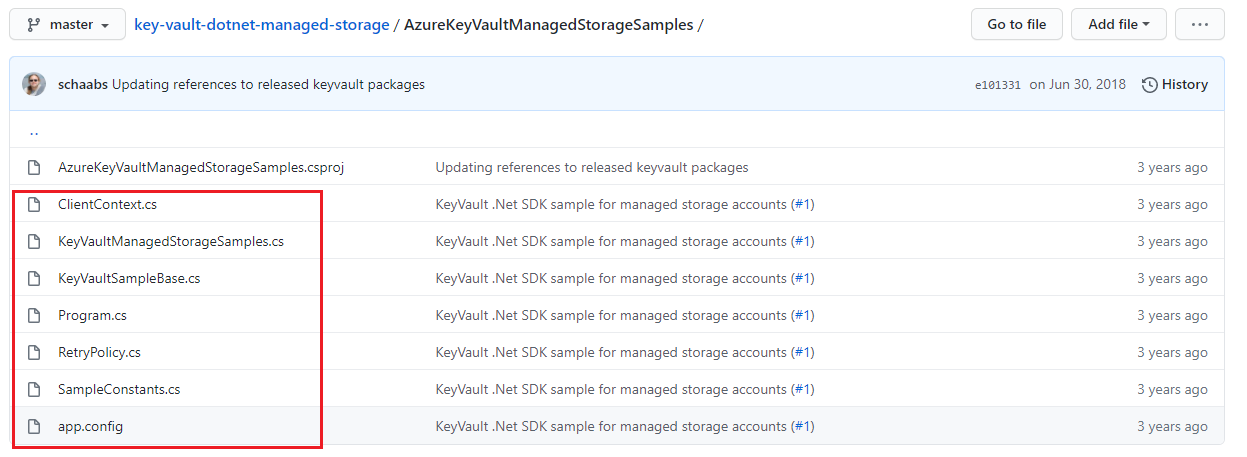
首先通过Github下载代码并在Azure环境中准备好AAD,Key Vault,Storage Account。
- git clone https://github.com/Azure-Samples/key-vault-dotnet-managed-storage.git
- 用VS 2019打开后,编辑app.config文件, 配置tenant, subscription, AD app id and secret, and storage account and its resource id等值
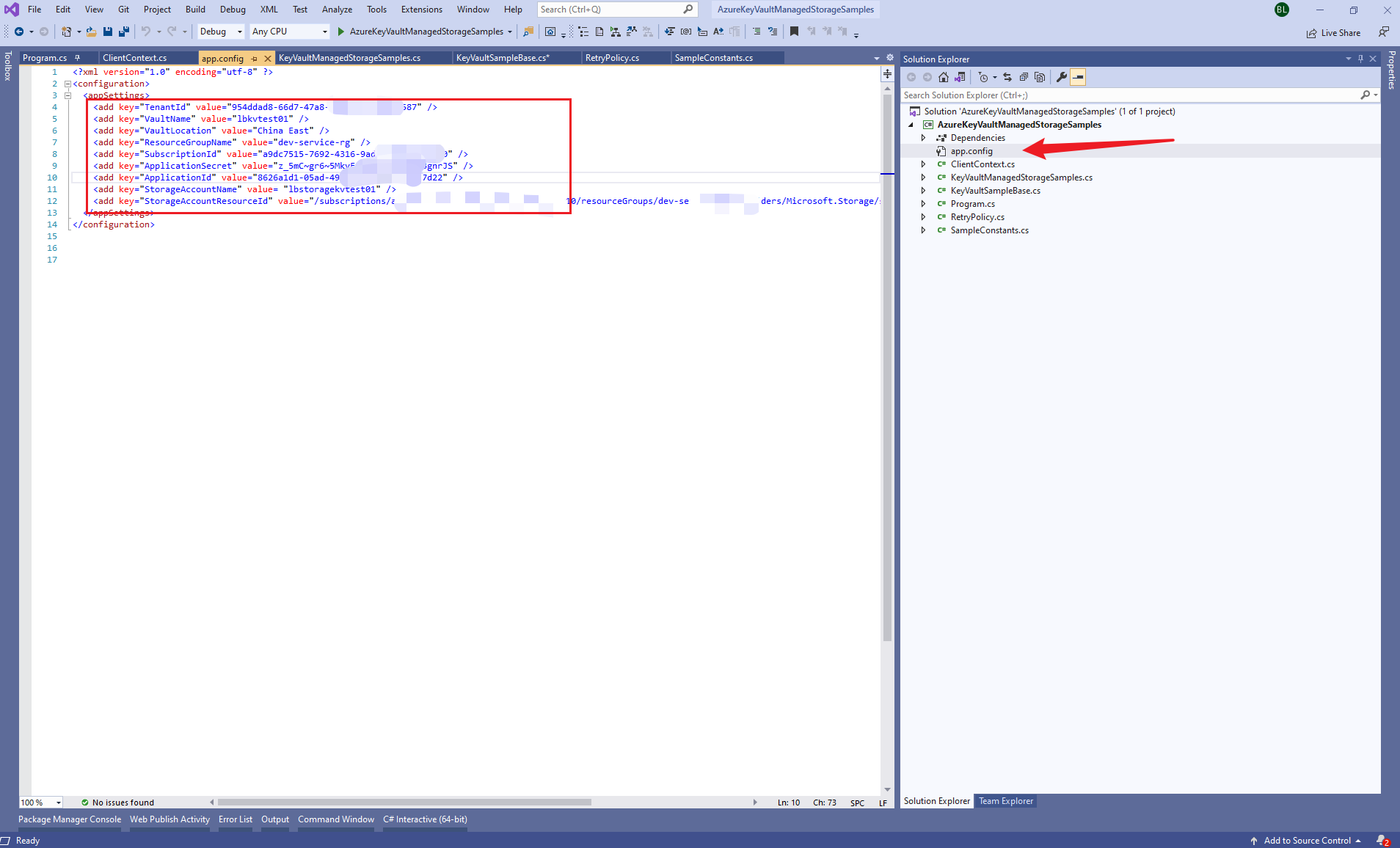
PS: 获取AAD中注册应用的相应配置值,可以参考博文:
【Azure Developer】使用Postman获取Azure AD中注册应用程序的授权Token,及为Azure REST API设置Authorization
【Azure Developer】Python代码通过AAD认证访问微软Azure密钥保管库(Azure Key Vault)中机密信息(Secret)
第一个错误:"AADSTS90002: Tenant 'xxxxxxxx-66d7-xxxx-8f9f-xxxxxxxxxxxx' not found. This may happen if there are no active subscriptions for the tenant. Check to make sure you have the correct tenant ID. Check with your subscription administrator.
这是因为代码默认是连接到Global Azure的AAD环境,所以认证的时候会把app.config中的tenant值在Global Azure AAD中查找。而我们在项目中配置的Tenant是中国区Azure的,所以出现not found的提示。 只需要在代码中指定AAD的环境中Azure China即可解决该问题。
- 在ClientContext.cs文件中 修改GetServiceCredentialsAsync方法ActiveDirectoryServiceSettings.Azure 为ActiveDirectoryServiceSettings.AzureChina
        /// <summary>

        /// Returns a task representing the attempt to log in to Azure public as the specified

        /// service principal, with the specified credential.

        /// </summary>

        /// <param name="certificateThumbprint"></param>

        /// <returns></returns>

        public static Task<ServiceClientCredentials> GetServiceCredentialsAsync(string tenantId, string applicationId, string appSecret)

        {

            if (_servicePrincipalCredential == null)

            {

                _servicePrincipalCredential = new ClientCredential(applicationId, appSecret);

            }

            //Update the Azure to Azure China

            return ApplicationTokenProvider.LoginSilentAsync(

                tenantId,

                _servicePrincipalCredential,

                ActiveDirectoryServiceSettings.AzureChina,

                TokenCache.DefaultShared);

        }
第二个错误:Microsoft.Rest.Azure.CloudException | HResult=0x80131500 | Message=The subscription 'xxxxxxxx-xxxx-xxxx-xxxx-xxxxxxxxxxxx' could not be found. | Source=Microsoft.Azure.Management.KeyVault
这个错误的原因为在Azure Management KeyVault对象中找不到我们在项目中配置的订阅信息。在Debug代码时候才发现,KeyVaultManagementClient对象默认的URL也是指向Global Azure。中国区的Key Vault Management的URL为https://management.chinacloudapi.cn, 与Global不同。需要在KeyVaultSampleBase.cs代码中设定ManagementClient.BaseUri = new Uri("https://management.chinacloudapi.cn"); 即可。
        private void InstantiateSample(string tenantId, string appId, string appSecret, string subscriptionId, string resourceGroupName, string vaultLocation, string vaultName, string storageAccountName, string storageAccountResourceId)

        {

            context = ClientContext.Build(tenantId, appId, appSecret, subscriptionId, resourceGroupName, vaultLocation, vaultName, storageAccountName, storageAccountResourceId);

            // log in with as the specified service principal for vault management operations

            var serviceCredentials = Task.Run(() => ClientContext.GetServiceCredentialsAsync(tenantId, appId, appSecret)).ConfigureAwait(true).GetAwaiter().GetResult();

// instantiate the management client

            ManagementClient = new KeyVaultManagementClient(serviceCredentials);

            ManagementClient.BaseUri = new Uri("https://management.chinacloudapi.cn");

            ManagementClient.SubscriptionId = subscriptionId;

            // instantiate the data client, specifying the user-based access token retrieval callback

            DataClient = new KeyVaultClient(ClientContext.AcquireUserAccessTokenAsync);

        }
第三个错误:The client 'xxxxxxxx-e256-xxxx-8ef8-xxxxxxxxxxxx' with object id 'xxxxxxxx-e256-xxxx-xxxxxxxxxxxx' does not have authorization to perform action 'Microsoft.KeyVault/vaults/read' over scope '/subscriptions/xxxxxxxx-xxxx-xxxx-xxxx-xxxxxxxxxxxx/resourceGroups/dev-service-rg/providers/Microsoft.KeyVault/vaults/<youkeyvaultname>' or the scope is invalid. If access was recently granted, please refresh your credentials.
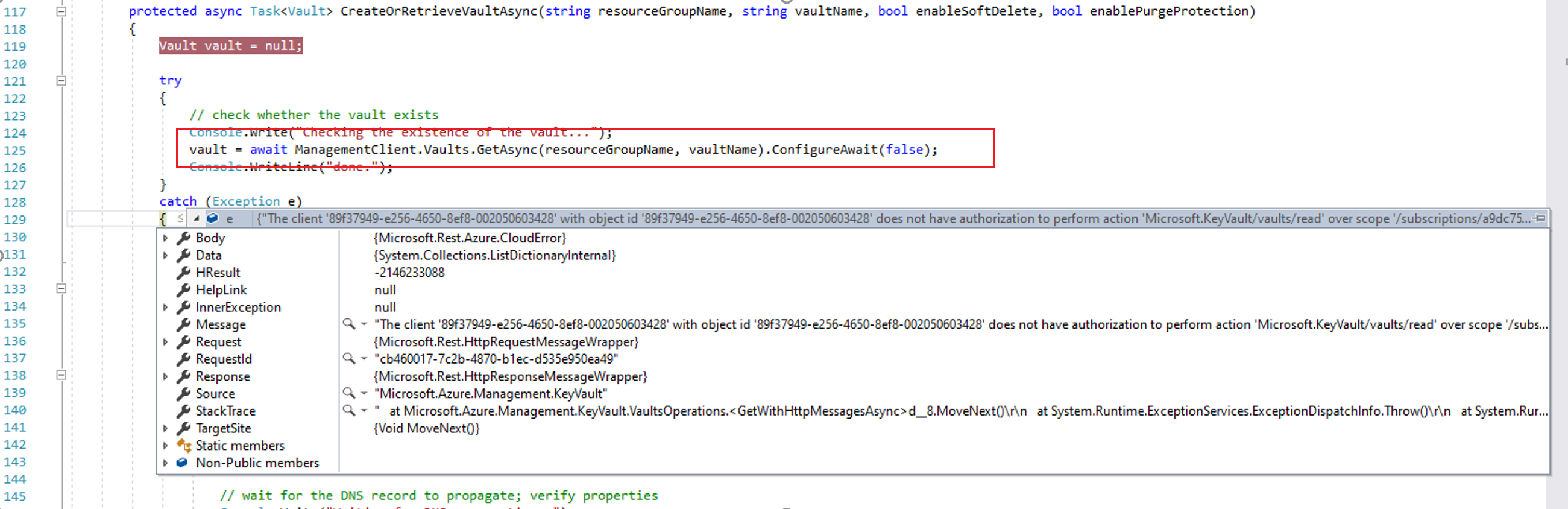
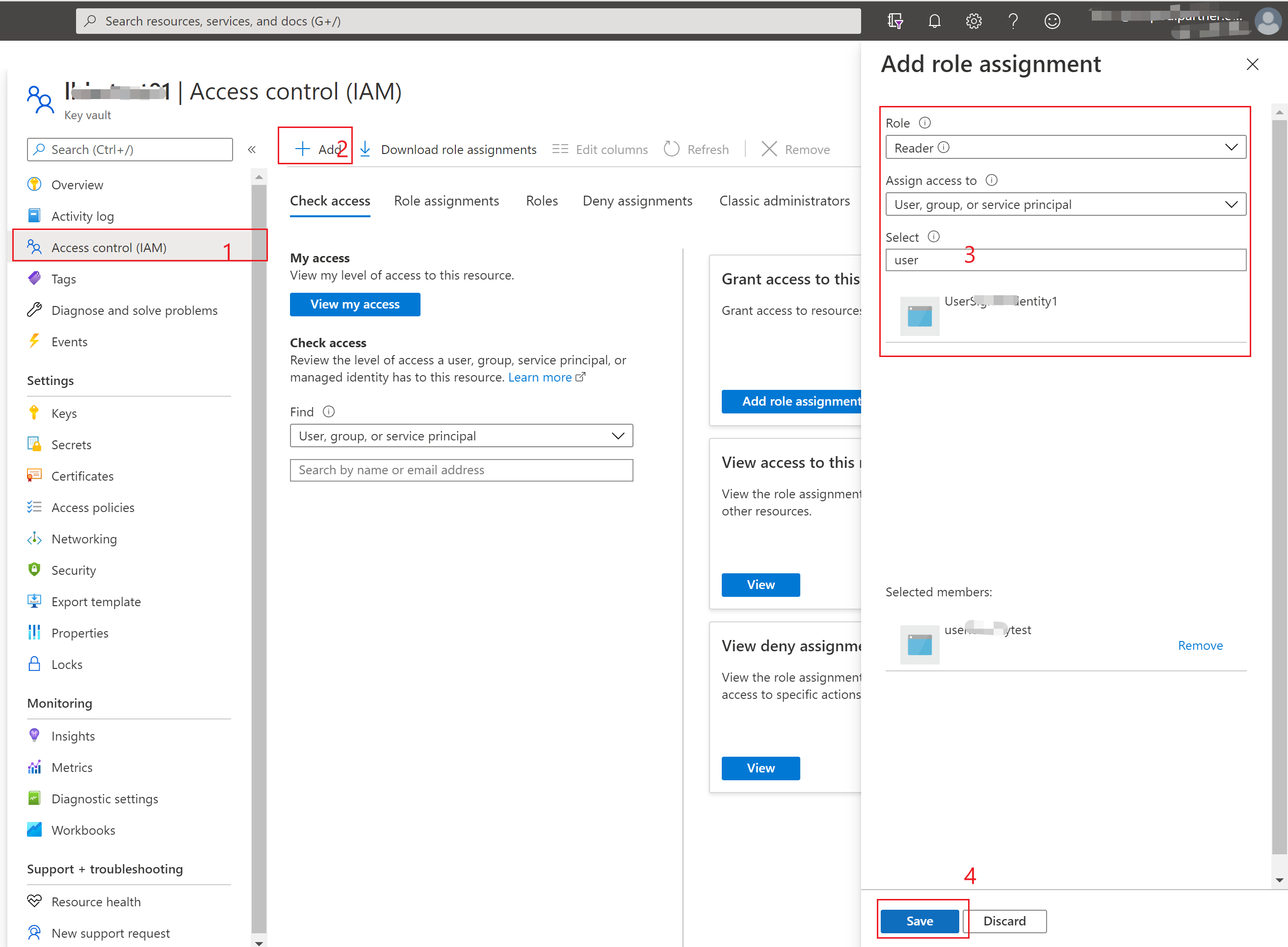
在通过代码获取Key Vault Management对象时候,由于程序当前使用的AAD注册应用没有被授予Key Vault的操作权限,所以出现does not have authorization to perform action 'Microsoft.KeyVault/vaults/read' 。通过到Key Vault的门户中为AAD应用分配权限即可解决此问题。
- Key Vault Portal -> Access Control(IAM) -> Add Role Assignment.
第四个错误:Unexpected exception encountered: AADSTS700016: Application with identifier '54d5b1e9-5f5c-48f1-8483-d72471cbe7e7' was not found in the directory 'xxxxxxxx-66d7-xxxx-8f9f-xxxxxxxxxxxx'. This can happen if the application has not been installed by the administrator of the tenant or consented to by any user in the tenant. You may have sent your authentication request to the wrong tenant.
这个错误很迷惑,因为identifier “54d5b1e9-5f5c-48f1-8483-d72471cbe7e7”并不包含在配置中,它是如何产生的呢? 在全局查看项目文件后,发现它是代码中hardcode的一个值。需要在使用时候把替换为app.config中的application id。
- 在SampleConstants.cs文件中的WellKnownClientId
        public static string WellKnownClientId

        {

            // Native AD app id with permissions in the subscription

            // Consider fetching it from configuration.

            get

            {

                return "54d5b1e9-5f5c-48f1-8483-d72471cbe7e7";

            }

        }
- 在ClientContext.cs文件中使用ConfigurationManager.AppSettings[SampleConstants.ConfigKeys.VaultMgmtAppId]替换WellKnownClientId
        public static async Task<string> AcquireUserAccessTokenAsync(string authority, string resource, string scope)

        {

            var context = new AuthenticationContext(authority, TokenCache.DefaultShared);

            if (_deviceCodeResponse == null)

            {

                //_deviceCodeResponse = await context.AcquireDeviceCodeAsync(resource, SampleConstants.WellKnownClientId).ConfigureAwait(false);

                _deviceCodeResponse = await context.AcquireDeviceCodeAsync(resource, ConfigurationManager.AppSettings[SampleConstants.ConfigKeys.VaultMgmtAppId]).ConfigureAwait(false);

                Console.WriteLine("############################################################################################");

                Console.WriteLine("To continue with the test run, please follow these instructions: {0}", _deviceCodeResponse.Message);

                Console.WriteLine("############################################################################################");

            }

            //context.AcquireTokenAsync()

            var result = await context.AcquireTokenByDeviceCodeAsync(_deviceCodeResponse).ConfigureAwait(false);

            return result.AccessToken;

        }
第五个错误:{"AADSTS7000218: The request body must contain the following parameter: 'client_assertion' or 'client_secret'.\r\nTrace ID: 57169df7-d54d-4533-b6cf-fc269ee93f00\r\nCorrelation ID: 33fb61c4-7266-4690-bb8d-4d4ebb5614f5\r\nTimestamp: 2021-01-19 02:44:50Z"}
这个错误是在 context.AcquireTokenByDeviceCodeAsync时,由于配置的AAD应用中没有开启移动应用或客户端应用的高级设置。详细的分析可以参考博客:https://blogs.aaddevsup.xyz/2019/08/receiving-error-aadsts7000218-the-request-body-must-contain-the-following-parameter-client_assertion-or-client_secret/
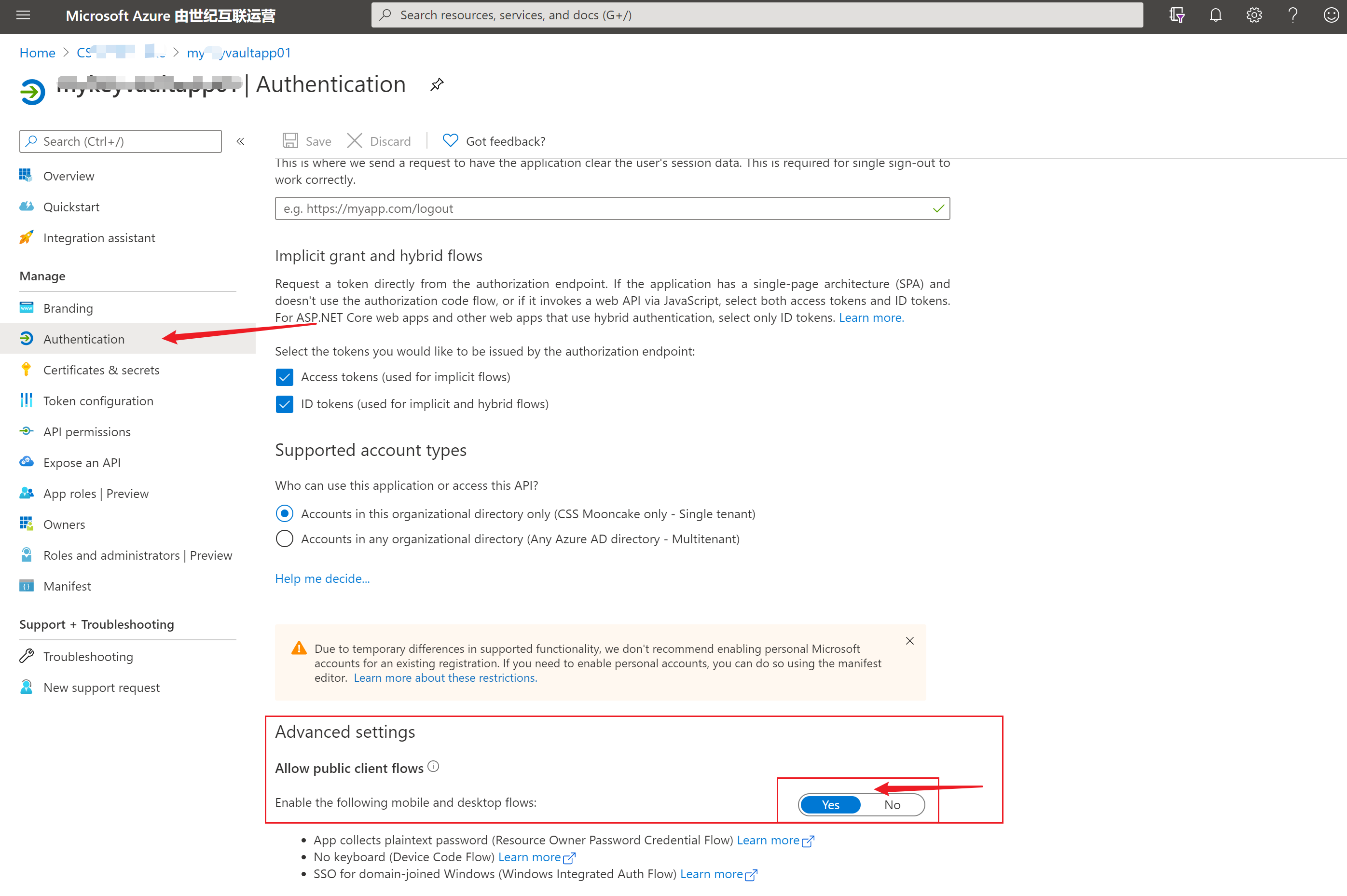
第六个错误:AADSTS54005: OAuth2 Authorization code was already redeemed, please retry with a new valid code or use an existing refresh token. |Trace ID: cbfb3d00-a3e5-445e-96b3-918a94054100 |Correlation ID: 40964a5f-e267-43da-988a-00bf33fa7ad4 |Timestamp: 2021-01-19 03:16:38Z
这个错误发生在 retrievedMsaResponse = await sample.DataClient.GetStorageAccountWithHttpMessagesAsync(vaultUri, managedStorageName).ConfigureAwait(false)的部分,由于通过AcquireTokenByDeviceCodeAsync获取到的token只能完成一次认证。所以再一次调用KeyVaultClient的Get-xxxxx-WithHttpMessageAsync时就会出现OAuth2 Authorization code was already redeemed错误。 解决方法为修改创建 DataClient = new KeyVaultClient(ClientContext.AcquireUserAccessTokenAsync)的认证方式或者是AcquireUserAccessTokenAsync中的获取token方式。
private void InstantiateSample(string tenantId, string appId, string appSecret, string subscriptionId, string resourceGroupName, string vaultLocation, string vaultName, string storageAccountName, string storageAccountResourceId)

        {

            context = ClientContext.Build(tenantId, appId, appSecret, subscriptionId, resourceGroupName, vaultLocation, vaultName, storageAccountName, storageAccountResourceId);

            // log in with as the specified service principal for vault management operations

            var serviceCredentials = Task.Run(() => ClientContext.GetServiceCredentialsAsync(tenantId, appId, appSecret)).ConfigureAwait(true).GetAwaiter().GetResult();

            //var serviceCredentials =ClientContext.GetServiceCredentialsAsync(tenantId, appId, appSecret).Result;

            // instantiate the management client

            ManagementClient = new KeyVaultManagementClient(serviceCredentials);

            ManagementClient.BaseUri = new Uri("https://management.chinacloudapi.cn");

            ManagementClient.SubscriptionId = subscriptionId;

            // instantiate the data client, specifying the user-based access token retrieval callback

            DataClient = new KeyVaultClient(ClientContext.AcquireUserAccessTokenAsync);
//DataClient = new KeyVaultClient(serviceCredentials); }
或者
        public static async Task<string> AcquireUserAccessTokenAsync(string authority, string resource, string scope)

        {

            var context = new AuthenticationContext(authority, TokenCache.DefaultShared);

            if (_deviceCodeResponse == null)

            {

                //_deviceCodeResponse = await context.AcquireDeviceCodeAsync(resource, SampleConstants.WellKnownClientId).ConfigureAwait(false);

                _deviceCodeResponse = await context.AcquireDeviceCodeAsync(resource, ConfigurationManager.AppSettings[SampleConstants.ConfigKeys.VaultMgmtAppId]).ConfigureAwait(false);

                Console.WriteLine("############################################################################################");

                Console.WriteLine("To continue with the test run, please follow these instructions: {0}", _deviceCodeResponse.Message);

                Console.WriteLine("############################################################################################");

            }

            //context.AcquireTokenAsync()

            var result = await context.AcquireTokenByDeviceCodeAsync(_deviceCodeResponse).ConfigureAwait(false);
       return result.AccessToken;

        }
(PS: 以上第六个错误还没有完全解决。)
参考资料:
创建 SAS 定义,并通过编写代码提取共享访问签名令牌:https://docs.azure.cn/zh-cn/key-vault/secrets/storage-keys-sas-tokens-code
Azure Sample:https://github.com/Azure-Samples
RECEIVING ERROR AADSTS7000218: THE REQUEST BODY MUST CONTAIN THE FOLLOWING PARAMETER: ‘CLIENT_ASSERTION’ OR ‘CLIENT_SECRET’ :https://blogs.aaddevsup.xyz/2019/08/receiving-error-aadsts7000218-the-request-body-must-contain-the-following-parameter-client_assertion-or-client_secret/
Python代码通过AAD认证访问微软Azure密钥保管库(Azure Key Vault)中机密信息(Secret): https://www.cnblogs.com/lulight/p/14286396.html
【Azure Developer】解决Azure Key Vault管理Storage的示例代码在中国区Azure遇见的各种认证/授权问题 - C# Example Code的更多相关文章
- Azure Key Vault(二)- 入门简介
一,引言 在介绍 Azure Key Vault 之前,先简单介绍一下 HSM(硬件安全模块). -------------------- 我是分割线 -------------------- 1,什 ...
- 【Azure Developer】Python代码通过AAD认证访问微软Azure密钥保管库(Azure Key Vault)中机密信息(Secret)
关键字说明 什么是 Azure Active Directory?Azure Active Directory(Azure AD, AAD) 是 Microsoft 的基于云的标识和访问管理服务,可帮 ...
- 【Azure Developer】使用 CURL 获取 Key Vault 中 Secrets 中的值
问题描述 在使用CURL通过REST API获取Azure Key Vaualt的Secrets值,提示Missing Token, 问如何来生成正确的Token呢? # curl 命令 curl - ...
- Azure Key Vault (3) 在Azure Windows VM里使用Key Vaule
<Windows Azure Platform 系列文章目录> 本章我们介绍如何在Azure Windows VM里面,使用.NET使用Azure Key Vault 我们需要对Key V ...
- Azure Key Vault (1) 入门
<Windows Azure Platform 系列文章目录> 为什么要使用Azure Key Vault? 我们假设在微软云Azure上有1个场景,在Windows VM里面有1个.NE ...
- 【Azure Developer】使用 adal4j(Azure Active Directory authentication library for Java)如何来获取Token呢
问题描述 使用中国区的Azure,在获取Token时候,参考了 adal4j的代码,在官方文档中,发现了如下的片段代码: ExecutorService service = Executors.new ...
- 中国区 Azure 应用程序开发说明
1.文档简介 微软公司为其在境外由微软运营的 Azure 服务(以下简称为 “境外 Azure”),创建和部署云应用程序,提供了相应工具. 在中国,由世纪互联运营的 Microsoft Azure ( ...
- 安装 Visual Studio,连接中国区 Azure
中国数据中心 目前,中国区 Azure 有两个数据中心,在位置字段中显示为“中国北部”和“中国东部”. 在 Azure 上创建应用程序的区别 在中国区 Azure 上开发应用程序与在境外 Azure ...
- 【Azure Developer】记录一次使用Java Azure Key Vault Secret示例代码生成的Jar包,单独运行出现 no main manifest attribute, in target/demo-1.0-SNAPSHOT.jar 错误消息
问题描述 创建一个Java Console程序,用于使用Azure Key Vault Secret.在VS Code中能正常Debug,但是通过mvn clean package打包为jar文件后, ...
随机推荐
- [python学习手册-笔记]004.动态类型
004.动态类型 ❝ 本系列文章是我个人学习<python学习手册(第五版)>的学习笔记,其中大部分内容为该书的总结和个人理解,小部分内容为相关知识点的扩展. 非商业用途转载请注明作者和出 ...
- 二、利用Git将GitHub上的项目拉下项目
本地同样需要安装Git,同样在GitHub上加入ssh公共钥匙 如果忘了 去看上一篇 一.本地项目部署到GitHub上 - 中华田园猫饭饭 - 博客园 (cnblogs.com) 1-鼠标右键点击 G ...
- MySQL锁(一)全局锁:如何做全库的逻辑备份?
数据库锁设计的初衷是处理并发问题,这也是数据库与文件系统的最大区别. 根据加锁的范围,MySQL里大致可以分为三种锁:全局锁.表锁和行锁.接下来我们会分三讲来介绍这三种锁,今天要讲的是全局锁. 全局锁 ...
- Python命令行模块(sys.argv,argparse,click)
Python作为一门脚本语言,经常作为脚本接受命令行传入参数,Python接受命令行参数大概有三种方式.因为在日常工作场景会经常使用到,这里对这几种方式进行总结. 命令行参数模块 这里命令行参数模块平 ...
- 微服务开发的最大痛点-分布式事务SEATA入门简介
前言 在微服务开发中,存在诸多的开发痛点,例如分布式事务.全链路跟踪.限流降级和服务平滑上下线等.而在这其中,分布式事务是最让开发者头痛的.那分布式事务是什么呢? 分布式事务就是指事务的参与者.支持事 ...
- 记:create-react-app暴露配置报错
上面主要是说 webpack 版本冲突 不是create-react-app本身的问题,需要手动解决. 解决办法: npm run eject // 显示所有的依赖项 如果运行出现类似这样的报错 Ar ...
- 个人微信公众号搭建Python实现 -开发配置和微信服务器转入-配置说明(14.1.2)
@ 目录 1.查看基本配置 2.修改服务器配置 3.当上面都配置好,点击提交 4.配置如下 1.查看基本配置 登录到微信公众号控制面板后点击基本配置 这里要讲的就是订阅号 前往注册微信公众号 2.修改 ...
- Python将文件夹下的文件名写入excel方便统计
如题,贴代码: 1 ''' 2 #python将某文件夹下的文件名存储到excel中 3 ''' 4 5 #导入所需模块 6 import os 7 import xlwt 8 9 #定义要处理的文件 ...
- PHP功能代码片段
1.连接MYSQL数据库代码 <?php $connec=mysql_connect("localhost","root","root&qu ...
- Autofac官方文档翻译--二、解析服务--1解析参数传递
Autofac 传递解析参数 注册组件公开相应的服务之后,你可以从container构造器和子lifetime scopes 中解析服务.使用Resolve()方法来实现: var builder = ...