
Turbine使用
一、简介
Turbine是聚合服务器发送事件流数据的一个工具,Hystrix的监控中,只能监控单个节点,实际生产中都为集群,因此可以通过Turbine来监控集群下Hystrix的metrics情况
Turbine的github地址:https://github.com/Netflix/Turbine
二、基本环境
- 一个eureka模块
- 两个消费者模块
- 一个turbine监控模块
三、创建eureka模块
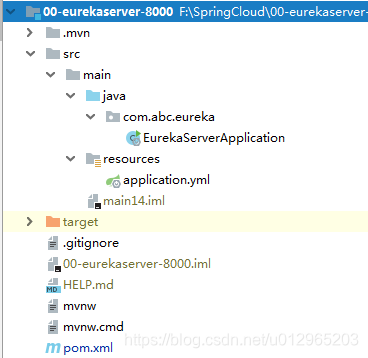
(1)创建项目
创建一个spring boot项目
(2)依赖
-
<?xml version="1.0" encoding="UTF-8"?>
-
<project xmlns="http://maven.apache.org/POM/4.0.0" xmlns:xsi="http://www.w3.org/2001/XMLSchema-instance"
-
xsi:schemaLocation="http://maven.apache.org/POM/4.0.0 http://maven.apache.org/xsd/maven-4.0.0.xsd">
-
<modelVersion>4.0.0</modelVersion>
-
-
<groupId>com.abc</groupId>
-
<artifactId>00-eurekaserver-8000</artifactId>
-
<version>0.0.1-SNAPSHOT</version>
-
<packaging>jar</packaging>
-
-
<parent>
-
<groupId>org.springframework.boot</groupId>
-
<artifactId>spring-boot-starter-parent</artifactId>
-
<version>2.1.7.RELEASE</version>
-
<relativePath/> <!-- lookup parent from repository -->
-
</parent>
-
-
<properties>
-
<java.version>1.8</java.version>
-
<spring-cloud.version>Greenwich.SR2</spring-cloud.version>
-
</properties>
-
-
<dependencies>
-
<dependency>
-
<groupId>org.springframework.cloud</groupId>
-
<artifactId>spring-cloud-starter-netflix-eureka-server</artifactId>
-
</dependency>
-
-
<dependency>
-
<groupId>org.springframework.boot</groupId>
-
<artifactId>spring-boot-starter-test</artifactId>
-
<scope>test</scope>
-
</dependency>
-
-
<!--热部署依赖-->
-
<dependency>
-
<groupId>org.springframework.boot</groupId>
-
<artifactId>spring-boot-devtools</artifactId>
-
<optional>true</optional>
-
</dependency>
-
</dependencies>
-
-
<dependencyManagement>
-
<dependencies>
-
<dependency>
-
<groupId>org.springframework.cloud</groupId>
-
<artifactId>spring-cloud-dependencies</artifactId>
-
<version>${spring-cloud.version}</version>
-
<type>pom</type>
-
<scope>import</scope>
-
</dependency>
-
</dependencies>
-
</dependencyManagement>
-
-
<build>
-
<plugins>
-
<plugin>
-
<groupId>org.springframework.boot</groupId>
-
<artifactId>spring-boot-maven-plugin</artifactId>
-
</plugin>
-
</plugins>
-
</build>
-
-
</project>
(3)application.yml配置
-
server:
-
port: 8000
-
-
eureka:
-
instance:
-
hostname: localhost # 指定Eureka主机
-
client:
-
register-with-eureka: false # 指定当前主机是否向Eureka服务器进行注册
-
fetch-registry: false # 指定当前主机是否要从Eurka服务器下载服务注册列表
-
service-url: # 服务暴露地址
-
defaultZone: http://localhost:8000/eureka
-
# defaultZone: http://${eureka.instance.hostname}:${server.port}/eureka
-
-
# server:
-
# enable-self-preservation: false # 关闭自我保护
(4)启动类
-
package com.abc.eureka;
-
-
import org.springframework.boot.SpringApplication;
-
import org.springframework.boot.autoconfigure.SpringBootApplication;
-
import org.springframework.cloud.netflix.eureka.server.EnableEurekaServer;
-
-
@SpringBootApplication
-
@EnableEurekaServer // 开启Eureka服务
-
public class EurekaServerApplication {
-
-
public static void main(String[] args) {
-
SpringApplication.run(EurekaServerApplication.class, args);
-
}
-
}
四、创建消费者09-consumer-turbine-8080
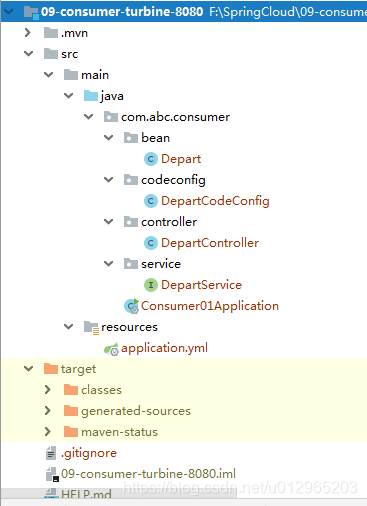
(1)创建项目
创建一个spring boot项目
(2)依赖
-
<?xml version="1.0" encoding="UTF-8"?>
-
<project xmlns="http://maven.apache.org/POM/4.0.0" xmlns:xsi="http://www.w3.org/2001/XMLSchema-instance"
-
xsi:schemaLocation="http://maven.apache.org/POM/4.0.0 http://maven.apache.org/xsd/maven-4.0.0.xsd">
-
<modelVersion>4.0.0</modelVersion>
-
<parent>
-
<groupId>org.springframework.boot</groupId>
-
<artifactId>spring-boot-starter-parent</artifactId>
-
<version>2.1.7.RELEASE</version>
-
<relativePath/> <!-- lookup parent from repository -->
-
</parent>
-
<groupId>com.abc</groupId>
-
<artifactId>09-consumer-turbine-8080</artifactId>
-
<version>0.0.1-SNAPSHOT</version>
-
<name>09-consumer-turbine-8080</name>
-
<description>Demo project for Spring Boot</description>
-
-
<properties>
-
<java.version>1.8</java.version>
-
<spring-cloud.version>Greenwich.SR2</spring-cloud.version>
-
</properties>
-
-
<dependencies>
-
-
<!--hystrix依赖-->
-
<dependency>
-
<groupId>org.springframework.cloud</groupId>
-
<artifactId>spring-cloud-starter-netflix-hystrix</artifactId>
-
</dependency>
-
-
<!--feign依赖-->
-
<dependency>
-
<groupId>org.springframework.cloud</groupId>
-
<artifactId>spring-cloud-starter-openfeign</artifactId>
-
</dependency>
-
-
<!-- hystrix-dashboard依赖 -->
-
<dependency>
-
<groupId>org.springframework.cloud</groupId>
-
<artifactId>spring-cloud-starter-netflix-hystrix-dashboard</artifactId>
-
</dependency>
-
-
<!--actuator依赖-->
-
<dependency>
-
<groupId>org.springframework.boot</groupId>
-
<artifactId>spring-boot-starter-actuator</artifactId>
-
</dependency>
-
-
<!--eureka客户端依赖-->
-
<dependency>
-
<groupId>org.springframework.cloud</groupId>
-
<artifactId>spring-cloud-starter-netflix-eureka-client</artifactId>
-
</dependency>
-
-
<dependency>
-
<groupId>org.springframework.boot</groupId>
-
<artifactId>spring-boot-starter-web</artifactId>
-
</dependency>
-
-
<!-- https://mvnrepository.com/artifact/org.webjars.bower/jquery -->
-
<dependency>
-
<groupId>org.webjars.bower</groupId>
-
<artifactId>jquery</artifactId>
-
<version>2.1.1</version>
-
</dependency>
-
-
<dependency>
-
<groupId>org.projectlombok</groupId>
-
<artifactId>lombok</artifactId>
-
<optional>true</optional>
-
</dependency>
-
-
<dependency>
-
<groupId>org.springframework.cloud</groupId>
-
<artifactId>spring-cloud-starter-netflix-turbine</artifactId>
-
</dependency>
-
<!--热部署依赖-->
-
<dependency>
-
<groupId>org.springframework.boot</groupId>
-
<artifactId>spring-boot-devtools</artifactId>
-
<optional>true</optional>
-
</dependency>
-
-
</dependencies>
-
-
<dependencyManagement>
-
<dependencies>
-
<dependency>
-
<groupId>org.springframework.cloud</groupId>
-
<artifactId>spring-cloud-dependencies</artifactId>
-
<version>${spring-cloud.version}</version>
-
<type>pom</type>
-
<scope>import</scope>
-
</dependency>
-
</dependencies>
-
</dependencyManagement>
-
-
<build>
-
<plugins>
-
<plugin>
-
<groupId>org.springframework.boot</groupId>
-
<artifactId>spring-boot-maven-plugin</artifactId>
-
</plugin>
-
</plugins>
-
</build>
-
-
</project>
(3)application.yml配置
-
# 在微服务网关zuul中演示时需要该工程的端口号为8090
-
server:
-
port: 8080
-
-
spring:
-
application: # 指定微服务对外暴露的名称
-
name: abcmsc-consumer-depart01
-
-
eureka:
-
client:
-
service-url:
-
defaultZone: http://localhost:8000/eureka
-
# instance:
-
# metadata-map:
-
# cluster: ribbon
-
# 开启Feign对Hystrix的支持
-
feign:
-
hystrix:
-
enabled: true
-
-
client:
-
config:
-
default:
-
connectTimeout: 5000 # 指定Feign连接提供者的超时时限
-
readTimeout: 5000 # 指定Feign从请求到获取提供者响应的超时时限
-
-
# 开启actuator的所有web终端
-
management:
-
endpoints:
-
web:
-
exposure:
-
include: "*"
-
-
# 设置服务熔断时限
-
hystrix:
-
command:
-
default:
-
execution:
-
isolation:
-
thread:
-
timeoutInMilliseconds: 3000
(4)实体类Depart
-
package com.abc.consumer.bean;
-
-
import lombok.Data;
-
-
@Data
-
public class Depart {
-
private Integer id;
-
private String name;
-
}
(5)DepartCodeConfig类
-
package com.abc.consumer.codeconfig;
-
-
import org.springframework.cloud.client.loadbalancer.LoadBalanced;
-
import org.springframework.context.annotation.Bean;
-
import org.springframework.context.annotation.Configuration;
-
import org.springframework.web.client.RestTemplate;
-
-
@Configuration
-
public class DepartCodeConfig {
-
-
@LoadBalanced // 开启消息者端的负载均衡功能,默认是轮询策略
-
@Bean
-
public RestTemplate restTemplate() {
-
return new RestTemplate();
-
}
-
-
}
(6)DepartController类
-
package com.abc.consumer.controller;
-
-
import com.abc.consumer.bean.Depart;
-
import com.abc.consumer.service.DepartService;
-
import com.netflix.hystrix.contrib.javanica.annotation.HystrixCommand;
-
import org.springframework.beans.factory.annotation.Autowired;
-
import org.springframework.web.bind.annotation.*;
-
-
import java.util.List;
-
-
@RestController
-
@RequestMapping("/consumer/depart")
-
public class DepartController {
-
-
@Autowired
-
DepartService service;
-
-
// 服务降级:若当前处理器方法发生异常,则执行fallbackMethod属性指定的方法
-
@HystrixCommand(fallbackMethod = "getHystrixHandle")
-
@GetMapping("/get/{id}")
-
public Depart getHandle(@PathVariable("id") int id) {
-
return service.getDepartById(id);
-
}
-
-
public Depart getHystrixHandle(@PathVariable("id") int id) {
-
Depart depart = new Depart();
-
depart.setId(id);
-
depart.setName("no this depart -- 方法级别");
-
return depart;
-
}
-
-
-
}
(7)DepartService类
-
package com.abc.consumer.service;
-
-
-
import com.abc.consumer.bean.Depart;
-
import org.springframework.cloud.openfeign.FeignClient;
-
import org.springframework.stereotype.Service;
-
import org.springframework.web.bind.annotation.*;
-
-
import java.util.List;
-
-
@Service
-
// 指定当前Service所绑定的提供者微服务名称
-
// fallback指定该接口所绑定的服务降级类
-
@FeignClient(value = "abcmsc-provider-depart")
-
@RequestMapping("/provider/depart")
-
public interface DepartService {
-
@GetMapping("/get/{id}")
-
Depart getDepartById(@PathVariable("id") int id);
-
-
}
(8)启动类
-
package com.abc.consumer;
-
-
import org.springframework.boot.SpringApplication;
-
import org.springframework.cloud.client.SpringCloudApplication;
-
import org.springframework.cloud.netflix.hystrix.dashboard.EnableHystrixDashboard;
-
import org.springframework.cloud.openfeign.EnableFeignClients;
-
-
// 指定Service接口所在的包,开启OpenFeign客户端
-
@EnableFeignClients(basePackages = "com.abc.consumer.service")
-
@SpringCloudApplication
-
@EnableHystrixDashboard // 开启Hystrix仪表盘功能
-
public class Consumer01Application {
-
-
public static void main(String[] args) {
-
SpringApplication.run(Consumer01Application.class, args);
-
}
-
-
}
五、创建消费者09-consumer-turbine-8081
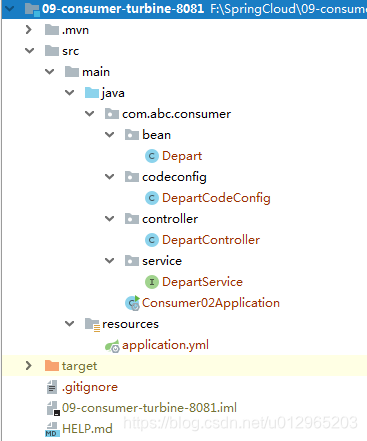
(1)复制项目09-consumer-turbine-8080
(2)修改依赖
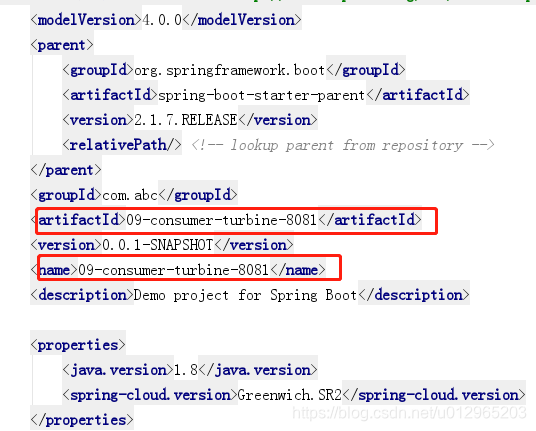
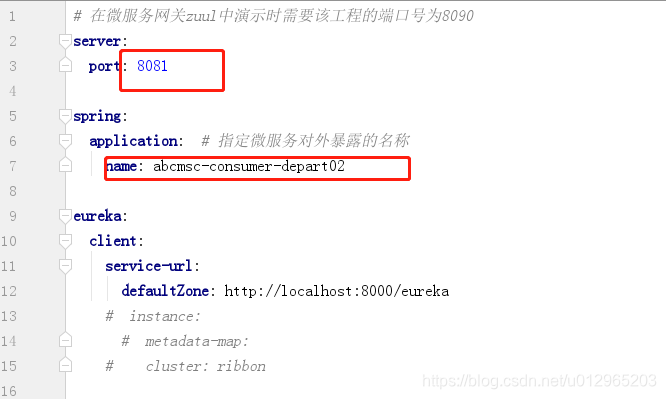
(3)修改application.yml配置
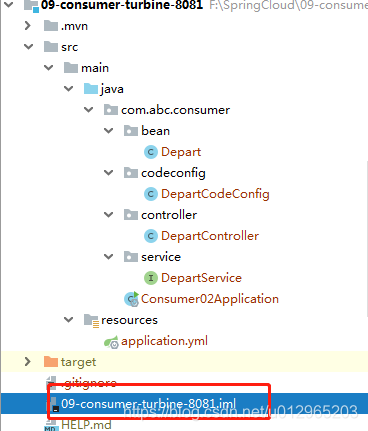
(4)修改09-consumer-turbine-8081.iml
六、创建消费者turbine监控
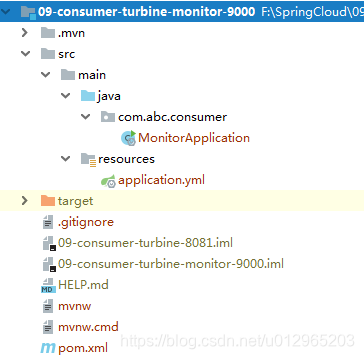
(1)创建项目
创建一个spring boot项目
(2)依赖
-
<?xml version="1.0" encoding="UTF-8"?>
-
<project xmlns="http://maven.apache.org/POM/4.0.0" xmlns:xsi="http://www.w3.org/2001/XMLSchema-instance"
-
xsi:schemaLocation="http://maven.apache.org/POM/4.0.0 http://maven.apache.org/xsd/maven-4.0.0.xsd">
-
<modelVersion>4.0.0</modelVersion>
-
<parent>
-
<groupId>org.springframework.boot</groupId>
-
<artifactId>spring-boot-starter-parent</artifactId>
-
<version>2.1.7.RELEASE</version>
-
<relativePath/> <!-- lookup parent from repository -->
-
</parent>
-
<groupId>com.abc</groupId>
-
<artifactId>09-consumer-turbine-monitor-9000</artifactId>
-
<version>0.0.1-SNAPSHOT</version>
-
<name>09-consumer-turbine-monitor-9000</name>
-
<description>Demo project for Spring Boot</description>
-
-
<properties>
-
<java.version>1.8</java.version>
-
<spring-cloud.version>Greenwich.SR2</spring-cloud.version>
-
</properties>
-
-
<dependencies>
-
-
<dependency>
-
<groupId>org.springframework.cloud</groupId>
-
<artifactId>spring-cloud-starter-netflix-turbine</artifactId>
-
</dependency>
-
-
<!--hystrix依赖-->
-
<dependency>
-
<groupId>org.springframework.cloud</groupId>
-
<artifactId>spring-cloud-starter-netflix-hystrix</artifactId>
-
</dependency>
-
-
<!--feign依赖-->
-
<dependency>
-
<groupId>org.springframework.cloud</groupId>
-
<artifactId>spring-cloud-starter-openfeign</artifactId>
-
</dependency>
-
-
<!-- hystrix-dashboard依赖 -->
-
<dependency>
-
<groupId>org.springframework.cloud</groupId>
-
<artifactId>spring-cloud-starter-netflix-hystrix-dashboard</artifactId>
-
</dependency>
-
-
<!--actuator依赖-->
-
<dependency>
-
<groupId>org.springframework.boot</groupId>
-
<artifactId>spring-boot-starter-actuator</artifactId>
-
</dependency>
-
-
<!--eureka客户端依赖-->
-
<dependency>
-
<groupId>org.springframework.cloud</groupId>
-
<artifactId>spring-cloud-starter-netflix-eureka-client</artifactId>
-
</dependency>
-
-
<dependency>
-
<groupId>org.springframework.boot</groupId>
-
<artifactId>spring-boot-starter-web</artifactId>
-
</dependency>
-
-
<!-- https://mvnrepository.com/artifact/org.webjars.bower/jquery -->
-
<dependency>
-
<groupId>org.webjars.bower</groupId>
-
<artifactId>jquery</artifactId>
-
<version>2.1.1</version>
-
</dependency>
-
-
<dependency>
-
<groupId>org.projectlombok</groupId>
-
<artifactId>lombok</artifactId>
-
<optional>true</optional>
-
</dependency>
-
<!--热部署依赖-->
-
<dependency>
-
<groupId>org.springframework.boot</groupId>
-
<artifactId>spring-boot-devtools</artifactId>
-
<optional>true</optional>
-
</dependency>
-
-
</dependencies>
-
<dependencyManagement>
-
<dependencies>
-
<dependency>
-
<groupId>org.springframework.cloud</groupId>
-
<artifactId>spring-cloud-dependencies</artifactId>
-
<version>${spring-cloud.version}</version>
-
<type>pom</type>
-
<scope>import</scope>
-
</dependency>
-
</dependencies>
-
</dependencyManagement>
-
-
<build>
-
<plugins>
-
<plugin>
-
<groupId>org.springframework.boot</groupId>
-
<artifactId>spring-boot-maven-plugin</artifactId>
-
</plugin>
-
</plugins>
-
</build>
-
-
</project>
(3)application.yml配置
-
-
server:
-
port: 9000
-
-
spring:
-
application: # 指定微服务对外暴露的名称
-
name: 09-consumer-turbine-monitor-9000
-
-
eureka:
-
client:
-
service-url: # 指定Eureka服务注册中心
-
defaultZone: http://localhost:8000/eureka
-
-
# 开启Feign对Hystrix的支持
-
feign:
-
hystrix:
-
enabled: true
-
-
client:
-
config:
-
default:
-
connectTimeout: 5000 # 指定Feign连接提供者的超时时限
-
readTimeout: 5000 # 指定Feign从请求到获取提供者响应的超时时限
-
-
# 开启actuator的所有web终端
-
management:
-
endpoints:
-
web:
-
exposure:
-
include: "*"
-
-
# 设置服务熔断时限
-
hystrix:
-
command:
-
default:
-
execution:
-
isolation:
-
thread:
-
timeoutInMilliseconds: 3000
-
turbine:
-
app-config: abcmsc-consumer-depart01,abcmsc-consumer-depart02
-
cluster-name-expression: new String("default")
-
combine-host-port: true
-
instanceUrlSuffix: /actuator/hystrix.stream #turbine默认监控actuator/路径下的端点,修改直接监控hystrix.stream
-
#cluster-name-expression: metadata['cluster']
-
#aggregator:
-
# cluster-config: ribbon
-
#instanceUrlSuffix: /hystrix.stream #turbine默认监控actuator/路径下的端点,修改直接监控hystrix.stream
(4)启动类
-
package com.abc.consumer;
-
-
import org.springframework.boot.SpringApplication;
-
import org.springframework.boot.autoconfigure.SpringBootApplication;
-
import org.springframework.cloud.netflix.eureka.EnableEurekaClient;
-
import org.springframework.cloud.netflix.hystrix.dashboard.EnableHystrixDashboard;
-
import org.springframework.cloud.netflix.turbine.EnableTurbine;
-
-
-
@SpringBootApplication
-
@EnableTurbine
-
@EnableHystrixDashboard
-
@EnableEurekaClient
-
public class MonitorApplication {
-
-
public static void main(String[] args) {
-
SpringApplication.run(MonitorApplication.class, args);
-
}
-
-
/*@Bean
-
public ServletRegistrationBean getServlet() {
-
HystrixMetricsStreamServlet streamServlet = new HystrixMetricsStreamServlet();
-
ServletRegistrationBean registrationBean = new ServletRegistrationBean(streamServlet);
-
registrationBean.setLoadOnStartup(1);
-
registrationBean.addUrlMappings("/actuator/hystrix.stream);
-
registrationBean.setName("HystrixMetricsStreamServlet");
-
return registrationBean;
-
}*/
-
-
}
七、启动
(1)启动eureka模块
(2)启动两个消费者模块
(3)启动turbine监控模块
八、效果
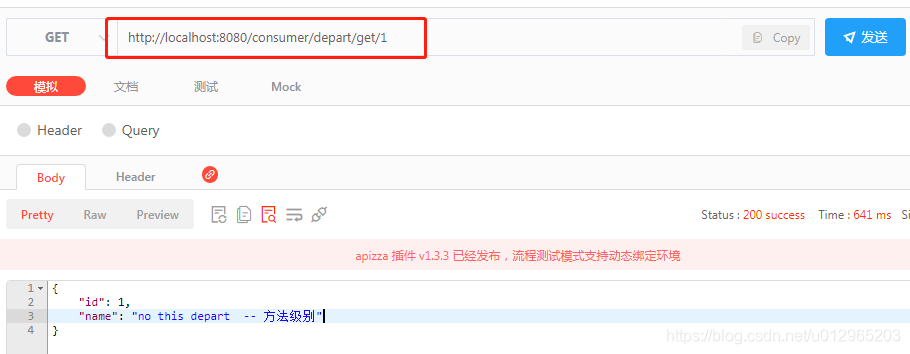
(1)请求http://localhost:8080/consumer/depart/get/1
(1)请求http://localhost:8081/consumer/depart/get/1
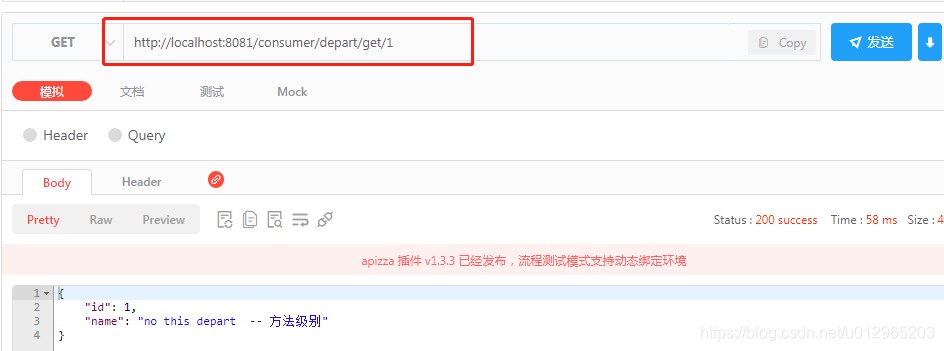
浏览器访问http://localhost:9000/hystrix
输入http://localhost:9000/turbine.stream
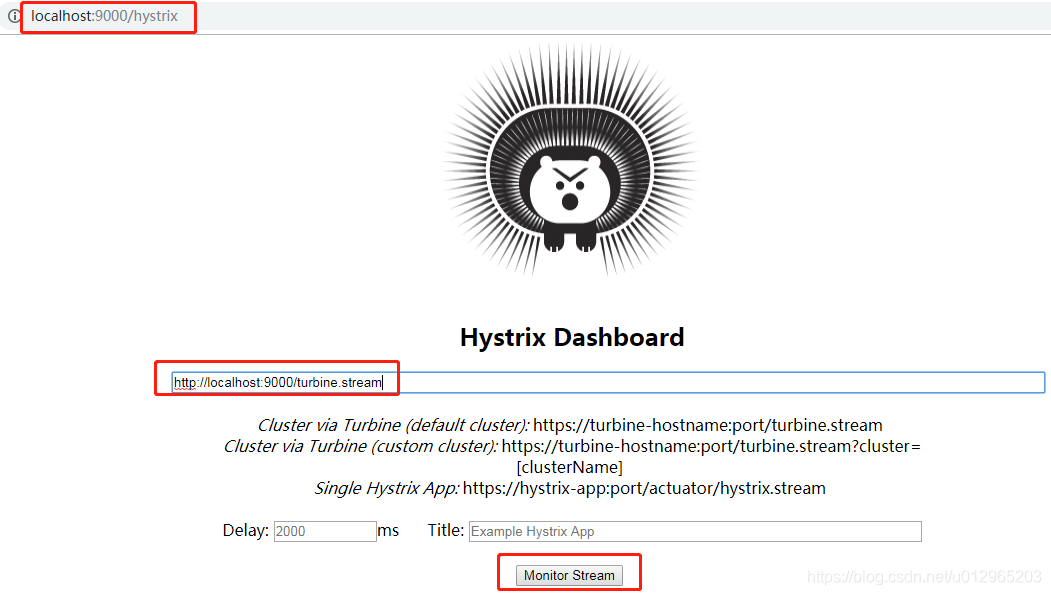

其他说明
图片说明借鉴 https://www.jianshu.com/p/590bad4c8947
Turbine使用的更多相关文章
- 第二十六章 hystrix-dashboard + turbine
一.使用turbine的意义 引入多个hystrix stream: 1.使用hystrix-dashboard的可以添加多个stream的功能 图中添加的两个stream会在真正monitor的时候 ...
- 附7 turbine
一.作用 聚集同一个微服务的相同的commandKey.Threadpool.commandGroupKey数据进行聚合 二.配置 1.集群(cluster)(turbine聚集数据的粒度) turb ...
- apache开源项目-- Turbine
1.缘起 Jetspeed是Apache Jakarta小组的开放源码门户系统.它使得最终用户可以通过WAP手机.浏览器.PDA等各种设备来使用各种各样的网络资源(比如应用程序.数据以及这之外的任何网 ...
- springcloud(五):熔断监控Hystrix Dashboard和Turbine
Hystrix-dashboard是一款针对Hystrix进行实时监控的工具,通过Hystrix Dashboard我们可以在直观地看到各Hystrix Command的请求响应时间, 请求成功率等数 ...
- spring cloud熔断监控Hystrix Dashboard和Turbine
参考: http://blog.csdn.net/ityouknow/article/details/72625646 完整pom <?xml version="1.0" e ...
- 改造断路器集群监控Hystrix Turbine实现自动注册消费者、实时监控多个服务
在上一篇文章中,我们搭建了Hystrix Dashoard,对指定接口进行监控.但是只能对一个接口进行监听,功能比较局限: Turbine:汇总系统内多个服务的数据并显示到 Hystrix Dashb ...
- spring cloud(五)熔断监控Hystrix Dashboard和Turbine
Hystrix-dashboard是一款针对Hystrix进行实时监控的工具,通过Hystrix Dashboard我们可以在直观地看到各Hystrix Command的请求响应时间, 请求成功率等数 ...
- Spring Cloud Turbine微服务集群实时监控
本文代码下载地址: https://gitlab.com/mySpringCloud/turbine SpringBoot版本:1.5.9.RELEASE (稳定版) SpringCloud版本:Ed ...
- SpringCloud系列七:Hystrix 熔断机制(Hystrix基本配置、服务降级、HystrixDashboard服务监控、Turbine聚合监控)
1.概念:Hystrix 熔断机制 2.具体内容 所谓的熔断机制和日常生活中见到电路保险丝是非常相似的,当出现了问题之后,保险丝会自动烧断,以保护我们的电器, 那么如果换到了程序之中呢? 当现在服务的 ...
- Spring Cloud 入门教程(八): 断路器指标数据监控Hystrix Dashboard 和 Turbine
1. Hystrix Dashboard (断路器:hystrix 仪表盘) Hystrix一个很重要的功能是,可以通过HystrixCommand收集相关数据指标. Hystrix Dashboa ...
随机推荐
- docker添加sudo权限
sudo groupadd docker # 添加group sudo gpasswd -a think docker # 添加用户到组 sudo service docker restart n ...
- 如何系统学习C 语言(下)之 文件篇
我们所编写的程序源代码以及编译生成的可执行文件都属于文件.所以文件的实质就是存储在外部存储介质上的一段连续的二进制数据. c 语言程序对文件的处理采用文件流的形式,程序运行在内存中,而文件是存储在外部 ...
- GitHub 12个实用技巧-从projiect项目管理、代码链接到博客wiki全过程
1 在GitHub.com上编辑代码 2 粘贴图片 3 美化代码 4 在PRs中巧妙关闭issues 5 链接到评论 6 链接到代码 7 灵活使用GitHub地址栏 8 创建复选框列表 9 在GitH ...
- 关于Cefsharp无法拖动Dom元素的解决方法
如图所显示,Cefsharp在嵌入网页,页面有对Dom元素的拖动的操作,独立在浏览器上对网页元素的拖动是没有问题的,但是嵌入到Cefsharp上显示禁用的图标.排查了H5的代码,没有写入禁用拖动的操作 ...
- [hdu6601]Keen On Everything But Triangle
有两个结论:1.排序后,答案一定是连续的三个数:2.当序列长度超过44一定有三个相同的数(因为即使该序列是斐波那契数列,此时也超过了1e9),然后用主席树等数据结构(略卡常,建议主席树)来维护前45大 ...
- rm命令弱爆了!
大家好,我是良许. 创建.删除和修改文件是用户在 Linux 系统中执行的非常常见操作.大家都知道,在 Linux 系统里使用 rm 命令删除单个文件时,几乎一瞬间就完成了.但是如果文件数量很大,那么 ...
- .NET E F(Entity Framework)框架 DataBase First 和 Code First 简单用法。
EF是微软.NET平台官方的ORM(objet-relation mapping),就是一种对象-关系 映射,是将关系数据库种的业务数据用对象的形式表现出来,并通过面向对象的方式讲这些对象组织起来,实 ...
- 【SCOI2005】繁忙的都市
Description 城市C是一个非常繁忙的大都市,城市中的道路十分的拥挤,于是市长决定对其中的道路进行改造.城市C的道路是这样分布的:城市中有n个交叉路口,有些交叉路口之间有道路相连,两个交叉路口 ...
- Matlab指针
Matlab指针 第一印象貌似是Matlab中不存在指针,所有变量与函数的赋值都是按值传递的,不会对参数进行修改.其实Matlab提供了handle类作为指针代替品.只要我们利用handle子类,就可 ...
- 中兴交换机基础配置(备份、dhcp中继、monitor)
1. 备份配置 格式: copy tftp/sftp/ftp [vrf mng] root: 本地文件 远端文件 1. 通过tftp进行备份,vrf mng表示指定使用管理口链路连接 copy tft ...