
[Tomcat源码分析] Eclipse中搭建Apache Tomcat源码调试环境
网上很多文章都推荐使用Ant下载编译,但本地实践中屡屡失败,无法下载。
后来参考 https://blog.csdn.net/xiongyouqiang/article/details/78941077 总算把调试环境搭建完成。
以下文章几乎完全copy上述网址,但稍作延展。
下载源码
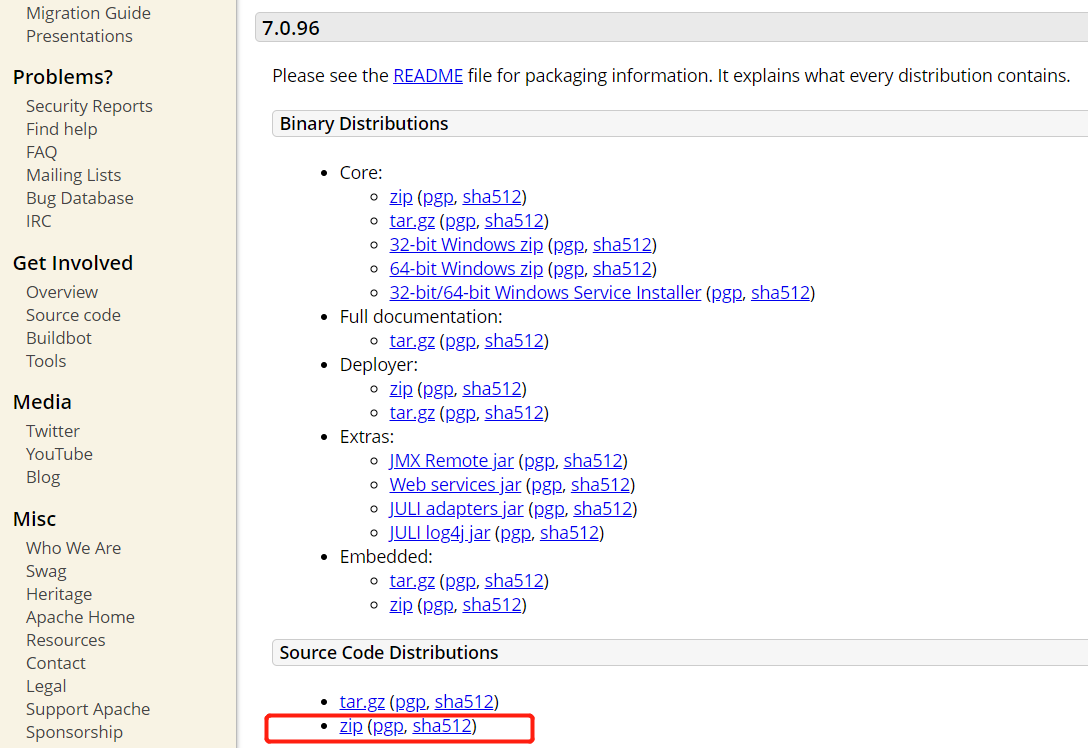
官网直接下载源码
http://tomcat.apache.org/download-70.cgi
源码导入到Eclipse中
第1步:Eclipse中新建一个Java Project,例如名称可以是Tomcat-Src
第2步:在工程上点击右键=>Import=>General=>File System,点击Next按钮。
第3步:点击Browser按钮,找到tomcat源码解压路径,勾选java、test、conf和webapps目录(注意不需要勾选examples目录),点击Finish按钮。
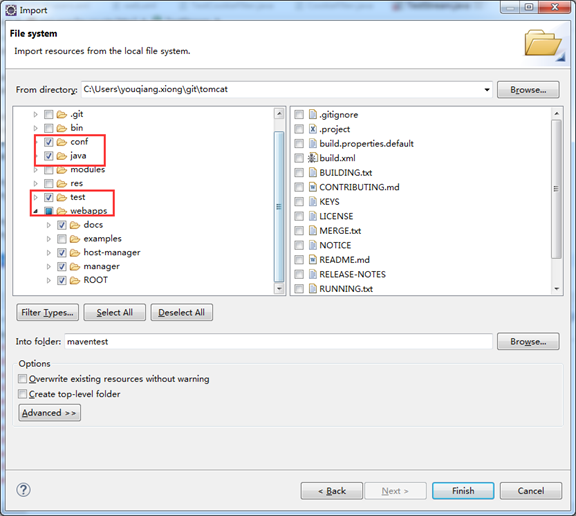
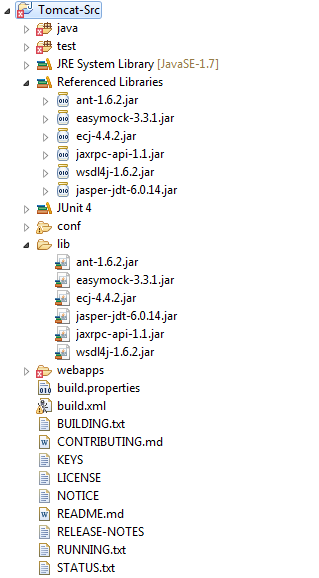
第4步:在java和test目录上点击右键=>Build Path=>Use As Source Folder將这两个目录设为源码目录。同时可以删除工程中原有的src目录了。
第5步:解决导入后工程中出现的编译错误,一般都是由于缺少某些jar导致
主要导入以下几个jar饱
ant.jar
ecj-4.4.2.jar
jaxrpc.jar
wsdl4j-1.5.2.jar
easymock-3.5.1.jar
在工程中新建一个lib目录,將这些jar包放到该目录下,同时添加到build path中。
apache tomcat采用junit作为单元测试工具,我们需要为工程添加Junit支持,在工程上点击右键=>Properties=>Java build path。
点击Add Library按钮,选择Junit4即可。
此时test包中的TestCookieFilter类会报CookieFilter编译异常,这是因为缺少CookieFilter这个类导致,经过一番查找总算找到了CookieFilter源码如下所示:
/*

* Licensed to the Apache Software Foundation (ASF) under one or more

* contributor license agreements. See the NOTICE file distributed with

* this work for additional information regarding copyright ownership.

* The ASF licenses this file to You under the Apache License, Version 2.0

* (the "License"); you may not use this file except in compliance with

* the License. You may obtain a copy of the License at

*

* http://www.apache.org/licenses/LICENSE-2.0

*

* Unless required by applicable law or agreed to in writing, software

* distributed under the License is distributed on an "AS IS" BASIS,

* WITHOUT WARRANTIES OR CONDITIONS OF ANY KIND, either express or implied.

* See the License for the specific language governing permissions and

* limitations under the License.

*/

package util;

import java.util.Locale;

import java.util.StringTokenizer;

/**

* Processes a cookie header and attempts to obfuscate any cookie values that

* represent session IDs from other web applications. Since session cookie names

* are configurable, as are session ID lengths, this filter is not expected to

* be 100% effective.

*

* It is required that the examples web application is removed in security

* conscious environments as documented in the Security How-To. This filter is

* intended to reduce the impact of failing to follow that advice. A failure by

* this filter to obfuscate a session ID or similar value is not a security

* vulnerability. In such instances the vulnerability is the failure to remove

* the examples web application.

*/

public class CookieFilter {

private static final String OBFUSCATED = "[obfuscated]";

private CookieFilter() {

// Hide default constructor

}

public static String filter(String cookieHeader, String sessionId) {

StringBuilder sb = new StringBuilder(cookieHeader.length());

// Cookie name value pairs are ';' separated.

// Session IDs don't use ; in the value so don't worry about quoted

// values that contain ;

StringTokenizer st = new StringTokenizer(cookieHeader, ";");

boolean first = true;

while (st.hasMoreTokens()) {

if (first) {

first = false;

} else {

sb.append(';');

}

sb.append(filterNameValuePair(st.nextToken(), sessionId));

}

return sb.toString();

}

private static String filterNameValuePair(String input, String sessionId) {

int i = input.indexOf('=');

if (i == -1) {

return input;

}

String name = input.substring(0, i);

String value = input.substring(i + 1, input.length());

return name + "=" + filter(name, value, sessionId);

}

public static String filter(String cookieName, String cookieValue, String sessionId) {

if (cookieName.toLowerCase(Locale.ENGLISH).contains("jsessionid") &&

(sessionId == null || !cookieValue.contains(sessionId))) {

cookieValue = OBFUSCATED;

}

return cookieValue;

}

}
此时仍有部分error,但不影响调试
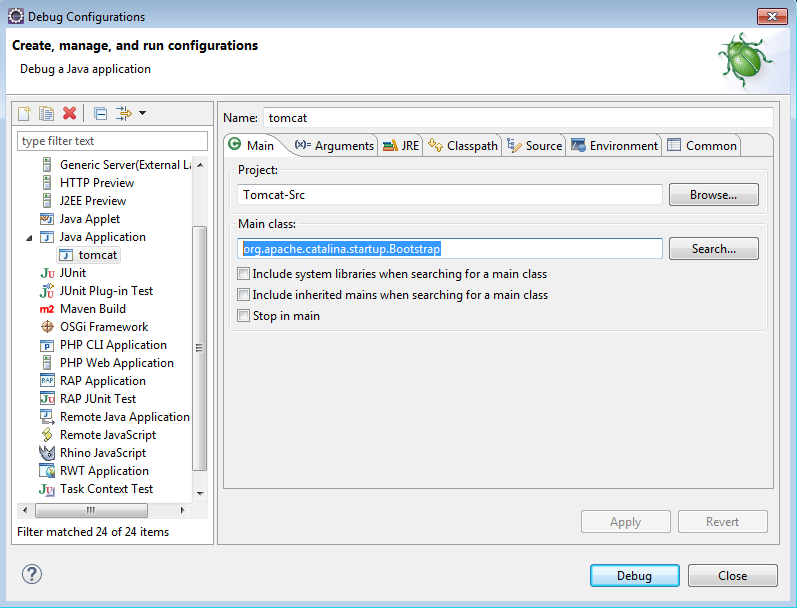
设置Debug Configuration,设定程序入口,开始调试!
————————————————
原文链接:https://blog.csdn.net/xiongyouqiang/article/details/78941077
[Tomcat源码分析] Eclipse中搭建Apache Tomcat源码调试环境的更多相关文章
- Eclipse中搭建Apache Tomcat7源码调试环境
第一步:获取Apache Tomcat7源码,读者可以从Apache 官方网站获取,官方下载地址: http://tomcat.apache.org/download-70.cgi 注意选择Sourc ...
- Tomcat源码分析----eclipse中搭建源码环境
前提:JDK,至少1.7,ant,要设置ANT_HOME环境变量,需要再classpath中增加ant的lib目录,在path变量中增加ant的bin目录 1.官网下载tomcat源码包:apache ...
- mac系统中搭建apache+mysql+php的开发环境,安装mysql后,登录报错:mac ERROR 1045 (28000): Access denied for user 'root'@'localhost' (using password: NO)
php新手在mac系统中搭建apache+mysql+php的开发环境(按照这篇博客来操作的:http://my.oschina.net/joanfen/blog/171109?fromerr=xvC ...
- 装载 | Eclipse中搭建最新版本的Android开发环境
文章目录 准备工作 下载文件 下载JDK并配置系统变量环境 下载安装Eclipse 下载Android SDK 下载ADT插件 使用下载好的软件搭建Android开发环境 安装Android的SDK ...
- Tomcat源码分析二:先看看Tomcat的整体架构
Tomcat源码分析二:先看看Tomcat的整体架构 Tomcat架构图 我们先来看一张比较经典的Tomcat架构图: 从这张图中,我们可以看出Tomcat中含有Server.Service.Conn ...
- 将Android源码导入eclipse中的方法以及编译Android源码指定模块
本文博客地址:http://blog.csdn.net/qq1084283172/article/details/53365659 将android源码导入eclipse.androidstudio. ...
- 在Eclipse中关联Android API源码
在Eclipse中快速关联API源码,便于查看类以及方法.方法如下: 1. 在对应的项目文件右键——>properties——>java build path——>libraries ...
- 在eclipse中建立子级源码文件夹
在eclipse中建立子级源码文件夹 右键点击项目 ---->new ---->source folder--->输入 src/main --->勾选update exclu ...
- OSGI企业应用开发(二)Eclipse中搭建Felix运行环境
上篇文章介绍了什么是OSGI以及使用OSGI构建应用的优点,接着介绍了两款常用的OSGI实现,分别为Apache Felix和Equinox,接下来开始介绍如何在Eclipse中使用Apache Fe ...
随机推荐
- Typescript基础(2)——函数
前言 今天继续typescript的学习,开始函数的学习. 函数 函数的定义 和JavaScript一样,TypeScript函数可以创建有名字的函数和匿名函数. 你可以随意选择适合应用程序的方式,不 ...
- uni-app学习(三)好用的插件1
1. uni-app学习(三) 1.1. async/await使用 表示异步处理,可使用then函数继续操作,返回的是Promise async function timeout() { retur ...
- LD_PRELOAD & putenv() 绕过 disable_functions & open_basedir
这次TCTF中一道题,给出了一个PHP一句话木马,设置了open_basedir,disable_functions包含所有执行系统命令的函数,然后目标是运行根目录下的/readflag,目标很明确, ...
- QP编码详解
- 原理 QP编码是一种使用可打印的ASCII字符 (如字母.数字与"=")表示各种编码格式下的字符.其方法是将一个8bit的字符表示成两个16进制数,并在前面加一个"= ...
- Linux下用户管理:删除用户
基本语法: userdel 用户名 但是我们在删除用户的时候很显然需要利用root用户权限来进行删除才是可以的.但是利用这种方法进行删除的话是会保留家目录的,意思是该用户所对应的家目录不会被删除. 不 ...
- mysql 实现全连接
mysql不支持全连接,但可以通过左外连接+ union+右外连接实现 SELECT * FROM t1 LEFT JOIN t2 ON t1.id = t2.id UNION SELECT * FR ...
- MongoDB安装调试
1:安装 去mongodb的官网http://www.mongodb.org/downloads下载32bit的包 解压后会出现以下文件 在安装的盘C:下建立mongodb文件夹,拷贝bin文件夹到该 ...
- 联邦学习(Federated Learning)
联邦学习简介 联邦学习(Federated Learning)是一种新兴的人工智能基础技术,在 2016 年由谷歌最先提出,原本用于解决安卓手机终端用户在本地更新模型的问题,其设计目标是 ...
- canopy聚类算法的MATLAB程序
canopy聚类算法的MATLAB程序 凯鲁嘎吉 - 博客园 http://www.cnblogs.com/kailugaji/ 1. canopy聚类算法简介 Canopy聚类算法是一个将对象分组到 ...
- NGINX动态增加模块,平滑升级
这是一个小心活,不过,多操作几次,也就熟悉了. 参考URL: https://segmentfault.com/a/1190000006755963 一,安装nginx依赖包. yum install ...