
Android GUI之Window、WindowManager
通过前几篇的文章(查看系列文章:http://www.cnblogs.com/jerehedu/p/4607599.html#gui ),我们清楚了Activity实际上是将视图的创建和显示交给了Window对象进行了处理并分析了视图的测量、布局及绘制过程。本篇文章将继续详细分析Window及WindowManger的作用。
首先,我们将通过下图弄清楚他们之间的关系。
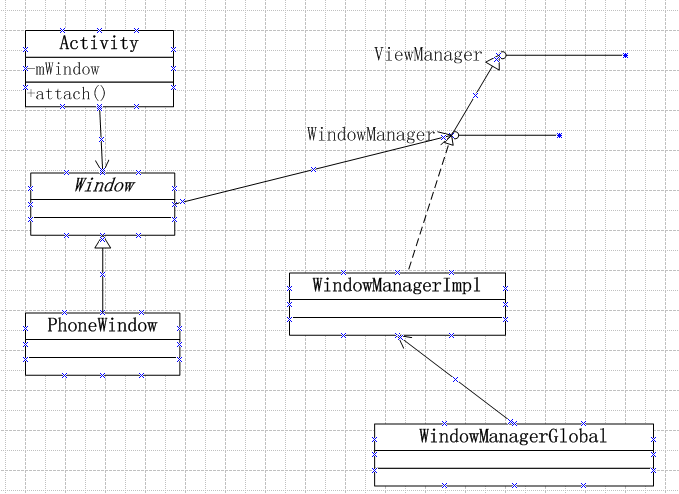
通过前几篇的文章,我们清楚了Activity实际上是将视图的创建和显示交给了Window对象进行了处理并分析了视图的测量、布局及绘制过程。本篇文章将继续详细分析Window及WindowManger的作用。
首先,我们将通过下图弄清楚他们之间的关系。
   /** Flag for the "options panel" feature.  This is enabled by default. */

    public static final int FEATURE_OPTIONS_PANEL = 0;

    /** Flag for the "no title" feature, turning off the title at the top

     *  of the screen. */

    public static final int FEATURE_NO_TITLE = 1;   //无标题栏

    /** Flag for the progress indicator feature */

    public static final int FEATURE_PROGRESS = 2;  //在标题栏上添加加载进度条

    /** Flag for having an icon on the left side of the title bar */

    public static final int FEATURE_LEFT_ICON = 3;

    /** Flag for having an icon on the right side of the title bar */

    public static final int FEATURE_RIGHT_ICON = 4;

    /** Flag for indeterminate progress */

    public static final int FEATURE_INDETERMINATE_PROGRESS = 5;

    /** Flag for the context menu.  This is enabled by default. */

    public static final int FEATURE_CONTEXT_MENU = 6;

    /** Flag for custom title. You cannot combine this feature with other title features. */

public static final int FEATURE_CUSTOM_TITLE = 7;

public static final int FEATURE_ACTION_BAR = 8;

public static final int FEATURE_ACTION_BAR_OVERLAY = 9;

public static final int FEATURE_ACTION_MODE_OVERLAY = 10;

public static final int FEATURE_MAX = FEATURE_ACTION_MODE_OVERLAY;

    /** Flag for setting the progress bar's visibility to VISIBLE */

    public static final int PROGRESS_VISIBILITY_ON = -1;

    /** Flag for setting the progress bar's visibility to GONE */

    public static final int PROGRESS_VISIBILITY_OFF = -2;

    /** Flag for setting the progress bar's indeterminate mode on */

    public static final int PROGRESS_INDETERMINATE_ON = -3;

    /** Flag for setting the progress bar's indeterminate mode off */

    public static final int PROGRESS_INDETERMINATE_OFF = -4;

    /** Starting value for the (primary) progress */

    public static final int PROGRESS_START = 0;

    /** Ending value for the (primary) progress */

    public static final int PROGRESS_END = 10000;

    /** Lowest possible value for the secondary progress */

    public static final int PROGRESS_SECONDARY_START = 20000;

    /** Highest possible value for the secondary progress */

public static final int PROGRESS_SECONDARY_END = 30000;
那么如何应用这些窗口特征呢?在Activity中,我们可以调用方法requestWindowFeature,实际此方法是调用了Window中的requestFeature的方法,方法原型如下:
    public boolean requestFeature(int featureId) {

        final int flag = 1<<featureId;

        mFeatures |= flag;

        mLocalFeatures |= mContainer != null ? (flag&~mContainer.mFeatures) : flag;

        return (mFeatures&flag) != 0;

}
注意此方法必须在setContentView方法之前调用才有效,一旦应用了这些窗口特征后续不可更改。
在window中定义了一个CallBack接口,此接口中一定了一系列的时间回调方法,用于处理UI的各种事件,如按键事件、触摸事件、轨迹球、Accessibility事件、菜单事件等等。比如Activity就实现了此接口。关于事件这块的内容,我们后面专门做分析研究。
在window中还定义了WindowManager,从字面上可以理解为窗口管理器,实际上它并不是真正的窗口管理器,WindowManager Service才是Android中真正意义上的窗口管理器。实际上Window内的WindowManager只是用于管理Window内部的视图,通过方法setWindowManager,可以看到Window中是如何创建WindowManager的,具体源码如下:
  public void setWindowManager(WindowManager wm, IBinder appToken, String appName,

            boolean hardwareAccelerated) {

        mAppToken = appToken;

        mAppName = appName;

        mHardwareAccelerated = hardwareAccelerated

                || SystemProperties.getBoolean(PROPERTY_HARDWARE_UI, false);

        if (wm == null) {

            wm = (WindowManager)mContext.getSystemService(Context.WINDOW_SERVICE);

        }

        mWindowManager = ((WindowManagerImpl)wm).createLocalWindowManager(this);

  }
通过该方法我们可以看到通过WindowManagerImpl的createLoaclWindowManager方法创建了一个WindowManager对象。
从上图中,我们看出WindowManager接口是继承了ViewManager接口,从源码中可以看出ViewManager接口只有三个方法,具体如下:
public interface ViewManager

{

    public void addView(View view, ViewGroup.LayoutParams params);

    public void updateViewLayout(View view, ViewGroup.LayoutParams params);

    public void removeView(View view);

}
很好理解主要用于window中view的添加、更新和删除。
WindowManager接口内容也比较简单,除了继承自ViewManager中的方法外,还定义了3个内部类和两个方法,具体API如下。

在这里我们要重点关注一下LayoutParams这个内部类,此类定义了许多与窗口相关的属性,比如位置、窗口类型(主要有三类:Application Windows、Sub-windows、System windows)、行为选项标志、窗口透明度等等,在此不再贴源码了,有兴趣的可以自行查看。
从window中的方法setWindowManager中可以看出创建的WindowManager的对象实际上是WindowManagerImpl,此类是WindowManager的实现类,源码如下:
public final class WindowManagerImpl implements WindowManager {

    private final WindowManagerGlobal mGlobal = WindowManagerGlobal.getInstance();

    private final Display mDisplay;

    private final Window mParentWindow;

    public WindowManagerImpl(Display display) {

        this(display, null);

    }

    private WindowManagerImpl(Display display, Window parentWindow) {

        mDisplay = display;

        mParentWindow = parentWindow;

    }

    public WindowManagerImpl createLocalWindowManager(Window parentWindow) {

        return new WindowManagerImpl(mDisplay, parentWindow);

    }

    public WindowManagerImpl createPresentationWindowManager(Display display) {

        return new WindowManagerImpl(display, mParentWindow);

    }

    @Override

    public void addView(View view, ViewGroup.LayoutParams params) {

        mGlobal.addView(view, params, mDisplay, mParentWindow);

    }

    @Override

    public void updateViewLayout(View view, ViewGroup.LayoutParams params) {

        mGlobal.updateViewLayout(view, params);

    }

    @Override

    public void removeView(View view) {

        mGlobal.removeView(view, false);

    }

    @Override

    public void removeViewImmediate(View view) {

        mGlobal.removeView(view, true);

    }

    @Override

    public Display getDefaultDisplay() {

        return mDisplay;

    }

}
该实现类比较简单,主要持有Window类型的mParentWindow对象,并提供一系列的方法用于构建WindowManagerImpl对象,其他方法的实现主要调用WindowManagerGlobal对象中的响应方法。
在window的setWindowManager方法主要调用了WindowManagerImpl的createLocalWindowManager创建了WindowManager对象,这样就将Window和WindowManager关联起来了,也就意味在调用WindowManager的addView、updateViewLayout、removeView时实际上操作的是Window内部的View,这一点可以通过查看WindowManagerGlobal相关方法的源码可以看出。
疑问咨询或技术交流,请加入官方QQ群: (452379712)
出处:http://www.cnblogs.com/jerehedu/
本文版权归烟台杰瑞教育科技有限公司和博客园共有,欢迎转载,但未经作者同意必须保留此段声明,且在文章页面明显位置给出原文连接,否则保留追究法律责任的权利。
Android GUI之Window、WindowManager的更多相关文章
- 图解Android - Android GUI 系统 (2) - 窗口管理 (View, Canvas, Window Manager)
Android 的窗口管理系统 (View, Canvas, WindowManager) 在图解Android - Zygote 和 System Server 启动分析一 文里,我们已经知道And ...
- android 中View, Window, Activity, WindowManager,ViewRoot几者之间的关系
(1)View:最基本的UI组件,表示屏幕上的一个矩形区域. (2)Window: 表示一个窗口,不一定有屏幕那么大,可以很大也可以很小: 它包含一个V ...
- 图解Android - System Service 概论 和 Android GUI 系统
通过 图解Android - Binder 和 Service 一文中,我们已经分析了Binder 和 Service的工作原理.接下来,我们来简要分析Android 系统里面都有哪些重要的Servi ...
- 图解Android - Android GUI 系统 (1) - 概论
Android的GUI系统是Android最重要也最复杂的系统之一.它包括以下部分: 窗口和图形系统 - Window and View Manager System. 显示合成系统 - Surfac ...
- 图解Android - Android GUI 系统 (5) - Android的Event Input System
Android的用户输入处理 Android的用户输入系统获取用户按键(或模拟按键)输入,分发给特定的模块(Framework或应用程序)进行处理,它涉及到以下一些模块: Input Reader: ...
- [虾扯蛋] android界面框架-Window
从纯sdk及framwork的角度看,android中界面框架相关的类型有:Window,WindowManager,View等.下面就以这几个类为出发点来概览下安卓开发的"界面架构&quo ...
- android Gui系统之SurfaceFlinger(1)---SurfaceFlinger概论
GUI 是任何系统都很重要的一块. android GUI大体分为4大块. 1)SurfaceFlinger 2)WMS 3)View机制 4)InputMethod 这块内容非常之多,但是理解后,可 ...
- android Gui系统之SurfaceFlinger(1)---SurfaceFlinger概论【转】
转自:https://www.cnblogs.com/deman/p/5584198.html 阅读目录 1.OpenGL & OpenGL ES 2.Android的硬件接口HAL 3.An ...
- Android GUI系统
图解Android - Android GUI 系统 (1) - 概论 图解Android - Android GUI 系统 (2) - 窗口管理系统 图解Android - Android GUI ...
随机推荐
- spring 事务配置
事务配置文档xml <!-- from the file 'context.xml' --> <?xml version="1.0" encoding=" ...
- 1017 Queueing at Bank (25)(25 point(s))
problem Suppose a bank has K windows open for service. There is a yellow line in front of the window ...
- github安装k8s
转:https://mritd.me/2016/10/29/set-up-kubernetes-cluster-by-kubeadm/#23镜像版本怎么整 一.环境准备 首先环境还是三台虚拟机,虚拟机 ...
- int类型的整数转换成汉字
int类型的整数转换成汉字 一.源代码:IntegerNumberToChinese.java package cn.com.zfc.example; import java.util.Scanner ...
- luoguP4360 [CEOI2004]锯木厂选址
题目链接 luoguP4360 [CEOI2004]锯木厂选址 题解 dis:后缀和 sum:前缀和 补集转化,减去少走的,得到转移方程 dp[i] = min(tot - sumj * disj - ...
- [POI2015]Odwiedziny
[POI2015]Odwiedziny 题目大意: 一棵\(n(n\le5\times10^4)\)个点的树,\(n\)次询问从一个点到另一个点的路径上,每次跳\(k\)个点,所经过的点权和. 思路: ...
- hdu 4549 矩阵快速幂
题意: M斐波那契数列F[n]是一种整数数列,它的定义如下: F[0] = aF[1] = bF[n] = F[n-1] * F[n-2] ( n > 1 ) 现在给出a, b, n,你能求出F ...
- 搭建Nexus本地仓库
1 下载nexus安装包 网址:http://www.sonatype.org/nexus/ 建议下载最新的版本,最新的版本支持比较新的jdk版本, 1.6 肯定是不行的,必须是1.7及其以上. ...
- Java发送HTTP POST请求示例
概述: http请求在所有的编程语言中几乎都是支持的,我们常用的两种为:GET,POST请求.一般情况下,发送一个GET请求都很简单,因为参数直接放在请求的URL上,所以,对于PHP这种语言,甚至只需 ...
- weblogic安装使用: Could not Create the Java Virtual Machine
第一次使用weblogic,完全不明白是怎么一回事!找安装包花了大把时间!找到了不知道怎么安装 -- _ --||| 找了一篇安装文档<weblogic 安装部署手册.doc>, 位于:[ ...