
weex 小结
1. import 文件时,必须引入全称,不能省略 .vue
import mEcharts from '../components/Echarts.vue'
2.weex 的 cli 中没有 配置 vue-router 和 less 需要自己安装
npm install vue-router --save

npm install less less-loader --save
3.安装 node-sass 时,需要同时安装 sass-loader
安装 node-sass
npm install --save node-sass --registry=https://registry.npm.taobao.org --disturl=https://npm.taobao.org/dist --sass-binary-site=http://npm.taobao.org/mirrors/node-sass
安装 sass-loader
npm install sass-loader --save
4.css样式 不支持缩写
例如:
border: 1px solid #eee;
需要改为:
border-width: 1px;

border-style: solid;

border-color: #eee;
5.图片名称 不能有 ' _ '
例如:
ic_tab_home_normal.png 或 01.png
需要改成:
icTabHomeNormal.png
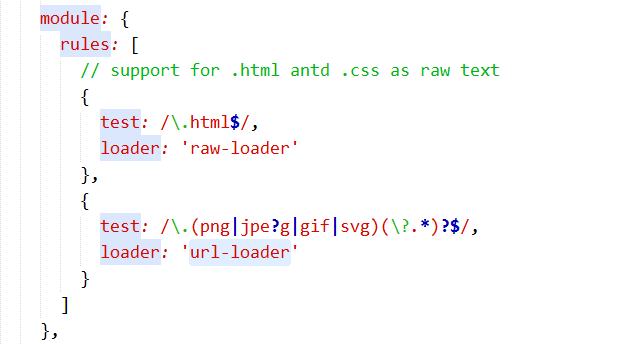
最后发现,需要 安装 url-loader 插件
npm i url-loader -S
配置 webpack.dev.js
{

  test: /\.(png|jpe?g|gif|svg)(\?.*)?$/,

  loader: 'url-loader'

}
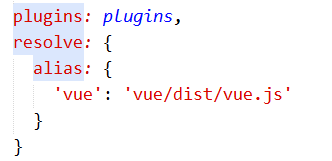
6.[Vue warn]: You are using the runtime-only build of Vue where the template compiler is not available. Either pre-compile the templates into render functions, or use the compiler-included build.

配置: webpack.config.js
resolve: {

    alias: {

	'vue': 'vue/dist/vue.js'

    }

}
7.<image></image> 无法读取本地图片,官方解释是 减小打包后的 apk 文件的体积,当用户首次安装后,会从网上将图片缓存至本地。
正确用法:
<image class="input-img" src="http://192.168.1.208:8081/src/assets/img/user.png"></image>
8.在 Weex 中,我们只支持 px 长度单位。并且它将在 JavaScript 运行时和本机渲染器中解析为数字类型。
.
weex 小结的更多相关文章
- weex 小结 --官方扩展组件
<wxc-tabbar> 页面底部的 tab 标签,通过点击在不同页面之间切换 属性: selected-index {number}:设置默认选中的 tab 索引,默认值为 0(第一个 ...
- weex 小结 -- <list>
可以包含各种子组件 <refresh style="width:750;padding:30;flex-direction:row;justify-content:center;&qu ...
- weex 小结--内建模块
使用以下模块时,需要导入依赖:var *** = require('@weex-module/****'); 1. navigator --像浏览器一样切换页面 2. webview(module) ...
- weex官方demo weex-hackernews代码解读(下)
weex 是阿里出品的一个类似RN的框架,可以使用前端技术来开发移动应用,实现一份代码支持H5,IOS和Android.而weex-hacknews则是weex官方出品的,首个使用 Weex 和 Vu ...
- weex stream 之fetch的get、post获取Json数据
无论何种平台,网络数据的获取都是十分重要的,最近学习weex,不可避免的要学习weex的数据请求方法了.网址 个人感觉,weex stream相较于其他平台,还算比较简单了,但是由于文档以及官方代码中 ...
- 前台vue的使用简单小结
前台vue的使用简单小结 本项目要求:安装有node.js 6.0以及以上安装npm使用vue.js官方安装方法初始化项目npm install安装VueResurce:npm install vue ...
- 前端开发个人小结 · Retrospection的博客
序 2018年转眼来到了最后一个月,算下来我进入前端之门也有一年了,虽然下半年由于忙于筹备毕业论文的相关事项,前端这一块有所放下,但是想想还是给自己这一年的学习做一个总结. 现代化软件开发确实是一个复 ...
- 从零开始编写自己的C#框架(26)——小结
一直想写个总结,不过实在太忙了,所以一直拖啊拖啊,拖到现在,不过也好,有了这段时间的沉淀,发现自己又有了小小的进步.哈哈...... 原想框架开发的相关开发步骤.文档.代码.功能.部署等都简单的讲过了 ...
- Python自然语言处理工具小结
Python自然语言处理工具小结 作者:白宁超 2016年11月21日21:45:26 目录 [Python NLP]干货!详述Python NLTK下如何使用stanford NLP工具包(1) [ ...
随机推荐
- Python3与SQLServer、Oracle、MySql的连接方法
环境: python3.4 64bit pycharm2018社区版 64bit Oracle 11 64bit SQLServer· Mysql 其中三种不同的数据库安装在不同的服务器上,通过局域网 ...
- 解决php7.3 configure: error: off_t undefined
//解决该问题:php7.3 configure: error: off_t undefined; check your library configuration # 添加搜索路径到配置文件echo ...
- Ribbitmq
rittbiMQ: 连接远程rabbitmq server sudo rabbitmqctl addser mihon mihon123 sudo rabbitmqctl set_permission ...
- 爬虫开发python工具包介绍 (4)
本文来自网易云社区 作者:王涛 此处我们给出几个常用的代码例子,包括get,post(json,表单),带证书访问:Get 请求 @gen.coroutine def fetch_url(): ...
- Python标准库之csv(1)
Python标准库之csv(1) 1.Python处理csv文件之csv.writer() import csv def csv_write(path,data): with open(path,'w ...
- Builder(构造者)
Builder(构造者) <?php class Product { private $name; public function setName($name) { $this->name ...
- pytorch中Math operation操作:torch.ger()
torch.ger(vec1, vec2, out=None) → Tensor Outer product of vec1 and vec2. If vec1 is a vector of size ...
- oracle客户端安装与配置
在进行开发时经常需要连接Oracle数据库,一般的场景是Oracle数据库在远程服务器上,本地计算机通过plsql developer来访问. 这就要求在本地安装好plsql developer,但是 ...
- 关于IOS项目QQ空间授权提示安装最新版本的QQ的解决方法!
- [luoguP4035] [JSOI2008]球形空间产生器(高斯消元)
传送门 设球心的坐标为未知量 用最后一个点来表示球面到球心的距离,那么它和前n个式子相等 移项乱搞 最后高斯消元 #include <cmath> #include <cstdio& ...