
jquery带按钮的图片切换效果
<!doctype html>

<html>

<head>

<meta charset="gb2312">

<title>jquery带按钮的图片切换效果</title>

<script type="text/javascript" src="jquery-1.8.0.js"></script>

<style type="text/css">

body,ul{ padding:0; margin:0;}

li{ list-style:none;}

.bg{ width:440px; position:relative; margin:20px auto;}

.bg .prev,.bg .next{ width:50px; height:100px; background:#000; color:#FFF; text-align:center; line-height:100px; position:absolute; top:0;}

.bg .prev{ left:0; cursor:pointer;}

.bg .next{ right:0; cursor:pointer;}

.bg .imgbg{ width:320px; height:100px; margin-left:60px; overflow:hidden;}

.bg .imgbg ul{ width:9999px;}

.bg .imgbg ul li{ width:100px; height:100px; float:left; margin-right:10px; background:#f00; line-height:100px; text-align:center;}

</style>

</head>

<body>

<div class="bg">

    <span class="prev">prev</span>

    <span class="next">next</span>

    <div class="imgbg">

        <ul>

            <li>1</li>

            <li>2</li>

            <li>3</li>

            <li>4</li>

        </ul>

    </div>

<div class="cl"></div>

</div>

<script type="text/javascript">

    function DY_scroll(bg,prev,next,imgbg,speed,auto){

        var bg = $(bg);

        var prev = $(prev);

        var next = $(next);

        var longdiv = $(imgbg).find('ul');

        var width = longdiv.find('li').outerWidth(true);

        var speed = speed;

        var auto = auto;

        //next按钮

        next.click(function(e) {

            longdiv.animate({marginLeft:-width},function(){

                longdiv.find('li').eq(0).appendTo(longdiv);

                longdiv.css('margin-left',0);

            });

        });

        //prev按钮

        prev.click(function(e) {

            longdiv.find('li:last').prependTo(longdiv);

            longdiv.css('margin-left',-width);

            longdiv.animate({marginLeft:0});

        });

        //自动播放与鼠标滑动停顿

        if(auto == true){

            ad = setInterval(function(){

                next.click();

            },speed*1000);

            bg.hover(function(e) {

                clearInterval(ad);

            },function(e){

                ad = setInterval(function(){

                    next.click();

                },speed*1000);

            });

        }

    }

    DY_scroll('.bg','.prev','.next','.imgbg',1,true);

</script>

</body>

</html>
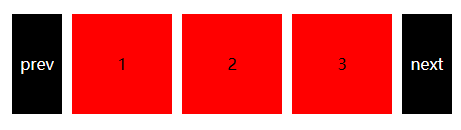
不多说效果如下:以上代码就是完整的切换效果,也是最简单的原理,希望能够学习
jquery带按钮的图片切换效果的更多相关文章
- jQuery plugin : bgStretcher 背景图片切换效果插件
转自:http://blog.dvxj.com/pandola/jQuery_bgStretcher.html bgStretcher 2011 (Background Stretcher)是一个jQ ...
- jQuery自动与手动图片切换效果下载
效果图: 查看效果:http://hovertree.com/jq/hovertreeimg/ 下载:http://hovertree.com/h/bjaf/gk8mko69.htm 使用代码: &l ...
- js带缩略图的图片切换效果
<!DOCTYPE html PUBLIC "-//W3C//DTD XHTML 1.0 Transitional//EN" "http://www.w3.org/ ...
- jquery带小图的图片轮换效果
右边显示大图,左边显示小图 <style> ul{ list-style:none; padding:0px; margin:0px;} li{ list-style:none; padd ...
- 10款好用的 jQuery 图片切换效果插件
jQuery 是一个非常优秀的 Javascript 框架,使用简单灵活,同时还有许多成熟的插件可供选择.其中,最令人印象深刻的应用之一就是对图片的处理,它可以让帮助你在你的项目中加入一些让人惊叹的效 ...
- jquery简单的图片切换效果,支持pc端、移动端的banner图片切换开发
详细内容请点击 无意中看见了两年前写的一个图片切换,那会儿刚刚学习网页制作,可以说是我的第一个处女座的jquery图片切换效果.无聊之余对它的宽度稍稍做了一下修改,变成了支持pc端.手机端全屏的ban ...
- 基于jQuery带标题的图片3D切换焦点图
今天给大家分享一款基于jQuery带标题的图片3D切换焦点图.这款焦点图适用浏览器:IE8.360.FireFox.Chrome.Safari.Opera.傲游.搜狗.世界之窗. 实现的代码. htm ...
- js鼠标滚轮滚动图片切换效果
效果体验网址:http://keleyi.com/keleyi/phtml/image/12.htm HTML文件代码: <!DOCTYPE html PUBLIC "-//W3C// ...
- 精致3D图片切换效果,最适合企业产品展示
这是一个精致的立体图片切换效果,特别适合企业产品展示,可立即用于实际项目中.支持导航和自动播放功能, 基于 CSS3 实现,推荐使用最新的 Chrome,Firefox 和 Safari 浏览器浏览效 ...
随机推荐
- Integration_Unit test coding standard
Integration & Unit test coding standard 命名规则 好的命名规则,直接从命名就可以清楚的知道该测试方法测试的内容和目的,而不用额外的添加注释说明.对于MV ...
- 小程序-支持的最小像素px
经过我手机多次测试,支持的最小px为: 8px;
- SpringMVC整合MongoDB
首先,在pom文件中新增spring-data-mongodb的依赖: <dependency> <groupId>org.springframework.data</g ...
- jquery图片左右来回循环飘动
$(function () { function left_right() { $("#sc1452").animate({'left':'-=100'},5000).delay( ...
- Mybatis原理分析一 从JDBC到Mybaits
1.引言 本文主要讲解JDBC怎么演变到Mybatis的渐变过程,重点讲解了为什么要将JDBC封装成Mybaits这样一个持久层框架.再而论述Mybatis作为一个数据持久层框架本身有待改进之处. 2 ...
- NYOJ 353 3D dungeon 【bfs】
题意:给你一个高L长R宽C的图形.每个坐标都能够视为一个方格.你一次能够向上.下.左,右,前,后任一方向移动一个方格, 可是不能向有#标记的方格移动. 问:从S出发能不能到达E,假设能请输出最少的移动 ...
- Vue2.0 视频教程
好像是一套vue 开发webapp 课程.来自网络. url:https://pan.baidu.com/s/1jIele9w password:b404 文章来源:刘俊涛的博客 地址:http:// ...
- Spring MVC访问静态资源
http://www.cnblogs.com/yank/p/4477204.html SpringMVC访问静态资源 在SpringMVC中常用的就是Controller与View.但是我们常常会需要 ...
- MySQL获得指定数据表中auto_increment自增id值的方法及实例
http://kb.cnblogs.com/a/2357592/很多情况下,我们要提前用到当前某个表的auto_increment自增列id,可以通过执行sql语句来查询到这个id值. show ta ...
- 开始学习linux的一些疑问
Linux - Unix环境高级编程(第三版) 代码编译 https://www.linuxidc.com/Linux/2011-08/41228.htm ftp://ftp1.linuxidc.co ...