
win10 安装keras
1.安装Python环境
建议安装Anconda3 ,4.2.0版本
下载地址:
https://repo.continuum.io/archive/index.html
或
https://mirrors.tuna.tsinghua.edu.cn/anaconda/archive/?C=N&O=D

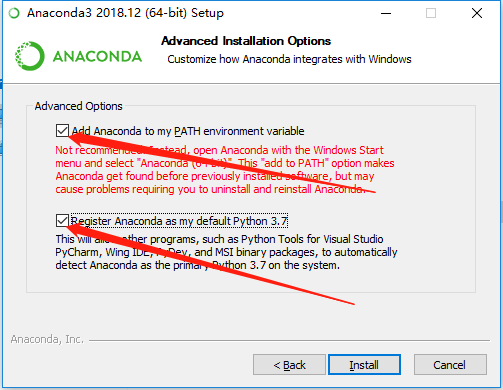
安装即可,记得全部勾选
2.Keras 安装
>>> pip install keras -U --pre
3.安装tensorflow
GPU 版本
>>> pip install --upgrade tensorflow-gpu
CPU 版本
>>> pip install --upgrade tensorflow
4.验证keras是否安装成功,在命令行中输入Python命令进入Python变成命令行环境(这是cpu版本)
C:\Users\mmm>python

Python 3.5. |Anaconda 4.2. (-bit)| (default, Jul   , ::) [MSC v.  bit (AMD64)] on win32

Type "help", "copyright", "credits" or "license" for more information.

>>> import keras

Using TensorFlow backend.

>>>
没有报错,那么Keras就已经成功安装了。
5.Keras中mnist数据集测试 下载Keras开发包
>>> conda install git

>>> git clone https://github.com/fchollet/keras.git

>>> cd keras/examples/

>>> python mnist_mlp.py
程序无错进行,至此,keras安装完成。
参考:
https://developer.nvidia.com/cuda-80-ga2-download-archive
https://repo.continuum.io/archive/index.html
https://blog.csdn.net/yuejisuo1948/article/details/81043823
https://keras-cn.readthedocs.io/en/latest/for_beginners/keras_windows/#keras
https://mirrors.tuna.tsinghua.edu.cn/anaconda/archive/?C=N&O=D
https://developer.nvidia.com/cudnn
https://www.anaconda.com/distribution/
win10 安装keras的更多相关文章
- Win10安装Keras+Tensorflow+Opencv
Win10安装keras 安装 Anaconda 清华加速下载链接: https://mirrors.tuna.tsinghua.edu.cn/anaconda/archive/ 我选择的版本是: A ...
- win10安装Keras报错处理
本机已经安装好TensorFlow安装Keras的过程中遇到了些问题,解决后做一下记录: 1.Keras与TensorFlow的关系 Keras默认以TensorFlow为后端,同时可选以Theano ...
- Win10上安装Keras 和 TensorFlow(GPU版本)
一. 安装环境 Windows 10 64bit 家庭版 GPU: GeForce GTX1070 Python: 3.5 CUDA: CUDA Toolkit 8.0 GA1 (Sept 2016 ...
- 2018最新win10 安装tensorflow1.4(GPU/CPU)+cuda8.0+cudnn8.0-v6 + keras 安装CUDA失败 导入tensorflow失败报错问题解决
原文作者:aircraft 原文链接:https://www.cnblogs.com/DOMLX/p/9747019.html 基本开发环境搭建 1. Microsoft Windows 版本 关于W ...
- 【吴恩达课程使用】keras cpu版安装【接】- anaconda (python 3.7) win10安装 tensorflow 1.8 cpu版
一.确认tensorflow的版本: 接上一条tensorflow的安装,注意版本不匹配会出现很多问题!:[吴恩达课程使用]anaconda (python 3.7) win10安装 tensorfl ...
- Windows10上安装Keras 和 TensorFlow-GPU
安装环境: Windows 10 64bit GPU: GeForce gt 720 Python: 3.5.3 CUDA: 8 首先下载Anaconda3的Win10 64bit版,安装Python ...
- windows10系统下安装keras框架以theano为后端并配置gpu加速
在安装之前,请确保你的显卡是NVIDIA的,并且是以下型号,否则不能进行gpu加速,右键我的电脑--管理--设备管理器--显示适配器.另外如果你的电脑是windows7,安装教程也是一样的,不过根据k ...
- Win10安装.net framework 4.0失败提示已是操作系统一部分如何解决
有位用户因为工作需求,所以想在win10系统电脑中安装microsoft .net framework 4.0.可是在安装过程中却失败了,还遇到提示"Microsoft.net framew ...
- Win10安装framework3.5
.NET少不了framewrok,其版本也比较多,默认情况下win7及上版本没有安装framework3.5,但有些软件又需要它,比如arcgis软件在安装时会检测是否存在3.5,如果没有,将不会正常 ...
随机推荐
- P2800 又上锁妖塔
P2800 又上锁妖塔 [温馨提示]使用仙术时飞过一层塔不花费时间,若爬过去,该层有多高,就要花费多长时间 我们可以用 f [ i ] 表示到达第 i 层时所用最短时间 到达第 i 层可 ...
- The Little Prince-11/27
The Little Prince-11/27 The little boy gradually realized that it is tiresome for children to be ...
- 详解BOM头以及去掉BOM头的方法--踩过BOM的大坑
类似WINDOWS自带的记事本等软件,在保存一个以UTF-8编码的文件时,会在文件开始的地方插入三个不可见的字符(0xEF 0xBB 0xBF,即BOM).它是一串隐藏的字符,用于让记事本等编辑器识别 ...
- html介绍和head标签
一.web标准 web准备介绍: w3c:万维网联盟组织,用来制定web标准的机构(组织) web标准:制作网页遵循的规范 web准备规范的分类:结构标准.表现标准.行为标准. 结构:html.表 ...
- String小案例(**)、包装类型和普通数据类型的转换(拆装箱)
###String用法: package StringTest; /**功能: * 判断Java文件名是否正确,判断邮箱格式是否正确 * 其中:合法的文件名应该以.java结尾 * 合法的邮箱名至少包 ...
- apache的rewrite机制配置
步骤: 1:启用rewrite模块,在默认情况下,没有启用 修改httpd.conf文件 #启动rewrite模块 LoadModule rewrite_module modules/mod_rewr ...
- chrome platform
folder_extension: ---menifest.json ---navigator_change.js manifest.json { "manifest_version&quo ...
- log buffer space等待事件
最近,我们有台服务器在delete操作期间发现一直在等待log buffer space,其他节点就没与这个问题.经查,向重做缓冲区上写入重做记录的进程,为了确保拥有重做缓冲区内必要的空间,需要获得r ...
- java热加载之springloaded
https://github.com/spring-projects/spring-loaded/wiki
- 大R玩家体验时空猎人折扣平台多角度分析
<时空猎人>讲述了时空裂隙的出现,导致大批魔物入侵阿达拉大陆.玩家可扮演狼人.机械师.异能者.冰魄等职业,与这片大陆的人们保卫家园. 游戏拥有宠物.等战斗培养元素,还引入竞技场.攻城战等P ...