
vue-cli打包到部署到nginx服务器
最近公司把云平台产品用vue 前后端分离的框架来写,前面大部分开发都比较顺利,后面打包部署出了bug
现在记录下自己遇到的哪些坑
1,我直接npm run build 打包出来,打开dist目录下面的index.html 空白页,页面上出现
no "NODE ENV"是我打包时没有指定打包到哪个环境
正确打包是 npm run build:prod
2.关于vue-router 中mode:'history'的设置,导致我页面打包后也是路由无法跳转
而且出现的bug是语法错误,unexpected toke <
无奈我去掉了history ,重新打包,就可以了
3.关于Nginx的配置nginx.conf
这里先复习下nginx命令,安装nginx点击这里可以查看
start nginx 启动并服务
tasklist /fi "imagename eqnginx.exe" 查看是否启动
nginx -s reload 改变配置文件时,需重启nginx工作进程
关闭进程
nginx -s stop 关闭服务
nginx -s quit 安全关闭
taskkill /F/IM nginx.exe 关闭所有nginx服务
下面整理下正确打包,部署到nginx的方法
新手小白建议在mode:hash 下先运行
第一步:打包(mode:hash)
1.打包后第一个问题是打开dist中的index.html没有显示页面,空白页面。
一、打开config的文件夹中的index.js

如图把assetsPUblicPath修改为‘./’
然后再次打包发现路由的内容不法渲染并且无任何错误,
二、把路由中的model注释掉
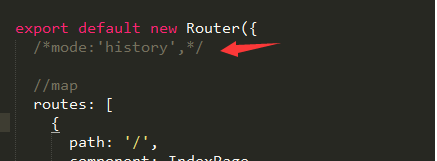
三、再次打开dist中的index.html,可以看到页面,路由也是正确的则表示可以把dis目录拿到nginx部署了
第一步:打包(mode:history)
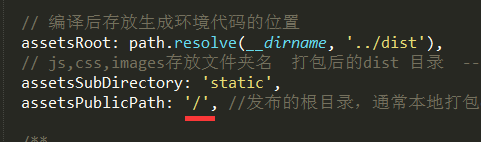
一、打包是直接写/根路径,而不是相对路径
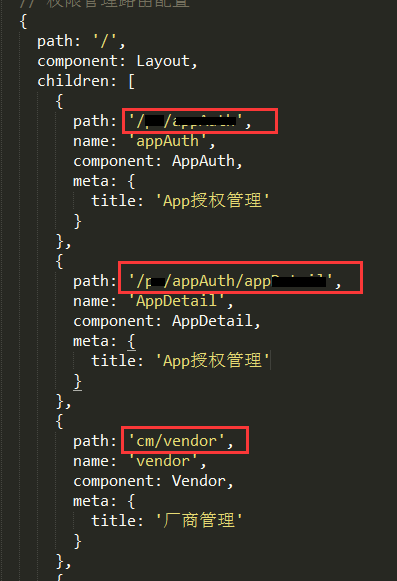
二、路由path前面全部要加上/,history模拟的是跳转地址路径
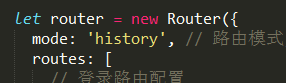
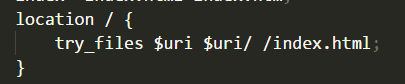
三、nginx加上下面的配置,其他和hash方式全部一样
第二步:如何部署nginx
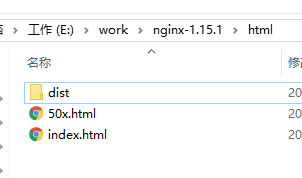
1.把dis目录复制到nginx下的html文件夹下面
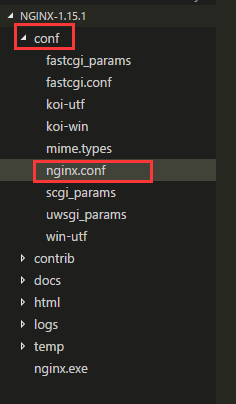
2.打开nginx.conf配置文件
代码如下:
#user  nobody;

worker_processes  ;

#error_log  logs/error.log;

#error_log  logs/error.log  notice;

#error_log  logs/error.log  info;

#pid        logs/nginx.pid;

events {

    worker_connections  ;

}

http {

    include       mime.types;

    default_type  application/octet-stream;

    #log_format  main  '$remote_addr - $remote_user [$time_local] "$request" '

    #                  '$status $body_bytes_sent "$http_referer" '

    #                  '"$http_user_agent" "$http_x_forwarded_for"';

    #access_log  logs/access.log  main;

    sendfile        on;

    #tcp_nopush     on;

    #keepalive_timeout  ;

    keepalive_timeout  ;

    #gzip  on;

    server {

        listen       ;  #自定义你服务器的端口号

        server_name  localhost; #自定义你的IP或者域名,localhost:127.0.0.1 本地的IP

        #charset koi8-r;

        #access_log  logs/host.access.log  main;

        root   E:\work\aiotcloud\yihao01-web-management\dist;  #dist目录指向你本地的工作目录,相当重要

        index  index.html index.htm;  #打开默认文件为index.html

     #官网介绍设置这条可以解决history路由的问题

        location / {

            try_files $uri $uri/ /index.html;

        }

     #####################################
     # 下面这些地址全部是nginx代理后台服务器的地址再转发给前端,解决跨域问题
     #######################################

        # 模块1

        location /securityAuthentication/{

            proxy_pass http://192.168.0.16:6804;

            add_header Content-Type "text/plain;charset=utf-8";

            add_header 'Access-Control-Allow-Origin' '*';

            add_header 'Access-Control-Allow-Credentials' 'true';

            add_header 'Access-Control-Allow-Methods' 'GET, POST';

        }

        # 模块2

        location /admin/{

            proxy_pass http://192.168.0.16:6810;

            add_header Content-Type "text/plain;charset=utf-8";

            add_header 'Access-Control-Allow-Origin' '*';

            add_header 'Access-Control-Allow-Credentials' 'true';

            add_header 'Access-Control-Allow-Methods' 'GET, POST';

        }

        # 模块3

        location /permission/{

            proxy_pass http://192.168.0.16:6810;

            add_header Content-Type "text/plain;charset=utf-8";

            add_header 'Access-Control-Allow-Origin' '*';

            add_header 'Access-Control-Allow-Credentials' 'true';

            add_header 'Access-Control-Allow-Methods' 'GET, POST';

        }

        # 模块4

        location /configurationManagement/{

            proxy_pass http://192.168.0.16:6812;

            add_header Content-Type "text/plain;charset=utf-8";

            add_header 'Access-Control-Allow-Origin' '*';

            add_header 'Access-Control-Allow-Credentials' 'true';

            add_header 'Access-Control-Allow-Methods' 'GET, POST';

        }

        # 模块5

        location /device/{

            proxy_pass http://192.168.0.16:6806;

            add_header Content-Type "text/plain;charset=utf-8";

            add_header 'Access-Control-Allow-Origin' '*';

            add_header 'Access-Control-Allow-Credentials' 'true';

            add_header 'Access-Control-Allow-Methods' 'GET, POST';

        }

        #error_page                /.html;

        # redirect server error pages to the static page /50x.html

        #

        error_page        /50x.html;

        location = /50x.html {

            root   html;

        }

        # proxy the PHP scripts to Apache listening on 127.0.0.1:

        #

        #location ~ \.php$ {

        #    proxy_pass   http://127.0.0.1;

        #}

        # pass the PHP scripts to FastCGI server listening on 127.0.0.1:

        #

        #location ~ \.php$ {

        #    root           html;

        #    fastcgi_pass   127.0.0.1:;

        #    fastcgi_index  index.php;

        #    fastcgi_param  SCRIPT_FILENAME  /scripts$fastcgi_script_name;

        #    include        fastcgi_params;

        #}

        # deny access to .htaccess files, if Apache's document root

        # concurs with nginx's one

        #

        #location ~ /\.ht {

        #    deny  all;

        #}

    }

    # another virtual host using mix of IP-, name-, and port-based configuration

    #

    #server {

    #    listen       ;

    #    listen       somename:;

    #    server_name  somename  alias  another.alias;

    #    location / {

    #        root   html;

    #        index  index.html index.htm;

    #    }

    #}

    # HTTPS server

    #

    #server {

    #    listen        ssl;

    #    server_name  localhost;

    #    ssl_certificate      cert.pem;

    #    ssl_certificate_key  cert.key;

    #    ssl_session_cache    shared:SSL:1m;

    #    ssl_session_timeout  5m;

    #    ssl_ciphers  HIGH:!aNULL:!MD5;

    #    ssl_prefer_server_ciphers  on;

    #    location / {

    #        root   html;

    #        index  index.html index.htm;

    #    }

    #}

}
3.win+R打开命令窗口,cd 到nginx文件夹,start nginx启动服务
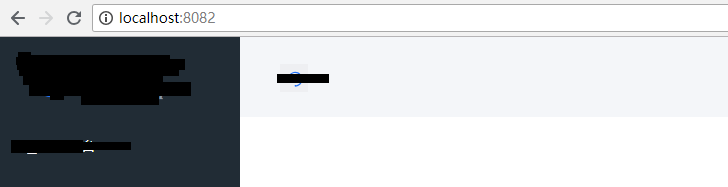
4.在浏览器输入localhost:8082 就可以看到nginx服务启动的页面啦!
vue-cli打包到部署到nginx服务器的更多相关文章
- vue项目打包部署到nginx 服务器上
假如要实现的效果如下 http://ip/vue =>是进入首页访问的路径是 usr/local/nginx/html/vue http://ip/website =>是进 ...
- vue项目打包本地后通过nginx解决跨域
前言 有时候我们打包好vue项目让后端人员部署项目时可能会有小插曲,为了不麻烦后端人员和避免尴尬,最好的办法就是在本地自己先测一下,而在本地运行打包后的项目会遇到接口跨域的问题.我平时经常用的方法就是 ...
- uniapp H5 打包并部署到 nginx
个人也是了百度了挺久的了,花费的时间( 俩个半小时 ) uniapp 的打包首先要先配置,配置好了才能去进行打包,如图所示. 这只是第一步. 注意: 1.运行基础路径最好用 ./ ,如果配置了其他请自 ...
- vue cli 打包项目造成css背景图路径错误
vue cli做项目的时候难免会碰到,css引用背景图或者css,js之间的相互引用!!!这时候打包后可能会出现一个错误!!如下图: 写法: 错误: 会无端多出一个“/css/static/” 这样就 ...
- Vue Cli 打包之后静态资源路径不对的解决方法
cli2版本: 将 config/index.js 里的 assetsPublicPath 的值改为 './' . build: { ... assetsPublicPath: './', ... } ...
- Vue打包之后部署到 express 服务器上
Part.1 安装 express npm install express body-parer --save Part.2 在项目根目录下创建 app.js 文件作为启动 express 服务器代码 ...
- 如何将Vue项目部署到Nginx 服务器中
https://blog.csdn.net/qq_35366269/article/details/91385689
- 【Vue】基于nodejs的vue项目打包编译部署
一·项目编译 1·进入项目目录下的终端执行命令 npm run build 正常情况如下图,如遇到错误不会编译成功,且编译后的html文件不能正常渲染. 2·编译完成后进入项目下的dist目录运行生成 ...
- 使用Maven完成自动化打包并部署到Linux服务器下(Tomcat7)
最近在使用maven,顺便尝试了下tomcat部署.网上找到了很多资料但是都不是最新的,所以贴上比较新的Tomcat7部署代码和配置,方便以后回顾-->测试OK. 1. 首先是配置Tomcat ...
随机推荐
- Angular学习第一步
前端开发越来越流行了,作为后端开发人员,也开始需要学习前端了.随着前端技术的发展,前端技术也越来越复杂,复杂程度不亚于后端,各种框架各种设计模式前端都用上了,什么AngularJS,Angular, ...
- 开源网站流量统计系统Piwik源码分析——参数统计(一)
Piwik现已改名为Matomo,这是一套国外著名的开源网站统计系统,类似于百度统计.Google Analytics等系统.最大的区别就是可以看到其中的源码,这正合我意.因为我一直对统计的系统很好奇 ...
- Python pandas学习总结
本来打算学习pandas模块,并写一个博客记录一下自己的学习,但是不知道怎么了,最近好像有点急功近利,就想把别人的东西复制过来,当心沉下来,自己自觉地将原本写满的pandas学习笔记删除了,这次打算写 ...
- Hibernate学习(五)———— hibernate一对一关系映射详解
一.一对一关系的概述 一对一关系看起来简单,其实也挺复杂的.其中关系就包含了四种,单向双向和主键关联外键关联. 什么意思呢,也就是包含了单向一对一主键关联.双向一对一主键关联,单向一对一外键关联,双向 ...
- [转]ionic3 实现android版本打包
本文转自:https://blog.csdn.net/weixin_39461487/article/details/79387250?utm_source=blogxgwz0 版权声明:本文为博主原 ...
- c# 生成自定义图片
using System.Drawing; using System.IO; using System.Drawing.Imaging; using System; namespace treads ...
- PowerDesigner 修改Name ,Code 不变
tools-> General Options-> Dialog:Operation Modes: 去掉 NameToCodeMirroring 前面的√
- 【ajax】1、ajax原理
Ajax核心XMLHttpRequest对象 XMLHttpRequest对象方法 XMLHttpRequest对象属性 onreadystatechange 状态改变的事件触发器.每次 readyS ...
- 项目开发版本控制----Git
版本控制的工具我早之前用的svn,后来换成了git.同样是版本控制,为什么要换呢?肯定是有原因的啦~ 一.Git和SVN的比较 svn的优缺点 优点: 1.管理方便,逻辑明确,符合一般人思维习惯. 2 ...
- 小程序webview应用实践
原文:小程序webview实践 作者:张所勇(转转开放业务部前端负责人) 公众号:大转转FE Fundebug经授权转载,版权归原作者所有. 大家好,我是转转开放业务部前端负责人张所勇,今天主要来跟大 ...