
Windows 配置nginx服务器 运行php项目
1下载
http://nginx.org/en/download.html
选择稳定版下载。
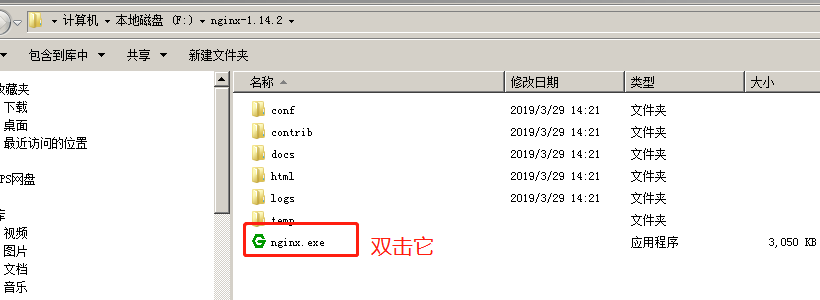
2 解压后 直接双击nginx.exe
双击后一个黑色的弹窗一闪而过
3 修改配置文件nginx.conf
3.1 修改你的站点名称 我这边还是localhost
3.2

   location / {

            #root   html;

            root    E:/ts.p2ps.cn;

            index  index.html index.htm index.php;

            try_files $uri $uri/ /index.php?$query_string;

            if (!-e $request_filename){

                rewrite ^/(.*) /index.php last;

            }

        }
3.3
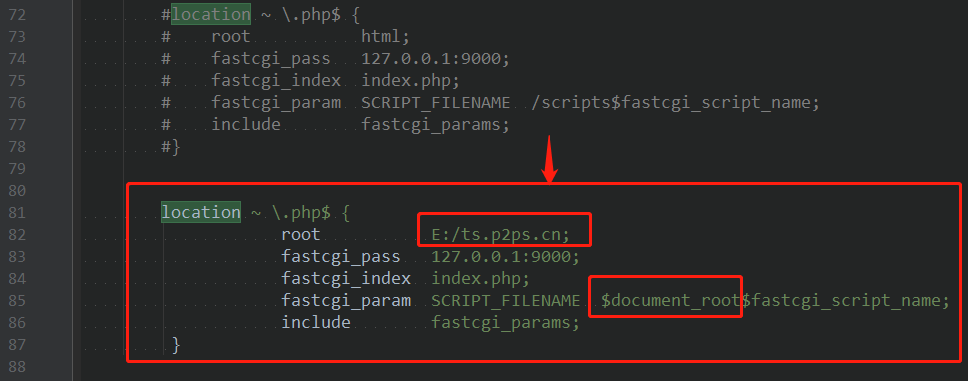
location ~ \.php$ {

                    root           E:/ts.p2ps.cn;

                    fastcgi_pass   127.0.0.1:9000;

                    fastcgi_index  index.php;

                    fastcgi_param  SCRIPT_FILENAME  $document_root$fastcgi_script_name;

                    include        fastcgi_params;

         }
4 启动nginx
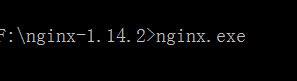
在cmd窗口下切换目录 输入命令: nginx.exe
5 修改php.ini配置
修改E:\PHP\php5.5\php5.5.12\ext下的php.ini-development文件,将文件名修改为php.ini,打开php配置文件php.ini:
搜索“extension_dir”,找到: ;extension_dir = “ext” 先去前面的分号再改为 extension_dir = “E:\PHP\php5.5\php5.5.12\ext”
搜索“date.timezone”,找到:;date.timezone = 先去前面的分号再改为 date.timezone = Asia/Shanghai
搜索“enable_dl”,找到:enable_dl = Off 改为 enable_dl = On
搜索“cgi.force_redirect” ;cgi.force_redirect = 1 先去前面的分号再改为 cgi.force_redirect = 0
搜索“fastcgi.impersonate”,找到: ;fastcgi.impersonate = 1 去掉前面的分号
搜索“cgi.rfc2616_headers”,找到:;cgi.rfc2616_headers = 0 先去前面的分号再改为 cgi.rfc2616_headers = 1
搜索“php_mysql”,找到:”extension=php_mysql.dll和extension=php_mysqli.dll 去掉前面的“;”extension=php_mysql.dll和extension=php_mysqli.dll (支持MYSQL数据库)
6 运行php
F:\xmapp\php>php-cgi.exe -b 127.0.0.1:9000 -c php.ini

7 打开浏览器 输入localhost 运行成功
8 停止nginx服务器
nginx -s stop

如果使用cmd命令窗口启动nginx,关闭cmd窗口是不能结束nginx进程的,可使用两种方法关闭nginx
(1)输入nginx命令 nginx -s stop(快速停止nginx) 或 nginx -s quit(完整有序的停止nginx)
(2)使用taskkill taskkill /f /t /im nginx.exe
10 制作批处理命令快速启动与关闭
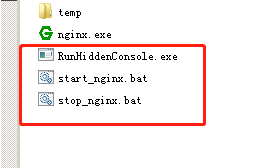
下载软件RunHiddenConsole.exe:
http://redmine.lighttpd.net/attachments/660/RunHiddenConsole.zip
start_nginx.bat
@echo off

REM set PHP_FCGI_CHILDREN=5

set PHP_FCGI_MAX_REQUESTS=1000

echo Starting PHP FastCGI...

F:\nginx-1.14.2\RunHiddenConsole "F:\xmapp\php\php-cgi.exe" -b 127.0.0.1:9000 -c "F:\xmapp\php\php.ini"

echo Starting nginx...

F:\nginx-1.14.2\RunHiddenConsole "F:/nginx-1.14.2/nginx.exe" -p "F:/nginx-1.14.2/"
stop_nginx.bat
@echo off

echo Stopping nginx...

taskkill /F /IM nginx.exe > nul

echo Stopping PHP FastCGI...

taskkill /F /IM php-cgi.exe > nul

exit
就可以双击运行控制启动与停止了。
11 参考资料
https://blog.csdn.net/weixin_41782253/article/details/82706617
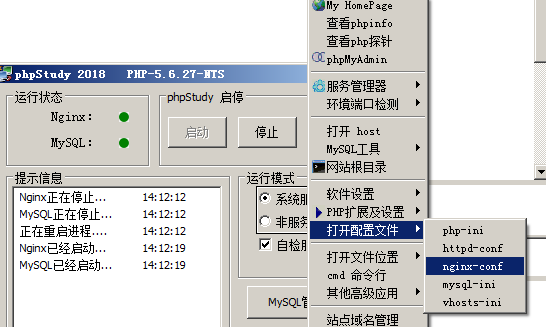
12 直接用phpstudy
#user  nobody;

worker_processes  1;

#error_log  logs/error.log;

#error_log  logs/error.log  notice;

#error_log  logs/error.log  info;

#pid        logs/nginx.pid;

events {

    worker_connections  1024;

}

http {

    include       mime.types;

    default_type  application/octet-stream;

    #log_format  main  '$remote_addr - $remote_user [$time_local] "$request" '

    #                  '$status $body_bytes_sent "$http_referer" '

    #                  '"$http_user_agent" "$http_x_forwarded_for"';

    #access_log  logs/access.log  main;

    sendfile        on;

    #tcp_nopush     on;

    #keepalive_timeout  0;

    keepalive_timeout  65;

    #gzip  on;

server {

        listen          80;

        server_name     localhost;

        root            E:/ts.p2ps.cn;

        #access_log  /tmp/testing.p2ps.cn.log;

        #error_log   /tmp/testing.p2ps.cn.log;

        #"upstream sent too big header" issue

        #nginx 错误

        # FirePHP 等造成头部过大的错误

        fastcgi_buffers  16 16k;

        fastcgi_buffer_size  32k;

        # 设置expires和max-age的时间

        location ~* "^.+\.(jpe?g|gif|css|png|js|ico|pdf|zip|tar|t?gz|mp3|wav|swf)$" {

            expires         30d;

            log_not_found   off;

        }

        #location / {

        #    try_files $uri $uri/ /index.php?$args;

        #}

        #将request指向index.php

        location / {

            index  index.php index.html index.htm;

            if (-f $request_filename) {

                break;

            }

           if (-d $request_filename) {

                break;

            }

           rewrite ^(.+)$ /index.php last;

        }

        #主程序目录不能被访问

        #location  /www/{

        #    deny    all;

        #}

 	location /src/ {

            fastcgi_pass 127.0.0.1:9000;

            fastcgi_index index.php;

            fastcgi_connect_timeout 300;

            fastcgi_send_timeout 300;

            fastcgi_read_timeout 300;

            #fastcgi_param SCRIPT_FILENAME $document_root$fastcgi_script_name;

            fastcgi_param SCRIPT_FILENAME $document_root/src/index.php;

            include fastcgi_params;

            #client_max_body_size  50m;

        }

        #引用PHP CGI

        location ~ .*\.(php|php5)?$ {

            fastcgi_pass   127.0.0.1:9000;

            fastcgi_param  SCRIPT_FILENAME $document_root$fastcgi_script_name;

            fastcgi_read_timeout 600;

            include fastcgi_params;

        }

    }

    # another virtual host using mix of IP-, name-, and port-based configuration

    #

    #server {

    #    listen       8000;

    #    listen       somename:8080;

    #    server_name  somename  alias  another.alias;

    #    location / {

    #        root   html;

    #        index  index.html index.htm;

    #    }

    #}

    # HTTPS server

    #

    #server {

    #    listen       443 ssl;

    #    server_name  localhost;

    #    ssl_certificate      cert.pem;

    #    ssl_certificate_key  cert.key;

    #    ssl_session_cache    shared:SSL:1m;

    #    ssl_session_timeout  5m;

    #    ssl_ciphers  HIGH:!aNULL:!MD5;

    #    ssl_prefer_server_ciphers  on;

    #    location / {

    #        root   html;

    #        index  index.html index.htm;

    #    }

    #}

}
Windows 配置nginx服务器 运行php项目的更多相关文章
- windows配置nginx实现负载均衡集群
windows配置nginx实现负载均衡集群2014-08-20 09:44:40 来源:www.abcde.cn 评论:0 点击:617 网上大部分关于nginx负载均衡集群的教程都是lin ...
- windows配置nginx实现负载均衡集群 -请求分流
windows配置nginx实现负载均衡集群 一.windows上安装nginx 1.下载nginx的windows版本http://nginx.org/en/download.html 2.把压缩文 ...
- Windows Server - SVN 服务器搭建与项目配置、客户端安装与配置
本教程以Windows Server 2012 R12 为例搭建SVN服务器,安装部署完成后,客户端可通过SVN客户端访问SVN服务器上的项目,也可以访问网上其他SVN服务器上的项目. 一.首先准备三 ...
- mac 安装nginx,并配置nginx的运行环境
1. 安装nginx // 查询有没有nginx brew search nginx //开始安装nignx brew install nginx 2. 检查nignx是否安装成功 nginx -V ...
- Linux服务器安装配置Nginx服务器
Nginx("engine x")是一款是由俄罗斯的程序设计师Igor Sysoev所开发高性能的 Web和 反向代理 服务器,也是一个 IMAP/POP3/SMTP 代理服务 ...
- 基于Windows 配置 nginx 集群 & 反向代理
1.下载 nginx 下载页面 : http://nginx.org/en/download.html 具体文件: http://nginx.org/download/nginx-1.7.0.zip ...
- Linux安装配置Nginx服务器
如有需要可以加我Q群[308742428]大家一起讨论技术,有偿服务. 后面会不定时为大家更新文章,敬请期待. 喜欢的朋友可以关注下. 前言 今天搭建nginx服务器,来访问静态资源文件. Nginx ...
- ubuntu14.04安装与配置nginx服务器
去年曾经配置过nginx服务器,可惜的是,几个月前因故障磁盘被格式化.今天又要用到nginx服务,所以从新配置了一番,但这次就不是那么顺利了.在此,愿与大家分享一下经验.只是简单的局域网应用,并未复杂 ...
- eclipse中配置Tomcat服务器以及新建项目
eclipse配置Tomcat服务器 http://jingyan.baidu.com/article/ca2d939dd90183eb6d31ce79.html eclipse中配置Tomcat服务 ...
随机推荐
- sqlite数据库操作
1.创建表 import sqlite3 conn = sqlite3.connect('C:\\Users\\Kuma\\Desktop\\spider.db') print('connect su ...
- [LeetCode&Python] Problem 504. Base 7
Given an integer, return its base 7 string representation. Example 1: Input: 100 Output: "202&q ...
- Linux 文件类型笔记
在UNIX中一切都是文件https://ph7spot.com/musings/in-unix-everything-is-a-file在UNIX中,一切都是字节流 ==== linux系统的文件类型 ...
- 【java编程】java中的移位运算符
java中有三种移位运算符 << : 左移运算符,num << 1,相当于num乘以2 >> : 右移运算符,num >& ...
- 报错:org.apache.hadoop.hive.metastore.HiveMetaException: Failed to get schema version.
报错环境: CDH中集成的hive服务,启动报错,所以初始化一下元数据. 配置文件:/etc/hive/conf hive-site.xml 命令目录:/opt/cloudera/parcels/CD ...
- debug protractor
HTAir:protractor-cucumber-typescript kbladewht$ node --inspect-brk=0.0.0.0:1229 node_modules/protrac ...
- 24种java设计模式总结和目录
https://blog.csdn.net/qq_40369829/article/details/80374131 简介原则分类创建型模式结构型模式行为型模式类图参考简介设计模式是在特定环境下,为解 ...
- easy ui 关闭选项卡
var tab = window.parent.getCurrentTab(); var tabs = window.parent.getTabs(); var index = tabs.tabs(& ...
- Optional 的基本用法
参考: https://www.cnblogs.com/xingzc/p/5778090.html http://www.runoob.com/java/java8-optional-class.ht ...
- session and cookie简析
无状态应用程序(cookies.session等机制出现的背景) Web应用程序服务器通常是“无状态的”: 每个HTTP请求都是独立的; 服务器无法判断2个请求是来自同一个浏览器还是用户. Web服务 ...