
interface21 - web - Log4jConfigListener(Log4j加载流程)
前言
最近打算花点时间好好看看spring的源码,然而现在Spring的源码经过迭代的版本太多了,比较庞大,看起来比较累,所以准备从最初的版本(interface21)开始入手,仅用于学习,理解其设计思想,后续慢慢研究其每次版本变更的内容。。。
先从interface21的一个典型web工程例子看起,宠物诊所 - petclinic,因为该工程基本涵盖了Spring的APO、IOC、JDBC、Web MVC、事务、国际化、主题切换、参数校验等主要功能。。。
先从简单的走起,看下该web工程中, Log4j是如何加载的吧~~~~~~~
对应的web.xml配置
    <context-param>

        <param-name>webAppRootKey</param-name>

        <param-value>petclinic.root</param-value>

    </context-param>

    <context-param>

        <param-name>log4jConfigLocation</param-name>

        <param-value>/WEB-INF/classes/log4j.properties</param-value>

    </context-param>

    <listener>

        <listener-class>com.interface21.web.util.Log4jConfigListener</listener-class>

    </listener>
执行时序图(看不清的话可以点击查看原图)
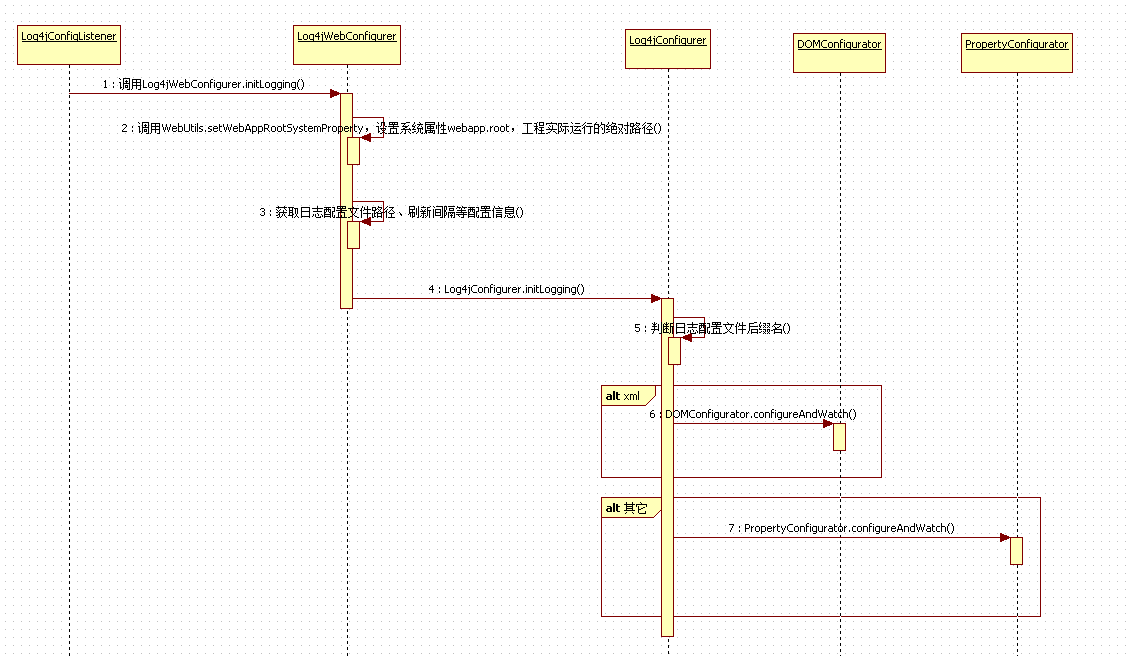
时序图中的各个步骤简要分析
执行的入口在Log4jConfigListener类的contextInitialized方法,由于Log4jConfigListener类实现了ServletContextListener接口,所以在Servlet容器(tomcat)启动时,会自动调用contextInitialized方法。
步骤描述:
- 进入Log4jConfigListener类的contextInitialized方法,该类只有一句代码,执行Log4jWebConfigurer.initLogging方法;
    public void contextInitialized(ServletContextEvent event) {

        Log4jWebConfigurer.initLogging(event.getServletContext());

} - 进入Log4jWebConfigurer类的initLogging方法,首先,调用WebUtils.setWebAppRootSystemProperty方法,内部调用servletContext.getRealPath("/")方法获取工程实际运行的绝对路径(如:F:\004_SVN\IBP\springweb\target\spring-web-1.0-SNAPSHOT\),设置到系统变量中(System.setProperty),注意这里的key值是可以配置的,通过webAppRootKey参数配置,如在本例子的web.xml中配成了petclinic.root;
    public static void setWebAppRootSystemProperty(ServletContext servletContext) {

        String param = servletContext.getInitParameter(WEB_APP_ROOT_KEY_PARAM);

        String key = (param != null ? param : DEFAULT_WEB_APP_ROOT_KEY);

        String oldValue = System.getProperty(key);

        if (oldValue != null) {

            servletContext.log("WARNING: Web app root system property already set: " + key + " = " + oldValue);

            servletContext.log("WARNING: Choose unique webAppRootKey values in your web.xml files!");

        } else {

            String root = servletContext.getRealPath("/");

            System.setProperty(key, root);

            servletContext.log("Set web app root system property: " + key + " = " + root);

        }

} - 获取日志配置文件路径、刷新间隔等配置信息,日志配置文件路径可根据log4jConfigLocation参数配置,这里配置的是相对路径,通过调用ServletContext.getRealPath()获得完整路径,注意getRealPath方法的参数要以“/”开头;刷新间隔可根据log4jRefreshInterval参数配置,默认为60s;
    public static void initLogging(ServletContext servletContext) {

        // set the web app root system property

        WebUtils.setWebAppRootSystemProperty(servletContext);

        // only perform custom Log4J initialization in case of a config file

        String location = servletContext.getInitParameter(CONFIG_LOCATION_PARAM);

        if (location != null) {

            // interpret location as relative to the web application root directory

            if (location.charAt(0) != '/') {

                location = "/" + location;

            }

            location = servletContext.getRealPath(location);

            // use default refresh interval if not specified

            long refreshInterval = Log4jConfigurer.DEFAULT_REFRESH_INTERVAL;

            String intervalString = servletContext.getInitParameter(REFRESH_INTERVAL_PARAM);

            if (intervalString != null) {

                refreshInterval = Long.parseLong(intervalString);

            }

            // write log message to server log

            servletContext.log("Initializing Log4J from " + location);

            // perform actual Log4J initialization

            try {

                Log4jConfigurer.initLogging(location, refreshInterval);

            } catch (FileNotFoundException ex) {

                throw new IllegalArgumentException("Invalid log4jConfigLocation parameter: " + ex.getMessage());

            }

        }

} - 进入Log4jConfigurer类的initLogging方法,initLogging比较简单,根据配置文件后缀名,使用相应的解析器解析配置文件中的元素。
    public static void initLogging(String location, long refreshInterval) throws FileNotFoundException {

        if (!(new File(location)).exists()) {

            throw new FileNotFoundException("Log4j config file [" + location + "] not found");

        }

        if (location.toLowerCase().endsWith(XML_FILE_EXTENSION)) {

            DOMConfigurator.configureAndWatch(location, refreshInterval);

        } else {

            PropertyConfigurator.configureAndWatch(location, refreshInterval);

        }

    }
另外补充下,当Servlet容器销毁时,会调用Log4jConfigListener的contextDestroyed方法,最终是调用LogManager.shutdown,执行一些资源关闭等操作;
interface21代码参考
https://github.com/peterchenhdu/interface21
interface21 - web - Log4jConfigListener(Log4j加载流程)的更多相关文章
- interface21 - web - ContextLoaderListener(Spring Web Application Context加载流程)
前言 最近打算花点时间好好看看spring的源码,然而现在Spring的源码经过迭代的版本太多了,比较庞大,看起来比较累,所以准备从最初的版本(interface21)开始入手,仅用于学习,理解其设计 ...
- interface21 - web - DispatcherServlet(DispatcherServlet初始化流程)
前言 最近打算花点时间好好看看spring的源码,然而现在Spring的源码经过迭代的版本太多了,比较庞大,看起来比较累,所以准备从最初的版本(interface21)开始入手,仅用于学习,理解其设计 ...
- web.xml组件加载顺序
在配置项目组件的过程中, 了解Tomcat加载组件顺序很有必要. 例如某些框架如Quartz的集群功能需要数据库的支持, 数据库的加载肯定要在框架组件加载之前. 经过查阅和Debug发现, web.x ...
- Cocos Creator 资源加载流程剖析【二】——Download部分
Download流程的处理由Downloader这个pipe负责(downloader.js),Downloader提供了各种资源的"下载"方式--即如何获取文件内容,有从网络获取 ...
- Cocos Creator 资源加载流程剖析【一】——cc.loader与加载管线
这系列文章会对Cocos Creator的资源加载和管理进行深入的剖析.主要包含以下内容: cc.loader与加载管线 Download部分 Load部分 额外流程(MD5 Pipe) 从编辑器到运 ...
- web.xml的加载过程配置详解
一:web.xml加载过程 简单说一下,web.xml的加载过程.当我们启动一个WEB项目容器时,容器包括(JBoss,Tomcat等).首先会去读取web.xml配置文件里的配置,当这一步骤没有 ...
- java面试记录二:spring加载流程、springmvc请求流程、spring事务失效、synchronized和volatile、JMM和JVM模型、二分查找的实现、垃圾收集器、控制台顺序打印ABC的三种线程实现
注:部分答案引用网络文章 简答题 1.Spring项目启动后的加载流程 (1)使用spring框架的web项目,在tomcat下,是根据web.xml来启动的.web.xml中负责配置启动spring ...
- Java Web应用的加载过程
在介绍Spring IoC和MVC的加载前,用这篇小文章简单地记录下,最简单的web应用的加载过程. 一.从最简单的web应用出发 使用Eclipse直接创建一个Dynamic Web Project ...
- Spring Security拦截器加载流程分析--练气中期
写在前面 上回我们讲了spring security整合spring springmvc的流程,并且知道了spring security是通过过滤器链来进行认证授权操作的.今天我们来分析一下sprin ...
随机推荐
- js判断是手机端还是pc端访问
if(/Android|webOS|iPhone|iPod|BlackBerry/i.test(navigator.userAgent)) { window.location.href = " ...
- tp3.2 phpexcel 简单导出多个sheet(execl表格)
参考链接:https://blog.csdn.net/u011341352/article/details/70211962 以下是公共类PHPExcel.php文件: // 开始 <?php/ ...
- thinkphp 视图(三)系统变量——原生标签
查看系统变量 dump($_SERVER); 在view中获取服务器变量 <p>{$Think.server.HTTP_HOST}</p> 获取env变量 status=dev ...
- linearlayout 中ImageView 居中等问题
linearlayout 下的子控件使用android:layout_gravity=”center” 控件居左,没有达到居中的效果, 父窗体只能指定一种控件摆放方向 横向还是竖向 下面我弄了三个 ...
- NGS NGS ngs(hisat,stringtie,ballgown)
NGS ngs(hisat,stringtie,ballgown) #HISAT (hierarchical indexing for spliced alignment of transcripts ...
- Gym - 100781G-Goblin Garden Guards
题目链接:https://nanti.jisuanke.com/t/28882 解题思路:单纯的判断点是否在圆内,一一遍历圆外切正方形内的点即可,注意,该题要建个结构体数组存每个地精的位置,再bool ...
- JDBC - Mysql 8.0.13 连接测试
因为换新的电脑设备,为其安装一些开发需要的应用及环境,下载了新版的Mysql8.0.13,在Eclipse中测试连接时遇到一些新的问题,遂记录. 1. Mysql 5.* 版本JDBC连接 a. 常 ...
- (PMP)第12章-----项目采购管理
B D 12.1 规划采购管理 输入 工具与技术 输出 1.项目章程 2.商业文件 (商业文件, 效益管理计划) 3.项目管理计划 (范围,质量,资源管理计划, 范围基准) 4.项目文件 (里程碑清单 ...
- Codeforces Round #486 (Div. 3) E. Divisibility by 25
Codeforces Round #486 (Div. 3) E. Divisibility by 25 题目连接: http://codeforces.com/group/T0ITBvoeEx/co ...
- 2019swpuj2ee作业一:C/S,B/S的应用的区别
1.硬件环境不同: C/S 一般建立在专用的网络上, 小范围里的网络环境, 局域网之间再通过专门服务器提供连接和数据交换服务.B/S 建立在广域网之上的, 不必是专门的网络硬件环境,例与电话上网, ...