
MyBatis中实现多表查询
如果查询的数据量大,推荐使用N+1次查询。数据量少使用联合查询。。。
一、
1、Mybatis是实现多表查询方式
1.1 业务装配:对两个表编写单表查询语句,在业务(Service)把查询的两表结果合并
1.2 使用Auto Mapping 特性,在实现两表联合查询时通过别名完成映射
1.3 使用MyBatis<resultMap>属性进行实现
2、多表查询时,类中包含另一个类的对象的分类
2.1 单个对象
2.2 集合对象
二、resultMap属性
1、<resultMap>标签写在mapper.xml中,由程序员控制SQL查询结果与实体类的映射关系。
1.2 默认MyBatis使用Auto Mapping特性
2、使用<resultMap> 标签时,<select>标签不写resultType属性,而是使用resultMap属性 引用<resultMap>标签
3、使用resultMap实现单表映射关系
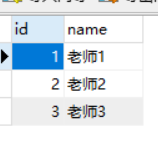
3.1 数据库设计
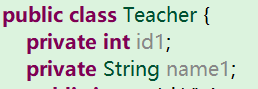
3.2 实体类设计
3.3 xxxmapper.xml代码
  <mapper namespace="com.bjsxt.mapper.TeacherMapper">

      <resultMap type="Teacher" id="mymap">

          <!-- 主键使用id标签配置映射关系-->

          <id column="id" property="id1"/>

          <!-- 其他列使用result标签配置映射关系 -->

          <result  column="name" property="name1"/>

      </resultMap>

      <select id="selall"  resultMap="mymap">

          select * from teacher

      </select>

  </mapper>
三、使用resultMap 实现关联单个对象(N+1方式)
4.1 N+1 查询方式,先查询出某个表的全部信息,根据这个表的信息查询另一个表的信息
4.2 与业务装配的区别:
4.2.1 之前在service里面写代码,现在由mybatis完成装配
4.3 实现步骤:
4.3.1 在Student 实现类中包含了一个Teacher 对象
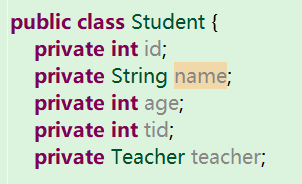
4.3.2 在TeacherMapper 中提供一个查询
  <mapper namespace="com.bjsxt.mapper.TeacherMapper">

      <select id="selById" resultType="teacher" parameterType="int" >

          select * from teacher where id=#{0}

      </select>

  </mapper>
4.3.3 在StudentMapper中
4.3.3.1 <association> 装配一个对象时使用(包含在student中的对象)
4.3.3.2 property 关联对象
4.3.3.3 select 通过哪个查询查询出这个对象的信息
4.3.3.4 column 把当前表的哪个列的值作为参数传递给另一个查询
4.3.3.5 大前提使用N+1方式时,如果列名和属性名相同可以不配置,使用Auto mapping特性,但是mybatis默认只会给列专配一次。。
  <mapper namespace="com.bjsxt.mapper.StudentMapper">

      <resultMap type="student" id="stumap">

          <id property="id" column="id"/>

          <result property="name" column="name"/>

          <result property="age" column="age"/>

          <result property="tid" column="tid"/>

          <!-- 如果关联一个对象 -->

          <association property="teacher" select="com.bjsxt.mapper.TeacherMapper.selById" column="tid"></association>

      </resultMap>

          <select id="selall"  resultMap="stumap">

              select * from student

          </select>

  </mapper>
4.3.3.6 可以把代码简化
  <mapper namespace="com.bjsxt.mapper.StudentMapper">

      <resultMap type="student" id="stumap">

          <result property="tid" column="tid"/>

          <!-- 如果关联一个对象 -->

          <association property="teacher" select="com.bjsxt.mapper.TeacherMapper.selById" column="tid"></association>

      </resultMap>

          <select id="selall"  resultMap="stumap">

              select * from student

          </select>

  </mapper>
四、使用<resultMap>查询关联集合对象(N+1)
1、在Teacher 中添加List<Student>

2、 在StudentMapper.xml中添加通过tid查询
  <mapper namespace="com.bjsxt.mapper.StudentMapper">

      <select id="selByTid" parameterType="int" resultType="student">

          select * from student where tid=#{0}

      </select>

  </mapper>
3、 在TeacherMapper.xml 中添加查询全部
3.1、<collection/> 当属性是集合类型时使用的标签
 <mapper namespace="com.bjsxt.mapper.TeacherMapper">

         <resultMap type="teacher" id="mymap">

              <id column="id" property="id"/>

              <result column="name" property="name"/>

              <collection property="list" ofType="student" select="com.bjsxt.mapper.StudentMapper.selByTid" column="id"></collection>

          </resultMap>

          <select id="selAll" resultMap="mymap">

            select * from teacher

          </select>

 </mapper>
五、使用<resultMap> 实现加载集合数据(联合查询方式)
1、在teacherMapper.xml中添加
1.1 mybatis可以通过主键判断对象是否被加载过
不需要担心创建重复 teacher
 <mapper namespace="com.bjsxt.mapper.TeacherMapper">

          <resultMap type="teacher" id="mymap">

              <id property="id" column="tid"/>

              <result property="name" column="tname"/>

              <collection property="list" ofType="student" >

                  <id property="id" column="sid"/>

                  <result property="name" column="sname"/>

                  <result property="age" column="age"/>

                  <result property="tid" column="tid"/>

              </collection>

          </resultMap>

          <select id="selAll" resultMap="mymap">

            select t.id tid,t.name tname,s.id sid,s.name sname,age,tid from teacher t left join student s on t.id=s.tid

          </select>

 </mapper>
六、 使用 Auto Mapping结合别名实现多表查询
6.1 只能使用多表联合查询方式
6.2 要求:查询出的列和属性名相同
6.3 实现方式
6.3.1 . 在SQL是关键字符,两侧添加返单引号
  <mapper namespace="com.bjsxt.mapper.StudentMapper">

      <select id="selAll" resultType="student">

      select t.id `teacher.id`,t.name `teacher.name`,s.id id,s.name name,age,tid

          from student s left join teacher t on s.tid=t.id;

      </select>

  </mapper>
注意点:::使用Auto Mapping 特性查询集合不好用 !!!!
七、 使用注解查询
1、注解:为了简化配置文件
2、Mybatis 的注解简化 xxxmapper.xml文件
2.1 如果涉及动态SQL 依然使用 xxxmapper.xml
3、xxxmapper.xml 和注解可以共存
4、使用注解时 Mybatis.xml 中<mappers> 使用
4.1 <package/>
4.2 <mapper class=" "/>
5、实现查询
	@Select("select * from teacher")

	List<Teacher> selAll();
6、实现插入
	@Insert("insert into teacher values(default,#{name})")

	int inTeacher(Teacher teacher);
7、实现修改
	@Update("update teacher set name=#{name} where id=#{id}")

	int upTeacher(Teacher teacher);
8、实现删除
	@Delete("delete from teacher where id=#{0}")

	int delTeacher(int id);
9、使用注解实现 <resultMap> 功能
9.1、以 N+1 举例
9.2、在StudentMapper 接口添加查询
@Select ("select * from student where tid=#{0}")

 List<Student> selByTid(int tid);
9.3、在TeacherMapper 接口添加
9.3.1 @Results() 相当于 <resultMap>
9.3.2 @Result() 相当于<id/> 或 <result/>
9.3.2.1 @Result(id=true) 相当于<id/>
9.3.3 @Many() 相当于<collection/>
9.3.4 @One() 相当于<association/>
@Results(value={

    @Result(id=true,property="id",column="id"),

    @Result(property="name",column="name"),

    @Result(property="list",column="id",many=@Many(select="com.bjsxt.mapper.StudentMapper.selByTid" ))

    })
@Select("select * from teacher")
List<Teacher> selTeacher();
MyBatis中实现多表查询的更多相关文章
- 在Mybatis中使用连表查询的一次实际应用
以前在工作中很少使用多表关联查询,对连表查询的具体作用和使用场景也没有很直观的认识,通过这次在项目中的实际应用,对此有了一定的认识,特记录如下. 关联表介绍: 分别是属性表attr_info.属性值表 ...
- Mybatis中的多表查询 多对多
示例:用户和角色 一个用户可以有多个角色 一个角色可以赋予多个用户 步骤: 1.建立两张表:用户表,角色表 让用户表和角色表具有多对多的关系. 需要使用中间表,中间表中包含各自的主键,在中间表中是外键 ...
- Mybatis中的多表查询 多对一,一对多
示例:用户和账户 一个用户可以有多个账户 一个账户只能属于一个用户(多个账户也可以属于同一个用户) 步骤: 1.建立两张表:用户表,账户表 让用户表和账户表之间具备一对多的关系:需要使用外键在账户表中 ...
- Hibernate中的多表查询及抓取策略
1.Hibernate中的多表查询 1.1SQL中的多表查询 [交叉连接] select * from A,B; [内连接] 显示内连接:inner join(inner 可以省略) Select * ...
- mysql中的回表查询与索引覆盖
了解一下MySQL中的回表查询与索引覆盖. 回表查询 要说回表查询,先要从InnoDB的索引实现说起.InnoDB有两大类索引,一类是聚集索引(Clustered Index),一类是普通索引(Sec ...
- Mybatis学习——一对一关联表查询
1.SQL语句建表 CREATE TABLE teacher( t_id ) ); CREATE TABLE class( c_id ), teacher_id INT ); ALTER TABLE ...
- MyBatis总结-实现关联表查询
一.一对一关联 1.1.提出需求 根据班级id查询班级信息(带老师的信息) 1.2.创建表和数据 创建一张教师表和班级表,这里我们假设一个老师只负责教一个班,那么老师和班级之间的关系就是一种一对一的关 ...
- MyBatis学习之多表查询
一对多需求:即一张表class中又含有多张表(teacher,student)内容.现根据class_id 来获取对应的班级信息(包括学生和老师信息) 方式一:嵌套结果 使用嵌套结果映射来处理重复的联 ...
- Oracle中的多表查询
多表查询 l 笛卡尔积: N*M l 使用关联字段消除笛卡尔积的多余数据: SELECT EMP.*,DEPT.DNAME,DEPT.LOC FROM EMP, DEPT WHERE EMP.DEPT ...
随机推荐
- pta l2-2(链表去重)
题目链接:https://pintia.cn/problem-sets/994805046380707840/problems/994805072641245184 题意:给定一个链表,要求删除其中键 ...
- Chrome格式化JavaScript代码
很多第三方插件的脚本,是压缩后的代码,甚至时动态加载的,代码只有一行. Chrome提供了格式化脚本代码的功能,方便加断点调试. 1 在Sources面板中,点击脚本名称,打开脚本源码. 2 点击左下 ...
- js replaceAll全部替换
js不支持replaceAll,可以用函数new RegExp('要替换的内容','g')代替, 代码: str.replace(new RegExp('要替换的内容','g'),"替换内容 ...
- NET Runtime version 2.0.50727.42 - 执行引擎错误 或者无法创建应用程序域
server2003操作系统 IIS运行应用程序报错,应用程序事件查看器详细: NET Runtime version 2.0.50727.42 - 执行引擎错误 或者无法创建应用程序域 解决方法:卸 ...
- java ATM模拟程序
//基本功能已经完善,文件读取没有问题,文件重写尚未完成. Account类 public class Account { //初始化参数 private String accountID; priv ...
- git--(3)分支 合并
git branch test //新建分支 git branch //列出分支 git branch -r //列出远程分支 git branch -m | -M oldbranch newbran ...
- jsplumb流程器使用2
jsplumb默认注册在浏览器的窗口,为整个页面提供静态实例 1. 单独实例化的方法: var firstInstance = jsPlumb.getInstance(); 内部传入可定义对象 全 ...
- public void method(),void前面的泛型T是什么
public <T>这个T是个修饰符的功能,表示是个泛型方法,就像有static修饰的方法是个静态方法一样. 注意<T> 不是返回值,此处的返回值是void ,此处的<T ...
- javascript 的原型与原型链的理解
javascript中一切皆对象,但是由于没有Class类的概念,所以就无法很好的表达对象与对象之间的关系了. 比如对象A与对象B之间,它们两个是相对独立的个体,互不干扰,对象A修改自身的属性不会影响 ...
- 10.22JS日记
1.js数据类型分析 (1)基础类型:string.number.boolean.null.undefined (2)引用类型:object-->json.array... 2.点运算 xxx ...