
SDN课程作业总结
SDN 期末作业总结
设计场景
我们采用参考场景一,实现负载均衡,拓扑图及端口示意如下:
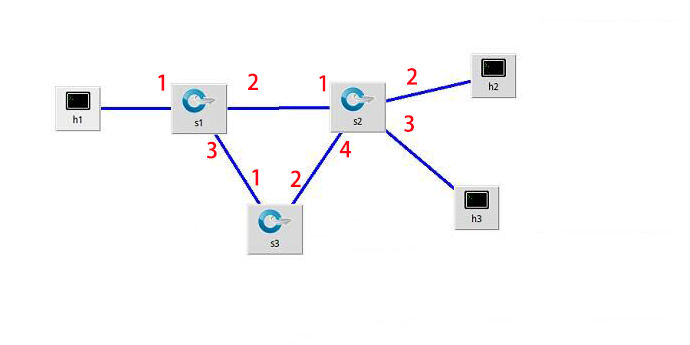
演示视频
关键代码
package loadBalance;

import java.io.BufferedReader;

import java.io.BufferedWriter;

import java.io.FileInputStream;

import java.io.FileNotFoundException;

import java.io.FileOutputStream;

import java.io.IOException;

import java.io.InputStream;

import java.io.InputStreamReader;

import java.io.OutputStream;

import java.io.OutputStreamWriter;

import java.io.UnsupportedEncodingException;

import java.net.HttpURLConnection;

import java.net.URL;

import java.util.Base64;

import net.sf.json.*;

public class Main {

	public static JSONObject jsonObject = null;

	public static JSONObject[] jsonArray = new  JSONObject[100];

	static String url24= "http://172.17.172.244:8181/restconf/config/opendaylight-inventory:nodes/node/openflow:2/flow-node-inventory:table/0/flow/0";

	static String url14= "http://172.17.172.244:8181/restconf/config/opendaylight-inventory:nodes/node/openflow:1/flow-node-inventory:table/0/flow/1";

	static String url21= "http://172.17.172.244:8181/restconf/config/opendaylight-inventory:nodes/node/openflow:2/flow-node-inventory:table/0/flow/0";

	static String url12= "http://172.17.172.244:8181/restconf/config/opendaylight-inventory:nodes/node/openflow:1/flow-node-inventory:table/0/flow/1";

	public static JSONObject httpRequest(String requestUrl, String requestMethod,int index) {

        StringBuffer buffer = new StringBuffer();

        try {

            URL url = new URL(requestUrl);

            // http协议传输

            HttpURLConnection httpUrlConn = (HttpURLConnection) url.openConnection();

            httpUrlConn.setDoOutput(true);

            httpUrlConn.setDoInput(true);

            httpUrlConn.setUseCaches(false);

            String userPassword = "admin" + ":" + "admin";

            String encoding =  Base64.getEncoder().encodeToString((userPassword).getBytes());

            httpUrlConn.setRequestProperty("Authorization", "Basic " + encoding);

            httpUrlConn.setRequestProperty("Connection", "Keep-Alive"); // 设置维持长连接

            httpUrlConn.setRequestProperty("Charset", "UTF-8");// 设置文件字符集:

            // 设置请求方式(GET/POST)

            httpUrlConn.setRequestMethod(requestMethod);

            if ("GET".equalsIgnoreCase(requestMethod))

            {

            	httpUrlConn.connect();

                // 将返回的输入流转换成字符串

                InputStream inputStream = httpUrlConn.getInputStream();

                InputStreamReader inputStreamReader = new InputStreamReader(inputStream, "utf-8");

                BufferedReader bufferedReader = new BufferedReader(inputStreamReader);

                String str = null;

                while ((str = bufferedReader.readLine()) != null) {

                    buffer.append(str);

                }

                bufferedReader.close();

                inputStreamReader.close();

                // 释放资源

                inputStream.close();

                inputStream = null;

                httpUrlConn.disconnect();

                jsonObject = JSONObject.fromObject(buffer.toString());

              //  System.out.println(buffer.toString());

            }else if("PUT".equalsIgnoreCase(requestMethod)){

            	byte[] data = (jsonArray[index].toString()).getBytes();//转换为字节数组

                httpUrlConn.setRequestProperty("Content-Length", String.valueOf(data.length));// 设置文件长度

                httpUrlConn.setRequestProperty("Content-Type", "application/json;charset=utf-8");

             // 开始连接请求

                httpUrlConn.connect();

                OutputStream  out = httpUrlConn.getOutputStream();

             // 写入请求的字符串

                out.write((jsonArray[index].toString()).getBytes());

                out.flush();

                out.close();

                if (httpUrlConn.getResponseCode() == 200) {

                	System.out.println("发送成功");

                }

            }else if("DELETE".equalsIgnoreCase(requestMethod)){

            }

        } catch (Exception e) {

            e.printStackTrace();

        }

        return jsonObject;

    }

	public static void init() throws IOException{

		String s = null;

		int i = 0;

		try {

			BufferedReader br = new BufferedReader(new InputStreamReader(new FileInputStream("DATA.txt"),"UTF-8"));

			while((s = br.readLine())!=null){

				jsonArray[i] = JSONObject.fromObject(s);

				i++;

			}

			String url31= "http://172.17.172.244:8181/restconf/config/opendaylight-inventory:nodes/node/openflow:3/flow-node-inventory:table/0/flow/0";

			String url32= "http://172.17.172.244:8181/restconf/config/opendaylight-inventory:nodes/node/openflow:3/flow-node-inventory:table/0/flow/1";

			String url11= "http://172.17.172.244:8181/restconf/config/opendaylight-inventory:nodes/node/openflow:1/flow-node-inventory:table/0/flow/0";

			String url22= "http://172.17.172.244:8181/restconf/config/opendaylight-inventory:nodes/node/openflow:2/flow-node-inventory:table/0/flow/1";

			String url13= "http://172.17.172.244:8181/restconf/config/opendaylight-inventory:nodes/node/openflow:1/flow-node-inventory:table/0/flow/2";

			String url23= "http://172.17.172.244:8181/restconf/config/opendaylight-inventory:nodes/node/openflow:2/flow-node-inventory:table/0/flow/2";

			String url33= "http://172.17.172.244:8181/restconf/config/opendaylight-inventory:nodes/node/openflow:3/flow-node-inventory:table/0/flow/2";

			httpRequest(url31,"PUT",0);

			httpRequest(url32,"PUT",1);

			httpRequest(url21,"PUT",2);

			httpRequest(url11,"PUT",3);

			httpRequest(url12,"PUT",4);

			httpRequest(url22,"PUT",5);

			httpRequest(url13,"PUT",6);

			httpRequest(url23,"PUT",7);

			httpRequest(url33,"PUT",10);

		} catch (UnsupportedEncodingException e) {

			// TODO Auto-generated catch block

			e.printStackTrace();

		} catch (FileNotFoundException e) {

			// TODO Auto-generated catch block

			e.printStackTrace();

		}

	}

	public static int getReceived(String url2){

		 jsonObject =  httpRequest(url2,"GET",0);

			JSONArray j1 = (JSONArray) jsonObject.get("node-connector");

			JSONObject j2 = (JSONObject) j1.get(0);

			JSONObject j3 =  (JSONObject) j2.get("opendaylight-port-statistics:flow-capable-node-connector-statistics");

			JSONObject j4 =  (JSONObject)j3.get("bytes");

			int received = (int) j4.get("received");

			return received;

	}

	public static void main(String[] args) {

		System.out.println("-------------------------------------------------");

		try {

			init();

		} catch (IOException e) {

			// TODO Auto-generated catch block

			e.printStackTrace();

		}

		String s = "";

		String url = "http://172.17.172.244:8181/restconf/config/opendaylight-inventory:nodes/node/openflow:3/flow-node-inventory:table/0/flow/1";

		String url1= "http://172.17.172.244:8181/restconf/config/opendaylight-inventory:nodes/node/openflow:2/flow-node-inventory:table/0/flow/0";

		String url2 = "http://172.17.172.244:8181/restconf/operational/opendaylight-inventory:nodes/node/openflow:2/node-connector/openflow:2:2";

//		 jsonObject =  httpRequest(url2,"GET",0);

//		System.out.println(jsonObject.toString());

		int received ;

		int temp = 0;

		while(true){

			received = getReceived(url2);

			try {

				Thread.sleep(5000);

			} catch (InterruptedException e) {

				// TODO Auto-generated catch block

				e.printStackTrace();

			}

			System.out.println(received-temp);

			if(received-temp<10000){

				//下负载均衡流表

//				System.out.println(received-temp);

				httpRequest(url24,"PUT",8);

				httpRequest(url14,"PUT",9);

			}else if(received-temp>10000 ){

//				System.out.println(received-temp);

				httpRequest(url21,"PUT",2);

				httpRequest(url12,"PUT",4);

			}

			temp = received;

		}

//		jsonObject =  httpRequest(url1,"PUT");

	}

}
期末分工
主要负责代码编写,参与小组讨论。
课程总结
上了这门课程之后,使得我对sdn新构型网络有了更进一步的理解,通过控制面板和转发面的分离,更好的是的程序能够很好的控制网络各项功能,这是在传统网络上的一个大的飞跃。并且学会了简单的odl控制器下发流标,实现负载均衡的思路。相信对以后会很有帮助。
SDN课程作业总结的更多相关文章
- 2017秋 FZU SDN 课程作业汇总
课程: SDN课程上机作业:SDN上机作业 参考作业: deepYY SDN作业: SDN作业 faberry的博客:faberry peiqiaoWang的博客:peiqiaoWang 相关博客汇总 ...
- 17秋 SDN课程 第五次上机作业
17秋 SDN课程 第五次上机作业 Project:https://github.com/Wasdns/new_balance Slide is available at https://github ...
- SDN课程阅读作业(2)
SDN课程阅读作业(2) 1.过去20年中可编程网络的发展可以分为几个阶段?每个阶段的贡献是什么? 答:可编程网络的发展分为三个阶段. (1)主动网络阶段 贡献: 1.对主动网络的研究开创了可编程网络 ...
- 17秋 SDN课程 第一次作业
SDN第一次作业 你会选择作 网络编程 方向的程序员吗?为什么? 有可能.原因如下: 1.我的研究与网络密切相关: 2.SDN侧重软件实现,自然涉及socket等网络编程知识,属于基本功: 3.市场. ...
- SDN 期末作业验收
前言 SDN 期末作业验收我们是采用的参考场景一,我们在此场景的基础上来做负载均衡,下面是我们搭建的拓扑图 演示视频 https://pan.baidu.com/s/1htkKLPM 负载均衡程序 相 ...
- Web编程基础--HTML、CSS、JavaScript 学习之课程作业“仿360极速浏览器新标签页”
Web编程基础--HTML.CSS.JavaScript 学习之课程作业"仿360极速浏览器新标签页" 背景: 作为一个中专网站建设出身,之前总是做静态的HTML+CSS+DIV没 ...
- 课程作业01:模仿JavaAppArguments.java示例,编写一个程序,此程序从命令行接收多个数字,求和之后输出结果。
1.设计思想: 首先是从JavaAppArguments.java示例开始,此示例已打印参数,定义数字 之和和作为存储单位的整型,然后将输入参数的字符串转化为整型,之后求和即可. 2.程序流程图: 3 ...
- coursea机器学习课程作业
coursea机器学习课程作业 一 关于此课程 课程地址 图片来自网络 1.官网课程地址传送 2.如果访问官网速度较慢可以上 B站课程地址 机器学习是一门研究在非特定编程条件下让计算机采取行动的学科. ...
- THE LAST ONE!! 2017《面向对象程序设计》课程作业八
THE LAST ONE!! 2017<面向对象程序设计>课程作业八 031602230 卢恺翔 GitHub传送门 题目描述 1.时间匆匆,本学期的博客作业就要结束了,是否有点不舍,是否 ...
随机推荐
- df说磁盘空间满了, du说没有,到底谁是对的
同事求助, 他在删掉一个很大的文件后, 磁盘空间依旧没释放.上去一看, 果然 df 看到磁盘空间占用依旧是100%,等等 du 看了一把,磁盘空间剩余很大. 造成这个原因是因为进程依旧打 ...
- 从PHP5.0到PHP7.1的性能全评测
本文是最初是来自国外的这篇:PHP Performance Evolution 2016, 感谢高可用架构公众号翻译成了中文版, 此处是转载的高可用架构翻译后的文章从PHP 5到PHP 7性能全评测( ...
- Java面试题精选
jdk ┌──────────────┬───────────────────────────────────────────────────────┐ │ │ │ ├──────────────┼─ ...
- php json_encode在CI框架中的使用细节
这个错误的造成原因是加载类类库,转换成json格式的时候不熟悉CI框架的规定导致的,CI框架中规定在将数据转换成json格式的时候需要将类库小写,当然了,调用的时候必须保证有这个类库,且可以在对应的文 ...
- winform窗体 小程序【登录窗体】【恶搞程序】
登录窗体 using System; using System.Collections.Generic; using System.Data.SqlClient; using System.Linq; ...
- CentOs 7.3下ELK日志分析系统搭建
系统环境 为了安装时不出错,建议选择这两者选择一样的版本,本文全部选择5.3版本. System: Centos release 7.3 Java: openjdk version "1.8 ...
- 青蛙的约会(poj1061+欧几里德)
青蛙的约会 Time Limit: 1000MS Memory Limit: 10000K Total Submissions: 94174 Accepted: 17412 Descripti ...
- 大明A+B(hdu1753)大数,java
大明A+B Time Limit: 3000/1000 MS (Java/Others) Memory Limit: 32768/32768 K (Java/Others)Total Submissi ...
- 随机错乱排序(sort的应用)
新手上路,大家多多指教哈,,, #include <iostream> #include <algorithm> #include <ctime> using na ...
- EF CodeFirst(三) 并发处理
并发分为两种,一种叫做悲观并发,一种叫乐观并发. 名字挺文艺 悲观并发 悲观并发是什么呢? 就拿我们常用的代码版本控制来说. 有一个文档,A和B都要 获取这个文档并进行修改, 如果当A在读取这个文档数 ...