
Seaborn风格设置
官方网站:seaborn: statistical data visualization — seaborn 0.11.2 documentation (pydata.org)
Seaborn是基于matplotlib的python数据可视化库,提供更高层次的API封装,包括一些高级图表可视化等工具,用于绘制更美观和信息更丰富的统计图表。
导入模块:
import numpy as np

import pandas as pd

import matplotlib.pyplot as plt

import seaborn as sns

%matplotlib inline
风格设置
全局风格设置
seaborn.set(

    context='notebook',

    style='darkgrid',

    palette='deep',

    font='sans-serif',

    font_scale=1,

    color_codes=True,

    rc=None,

)

Docstring:

Set aesthetic parameters in one step.

Each set of parameters can be set directly or temporarily, see the

referenced functions below for more information.

Parameters

----------

context : string or dict

    Plotting context parameters, see :func:`plotting_context`

style : string or dict

    Axes style parameters, see :func:`axes_style`

palette : string or sequence

    Color palette, see :func:`color_palette`

font : string

    Font family, see matplotlib font manager.

font_scale : float, optional

    Separate scaling factor to independently scale the size of the

    font elements.

color_codes : bool

    If ``True`` and ``palette`` is a seaborn palette, remap the shorthand

    color codes (e.g. "b", "g", "r", etc.) to the colors from this palette.

rc : dict or None

    Dictionary of rc parameter mappings to override the above.
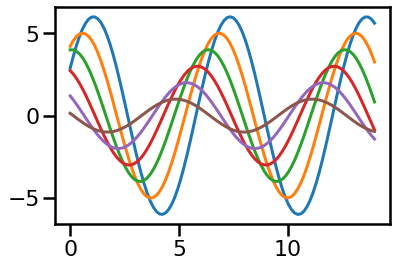
# 创建正弦函数

def sinplot(flip=1):

    x = np.linspace(0, 14, 100)

    for i in range(1, 7):

        plt.plot(x, np.sin(x + i * .5) * (7 - i) * flip)

sinplot()
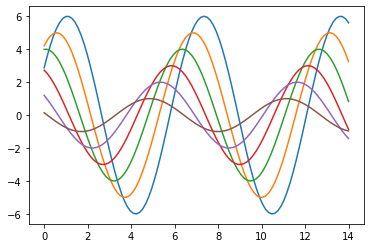
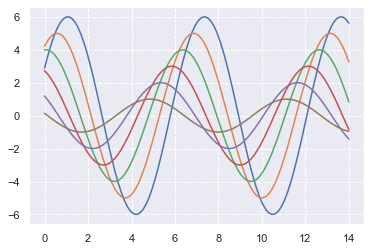
sns.set()     #设置seaborn默认风格,一旦设置就设置了全局的风格

sinplot()

plt.grid(linestyle = '--')     #设置网格线
局部风格设置
seaborn.set_style(style=None, rc=None)

Docstring:

Set the aesthetic style of the plots.

This affects things like the color of the axes, whether a grid is

enabled by default, and other aesthetic elements.

Parameters

----------

style : dict, None, or one of {darkgrid, whitegrid, dark, white, ticks}

    A dictionary of parameters or the name of a preconfigured set.

rc : dict, optional

    Parameter mappings to override the values in the preset seaborn

    style dictionaries. This only updates parameters that are

    considered part of the style definition.

Examples

--------

>>> set_style("whitegrid")

>>> set_style("ticks", {"xtick.major.size": 8, "ytick.major.size": 8})

See Also

--------

axes_style : return a dict of parameters or use in a ``with`` statement

             to temporarily set the style.

set_context : set parameters to scale plot elements

set_palette : set the default color palette for figures
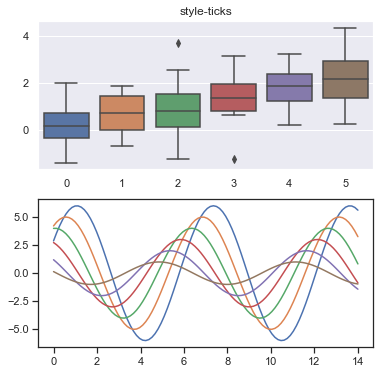
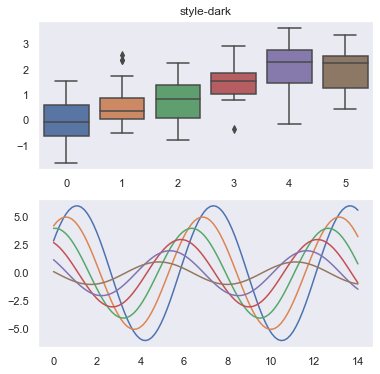
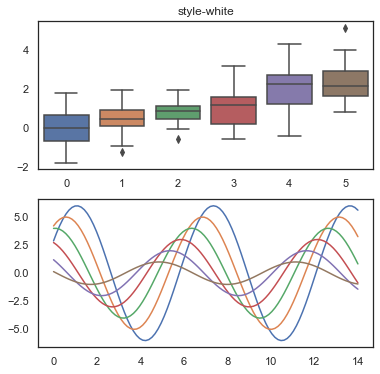
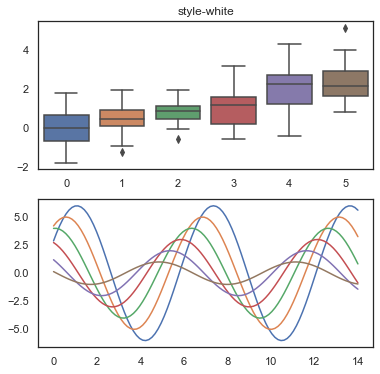
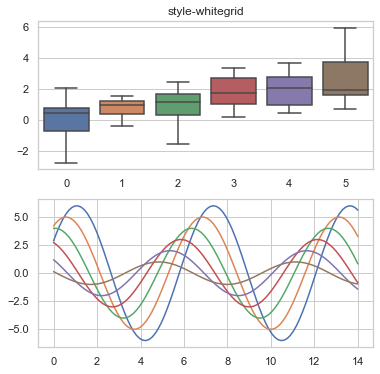
#set_style()切换图表风格

#风格选择:"white","dark","whitegrid","darkgrid","ticks"

fig = plt.figure(figsize=(6, 6))

style = 'ticks'

ax1 = fig.add_subplot(2,1,1)

sns.set_style(style)

data = np.random.normal(size=(20,6)) + np.arange(6)/2

sns.boxplot(data=data)

plt.title('style-{0}'.format(style))

ax2 = fig.add_subplot(2,1,2)

sinplot()
设置图形坐标轴
seaborn.despine(

    fig=None,

    ax=None,

    top=True,

    right=True,

    left=False,

    bottom=False,

    offset=None,

    trim=False,

)

Docstring:

Remove the top and right spines from plot(s).

fig : matplotlib figure, optional

    Figure to despine all axes of, default uses current figure.

ax : matplotlib axes, optional

    Specific axes object to despine.

top, right, left, bottom : boolean, optional

    If True, remove that spine.

offset : int or dict, optional

    Absolute distance, in points, spines should be moved away

    from the axes (negative values move spines inward). A single value

    applies to all spines; a dict can be used to set offset values per

    side.

trim : bool, optional

    If True, limit spines to the smallest and largest major tick

    on each non-despined axis.
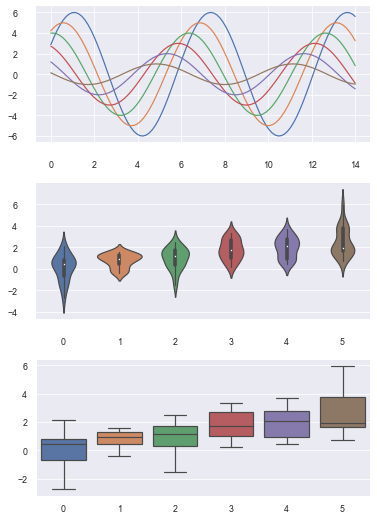
#创建图表

fig = plt.figure(figsize=(6,9))

plt.subplots_adjust(hspace=0.3)

sns.set_style('darkgrid')

ax1 = fig.add_subplot(3,1,1)

sinplot()

sns.despine()      #默认删除上和右坐标轴

ax2 = fig.add_subplot(3,1,2)

sns.violinplot(data=data)

sns.despine(offset=10, trim=True)      #offset: 与坐标轴之间的偏移;trim=True,将坐标轴限制在数据最大和最小值之间

ax3 = fig.add_subplot(3,1,3)

sns.boxplot(data=data, palette='deep')

sns.despine(left=False, right=True)   #隐藏右边坐标轴
设置子图风格
seaborn.axes_style(style=None, rc=None)

Docstring:

Return a parameter dict for the aesthetic style of the plots.

This affects things like the color of the axes, whether a grid is

enabled by default, and other aesthetic elements.

This function returns an object that can be used in a ``with`` statement

to temporarily change the style parameters.

Parameters

----------

style : dict, None, or one of {darkgrid, whitegrid, dark, white, ticks}

    A dictionary of parameters or the name of a preconfigured set.

rc : dict, optional

    Parameter mappings to override the values in the preset seaborn

    style dictionaries. This only updates parameters that are

    considered part of the style definition.
#axes_style()设置局部图表(子图)风格

#与with配合使用,实现局部代码区分

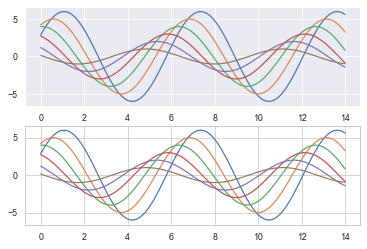
with sns.axes_style('darkgrid'):

    plt.subplot(211)

    sinplot()

#外部图表风格

sns.set_style('whitegrid')

plt.subplot(212)

sinplot()
设置图形显示尺度
seaborn.set_context(context=None, font_scale=1, rc=None)

Docstring:

Set the plotting context parameters.

This affects things like the size of the labels, lines, and other

elements of the plot, but not the overall style. The base context

is "notebook", and the other contexts are "paper", "talk", and "poster",

which are version of the notebook parameters scaled by .8, 1.3, and 1.6,

respectively.

Parameters

----------

context : dict, None, or one of {paper, notebook, talk, poster}

    A dictionary of parameters or the name of a preconfigured set.

font_scale : float, optional

    Separate scaling factor to independently scale the size of the

    font elements.

rc : dict, optional

    Parameter mappings to override the values in the preset seaborn

    context dictionaries. This only updates parameters that are

    considered part of the context definition.

Examples

--------

>>> set_context("paper")

>>> set_context("talk", font_scale=1.4)

>>> set_context("talk", rc={"lines.linewidth": 2})
#set_context()设置图形显示尺度

#尺度类型:"paper","notebook","talk","poster"

sns.set_context()      #默认为notebook

sinplot()
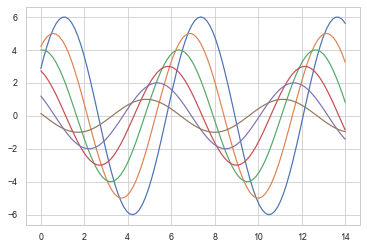
sns.set_context('paper')       #paper风格

sinplot()
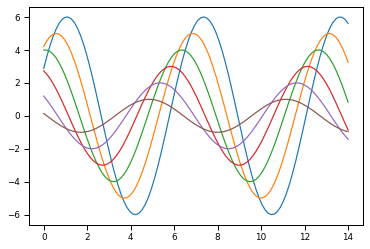
sns.set_context('talk')        #talk风格

sinplot()
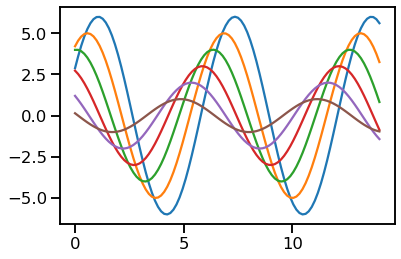
sns.set_context('poster')      #poster风格

sinplot()
Seaborn风格设置的更多相关文章
- 可视化库-seaborn-布局风格设置(第五天)
1. sns.set_style() 进行风格设置, sns.set() 进行设置的重置, 五种风格 # 1.darkgrid# 2.whitegrid# 3.dark# 4.white# 5 tic ...
- 5-1可视化库Seabon-整体布局风格设置
In [1]: import seaborn as sns import numpy as np import matplotlib as mpl import matplotlib.pyplot a ...
- 谈谈CListCtrl 扩展风格设置方法-SetExtendedStyle和ModifyStyleEx 比較
谈谈CListCtrl 扩展风格设置方法 --------------------------------------SetExtendedStyle和ModifyStyleEx 比較 对于刚開始学习 ...
- android studio eclipse keymap theme 快捷键 主题风格设置
android studio eclipse keymap theme 快捷键 主题风格设置 将Android Studio的快捷键设置与eclipse一致,使用习惯的快捷键才顺手.Mac系统下:进入 ...
- 图表可视化seaborn风格和调色盘
seaborn是基于matplotlib的python数据可视化库,提供更高层次的API封装,包括一些高级图表可视化等工具. 使用seaborn需要先安装改模块pip3 install seaborn ...
- Intellij IDEA 13.1.3 字体,颜色,风格设置
作者QQ:1095737364 打开file-->settings,然后根据提示完成设置,当然,可以根据自己的爱好设置自己的风格,那个工程区的背景我还没有找到在什么地方,如果你找到了麻烦告诉我一 ...
- Android 圆形ProgressBar风格设置
Android系统自带的ProgressBar风格不是很好,如果想自己设置风格的话,一般有几种方法.首先介绍一下第一种方法通过动画实现.在res的anim下创建动画资源loading.xml: < ...
- 黄聪:Xmind修改默认字体风格设置
Xmind是一款非常好用的思维导图软件,但默认字体使用宋体不够好看,软件本身不支持设置默认字体,但通过修改配置文件达到配置默认字体的目的 默认控制风格的配置文件位置 XMind\plugins\org ...
- Eclipse代码风格设置
在编写代码的过程中,代码的呈现形式是通过eclipse的Formatter配置文件所控制的.我们可以按照自己的习惯生成属于自己的代码风格配置文件,方便规范以后的代码编写形式.具体的操作步骤如下所示:( ...
- CDockablepane风格设置
屏蔽掉pane右上角的几个按钮 即将CDockablePane右上角的三个按钮屏蔽. 1 去掉关闭按钮 在CDockablePane的派生类中,重写方法CanBeClosed即可 ...
随机推荐
- Vue3学习(二十)- 富文本插件wangeditor的使用
写在前面 学习.写作.工作.生活,都跟心情有很大关系,甚至有时候我更喜欢一个人独处,戴上耳机coding的感觉. 明显现在的心情,比中午和上午好多了,心情超棒的,靠自己解决了两个问题: 新增的时候点击 ...
- Html飞机大战(十一): 飞机撞毁爆炸
好家伙,这篇写英雄撞机爆炸 我们先把子弹销毁弄上去 子弹穿过敌机,敌机爆炸后消失,子弹同样也应该销毁,(当然后续会考虑穿甲弹) 然后我们还要把主角碰撞爆炸检测也加上去 因为他们共用一个思路 ...
- 【Azure Redis】中国区Redis在东三区的资源无法在通过门户上与北三区资源之间建立灾备链接
问题描述 为应用启用灾备管理,在北三区建立了一个Azure Redis,同时,在东三区也建立了一个同样的Prem级Redis服务.但是在建立灾备(DR:Disease Recovery)时候,却无法选 ...
- 【Azure Developer】示例: 在中国区调用MSGraph SDK通过User principal name获取到User信息,如Object ID
问题描述 示例调用MSGraph SDK通过User principal name获取到User信息,如Object ID. 参考资料 选择 Microsoft Graph 身份验证提供程序 : ht ...
- 【Azure 存储服务】如何查看Storage Account的删除记录,有没有接口可以下载近1天删除的Blob文件信息呢?
问题描述 如何查看Storage Account的删除记录,有没有接口可以下载近1天删除的Blob文件信息呢?因为有时候出现误操作删除了某些Blob文件,想通过查看删除日志来定位被删除的文件信息. 问 ...
- 【Azure Developer】Visual Studio 2019中如何修改.Net Core应用通过IIS Express Host的应用端口(SSL/非SSL)
问题描述 在VS 2019调试 .Net Core Web应用的时,使用IIS Express Host,默认情况下会自动生成HTTP, HTTPS的端口,在VS 2019的项目属性->Debu ...
- 【Azure Developer】AAD API如何获取用户“Block sign in”信息(accountEnabled)
问题描述 使用API获取所有Azure AD中的用户列表,API所参考的文档:https://docs.microsoft.com/en-us/graph/api/user-list?view=gra ...
- C++ 多线程笔记2 线程同步
C++ 多线程笔记2 线程同步 并发(Concurrency)和并行(Parallelism) 并发是指在单核CPU上,通过时间片轮转的方式,让多个任务看起来像是同时进行的.实际上,CPU在一个时间段 ...
- Windows10 windows installer卸载或安装不了软件怎么办?
先说我的方法: 1.把安装出现问题的软件或者想要卸载的软件的安装目录下的所有文件都删除. 2.用清理软件清理一下垃圾,包括注册表,这里我自己使用的是火绒->安全工具- ...
- Mybatis中没有返回值的查询方法
最近在项目开发中发现一件非常有意思的事情,一个Mapper.java文件中有一个查询方法没有返回值,这引起了我的好奇心, 没有返回值查询还有什么用呢? 仔细去看这个Mapper.java文件对应的xm ...