
TensorRT&Sample&Python[fc_plugin_caffe_mnist]
本文是基于TensorRT 5.0.2基础上,关于其内部的fc_plugin_caffe_mnist例子的分析和介绍。
本例子相较于前面例子的不同在于,其还包含cpp代码,且此时依赖项还挺多。该例子展示如何使用基于cpp写的plugin,用tensorrt python 绑定接口和caffe解析器一起工作的过程。该例子使用cuBLAS和cuDNn实现一个全连接层,然后实现成tensorrt plugin,然后用pybind11生成对应python绑定,这些绑定随后被用来注册为caffe解析器的一部分。
1 引言
假设当前路径为:
TensorRT-5.0.2.6/samples
其对应当前例子文件目录树为:
# tree python

python

├── common.py

├── fc_plugin_caffe_mnist

│   ├── CMakeLists.txt

│   ├── __init__.py

│   ├── plugin

│   │   ├── FullyConnected.h

│   │   └── pyFullyConnected.cpp

│   ├── README.md

│   ├── requirements.txt

│   └── sample.py
其中:
- plugin包含FullyConnected 层的plugin:
- FullyConnected.h 基于CUDA,cuDNN,cuBLAS实现该插件;
- pyFullyConnected.cpp 生成关于FCPlugin和FCPluginFactory插件的python绑定;
- sample.py 使用提供的FullyConnected 层插件运行MNIST网络;
2 安装依赖
git clone -b v2.2.3 https://github.com/pybind/pybind11.git
- 安装python包:
Pillow

pycuda

numpy

argparse
3 编译该插件
- 创建build文件夹,然后进入该文件夹
mkdir build && pushd build
- cmake生成对应Makefile,此处可以自由设定一些参数。如果其中有些依赖不在默认位置路径上,可以cmake手动指定,关于Cmake的文档,可参考
cmake .. -DCUDA_ROOT=/usr/local/cuda-9.0 \

         -DPYBIND11_DIR=/root/pybind11/ \

         -DPYTHON3_INC_DIR=/usr/local/python3/include/python3.5m/ \

         -DNVINFER_LIB=/TensorRT-5.0.2.6/lib/libnvinfer.so  \

         -D_NVINFER_PLUGIN_LIB=/TensorRT-5.0.2.6/lib/ \

         -D_NVPARSERS_LIB=/TensorRT-5.0.2.6/lib \

         -DTRT_INC_DIR=/TensorRT-5.0.2.6/include/
注意cmake打出的日志中的VARIABLE_NAME-NOTFOUND
- 进行编译
make -j32
- 跳出build
popd
4 代码解析
首先,按上面编译过程所述,在build文件夹中会需要调用cmake命令,而该命令会读取上一层,也就是CMakeLists.txt,
其中关于find_library, include_directories, add_subdirectory的可以参考cmake-command文档
cmake_minimum_required(VERSION 3.2 FATAL_ERROR) # 最小cmake版本限定

project(FCPlugin LANGUAGES CXX C) # 项目名称和对应的编程语言

# 设定一个宏set_ifndef,用于操作当变量未找到时的行为:此处将未找到变量var 设定为val

macro(set_ifndef var val)

    if(NOT ${var})

        set(${var} ${val})

    endif()

    message(STATUS "Configurable variable ${var} set to ${${var}}")

endmacro()

# -------- CONFIGURATION --------

# Set module name here. MUST MATCH the module name specified in the .cpp

set_ifndef(PY_MODULE_NAME fcplugin)

set(CMAKE_CXX_STANDARD 11) # 设定C++11标注

set(PYBIND11_CPP_STANDARD -std=c++11) # pybind11 defaults to c++14.

set_ifndef(PYBIND11_DIR $ENV{HOME}/pybind11/)

set_ifndef(CUDA_VERSION 10.0)

set_ifndef(CUDA_ROOT /usr/local/cuda-${CUDA_VERSION})

set_ifndef(CUDNN_ROOT ${CUDA_ROOT})

set_ifndef(PYTHON_ROOT /usr/include)

set_ifndef(TRT_LIB_DIR /usr/lib/x86_64-linux-gnu)

set_ifndef(TRT_INC_DIR /usr/include/x86_64-linux-gnu)

# 寻找依赖

message("\nThe following variables are derived from the values of the previous variables unless provided explicitly:\n")

find_path(_CUDA_INC_DIR cuda_runtime_api.h HINTS ${CUDA_ROOT} PATH_SUFFIXES include)

set_ifndef(CUDA_INC_DIR ${_CUDA_INC_DIR})

find_library(_CUDA_LIB cudart HINTS ${CUDA_ROOT} PATH_SUFFIXES lib lib64)

set_ifndef(CUDA_LIB ${_CUDA_LIB})

find_library(_CUBLAS_LIB cublas HINTS ${CUDA_ROOT} PATH_SUFFIXES lib lib64)

set_ifndef(CUBLAS_LIB ${_CUBLAS_LIB})

find_path(_CUDNN_INC_DIR cudnn.h HINTS ${CUDNN_ROOT} PATH_SUFFIXES include x86_64-linux-gnu)

set_ifndef(CUDNN_INC_DIR ${_CUDNN_INC_DIR})

find_library(_CUDNN_LIB cudnn HINTS ${CUDNN_ROOT} PATH_SUFFIXES lib lib64 x86_64-linux-gnu)

set_ifndef(CUDNN_LIB ${_CUDNN_LIB})

find_library(_TRT_INC_DIR NvInfer.h HINTS ${TRT_INC_DIR} PATH_SUFFIXES include x86_64-linux-gnu)

set_ifndef(TRT_INC_DIR ${_TRT_INC_DIR})

find_library(_NVINFER_LIB nvinfer HINTS ${TRT_LIB_DIR} PATH_SUFFIXES lib lib64 x86_64-linux-gnu)

set_ifndef(NVINFER_LIB ${_NVINFER_LIB})

find_library(_NVPARSERS_LIB nvparsers HINTS ${TRT_LIB_DIR} PATH_SUFFIXES lib lib64 x86_64-linux-gnu)

set_ifndef(NVPARSERS_LIB ${_NVPARSERS_LIB})

find_library(_NVINFER_PLUGIN_LIB nvinfer_plugin HINTS ${TRT_LIB_DIR} PATH_SUFFIXES lib lib64 x86_64-linux-gnu)

set_ifndef(NVINFER_PLUGIN_LIB ${_NVINFER_PLUGIN_LIB})

find_path(_PYTHON2_INC_DIR Python.h HINTS ${PYTHON_ROOT} PATH_SUFFIXES python2.7)

set_ifndef(PYTHON2_INC_DIR ${_PYTHON2_INC_DIR})

find_path(_PYTHON3_INC_DIR Python.h HINTS ${PYTHON_ROOT} PATH_SUFFIXES python3.7 python3.6 python3.5 python3.4)

set_ifndef(PYTHON3_INC_DIR ${_PYTHON3_INC_DIR})

# -------- BUILDING --------

# 增加include文件夹路径

include_directories(${TRT_INC_DIR} ${CUDA_INC_DIR} ${CUDNN_INC_DIR} ${PYBIND11_DIR}/include/)

# CMAKE_BINARY_DIR:表示build的根路径,这里是在build文件夹增加pybind11文件夹

add_subdirectory(${PYBIND11_DIR} ${CMAKE_BINARY_DIR}/pybind11)

# CMAKE_SOURCE_DIR:表示项目的根路径

file(GLOB_RECURSE SOURCE_FILES ${CMAKE_SOURCE_DIR}/plugin/*.cpp)

# Bindings library. The module name MUST MATCH the module name specified in the .cpp

# 是否支持python3

if(PYTHON3_INC_DIR AND NOT (${PYTHON3_INC_DIR} STREQUAL "None"))

    pybind11_add_module(${PY_MODULE_NAME} SHARED THIN_LTO ${SOURCE_FILES})

    target_include_directories(${PY_MODULE_NAME} BEFORE PUBLIC ${PYTHON3_INC_DIR})

    target_link_libraries(${PY_MODULE_NAME} PRIVATE ${CUDNN_LIB} ${CUDA_LIB} ${CUBLAS_LIB} ${NVINFER_LIB} ${NVPARSERS_LIB} ${NVINFER_PLUGIN_LIB})

endif()

# 是否支持python2

if(PYTHON2_INC_DIR AND NOT (${PYTHON2_INC_DIR} STREQUAL "None"))

    # Suffix the cmake target name with a 2 to differentiate from the Python 3 bindings target.

    pybind11_add_module(${PY_MODULE_NAME}2 SHARED THIN_LTO ${SOURCE_FILES})

    target_include_directories(${PY_MODULE_NAME}2 BEFORE PUBLIC ${PYTHON2_INC_DIR})

    target_link_libraries(${PY_MODULE_NAME}2 PRIVATE ${CUDNN_LIB} ${CUDA_LIB} ${CUBLAS_LIB} ${NVINFER_LIB} ${NVPARSERS_LIB} ${NVINFER_PLUGIN_LIB})

    # Rename to remove the .cpython-35... extension.

    set_target_properties(${PY_MODULE_NAME}2 PROPERTIES OUTPUT_NAME ${PY_MODULE_NAME} SUFFIX ".so")

    # Python 2 requires an empty __init__ file to be able to import.

    file(WRITE ${CMAKE_BINARY_DIR}/__init__.py "")

endif()
运行结果如图:
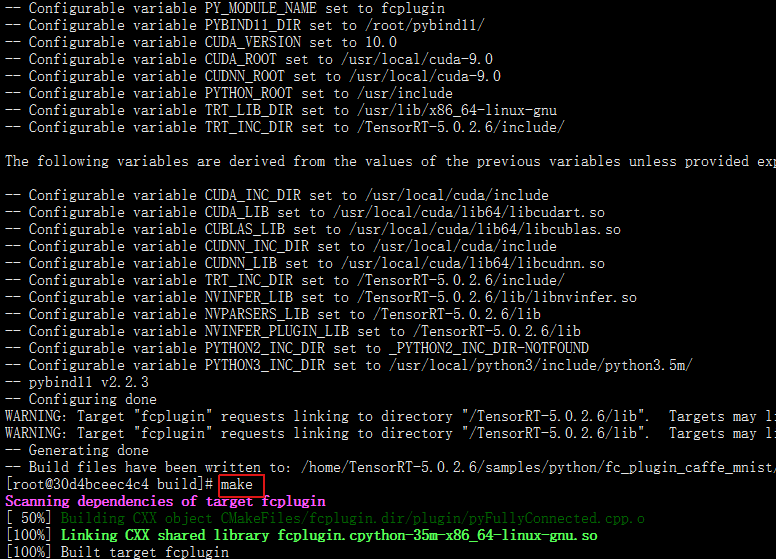
现在来看FullyConnected.h,因为长期不写cpp,所以对cpp代码都生疏了
#ifndef _FULLY_CONNECTED_H_

#define _FULLY_CONNECTED_H_

#include <cassert>

#include <cstring>

#include <cuda_runtime_api.h>

#include <cudnn.h>

#include <cublas_v2.h>

#include <stdexcept>

#include "NvInfer.h" //在路径 /TensorRT-5.0.2.6/include/

#include "NvCaffeParser.h" //在路径 /TensorRT-5.0.2.6/include/

#define CHECK(status) { if (status != 0) throw std::runtime_error(__FILE__ +  __LINE__ + std::string{"CUDA Error: "} + std::to_string(status)); }

// 将数据从host移动到device

nvinfer1::Weights copyToDevice(const void* hostData, int count)

{

	void* deviceData;

	CHECK(cudaMalloc(&deviceData, count * sizeof(float)));

	CHECK(cudaMemcpy(deviceData, hostData, count * sizeof(float), cudaMemcpyHostToDevice));

	return nvinfer1::Weights{nvinfer1::DataType::kFLOAT, deviceData, count};

}

//将数据从device移动到host

int copyFromDevice(char* hostBuffer, nvinfer1::Weights deviceWeights)

{

	*reinterpret_cast<int*>(hostBuffer) = deviceWeights.count;

	CHECK(cudaMemcpy(hostBuffer + sizeof(int), deviceWeights.values, deviceWeights.count * sizeof(float), cudaMemcpyDeviceToHost));

	return sizeof(int) + deviceWeights.count * sizeof(float);

}

//-----------------------------

/*建立FCPlugin类*/

class FCPlugin: public nvinfer1::IPluginExt

{

public:

	// In this simple case we're going to infer the number of output channels from the bias weights.

	// The knowledge that the kernel weights are weights[0] and the bias weights are weights[1] was

	// divined from the caffe innards

	FCPlugin(const nvinfer1::Weights* weights, int nbWeights)

	{

		assert(nbWeights == 2);

		mKernelWeights = copyToDevice(weights[0].values, weights[0].count);

		mBiasWeights = copyToDevice(weights[1].values, weights[1].count);

	}

	// 构造函数,用于从一个字节流中创建plugin

	FCPlugin(const void* data, size_t length)

	{

		const char* d = reinterpret_cast<const char*>(data), *a = d;

		mKernelWeights = copyToDevice(d + sizeof(int), reinterpret_cast<const int&>(d));

		d += sizeof(int) + mKernelWeights.count * sizeof(float);

		mBiasWeights = copyToDevice(d + sizeof(int), reinterpret_cast<const int&>(d));

		d += sizeof(int) + mBiasWeights.count * sizeof(float);

		assert(d == a + length);

	}

	virtual int getNbOutputs() const override { return 1; }

	virtual nvinfer1::Dims getOutputDimensions(int index, const nvinfer1::Dims* inputs, int nbInputDims) override

	{

		assert(index == 0 && nbInputDims == 1 && inputs[0].nbDims == 3);

		return nvinfer1::DimsCHW{static_cast<int>(mBiasWeights.count), 1, 1};

	}

	virtual int initialize() override

	{

		CHECK(cudnnCreate(&mCudnn));

		CHECK(cublasCreate(&mCublas));

		// Create cudnn tensor descriptors for bias addition.

		CHECK(cudnnCreateTensorDescriptor(&mSrcDescriptor));

		CHECK(cudnnCreateTensorDescriptor(&mDstDescriptor));

		return 0;

	}

	virtual void terminate() override

	{

		CHECK(cudnnDestroyTensorDescriptor(mSrcDescriptor));

		CHECK(cudnnDestroyTensorDescriptor(mDstDescriptor));

		CHECK(cublasDestroy(mCublas));

		CHECK(cudnnDestroy(mCudnn));

	}

    // This plugin requires no workspace memory during build time.

	virtual size_t getWorkspaceSize(int maxBatchSize) const override { return 0; }

	virtual int enqueue(int batchSize, const void* const* inputs, void** outputs, void* workspace, cudaStream_t stream) override

	{

		int nbOutputChannels = mBiasWeights.count;

		int nbInputChannels = mKernelWeights.count / nbOutputChannels;

		constexpr float kONE = 1.0f, kZERO = 0.0f;

		// Do matrix multiplication.

		cublasSetStream(mCublas, stream);

		cudnnSetStream(mCudnn, stream);

		CHECK(cublasSgemm(mCublas, CUBLAS_OP_T, CUBLAS_OP_N, nbOutputChannels, batchSize, nbInputChannels, &kONE,

				reinterpret_cast<const float*>(mKernelWeights.values), nbInputChannels,

				reinterpret_cast<const float*>(inputs[0]), nbInputChannels, &kZERO,

				reinterpret_cast<float*>(outputs[0]), nbOutputChannels));

        // Add bias.

		CHECK(cudnnSetTensor4dDescriptor(mSrcDescriptor, CUDNN_TENSOR_NCHW, CUDNN_DATA_FLOAT, 1, nbOutputChannels, 1, 1));

		CHECK(cudnnSetTensor4dDescriptor(mDstDescriptor, CUDNN_TENSOR_NCHW, CUDNN_DATA_FLOAT, batchSize, nbOutputChannels, 1, 1));

		CHECK(cudnnAddTensor(mCudnn, &kONE, mSrcDescriptor, mBiasWeights.values, &kONE, mDstDescriptor, outputs[0]));

		return 0;

	}

	// For this sample, we'll only support float32 with NCHW.

	virtual bool supportsFormat(nvinfer1::DataType type, nvinfer1::PluginFormat format) const override

	{

		return (type == nvinfer1::DataType::kFLOAT && format == nvinfer1::PluginFormat::kNCHW);

	}

	void configureWithFormat(const nvinfer1::Dims* inputDims, int nbInputs, const nvinfer1::Dims* outputDims, int nbOutputs, nvinfer1::DataType type, nvinfer1::PluginFormat format, int maxBatchSize)

	{

		assert(nbInputs == 1 && inputDims[0].d[1] == 1 && inputDims[0].d[2] == 1);

		assert(nbOutputs == 1 && outputDims[0].d[1] == 1 && outputDims[0].d[2] == 1);

		assert(mKernelWeights.count == inputDims[0].d[0] * inputDims[0].d[1] * inputDims[0].d[2] * mBiasWeights.count);

	}

	virtual size_t getSerializationSize() override

	{

		return sizeof(int) * 2 + mKernelWeights.count * sizeof(float) + mBiasWeights.count * sizeof(float);

	}

	virtual void serialize(void* buffer) override

	{

		char* d = reinterpret_cast<char*>(buffer), *a = d;

		d += copyFromDevice(d, mKernelWeights);

		d += copyFromDevice(d, mBiasWeights);

		assert(d == a + getSerializationSize());

	}

	// 析构函数,释放buffer.

	virtual ~FCPlugin()

	{

		cudaFree(const_cast<void*>(mKernelWeights.values));

		mKernelWeights.values = nullptr;

		cudaFree(const_cast<void*>(mBiasWeights.values));

		mBiasWeights.values = nullptr;

	}

private:

	cudnnHandle_t mCudnn;

	cublasHandle_t mCublas;

	nvinfer1::Weights mKernelWeights{nvinfer1::DataType::kFLOAT, nullptr}, mBiasWeights{nvinfer1::DataType::kFLOAT, nullptr};

	cudnnTensorDescriptor_t mSrcDescriptor, mDstDescriptor;

};

/*建立FCPluginFactory类*/

class FCPluginFactory : public nvcaffeparser1::IPluginFactoryExt, public nvinfer1::IPluginFactory

{

public:

	bool isPlugin(const char* name) override { return isPluginExt(name); }

	bool isPluginExt(const char* name) override { return !strcmp(name, "ip2"); }

    // Create a plugin using provided weights.

	virtual nvinfer1::IPlugin* createPlugin(const char* layerName, const nvinfer1::Weights* weights, int nbWeights) override

	{

		assert(isPluginExt(layerName) && nbWeights == 2);

		assert(mPlugin == nullptr);

        // This plugin will need to be manually destroyed after parsing the network, by calling destroyPlugin.

		mPlugin = new FCPlugin{weights, nbWeights};

		return mPlugin;

	}

    // Create a plugin from serialized data.

	virtual nvinfer1::IPlugin* createPlugin(const char* layerName, const void* serialData, size_t serialLength) override

	{

		assert(isPlugin(layerName));

        // This will be automatically destroyed when the engine is destroyed.

		return new FCPlugin{serialData, serialLength};

	}

    // User application destroys plugin when it is safe to do so.

    // Should be done after consumers of plugin (like ICudaEngine) are destroyed.

	void destroyPlugin() { delete mPlugin; }

    FCPlugin* mPlugin{ nullptr };

};

#endif //_FULLY_CONNECTED_H
现在来看pyFullyConnected.cpp该源码中用到了pybind11,关于其文档
#include "FullyConnected.h"

#include "NvInfer.h"

#include "NvCaffeParser.h"

#include <pybind11/pybind11.h>

PYBIND11_MODULE(fcplugin, m)

{

    namespace py = pybind11;

    // 以python方式导入tensorrt模块.

    py::module::import("tensorrt");

    // Note that we only need to bind the constructors manually. Since all other methods override IPlugin functionality, they will be automatically available in the python bindings.

    // The `std::unique_ptr<FCPlugin, py::nodelete>` specifies that Python is not responsible for destroying the object. This is required because the destructor is private.

    py::class_<FCPlugin, nvinfer1::IPluginExt, std::unique_ptr<FCPlugin, py::nodelete>>(m, "FCPlugin")

        // Bind the normal constructor as well as the one which deserializes the plugin

        .def(py::init<const nvinfer1::Weights*, int>())

        .def(py::init<const void*, size_t>())

    ;

    // Since the createPlugin function overrides IPluginFactory functionality, we do not need to explicitly bind it here.

    // We specify py::multiple_inheritance because we have not explicitly specified nvinfer1::IPluginFactory as a base class.

    py::class_<FCPluginFactory, nvcaffeparser1::IPluginFactoryExt>(m, "FCPluginFactory", py::multiple_inheritance())

        // Bind the default constructor.

        .def(py::init<>())

        // The destroy_plugin function does not override the base class, so we must bind it explicitly.

        .def("destroy_plugin", &FCPluginFactory::destroyPlugin)

    ;

}
cpp的代码就先不解释了。。。
接着分析sample.py
# This sample uses a Caffe model along with a custom plugin to create a TensorRT engine.

from random import randint

from PIL import Image

import numpy as np

import pycuda.driver as cuda

import pycuda.autoinit

import tensorrt as trt

try:

    from build import fcplugin

except ImportError as err:

    raise ImportError("""ERROR: Failed to import module ({})

Please build the FullyConnected sample plugin.

For more information, see the included README.md

Note that Python 2 requires the presence of `__init__.py` in the build folder""".format(err))

import sys, os

sys.path.insert(1, os.path.join(sys.path[0], ".."))

# import common

# 这里将common中的GiB和find_sample_data,do_inference等函数移动到该py文件中,保证自包含。

def GiB(val):

    '''以GB为单位,计算所需要的存储值,向左位移10bit表示KB,20bit表示MB '''

    return val * 1 << 30

def find_sample_data(description="Runs a TensorRT Python sample", subfolder="", find_files=[]):

    '''该函数就是一个参数解析函数。

    Parses sample arguments.

    Args:

        description (str): Description of the sample.

        subfolder (str): The subfolder containing data relevant to this sample

        find_files (str): A list of filenames to find. Each filename will be replaced with an absolute path.

    Returns:

        str: Path of data directory.

    Raises:

        FileNotFoundError

    '''

    # 为了简洁,这里直接将路径硬编码到代码中。

    data_root = kDEFAULT_DATA_ROOT = os.path.abspath("/TensorRT-5.0.2.6/python/data/")

    subfolder_path = os.path.join(data_root, subfolder)

    if not os.path.exists(subfolder_path):

        print("WARNING: " + subfolder_path + " does not exist. Using " + data_root + " instead.")

    data_path = subfolder_path if os.path.exists(subfolder_path) else data_root

    if not (os.path.exists(data_path)):

        raise FileNotFoundError(data_path + " does not exist.")

    for index, f in enumerate(find_files):

        find_files[index] = os.path.abspath(os.path.join(data_path, f))

        if not os.path.exists(find_files[index]):

            raise FileNotFoundError(find_files[index] + " does not exist. ")

    if find_files:

        return data_path, find_files

    else:

        return data_path

#-----------------

TRT_LOGGER = trt.Logger(trt.Logger.WARNING)

class ModelData(object):

    INPUT_NAME = "input"

    INPUT_SHAPE = (1, 28, 28)

    OUTPUT_NAME = "prob"

    OUTPUT_SHAPE = (10, )

    DTYPE = trt.float32

# 用一个解析器从binary_proto中检索mean data.

def retrieve_mean(mean_proto):

    with trt.CaffeParser() as parser:

        return parser.parse_binary_proto(mean_proto)

# 创建解析器的plugin factory. 设定成全局是因为可以在engine销毁之后再销毁.

fc_factory = fcplugin.FCPluginFactory()

'''main第二步:构建engine '''

def build_engine(deploy_file, model_file):

    with trt.Builder(TRT_LOGGER) as builder, \

         builder.create_network() as network, \

         trt.CaffeParser() as parser:

        builder.max_workspace_size = GiB(1)

        # 设定解析器的plugin factory。这里将其绑定到引用是为了后续能够手动销毁

        # parser.plugin_factory_ext 是一个 write-only属性

        ''' plugin_factory_ext是CaffeParser特有的接口,为了接入用户定义的组件

       https://docs.nvidia.com/deeplearning/sdk/tensorrt-api/python_api/parsers/Caffe/pyCaffe.html?highlight=plugin_factory_ext

        '''

        parser.plugin_factory_ext = fc_factory

        # 解析该模型,并构建engine

        model_tensors = parser.parse(deploy=deploy_file, model=model_file, network=network, dtype=ModelData.DTYPE)

        # 标记网络的输出

        network.mark_output(model_tensors.find(ModelData.OUTPUT_NAME))

        return builder.build_cuda_engine(network)

'''main中第三步:分配buffer '''

def allocate_buffers(engine):

    inputs = []

    outputs = []

    bindings = []

    stream = cuda.Stream()

    for binding in engine:

        size = trt.volume(engine.get_binding_shape(binding)) * engine.max_batch_size

        dtype = trt.nptype(engine.get_binding_dtype(binding))

        # 分配host和device端的buffer

        host_mem = cuda.pagelocked_empty(size, dtype)

        device_mem = cuda.mem_alloc(host_mem.nbytes)

        # 将device端的buffer追加到device的bindings.

        bindings.append(int(device_mem))

        # Append to the appropriate list.

        if engine.binding_is_input(binding):

            inputs.append(HostDeviceMem(host_mem, device_mem))

        else:

            outputs.append(HostDeviceMem(host_mem, device_mem))

    return inputs, outputs, bindings, stream

'''main中第四步:选择测试样本 '''

def load_normalized_test_case(data_path, pagelocked_buffer, mean, case_num=randint(0, 9)):

    test_case_path = os.path.join(data_path, str(case_num) + ".pgm")

    # Flatten图像为1维数组,然后归一化,并copy到pagelocked内存中。

    img = np.array(Image.open(test_case_path)).ravel()

    np.copyto(pagelocked_buffer, img - mean)

    return case_num

'''main中第五步:执行inference '''

# 该函数可以适应多个输入/输出;输入和输出格式为HostDeviceMem对象组成的列表

def do_inference(context, bindings, inputs, outputs, stream, batch_size=1):

    # 将数据移动到GPU

    [cuda.memcpy_htod_async(inp.device, inp.host, stream) for inp in inputs]

    # 执行inference.

    context.execute_async(batch_size=batch_size, bindings=bindings, stream_handle=stream.handle)

    # 将结果从 GPU写回到host端

    [cuda.memcpy_dtoh_async(out.host, out.device, stream) for out in outputs]

    # 同步stream

    stream.synchronize()

    # 返回host端的输出结果

    return [out.host for out in outputs]

def main():

    ''' 1 - 读取caffe生成的模型文件'''

    data_path, [deploy_file, model_file, mean_proto] = find_sample_data(

          description="Runs an MNIST network using a Caffe model file",

          subfolder="mnist",

         find_files=["mnist.prototxt",

                 "mnist.caffemodel",

                 "mnist_mean.binaryproto"])

    ''' 2 - 基于build_engine构建engine'''

    with build_engine(deploy_file, model_file) as engine:

        ''' 3 - 构建engine, 分配buffers, 创建一个流 '''

        inputs, outputs, bindings, stream = allocate_buffers(engine)

        mean = retrieve_mean(mean_proto)

        with engine.create_execution_context() as context:

            ''' 4 - 读取测试样本,并归一化'''

            case_num = load_normalized_test_case(data_path, inputs[0].host, mean)

            ''' 5 -执行inference,do_inference函数会返回一个list类型,此处只有一个元素 '''

            [output] = do_inference(context, bindings=bindings, inputs=inputs, outputs=outputs, stream=stream)

            pred = np.argmax(output)

            print("Test Case: " + str(case_num))

            print("Prediction: " + str(pred))

    ''' 6 - 在engine销毁之后,这里手动销毁plugin'''

    fc_factory.destroy_plugin()

if __name__ == "__main__":

    main()
运行结果如图:

TensorRT&Sample&Python[fc_plugin_caffe_mnist]的更多相关文章
- TensorRT&Sample&Python[yolov3_onnx]
本文是基于TensorRT 5.0.2基础上,关于其内部的yolov3_onnx例子的分析和介绍. 本例子展示一个完整的ONNX的pipline,在tensorrt 5.0的ONNX-TensorRT ...
- TensorRT&Sample&Python[uff_custom_plugin]
本文是基于TensorRT 5.0.2基础上,关于其内部的uff_custom_plugin例子的分析和介绍. 本例子展示如何使用cpp基于tensorrt python绑定和UFF解析器进行编写pl ...
- TensorRT&Sample&Python[network_api_pytorch_mnist]
本文是基于TensorRT 5.0.2基础上,关于其内部的network_api_pytorch_mnist例子的分析和介绍. 本例子直接基于pytorch进行训练,然后直接导出权重值为字典,此时并未 ...
- TensorRT&Sample&Python[end_to_end_tensorflow_mnist]
本文是基于TensorRT 5.0.2基础上,关于其内部的end_to_end_tensorflow_mnist例子的分析和介绍. 1 引言 假设当前路径为: TensorRT-5.0.2.6/sam ...
- TensorRT&Sample&Python[introductory_parser_samples]
本文是基于TensorRT 5.0.2基础上,关于其内部的introductory_parser_samples例子的分析和介绍. 1 引言 假设当前路径为: TensorRT-5.0.2.6/sam ...
- tensorRT使用python进行网络定义
- Python API vs C++ API of TensorRT
Python API vs C++ API of TensorRT 本质上,C++ API和Python API应该在支持您的需求方面接近相同.pythonapi的主要优点是数据预处理和后处理都很容易 ...
- (原)pytorch中使用TensorRT
转载请注明出处: https://www.cnblogs.com/darkknightzh/p/11332155.html 代码网址: https://github.com/darkknightzh/ ...
- 基于TensorRT 3的自动驾驶快速INT8推理
基于TensorRT 3的自动驾驶快速INT8推理 Fast INT8 Inference for Autonomous Vehicles with TensorRT 3 自主驾驶需要安全性,需要一种 ...
随机推荐
- Hbase给初学者的“下马威”
自从成为架构师()之后,李大胖的学习动力似乎少了一些,尤其是今年(当然也有一些客观因素). 临近岁末,内心着实有些惭愧,决定学习一把大数据.跟随一下业界前沿(其实已经不是前沿了),梦想着有一天能够拥有 ...
- Refit在ASP.NET Core中的实践
前言 声名式服务调用,己经不算是一个新鲜的话题了,毕竟都出来好些年了. 下面谈谈,最近项目中用到一个这样的组件的简单实践. 目前部分项目用到的是Refit这个组件,都是配合HttpClientFact ...
- TFS2012服务端环境搭建
微软提供的TFS(Team Foundation Server)是为开发者团队提供的一个集 代码仓库.任务管理.文档管理等众多强大功能的服务平台. 1.TFS依赖项 目前TFS已经出到了2018版本, ...
- 第一个用eclipse打包APK时报错一个错误怎么解决
这个问题也是我在android开发群里面解决的一个问题. 如果有什么想法或者想法可以在下面进行评论,我们可以一起交流一下! 我们在eclipse中开发完一个程序之后,需要将其打包为APK的安装包,我们 ...
- 持续集成配置之Nuget
持续集成配置之Nuget Intro 本文是基于微软的 VSTS(Visual Studio Team Service) 做实现公众类库的自动打包及发布. 之前自己的项目有通过 Github 上的 T ...
- webpack入门教程--2
这次是创建第二个JS文件. 我们还是在app文件夹中创建一个叫做book2.js的JS文件,并在其中输入以下代码: module.exports = "It works from book2 ...
- linux部署二:网卡配置和Yum源的替换
一,初次登陆: 1.登陆(用root登陆)(1).账户名root(2).密码 ....2.工作界面切换A.Ctrl + alt + F1 : 图形化界面B.Ctrl + alt + F2----F6 ...
- HTML和CSS在IE7中常见的兼容性问题
IE7及以下版本都会有这些问题 1.IE7块转内联块问题 问题描述:好像块转内联块失败,依然不在一行排列 解决办法:给元素添加如下css *display:inline;*zoom:1; *di ...
- .Net Core + Angular Cli / Angular4 开发环境搭建
一.基础环境配置 1.安装VS 2017 v15.3或以上版本 2.安装VS Code最新版本 3.安装Node.js v6.9以上版本 4.重置全局npm源,修正为 淘宝的 NPM 镜像: npm ...
- dede 采集文章内容中图片不显示的问题
找到include文件下面的dedecollection.class.php 找到DownMedias这个方法,大概在870行 //下载标记里的图片和flash $okurl = $this-> ...