
CSS:Tutorial two
1、CSS Text
text color, text align...
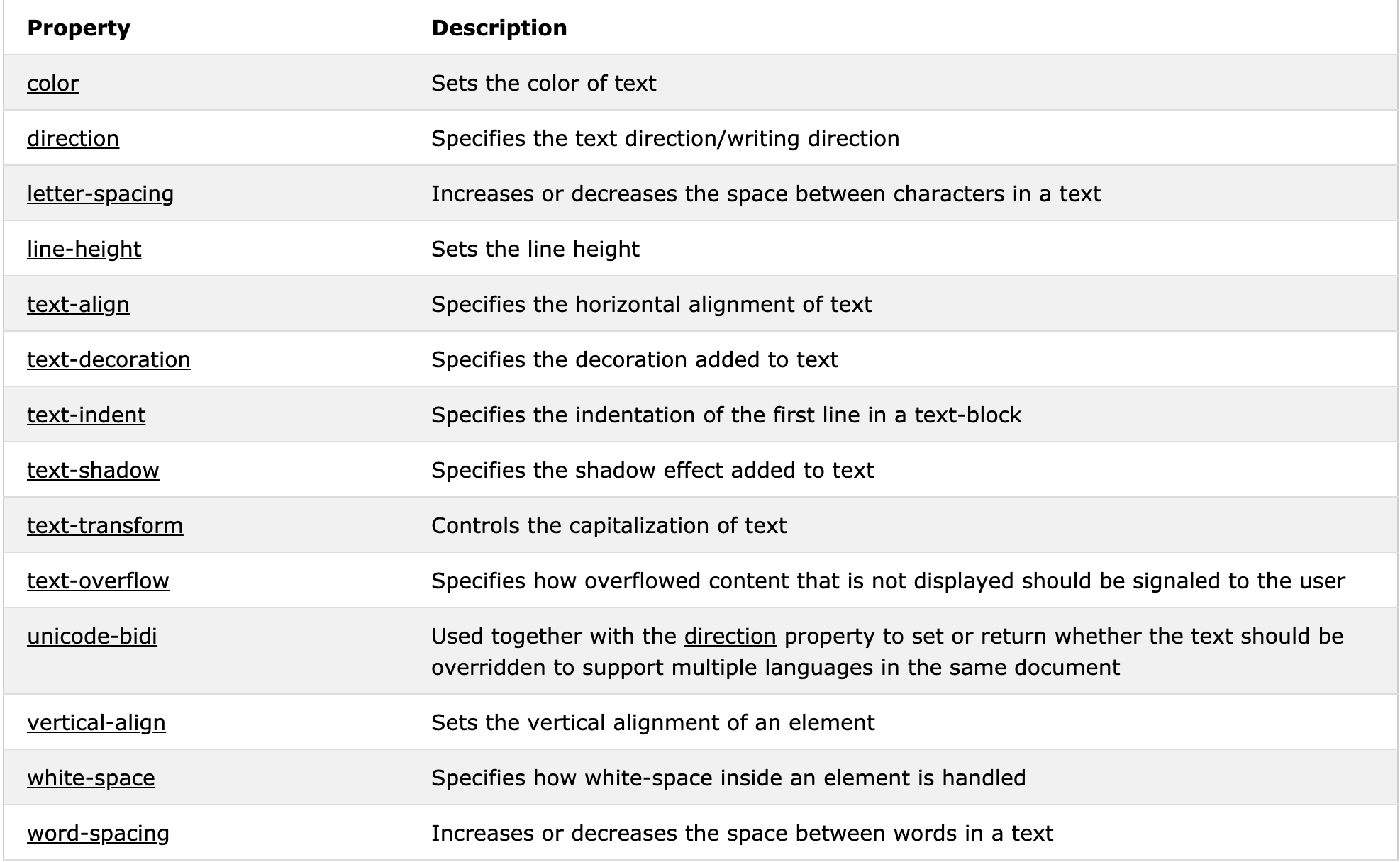
Text Decoration
The text-decoration property is used to set or remove decorations from text.
The value text-decoration: none; is often used to remove underlines from links:
h1 {

  text-decoration: overline;

}

h2 {

  text-decoration: line-through;

}

h3 {

  text-decoration: underline;

}
Text Transformation
The text-transform property is used to specify uppercase and lowercase letters in a text.
It can be used to turn everything into uppercase or lowercase letters, or capitalize the first letter of each word:
p.uppercase {

  text-transform: uppercase;

}

p.lowercase {

  text-transform: lowercase;

}

p.capitalize {

  text-transform: capitalize;

}
Text Indentation
The text-indent property is used to specify the indentation of the first line of a text:
p {

  text-indent: 50px;

}
Letter Spacing
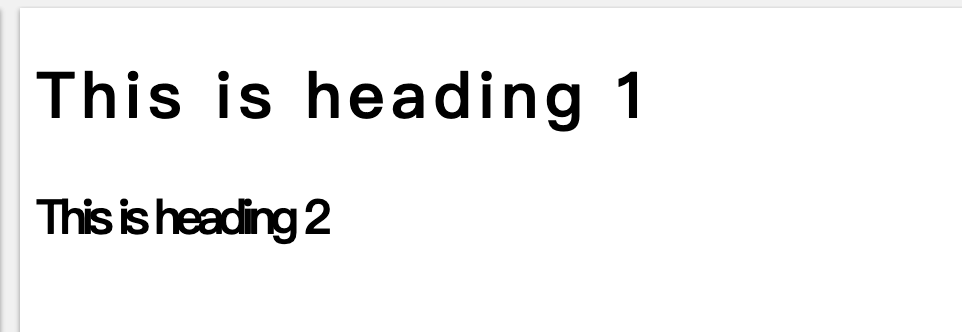
The letter-spacing property is used to specify the space between the characters in a text.
The following example demonstrates how to increase or decrease the space between characters:
h1 {

  letter-spacing: 3px;

}

h2 {

  letter-spacing: -3px;

}
Line Height
The line-height property is used to specify the space between lines:
Text Direction
he direction property is used to change the text direction of an element:
p {

  direction: rtl;

}
This is right-to-left text direction
<head>

<style>

p.ex1 {

  direction: rtl;

}

</style>

</head>

<body>

<p>This is the default text direction.</p>

<p class="ex1"><bdo dir="rtl">This is right-to-left text direction.</bdo></p>

</body>
Word Spacing
The word-spacing property is used to specify the space between the words in a text.
Text Shadow
The text-shadow property adds shadow to text.
The following example specifies the position of the horizontal shadow (3px), the position of the vertical shadow (2px) and the color of the shadow (red):
h1 {

  text-shadow: 3px 2px red;

}
2、CSS Fonts
Font Family
The font family of a text is set with the font-family property.
The font-family property should hold several font names as a "fallback" system. If the browser does not support the first font, it tries the next font, and so on.
Start with the font you want, and end with a generic family, to let the browser pick a similar font in the generic family, if no other fonts are available.
Note: If the name of a font family is more than one word, it must be in quotation marks, like: "Times New Roman".
More than one font family is specified in a comma-separated list:
p {

  font-family: "Times New Roman", Times, serif;

}

p.sansserif {

  font-family: Arial, Helvetica, sans-serif;

}
Font Style
The font-style property is mostly used to specify italic text.
This property has three values:
- normal - The text is shown normally
- italic - The text is shown in italics
- oblique - The text is "leaning" (oblique is very similar to italic, but less supported)
Font Size
The font-size property sets the size of the text.
Being able to manage the text size is important in web design. However, you should not use font size adjustments to make paragraphs look like headings, or headings look like paragraphs.
Always use the proper HTML tags, like <h1> - <h6> for headings and <p> for paragraphs.
The font-size value can be an absolute, or relative size.
Absolute size:
- Sets the text to a specified size
- Does not allow a user to change the text size in all browsers (bad for accessibility reasons)
- Absolute size is useful when the physical size of the output is known
Relative size:
- Sets the size relative to surrounding elements
- Allows a user to change the text size in browsers
Note: If you do not specify a font size, the default size for normal text, like paragraphs, is 16px (16px=1em).
Set Font Size With Pixels(16px)
Set Font Size With Em(1em)
To allow users to resize the text (in the browser menu), many developers use em instead of pixels.
The em size unit is recommended by the W3C.
1em is equal to the current font size. The default text size in browsers is 16px. So, the default size of 1em is 16px.
The size can be calculated from pixels to em using this formula: pixels/16=em
h1 {

  font-size: 2.5em; /* 40px/16=2.5em */

}

h2 {

  font-size: 1.875em; /* 30px/16=1.875em */

}

p {

  font-size: 0.875em; /* 14px/16=0.875em */

}
Responsive Font Size
The text size can be set with a vw unit, which means the "viewport width".
That way the text size will follow the size of the browser window:
<!DOCTYPE html>

<html>

<meta name="viewport" content="width=device-width, initial-scale=1.0">

<body>

<h1 style="font-size:10vw;">Responsive Text</h1>

<p style="font-size:5vw;">Resize the browser window to see how the text size scales.</p>

<p style="font-size:5vw;">Use the "vw" unit when sizing the text. 10vw will set the size to 10% of the viewport width.</p>

<p>Viewport is the browser window size. 1vw = 1% of viewport width. If the viewport is 50cm wide, 1vw is 0.5cm.</p>

</body>

</html>
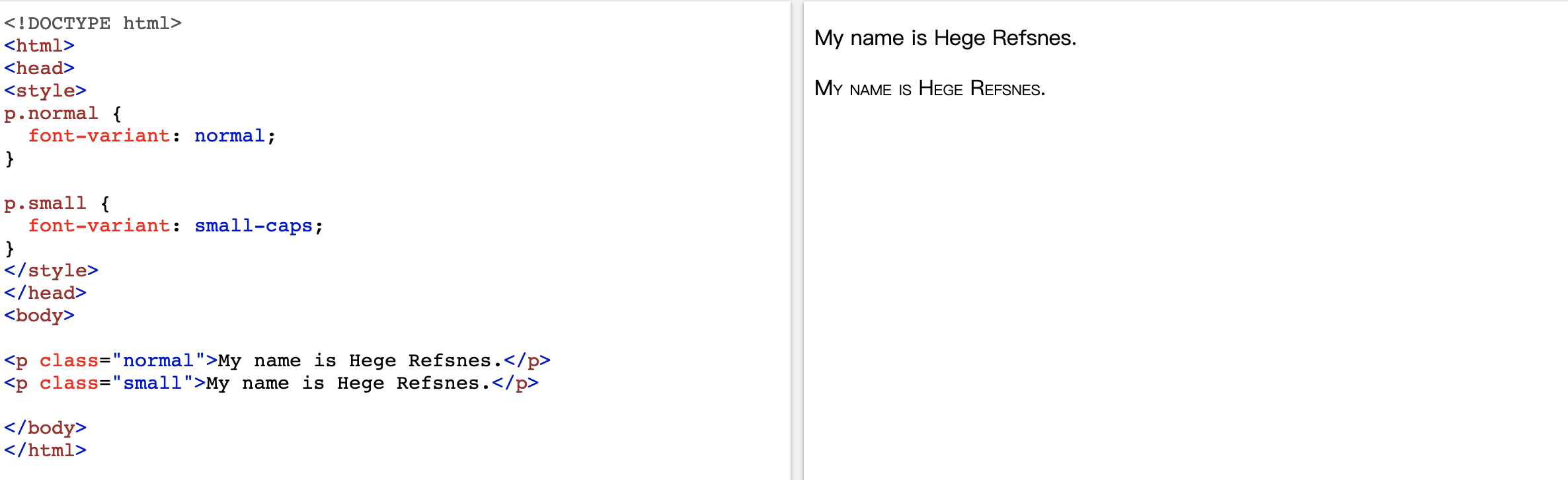
Font Variant
he font-variant property specifies whether or not a text should be displayed in a small-caps font.
In a small-caps font, all lowercase letters are converted to uppercase letters. However, the converted uppercase letters appears in a smaller font size than the original uppercase letters in the text.
3、CSS Icons
The simplest way to add an icon to your HTML page, is with an icon library, such as Font Awesome.
Add the name of the specified icon class to any inline HTML element (like <i> or <span>).
All the icons in the icon libraries below, are scalable vectors that can be customized with CSS (size, color, shadow, etc.)
Font Awesome Icons
<!DOCTYPE html>

<html>

<head>

<link rel="stylesheet" href="https://use.fontawesome.com/releases/v5.7.0/css/all.css" integrity="sha384-lZN37f5QGtY3VHgisS14W3ExzMWZxybE1SJSEsQp9S+oqd12jhcu+A56Ebc1zFSJ" crossorigin="anonymous">

</head>

<body>

<i class="fas fa-cloud"></i>

<i class="fas fa-heart"></i>

<i class="fas fa-car"></i>

<i class="fas fa-file"></i>

<i class="fas fa-bars"></i>

</body>

</html>
Bootstrap Icons
To use the Bootstrap glyphicons, add the following line inside the <head> section of your HTML page
<!DOCTYPE html>

<html>

<head>

<link rel="stylesheet" href="https://maxcdn.bootstrapcdn.com/bootstrap/3.3.7/css/bootstrap.min.css">

</head>

<body>

<i class="glyphicon glyphicon-cloud"></i>

<i class="glyphicon glyphicon-remove"></i>

<i class="glyphicon glyphicon-user"></i>

<i class="glyphicon glyphicon-envelope"></i>

<i class="glyphicon glyphicon-thumbs-up"></i>

</body>

</html>
Google Icons
<!DOCTYPE html>

<html>

<head>

<link rel="stylesheet" href="https://fonts.googleapis.com/icon?family=Material+Icons">

</head>

<body>

<i class="material-icons">cloud</i>

<i class="material-icons">favorite</i>

<i class="material-icons">attachment</i>

<i class="material-icons">computer</i>

<i class="material-icons">traffic</i>

</body>

</html>
CSS:Tutorial two的更多相关文章
- CSS:Tutorial four
1.CSS Tables To specify table borders in CSS, use the border property. The example below specifies a ...
- CSS:Tutorial three
1.CSS Links links can be styled differently depending on what state they are in. The four links stat ...
- CSS:Tutorial one
1.Three Ways to Insert CSS External style sheet Internal style sheet Inline style External Style She ...
- Hover.css:一组超实用的 CSS3 悬停效果和动画
Hover.css 是一套基于 CSS3 的鼠标悬停效果和动画,这些可以非常轻松的被应用到按钮.LOGO 以及图片等元素.所有这些效果都是只需要单一的标签,必要的时候使用 before 和 after ...
- CSS:opacity 的取值范围是 0~1
CSS:opacity 的取值范围是 0~1,难怪设置为 1~100 看不到效果.
- CSS:CSS定位和浮动
CSS2.1规定了3种定位方案 1.Normal flow:普通流(相对定位 position relative.静态定位 position static) 普通流(normal flow,国内有人翻 ...
- CSS: word-wrap和word-break
最近修改页面排版的一些问题,发现关于内容分词换行有两个主要的CSS: word-wrap 和 word-break 特别是word-wrap还有个取值break-word,更使得这两个属性容易混淆. ...
- CSS:不可思议的border属性
原文:Magic of CSS border property 译文:不可思议的CSS border属性 译者:dwqs 在CSS中,其border属性有很多的规则.对于一些事物,例如三角形或者其它的 ...
- Normalize.css:优化重置CSS默认属性
Normalize.css:优化重置CSS默认属性 官方网站:http://necolas.github.io/normalize.css/ 项目仓库:https://github.com/necol ...
随机推荐
- 006-虚拟机中centos7实现nat静态ip上网
1.设置虚拟机网卡VMnet8 2.修改虚拟机参数 (1).点击编辑-->虚拟网络编辑器,如下图设置 (2)nat设置如下[使用默认即可,记住网关.掩码等,非常重要,因为在centos里面要设置 ...
- 【Myeclipse设置】MyEclipse取消Show in Breadcrumb的方法
有时不小心把快捷导航整出来,对于本来就很小的编辑空间来讲就很痛苦了,下面的方法可行,本人亲自试验过. 参考地址:百度文库中的解决方法 在最后用户通过点击出来的图标 ,就可以自如的控制出现和消失了.
- 维多利亚的秘密 golang入坑系列
原文在gitbook,字字原创,版权没有,转载随意. 在写本文的前一天,2017维密在上海开始了. 为了纪念屌丝界的盛世,特为本节起名维多利亚的秘密.现在的社会,要想出名只有抓眼球.所以写份技术文章, ...
- Tornado模块分类
Tornado模块分类 1. Core web framework tornado.web — 包含web框架的大部分主要功能,包含RequestHandler和Application两个重要的类 t ...
- Django 分页器 缓存 信号 序列化
阅读目录 分页器 缓存 信号 序列化 Django分页器 (paginator) 导入 from django.core.paginator import Paginator, EmptyPage, ...
- vue之 node.js 的简单介绍
一.什么是 node.js? 它是可以运行在JavaScript的服务平台 二.安装 1.node.js的特性 - 非阻塞IO模型 - 时间驱动 2.运用场景 - 高并发低业务 - 实时场景 - 聊天 ...
- Linux用户、群组及权限
由于对文件的操作需要切换到相应文件夹下进行,所以对文件内容的修改,最基本的是需要其文件夹执行的权限. 文件夹的读权限(read)可以独立行使,但是对文件夹内容的写权限(对其内文件的新建.删除.重命名) ...
- Kotlin学习记录1
参考我的博客:http://www.isedwardtang.com/2017/09/02/kotlin-primer-1/
- MySQL-5.7 游标及DECLARE
1.cursor游标 用来声明一个数据集 游标的声明必须在变量和条件声明之后,在handler声明之前 游标特性: 不灵敏:服务器可以或不复制其结果 只读:不可更新 不可滚动的:只能在一个方向上遍历, ...
- Number使用笔记
Numbe函数用于将对象转换为数字 0 0 null 0 空 0 "" 0 true 1 false 0 date ...