
使用node中的express解决vue-cli加载不到dev-server.js的问题
在使用vue开发过程中,难免需要去本地数据地址进行请求,而原版配置在dev-server.js中,新版vue-webpack-template已经删除dev-server.js,改用webpack.dev.conf.js代替,所以 配置本地访问在webpack.dev.conf.js里配置即可。
现在我们就来用node里的express来解决本地数据请求的问题。主要为下面三步:安装express和resource、注册并使用vue-resource、配置express并设置路由规则
1、安装node的express,和vue-resource
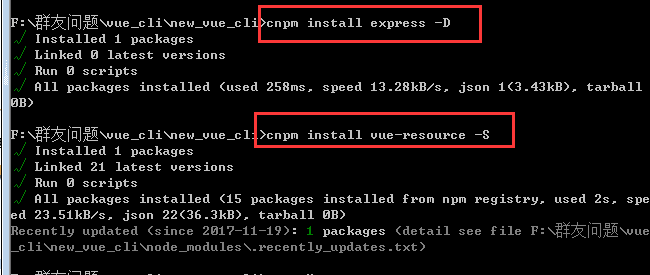
2、注意: 这里安装vue-resource后需要在main.js注册并使用下
import VueResource from 'vue-resource'

Vue.use(VueResource)
3、在webpack.dev.conf配置express并设置路由规则
#webpack.dev.conf.js

// 首先在const portfinder = require('portfinder')后添加

// nodejs开发框架express,用来简化操作

const express = require('express')

// 创建node.js的express开发框架的实例

const app = express()

// 引用的json地址

var appData = require('../data.json')

// json某一个key

var goods = appData.result

var apiRoutes = express.Router()

app.use('/api', apiRoutes)
(1)get请求配置
#webpack.dev.conf.js

// 在devServer选项中添加以下内容

before(app) {

  app.get('/api/someApi', (req, res) => {

    res.json({

      // 这里是你的json内容

    })

  })

}
注意: 修改配置文件完毕后,需要重新运行命令npm run dev即可。
(2)post请求配置。如果要配置post请求,需要在该文件夹配置如下:
#webpack.dev.conf.js

apiRoutes.post('/foods', function (req, res) { //注意这里改为post就可以了

  res.json({

    error: ,

    data: foods

  });

})

// 在组件里面

#...vue

created () {

 this.$http.post('http://localhost:8080/api/foods').then((res) => {

  console.log(res)

 })

}
(3)完整配置
'use strict'

const utils = require('./utils')

const webpack = require('webpack')

const config = require('../config')

const merge = require('webpack-merge')

const path = require('path')

const baseWebpackConfig = require('./webpack.base.conf')

const CopyWebpackPlugin = require('copy-webpack-plugin')

const HtmlWebpackPlugin = require('html-webpack-plugin')

const FriendlyErrorsPlugin = require('friendly-errors-webpack-plugin')

const portfinder = require('portfinder')

const HOST = process.env.HOST

const PORT = process.env.PORT && Number(process.env.PORT)

//增加express --start

const express = require('express')

const app = express()

var appData = require('../goods.json')

var goods = appData.goods

var apiRoutes = express.Router()

app.use('/api', apiRoutes)

//增加express --end

const devWebpackConfig = merge(baseWebpackConfig, {

  module: {

    rules: utils.styleLoaders({ sourceMap: config.dev.cssSourceMap, usePostCSS: true })

  },

  // cheap-module-eval-source-map is faster for development

  devtool: config.dev.devtool,

  // these devServer options should be customized in /config/index.js

  devServer: {

    clientLogLevel: 'warning',

    historyApiFallback: {

      rewrites: [

        { from: /.*/, to: path.posix.join(config.dev.assetsPublicPath, 'index.html') },

      ],

    },

    hot: true,

    contentBase: false, // since we use CopyWebpackPlugin.

    compress: true,

    host: HOST || config.dev.host,

    port: PORT || config.dev.port,

    open: config.dev.autoOpenBrowser,

    overlay: config.dev.errorOverlay

      ? { warnings: false, errors: true }

      : false,

    publicPath: config.dev.assetsPublicPath,

    proxy: config.dev.proxyTable,

    quiet: true, // necessary for FriendlyErrorsPlugin

    watchOptions: {

      poll: config.dev.poll,

    },

    //增加express --start

    before(app) {

      app.get('/api/goods', (req, res) => {

        res.json({

          code: 0,

          data: goods

        })

      })

    }

    //增加express --end

  },

  plugins: [

    new webpack.DefinePlugin({

      'process.env': require('../config/dev.env')

    }),

    new webpack.HotModuleReplacementPlugin(),

    new webpack.NamedModulesPlugin(), // HMR shows correct file names in console on update.

    new webpack.NoEmitOnErrorsPlugin(),

    // https://github.com/ampedandwired/html-webpack-plugin

    new HtmlWebpackPlugin({

      filename: 'index.html',

      template: 'index.html',

      inject: true

    }),

    // copy custom static assets

    new CopyWebpackPlugin([

      {

        from: path.resolve(__dirname, '../static'),

        to: config.dev.assetsSubDirectory,

        ignore: ['.*']

      }

    ])

  ]

})

module.exports = new Promise((resolve, reject) => {

  portfinder.basePort = process.env.PORT || config.dev.port

  portfinder.getPort((err, port) => {

    if (err) {

      reject(err)

    } else {

      // publish the new Port, necessary for e2e tests

      process.env.PORT = port

      // add port to devServer config

      devWebpackConfig.devServer.port = port

      // Add FriendlyErrorsPlugin

      devWebpackConfig.plugins.push(new FriendlyErrorsPlugin({

        compilationSuccessInfo: {

          messages: [`Your application is running here: http://${devWebpackConfig.devServer.host}:${port}`],

        },

        onErrors: config.dev.notifyOnErrors

        ? utils.createNotifierCallback()

        : undefined

      }))

      resolve(devWebpackConfig)

    }

  })

})
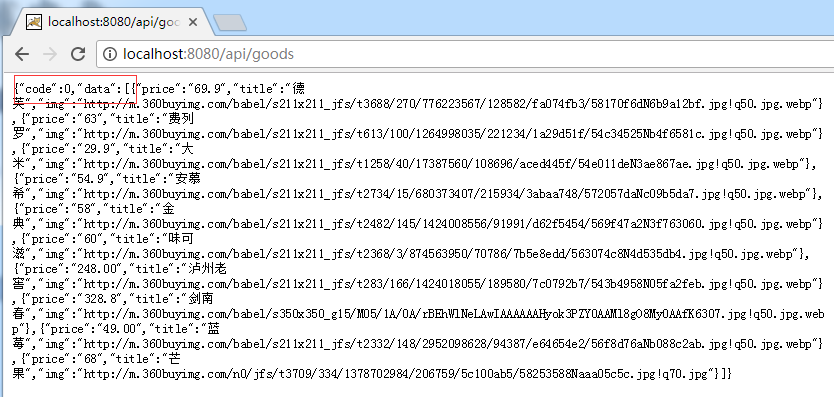
4、检测 npm run dev 后,在浏览器地址栏中输入http://localhost:8080/api/goods即可看到数据
注意:新建goods.json引入时候的路径
在使用中有个粗心的位置,就是npm run dev的时候总是报错:missing scripts dev,导致项目启动不了。
考虑到可能是package.json文件里的scripts里面没有dev导致,所以查看,结果却有: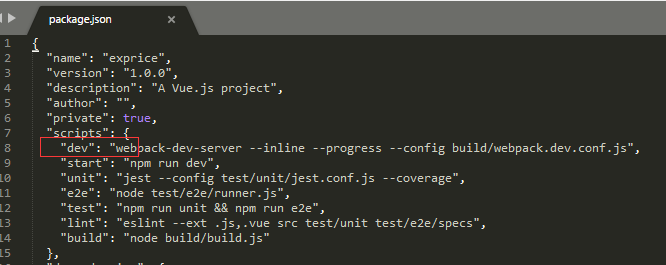
最后就是粗心导致的问题,原来我是在 cd vueCli 这个目录下去 npm run dev 的,所以肯定会missing scripts dev;改成cd exprice目录下去 npm run dev 就行了。所以一定得细心啊。
使用node中的express解决vue-cli加载不到dev-server.js的问题的更多相关文章
- 解决新版本webpack vue-cli生成文件没有dev.server.js问题
新版本webpack生成的dev.server.js 在webpack.dev.conf.js中 webpack.dev.conf.js const axios = require('axios') ...
- 在web.xml中添加配置解决hibernate 懒加载异常
在web.xml添加如下,注意:在配置在struts2的拦截器之前,只能解决请求时出现的懒加载异常:如果没有请求,还需要lazy属性的添加(比如过滤器) <!-- 配置Spring的用于解决懒加 ...
- 在Vue中的load或ready的加载时机
在Vue中的load或ready的加载时机 1.我们来插入一段代码来分析: Js代码如下 <script type="text/javascript"> var app ...
- vue超简单加载字体方法,解决scss难加载字体的问题
vue超简单加载字体方法,解决scss难加载字体的问题 scss在加载字体方面一直不太好用,需要繁杂的配置才能达到想要的效果,这里说一种非常简单的方法 在App.vue的style标签下引入字体文件后 ...
- vue : 无法加载文件 C:\Users\XXX\AppData\Roaming\npm\vue.ps1,因为在此系统上禁止运行脚本
问题: 使用命令行安装完成vue/cli后,使用vue ui无法创建demo vue : 无法加载文件 C:\Users\yangx\AppData\Roaming\npm\vue.ps1,因为在此系 ...
- vue 首次加载缓慢/刷新后加载缓慢 原因及解决方案
# vue 首次加载缓慢/刷新后加载缓慢 原因及解决方案 最近做项目发现一个问题,页面每次刷新后加载速度都非常慢,20s左右,在开发环境则非常流畅,几乎感觉不到,本文参考望山的各种方案优化 1,关闭打 ...
- Vue首页加载过慢 解决方案
一.什么导致了首页初步加载过慢:app.js文件体积过大 二.解决方法: 1.Vue-router懒加载 vue-router懒加载可以解决首次加载资源过多导致的速度缓慢问题:vue-router支持 ...
- Vue动态加载异步组件
背景: 目前我们项目都是按组件划分的,然后各个组件之间封装成产品.目前都是采用iframe直接嵌套页面.项目中我们还是会碰到一些通用的组件跟业务之间有通信,这种情况下iframe并不是最好的选择,if ...
- Android中ViewPager+Fragment取消(禁止)预加载延迟加载(懒加载)问题解决方案
转载请注明出处:http://blog.csdn.net/linglongxin24/article/details/53205878本文出自[DylanAndroid的博客] Android中Vie ...
随机推荐
- hdu 1853(拆点判环+费用流)
Cyclic Tour Time Limit: 1000/1000 MS (Java/Others) Memory Limit: 32768/65535 K (Java/Others)Total ...
- hdu 1065(贪心)
Wooden Sticks Time Limit: 1000MS Memory Limit: 10000K Total Submissions: 20938 Accepted: 8872 De ...
- 【转】kubernetes 中 deployment 支持哪些键值
这个比较全,可以参考 ================= https://www.addops.cn/post/kubernetes-deployment-fileds.html ========== ...
- gulp-基本功能总汇
研究了三天的gulp,今天做一个结束吧. 本次包含的功能有: html压缩 图片压缩 css压缩 js检测 js压缩 文件合并 文件更名 提示信息 编译less 创建服务器-浏览器实时刷新 因为我安装 ...
- ELK系列--logstash无法启动
1.logstash无法启动,提示bind address 原因: 1)配置目录下存在多个配置文件,而logstash会加载所有conf格式的文件 解决方案:删除不必要的,保留一个conf ...
- poj1743 后缀数组, poj挂了 存个代码
#include<bits/stdc++.h> #define LL long long #define fi first #define se second #define mk mak ...
- Aras Innovator DB备份与还原
错误信息 确认到该问题是因为孤立帐号的问题,在解决孤立帐号之前,可以通过语句查看,另外,还原了DB后,系统不会自动创建原来的登陆帐号的,需要手动新增登陆帐号 #查看孤立帐号列表exec sp_chan ...
- 验收测试与UI
CRS 如果功能复杂的情况下,是不是先写验收测试,然后写单元测试,最后写代码? STST 是的 从高往低走,无论是分析,还是测试,还是开发 从高往低走,带来的是干净无累赘的,底层依赖高层的优雅的结果 ...
- ZOJ 1610.Count the Colors-线段树(区间染色、区间更新、单点查询)-有点小坑(染色片段)
ZOJ Problem Set - 1610 Count the Colors Time Limit: 2 Seconds Memory Limit: 65536 KB Painting s ...
- 动若脱兔:深入浅出angr--初步理解符号执行以及angr架构
一:概论 angr作为符号执行的工具,集成了过去的许多分析方式,它不仅能进行动态符号执行,而且还能进行很多静态分析,他在分析二进制程序中能发挥很大的作用,下面为一些应用: 1:利用符号执行探究执行路径 ...