
send_keys报错element not interactable
这两天要在阿里云日志中操作UI,以输入关键字搜索日志。
在send_keys时报错element not interactable。
iframe
第一个问题是iframe,通过切换iframe解决:
driver.switch_to.frame(0) # 索引从0开始
span
第二个问题是span。
F12查看html长这样:

①find_element(pre).click 有效,说明iframe切换成功了
②find_element(span2).send_keys报错
element not interactable
span不支持send_keys。
第一个方法,通过调js来解决,设置span的innerText
search_text = 'error'

log_search_span = driver.find_element_by_xpath(

        '//*[@id="queryEl"]/div[2]/div/div[6]/div[1]/div/div/div/div[5]/div/pre')

js = 'arguments[0].innerText=arguments[1];'

driver.execute_script(js, log_search_span, search_text)
第二个方法,添加属性contenteditable
search_text = 'error'

log_search_span = driver.find_element_by_xpath(

        '//*[@id="queryEl"]/div[2]/div/div[6]/div[1]/div/div/div/div[5]/div/pre')

js = 'arguments[0].setAttribute("contenteditable", "true");'

driver.execute_script(js, log_search_span)

log_search_span.send_keys(search_text)  # 可编辑后send_keys成功
不简单
虽然值设置成功了,但是不能用,在查询时,还是用空值在查询。
经过分析,得出以下线索:
- 设置的元素值是已经生成后的dom
- 程序真正的dom隐藏在js/后端中
- span是由js或后端动态生成的
- 要想模拟出来,需要分析js实现代码
- 控制台的js代码是加密混淆过的
- selenium的send_keys已经是模拟键盘输入了,不知道为啥没有触发相关代码,存值到dom
网上很多的方案是<input>标签,比较好解决,阿里的这个span还真有点不简单。
chrome console调试js
最后分享一下chrome console调试js的方法。
F12后,在元素上右键,选择Copy selector,复制selector
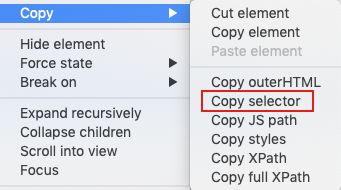
切换到console,输入即可定位到该元素:
document.querySelector('#queryEl > div.react-codemirror2 > div > div.CodeMirror-scroll > div.CodeMirror-sizer > div > div > div > div.CodeMirror-code > div > pre > span > span').innerText;
send_keys报错element not interactable的更多相关文章
- selenium报错Element is not clickable at point及四种解决方法
使用Selenium时,触发点击事件,经常报如下异常:Element is not clickable at point 1.未加载没加载出来就等待元素加载出来,再往下执行.可以使用python库ti ...
- 使用饿了么ui表单验证报错: [Element Warn][Form]model is required for validat
[Element Warn][Form]model is required for validat 如文末的完整例子: 该提示说的是 form表单需要一个绑定一个 对象(使用:model=" ...
- ReactJs 报错 Element type is invalid: expected a string (from built-in components) or a class/function (for composite components) but got: undefined. Check the render method of `Me`.
今天在重构一个页面的时候,碰到了一个error,具体的error信息如下图中所示: 最后经过一番查找定位,终于找到了问题所在,原因就是在父组件引用子组件时多加了一个大括号. import {Chart ...
- appium报错Message: Cannot set the element to ‘XXXX’. Did you interact with the correct element?
appium+python+android 在定位到模块输入内容的时候遇到了一个问题 send_keys报错 appium报错Message: Cannot set the element to 'X ...
- 解决eclipse spring配置报错:cvc-elt.1: Cannot find the declaration of element
解决eclipse spring配置报错:cvc-elt.1: Cannot find the declaration of element 'beans'.Referenced file conta ...
- web.xml文件报错:cvc-complex-type.2.4.a: Invalid content was found starting with element 'init-param'.
<?xml version="1.0" encoding="UTF-8"?> <web-app version="3.0" ...
- select2取值报错,Failed to read the 'selectionDirection' property from 'HTMLInputElement': The input element's type ('hidden') does not support selection.
用到了 select2 组件来多选收件人,用搜狗浏览器(6.2版高速模式)在执行到如下这句时报错(Uncaught InvalidStateError: Failed to read the 'sel ...
- 关于xpath语句完全正确,但是页面报错: no such element: Unable to locate element: {"method":"xpath","selector":"xpath"}
之前使用selenium-webdriver来写UI的自动化脚本,发现有一个元素一直无法定位,查看其源码,如下 利用xpathChecker验证了xpath语句的是正确的,但是控制台一直报错: no ...
- jQuery配合html2canvas 使用时 报错 Uncaught (in promise) Provided element is not within a Document
报错代码: 这个函数运行时 function download(){ var element = $("#demo"); //jquery 获取元素 //这里将会报错 html2c ...
随机推荐
- 拾遗:vim 配置(个人适用,仅供参考)
~/.vimrc "===================通用配置====================== set encoding=utf- set statusline=%F%=[L ...
- TypeError: write() argument must be str, not bytes报错
TypeError: write() argument must be str, not bytes 之前文件打开的语句是: with open('C:/result.pk','w') as fp: ...
- List集合--Vector子类
Vector子类 Vector是一个原始古老的程序类,这个类是在JDK1.0的时候就提供的,而后到了JDK1.2的时候,由于有一部分开发者已经习惯于使用Vector,并且许多的系统类也是基于Vecto ...
- canvas时间粒子
<!DOCTYPE html> <html lang="en"> <head> <meta charset="UTF-8&quo ...
- PHP pthread多线程
class test extends Thread { public $arg; public function __construct($arg){ $this->arg = $arg; } ...
- maxim - Android UI压力测试
项目介绍 项目地址:https://github.com/zhangzhao4444/Maxim 与monkey对比优势: 快 稳:只进行有意义的操作,防误点状态栏,不会乱断网.卸载应用 支持脱机运行 ...
- 【目录】Identityserver 4 老张的哲学
随笔分类 - .IdentityServer4 从壹开始 [ Ids4实战 ] 之四 ║ 用户数据管理 & 前后端授权联调 摘要: 前言 哈喽~~~ 大家周一好!夏天到了,大家舒服了没有,熟话 ...
- windows修改docker的默认存放位置
docker默认存储到c盘,我需要移动到其他盘. 参考了网上很多资料,结果要么移动不了,要么重启docker就回到c盘了. 最后参考docker的官方论坛,找到了解决方案.https://forums ...
- python2和python3编码
python2编码 unicode:unicode 你好 u'\u4f60\u597d' | | | | encode('utf8')| |decode('utf8') encode('gbk')| ...
- css3中的scroll-behavior属性
scroll-behavior属性 当用户手动导航或者 CSSOM scrolling API 触发滚动操作时,CSS 属性 scroll-behavior 为一个滚动框指定滚动行为,当用户通过鼠标滑 ...