
SpringBoot入门笔记(一)、HelloWorld
本文是一篇SprintBoot学习入门笔记
1、打开Eclipse,版本为Oxygen 4.7.0
2、新建项目
NewProject->MavenProject->Next->Next
GroupId填写com.learn,Artifactid 填写spring-boot-hello,完成
3、配置pom.xml
双击pom.xml,打开pom.xml选项卡,因为暂时不需要Test,删除Test有关的,另外删除项目Test目录。
修改后的pom.xml内容如下
<project xmlns="http://maven.apache.org/POM/4.0.0" xmlns:xsi="http://www.w3.org/2001/XMLSchema-instance"

  xsi:schemaLocation="http://maven.apache.org/POM/4.0.0 http://maven.apache.org/xsd/maven-4.0.0.xsd">

  <modelVersion>4.0.0</modelVersion>

  <groupId>com.kfit</groupId>

  <artifactId>spring-boot-hello</artifactId>

  <version>0.0.1-SNAPSHOT</version>

  <packaging>jar</packaging>

  <name>spring-boot-hello</name>

  <url>http://maven.apache.org</url>

<parent>

    <groupId>org.springframework.boot</groupId>

    <artifactId>spring-boot-starter-parent</artifactId>

    <version>1.4.1.RELEASE</version>

</parent>

  <properties>

    <project.build.sourceEncoding>UTF-8</project.build.sourceEncoding>

    <!-- 指定jdk1.8 -->

    <java.version>1.8</java.version>

  </properties>

  <dependencies>

    <dependency>

        <groupId>org.springframework.boot</groupId>

        <artifactId>spring-boot-starter-web</artifactId>

    </dependency>

  </dependencies>

</project>
4、新建Controller类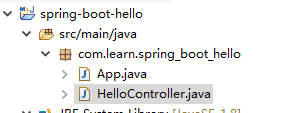
内容如下
package com.learn.spring_boot_hello;

import org.springframework.web.bind.annotation.RequestMapping;

import org.springframework.web.bind.annotation.RestController;

@RestController

public class HelloController {

    @RequestMapping("/hello")

    public String hello() {

        return "hello";

    }

}
5、App.Java中启动
package com.learn.spring_boot_hello;

import org.springframework.boot.SpringApplication;

import org.springframework.boot.autoconfigure.SpringBootApplication;

/**

 * 在这里使用@SpringBootApplication指定这是一个sprint boot的应用程序

 *

 */

@SpringBootApplication

public class App

{

    public static void main( String[] args )

    {

        SpringApplication.run(App.class, args);

    }

}
6、项目右键Run,选择App,Ok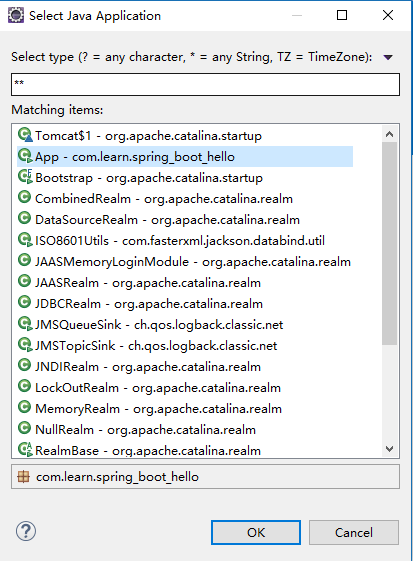
7、查看Console,如果输出以下内容表示运行正常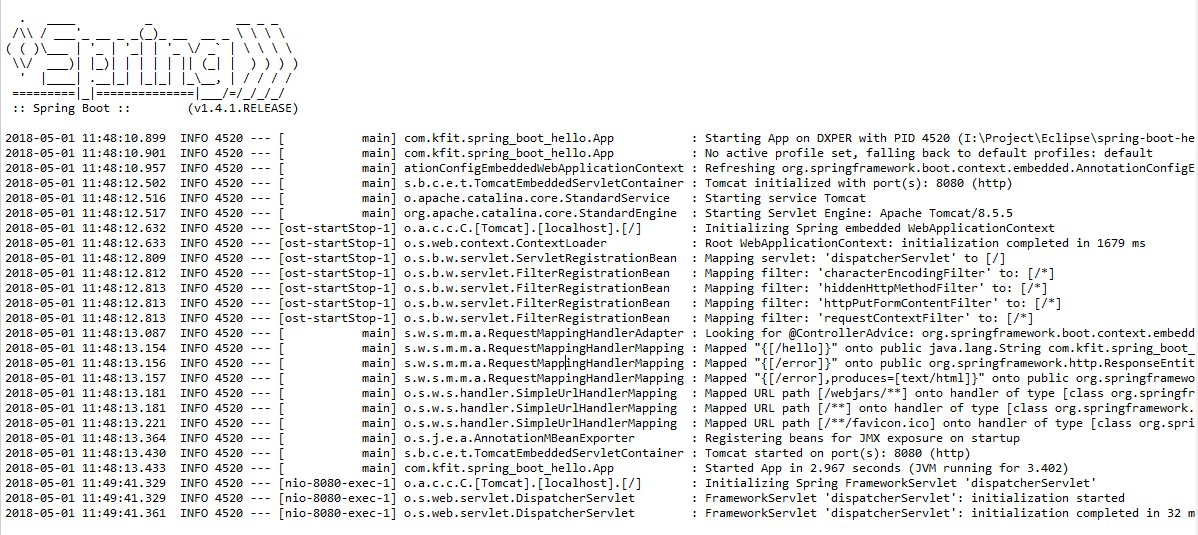
8、浏览器测试
http://127.0.0.1:8080/hello
输出
hello
9、新建一个Student实体类
package com.learn.spring_boot_hello;

public class Student {

    int id;

    String name;

    public int getId() {

        return id;

    }

    public void setId(int id) {

        this.id = id;

    }

    public String getName() {

        return name;

    }

    public void setName(String name) {

        this.name = name;

    }

}
10、Controller里编写对应的方法
    @RequestMapping("/getstudent")

    public Student getStudent() {

        Student student=new Student();

        student.id=1;

        student.name="小明";

        return student;

    }
11、启动
http://127.0.0.1:8080/getstudent
{"id":1,"name":"小明"}
从上面可以看出会自动把对象转为json,默认使用的jackson解析框架。
(完毕)
SpringBoot入门笔记(一)、HelloWorld的更多相关文章
- SpringBoot入门笔记(二)、使用fastjson
1.添加fastjson配置 <dependency> <groupId>com.alibaba</groupId> <artifactId>fastj ...
- SpringBoot入门笔记(四)、通常Mybatis项目目录结构
1.工程启动类(AppConfig.java) 2.实体类(domain) 3.数据访问层(dao) 4.数据服务层(service) 5.前端控制器(controller) 6.工具类(util) ...
- SpringBoot入门笔记(三)、热加载
1.配置热加载环境,在pom.xml添加如下代码 <build> <!--springloader plugin --> <plugins> <plugin& ...
- SpringBoot 入门笔记
1. Spring 4.3中引入了: @GetMapping @PostMapping @PutMapping @DeleteMapping @PatchMapping 2. @RequestMapp ...
- SpringBoot学习笔记<一>入门与基本配置
毕业实习项目技术学习笔记 参考文献 学习视频 2小时学会Spring Boot:https://www.imooc.com/learn/767 学习资料 SpringBoot入门:https://bl ...
- SpringBoot学习笔记(一)入门简介
一.SpringBoot 入门简介 整体讲解内容概况: 1.1 简介 简化Spring应用开发的一个框架: 整个Spring技术栈的一个大整合: J2EE开发的一站式解决方案. Spring Boot ...
- SpringBoot入门基础
目录 SpringBoot入门 (一) HelloWorld. 2 一 什么是springboot 1 二 入门实例... 1 SpringBoot入门 (二) 属性文件读取... 16 一 自定义属 ...
- 一看就懂的Mybatis框架入门笔记
本篇为初学Mybatis框架时的入门笔记,整理发出 Spring集成Mybatis https://www.cnblogs.com/yueshutong/p/9381590.html SpringBo ...
- 「Android 开发」入门笔记
「Android 开发」入门笔记(界面编程篇) ------每日摘要------ DAY-1: 学习笔记: Android应用结构分析 界面编程与视图(View)组件 布局管理器 问题整理: Andr ...
随机推荐
- JS基本类型-引用类型-深浅拷贝
在JavaScript中变量包含两种类型的值:一种是基本类型,一种是引用类型. 基本类型包括:数值.字符串.null.undefined.布尔值引用类型包括:对象.数组.函数.正则… 补充: null ...
- [POI2005]DWU-Double-row
有2n个士兵站成两排,他们需要被重新排列,以保证每一排里没有同样高的士兵——这样我们就说,士兵们被合理地安排了位置. 每次操作可以交换两个在同一位置(但不在同一排)的士兵.你的任务是用最少的操作来确保 ...
- 解决mysql配置文件my.cnf添加max_connections不生效
问题描述: 最新为了方便测试,通过mysql官方指定的yum源安装了mysql5.6.40,在向mysql的配置文件my.cnf添加max_connections=3600后,重启mysql后发现不生 ...
- CodeForces - 589D(暴力+模拟)
题目链接:http://codeforces.com/problemset/problem/589/D 题目大意:给出n个人行走的开始时刻,开始时间和结束时间,求每个人分别能跟多少人相遇打招呼(每两人 ...
- 牛客练习赛31 D神器大师泰兹瑞与威穆
双链表搞完了 #include<bits/stdc++.h> using namespace std; #define maxn 1000005 int tot,bac[maxn],fa[ ...
- ajax 执行成功 没有返回
提交表单 或执行ajax 的按钮,只能使用 input type=“button” 标签
- Arch Linux中安装Anaconda
安装步骤 通过AUR安装yaourt -S anaconda 激活Anaconda环境source /opt/anaconda/bin/activate root 关闭Anaconda环境source ...
- [CTSC2018]暴力写挂——边分树合并
[CTSC2018]暴力写挂 题面不错 给定两棵树,两点“距离”定义为:二者深度相加,减去两棵树上的LCA的深度(深度指到根节点的距离) 求最大的距离. 解决多棵树的问题就是降维了. 经典的做法是边分 ...
- windows蜜汁调音
哈,用的蜂鸣器,我静音了这东西还放. 只能调的很垃圾,但是很好玩. #include<cstdio> #include<windows.h> using namespace s ...
- bcftools将vcf生成bgzip和index格式
利用bcftools软件将vcf格式生成gz格式和index格式,需要用到“-Oz”和“index”命令,具体如下: /bcftools-1.8/bin/bcftools view ExAC.vcf ...