
简介 - MongoDB
1- NoSQL简介
- NoSQL(NoSQL = Not Only SQL ),意即"不仅仅是SQL";
- NoSQL是指非关系型的数据库,有时也称作Not Only SQL的缩写,即"不仅仅是SQL",是对非传统关系型数据库管理系统的统称;
- NoSQL用于超大规模数据的存储(数据存储不需要固定的模式,无需多余操作就可以横向扩展);
2- MongoDB简介
- MongoDB是一个由C++语言编写、介于关系和非关系之间、基于分布式文件存储的开源数据库系统;
- MongoDB旨在为WEB应用提供可扩展的高性能数据存储解决方案,在高负载的情况下,可以添加更多的节点来保证服务器性能;
- MongoDB将数据存储为一个文档(类似于 JSON 对象),数据结构由键值(key=>value)对组成,字段值可以包含其他文档,数组及文档数组;
- 存储方式和Redis类似,但Redis是内存存储,而MongoDB是和普通数据库目录一样存储在硬盘;
3- 安装与启动
3.1- 官网安装指南(推荐)
- Install MongoDB:https://docs.mongodb.com/manual/installation/
- MongoDB Community Edition on Linux:https://docs.mongodb.com/manual/administration/install-on-linux/
- MongoDB Community Edition on RedHat:https://docs.mongodb.com/manual/tutorial/install-mongodb-on-red-hat/
- MongoDB Community Edition on Windows:https://docs.mongodb.com/manual/tutorial/install-mongodb-on-windows/
3.2- 安装示例(在CentOS7部署单节点MongoDB)
- 与官网推荐安装方式有所不同,启动MongoDB的方式也有差异,例如需要每次声明环境变量等等。
- 建议通过“官网安装指南”来完成MongoDB的安装及使用
3.2.1- 下载安装包
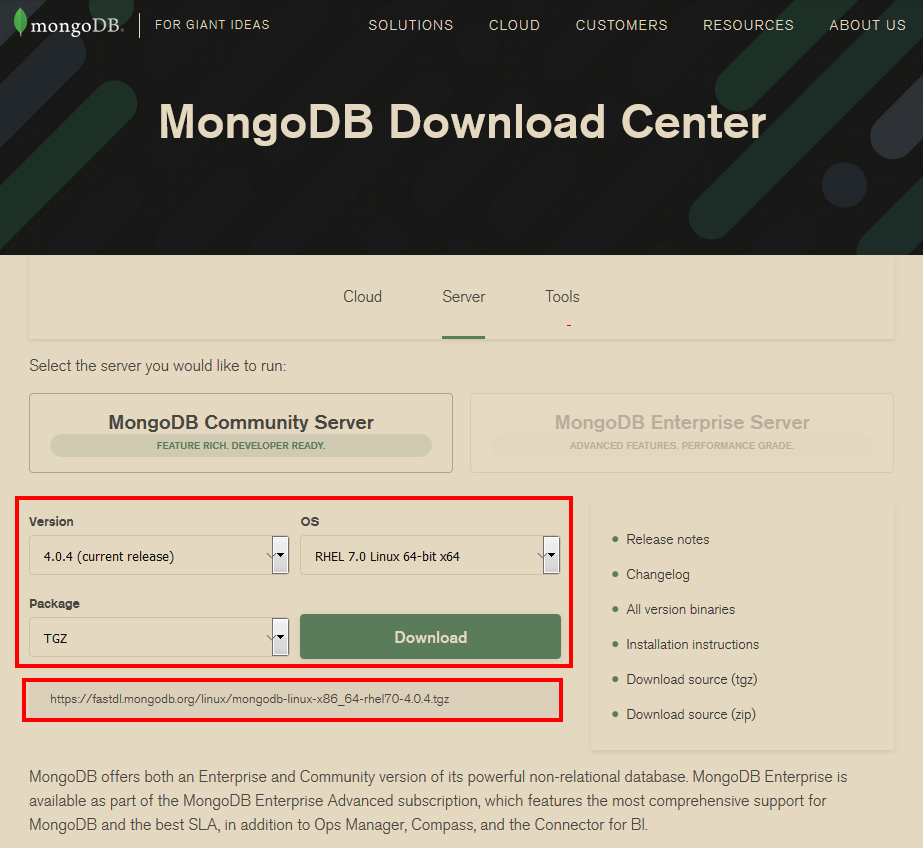
3.2.2- 安装并设置环境变量
[root@localhost ~]# ll

total 82988

-rw-------. 1 root root     2029 Nov 16 15:05 anaconda-ks.cfg

-rw-r--r--. 1 root root     2060 Nov 16 15:08 initial-setup-ks.cfg

-rwxrwxrwx. 1 root root 84970205 Nov 16 15:13 mongodb-linux-x86_64-rhel70-4.0.4.tgz

[root@localhost ~]#

[root@localhost ~]# mkdir -p /usr/local/mongodb

[root@localhost ~]# chmod 755 /usr/local/mongodb

[root@localhost ~]#

[root@localhost ~]# tar -zxvf mongodb-linux-x86_64-rhel70-4.0.4.tgz

mongodb-linux-x86_64-rhel70-4.0.4/README

mongodb-linux-x86_64-rhel70-4.0.4/THIRD-PARTY-NOTICES

mongodb-linux-x86_64-rhel70-4.0.4/MPL-2

mongodb-linux-x86_64-rhel70-4.0.4/LICENSE-Community.txt

mongodb-linux-x86_64-rhel70-4.0.4/bin/mongodump

mongodb-linux-x86_64-rhel70-4.0.4/bin/mongorestore

mongodb-linux-x86_64-rhel70-4.0.4/bin/mongoexport

mongodb-linux-x86_64-rhel70-4.0.4/bin/mongoimport

mongodb-linux-x86_64-rhel70-4.0.4/bin/mongostat

mongodb-linux-x86_64-rhel70-4.0.4/bin/mongotop

mongodb-linux-x86_64-rhel70-4.0.4/bin/bsondump

mongodb-linux-x86_64-rhel70-4.0.4/bin/mongofiles

mongodb-linux-x86_64-rhel70-4.0.4/bin/mongoreplay

mongodb-linux-x86_64-rhel70-4.0.4/bin/mongod

mongodb-linux-x86_64-rhel70-4.0.4/bin/mongos

mongodb-linux-x86_64-rhel70-4.0.4/bin/mongo

mongodb-linux-x86_64-rhel70-4.0.4/bin/install_compass

[root@localhost ~]#

[root@localhost ~]# mv mongodb-linux-x86_64-rhel70-4.0.4/bin /usr/local/mongodb/

[root@localhost ~]#

[root@localhost ~]# ll -R /usr/local/mongodb/

/usr/local/mongodb/:

total 0

drwxr-xr-x. 2 root root 231 Nov 19 15:47 bin

/usr/local/mongodb/bin:

total 253744

-rwxr-xr-x. 1 root root 12393712 Nov  7 03:48 bsondump

-rwxr-xr-x. 1 root root     5792 Nov  7 04:06 install_compass

-rwxr-xr-x. 1 root root 39753304 Nov  7 04:06 mongo

-rwxr-xr-x. 1 root root 62170704 Nov  7 04:06 mongod

-rwxr-xr-x. 1 root root 14702992 Nov  7 03:49 mongodump

-rwxr-xr-x. 1 root root 12733096 Nov  7 03:48 mongoexport

-rwxr-xr-x. 1 root root 12634648 Nov  7 03:48 mongofiles

-rwxr-xr-x. 1 root root 12892232 Nov  7 03:49 mongoimport

-rwxr-xr-x. 1 root root 15800824 Nov  7 03:49 mongoreplay

-rwxr-xr-x. 1 root root 15821528 Nov  7 03:49 mongorestore

-rwxr-xr-x. 1 root root 35363672 Nov  7 04:06 mongos

-rwxr-xr-x. 1 root root 12947464 Nov  7 03:48 mongostat

-rwxr-xr-x. 1 root root 12589240 Nov  7 03:49 mongotop

[root@localhost ~]#

[root@localhost ~]# echo $PATH

/usr/local/sbin:/usr/local/bin:/sbin:/bin:/usr/sbin:/usr/bin:/root/bin

[root@localhost ~]#

[root@localhost ~]# export PATH=/usr/local/mongodb/bin:$PATH

[root@localhost ~]#

[root@localhost ~]# echo $PATH

/usr/local/mongodb/bin:/usr/local/sbin:/usr/local/bin:/sbin:/bin:/usr/sbin:/usr/bin:/root/bin

[root@localhost ~]#
注意:这里是把bin目录绝对路径临时添加到环境变量中,重启系统后,将恢复默认环境变量;
3.2.3- 创建数据库目录
[root@localhost ~]# mkdir -p /home/Anliven/data/db

[root@localhost ~]# chmod 755 /home/Anliven/data/db
3.2.4- 运行MongoDB服务
- 参数“--dbpath”:指定数据库目录,数据库目录默认为“/data/db”;
- 参数“--auth”:启用认证(MongoDB 默认安装完成后,只允许本地连接,同时不需要使用任何账号密码就可以直接连接);
[root@localhost ~]# /usr/local/mongodb/bin/mongod --dbpath=/home/Anliven/data/db --auth

2018-11-20T09:57:23.501+0800 I CONTROL  [main] Automatically disabling TLS 1.0, to force-enable TLS 1.0 specify --sslDisabledProtocols 'none'

2018-11-20T09:57:23.508+0800 I CONTROL  [initandlisten] MongoDB starting : pid=18449 port=27017 dbpath=/home/Anliven/data/db 64-bit host=localhost.localdomain

2018-11-20T09:57:23.508+0800 I CONTROL  [initandlisten] db version v4.0.4

2018-11-20T09:57:23.508+0800 I CONTROL  [initandlisten] git version: f288a3bdf201007f3693c58e140056adf8b04839

2018-11-20T09:57:23.508+0800 I CONTROL  [initandlisten] OpenSSL version: OpenSSL 1.0.1e-fips 11 Feb 2013

2018-11-20T09:57:23.508+0800 I CONTROL  [initandlisten] allocator: tcmalloc

2018-11-20T09:57:23.508+0800 I CONTROL  [initandlisten] modules: none

2018-11-20T09:57:23.508+0800 I CONTROL  [initandlisten] build environment:

2018-11-20T09:57:23.508+0800 I CONTROL  [initandlisten]     distmod: rhel70

2018-11-20T09:57:23.508+0800 I CONTROL  [initandlisten]     distarch: x86_64

2018-11-20T09:57:23.508+0800 I CONTROL  [initandlisten]     target_arch: x86_64

2018-11-20T09:57:23.508+0800 I CONTROL  [initandlisten] options: { security: { authorization: "enabled" }, storage: { dbPath: "/home/Anliven/data/db" } }

......

......

......
- “MongoDB starting : pid=3491 port=27017 dbpath=/home/Anliven/data/db 64-bit host=localhost.localdomain”
- options: { security: { authorization: "enabled" }, storage: { dbPath: "/home/Anliven/data/db" } }
3.2.5- 禁用SELinux
4- MongoDB后台管理Shell
4.1- 进入MongoDB Shell
执行MongoDB安装路径下bin目录中的mongo命令文件就进入MongoDB后台管理;
[Anliven@localhost ~]$ cd /usr/local/mongodb/bin/

[Anliven@localhost bin]$ ll

total 253744

-rwxr-xr-x. 1 root root 12393712 Nov  7 03:48 bsondump

-rwxr-xr-x. 1 root root     5792 Nov  7 04:06 install_compass

-rwxr-xr-x. 1 root root 39753304 Nov  7 04:06 mongo

-rwxr-xr-x. 1 root root 62170704 Nov  7 04:06 mongod

-rwxr-xr-x. 1 root root 14702992 Nov  7 03:49 mongodump

-rwxr-xr-x. 1 root root 12733096 Nov  7 03:48 mongoexport

-rwxr-xr-x. 1 root root 12634648 Nov  7 03:48 mongofiles

-rwxr-xr-x. 1 root root 12892232 Nov  7 03:49 mongoimport

-rwxr-xr-x. 1 root root 15800824 Nov  7 03:49 mongoreplay

-rwxr-xr-x. 1 root root 15821528 Nov  7 03:49 mongorestore

-rwxr-xr-x. 1 root root 35363672 Nov  7 04:06 mongos

-rwxr-xr-x. 1 root root 12947464 Nov  7 03:48 mongostat

-rwxr-xr-x. 1 root root 12589240 Nov  7 03:49 mongotop

[Anliven@localhost bin]$ ./mongo

MongoDB shell version v4.0.4

connecting to: mongodb://127.0.0.1:27017

Implicit session: session { "id" : UUID("562febfc-d408-4f7c-b3a7-a230c64c2c38") }

MongoDB server version: 4.0.4

Welcome to the MongoDB shell.

For interactive help, type "help".

For more comprehensive documentation, see

	http://docs.mongodb.org/

Questions? Try the support group

	http://groups.google.com/group/mongodb-user

Server has startup warnings:

2018-11-19T15:52:35.148+0800 I CONTROL  [initandlisten]

2018-11-19T15:52:35.148+0800 I CONTROL  [initandlisten] ** WARNING: Access control is not enabled for the database.

2018-11-19T15:52:35.148+0800 I CONTROL  [initandlisten] **          Read and write access to data and configuration is unrestricted.

2018-11-19T15:52:35.148+0800 I CONTROL  [initandlisten] ** WARNING: You are running this process as the root user, which is not recommended.

2018-11-19T15:52:35.148+0800 I CONTROL  [initandlisten]

2018-11-19T15:52:35.148+0800 I CONTROL  [initandlisten] ** WARNING: This server is bound to localhost.

2018-11-19T15:52:35.148+0800 I CONTROL  [initandlisten] **          Remote systems will be unable to connect to this server.

2018-11-19T15:52:35.148+0800 I CONTROL  [initandlisten] **          Start the server with --bind_ip <address> to specify which IP

2018-11-19T15:52:35.148+0800 I CONTROL  [initandlisten] **          addresses it should serve responses from, or with --bind_ip_all to

2018-11-19T15:52:35.148+0800 I CONTROL  [initandlisten] **          bind to all interfaces. If this behavior is desired, start the

2018-11-19T15:52:35.148+0800 I CONTROL  [initandlisten] **          server with --bind_ip 127.0.0.1 to disable this warning.

2018-11-19T15:52:35.148+0800 I CONTROL  [initandlisten]

2018-11-19T15:52:35.149+0800 I CONTROL  [initandlisten]

2018-11-19T15:52:35.149+0800 I CONTROL  [initandlisten] ** WARNING: /sys/kernel/mm/transparent_hugepage/enabled is 'always'.

2018-11-19T15:52:35.149+0800 I CONTROL  [initandlisten] **        We suggest setting it to 'never'

2018-11-19T15:52:35.149+0800 I CONTROL  [initandlisten]

2018-11-19T15:52:35.149+0800 I CONTROL  [initandlisten] ** WARNING: /sys/kernel/mm/transparent_hugepage/defrag is 'always'.

2018-11-19T15:52:35.149+0800 I CONTROL  [initandlisten] **        We suggest setting it to 'never'

2018-11-19T15:52:35.149+0800 I CONTROL  [initandlisten]

---

Enable MongoDB's free cloud-based monitoring service, which will then receive and display

metrics about your deployment (disk utilization, CPU, operation statistics, etc).

The monitoring data will be available on a MongoDB website with a unique URL accessible to you

and anyone you share the URL with. MongoDB may use this information to make product

improvements and to suggest MongoDB products and deployment options to you.

To enable free monitoring, run the following command: db.enableFreeMonitoring()

To permanently disable this reminder, run the following command: db.disableFreeMonitoring()

---

>
进入MongoDB Shell,默认会选择 test 文档(一个空数据库),以后进入时会选择用户指定的数据库;
- db:查看当前选择的数据库;
- show dbs:查看非空的数据库列表;
- use <db name>:切换选择数据库,如果数据库存在则切换,如果不存在则直接创建;
- exit 或者 quit() :退出MongoDB Shell;
4.2- 获取命令帮助信息
> help

    db.help()                    help on db methods

    db.mycoll.help()             help on collection methods

    sh.help()                    sharding helpers

    rs.help()                    replica set helpers

    help admin                   administrative help

    help connect                 connecting to a db help

    help keys                    key shortcuts

    help misc                    misc things to know

    help mr                      mapreduce

    show dbs                     show database names

    show collections             show collections in current database

    show users                   show users in current database

    show profile                 show most recent system.profile entries with time >= 1ms

    show logs                    show the accessible logger names

    show log [name]              prints out the last segment of log in memory, 'global' is default

    use <db_name>                set current database

    db.foo.find()                list objects in collection foo

    db.foo.find( { a : 1 } )     list objects in foo where a == 1

    it                           result of the last line evaluated; use to further iterate

    DBQuery.shellBatchSize = x   set default number of items to display on shell

    exit                         quit the mongo shell

>
db.help():显示db常用命令帮助;
> db.help()

DB methods:

    db.adminCommand(nameOrDocument) - switches to 'admin' db, and runs command [just calls db.runCommand(...)]

    db.aggregate([pipeline], {options}) - performs a collectionless aggregation on this database; returns a cursor

    db.auth(username, password)

    db.cloneDatabase(fromhost) - deprecated

    db.commandHelp(name) returns the help for the command

    db.copyDatabase(fromdb, todb, fromhost) - deprecated

    db.createCollection(name, {size: ..., capped: ..., max: ...})

    db.createView(name, viewOn, [{$operator: {...}}, ...], {viewOptions})

    db.createUser(userDocument)

    db.currentOp() displays currently executing operations in the db

    db.dropDatabase()

    db.eval() - deprecated

    db.fsyncLock() flush data to disk and lock server for backups

    db.fsyncUnlock() unlocks server following a db.fsyncLock()

    db.getCollection(cname) same as db['cname'] or db.cname

    db.getCollectionInfos([filter]) - returns a list that contains the names and options of the db's collections

    db.getCollectionNames()

    db.getLastError() - just returns the err msg string

    db.getLastErrorObj() - return full status object

    db.getLogComponents()

    db.getMongo() get the server connection object

    db.getMongo().setSlaveOk() allow queries on a replication slave server

    db.getName()

    db.getPrevError()

    db.getProfilingLevel() - deprecated

    db.getProfilingStatus() - returns if profiling is on and slow threshold

    db.getReplicationInfo()

    db.getSiblingDB(name) get the db at the same server as this one

    db.getWriteConcern() - returns the write concern used for any operations on this db, inherited from server object if set

    db.hostInfo() get details about the server's host

    db.isMaster() check replica primary status

    db.killOp(opid) kills the current operation in the db

    db.listCommands() lists all the db commands

    db.loadServerScripts() loads all the scripts in db.system.js

    db.logout()

    db.printCollectionStats()

    db.printReplicationInfo()

    db.printShardingStatus()

    db.printSlaveReplicationInfo()

    db.dropUser(username)

    db.repairDatabase()

    db.resetError()

    db.runCommand(cmdObj) run a database command.  if cmdObj is a string, turns it into {cmdObj: 1}

    db.serverStatus()

    db.setLogLevel(level,<component>)

    db.setProfilingLevel(level,slowms) 0=off 1=slow 2=all

    db.setWriteConcern(<write concern doc>) - sets the write concern for writes to the db

    db.unsetWriteConcern(<write concern doc>) - unsets the write concern for writes to the db

    db.setVerboseShell(flag) display extra information in shell output

    db.shutdownServer()

    db.stats()

    db.version() current version of the server

>
一些示例:
> db

test

>

> show dbs

admin   0.000GB

config  0.000GB

local   0.000GB

>

> use local

switched to db local

>

> db

local

>

> exit

bye

[Anliven@localhost bin]$
在此界面不仅可以插入一些简单的数据、对插入的数据进行检索,还可以进行简单数学运算;
> 111 + 222

333

> 666 / 111

6

>
5- PyMongo
6- 参考信息
- MongoDB教程:http://www.runoob.com/mongodb/
简介 - MongoDB的更多相关文章
- MongoDB简介---MongoDB基础用法(一)
Mongo MongoDB是一个基于分布式文件存储的数据库.MongoDB是一个介于关系数据库和非关系数据库之间的产品,是非关系数据库当中功能最丰富,最像关系数据库的. MongoDB 将数据存储为一 ...
- MongoDB学习笔记一—简介
MongoDB简介 MongoDB在功能和复杂性之间取得了很好的平衡,并且大大简化了原先十分复杂的任务,它具备支撑今天主流web应用的关键功能:索引.复制.分片.丰富的查询语法,特别灵活的数据模型.与 ...
- mongodb简介(转)
1.简介 MongoDB是一个基于分布式文件存储的数据库.由C++语言编写.旨在为WEB应用提供可扩展的高性能数据存储解决方案. MongoDB是一个介于关系数据库和非关系数据库之间的产品,是非关系数 ...
- 2.MongoDB数据库简介
1).简介 MongoDB是一个基于分布式文件存储的数据库.由C++语言编写.旨在为WEB应用提供可扩展的高性能数据存储解决方案. mongoDB是一个介于关系数据库和非关系数据库之间的产品,是非关系 ...
- MongoDB简介与增删改查
一.简介 MongoDB 是由C++语言编写的,是一个基于分布式文件存储的开源数据库系统.MongoDB 旨在为WEB应用提供可扩展的高性能数据存储解决方案.MongoDB 将数据存储为一个文档,数据 ...
- MongoDB学习笔记-01 简介、安装
MongoDB简介 MongoDB是一种强大.灵活.可拓展的存储方式.是一个面向文档(相当于"行"的概念)的数据库. 可拓展:通过添加服务器而增加存储量. Windows下安装 版 ...
- MongoDB之TextSearch简介
MongoDB之TextSearch简介 MongoDB支持对文本内容执行文本搜索操作,其提供了索引text index和查询操作$text来完成文本搜索功能.下面我们通过一个简单的例子来体验一下M ...
- MongoDB学习(一)简介
本篇主要简单介绍一下MongoDB数据库. 一.简介 mongoDB是一个开源的,基于分布式的,面向文档存储的非关系型数据库.是非关系型数据库当中功能最丰富.最像关系数据库的. mongoDB由C++ ...
- MongoDB(二):MongoDB简介及安装
一.MongoDB 1.简介 MongoDB是由C++语言编写的,是一个基于分布式文件存储的开源数据库系统.旨在为WEB应用提供可扩展的高性能数据存储解决方案.在高负载的情况下,添加更多的节点(分布式 ...
随机推荐
- EasyPR源码剖析(6):车牌判断之LBP特征
一.LBP特征 LBP指局部二值模式,英文全称:Local Binary Pattern,是一种用来描述图像局部特征的算子,LBP特征具有灰度不变性和旋转不变性等显著优点. 原始的LBP算子定义在像素 ...
- Python学习心得--变量类型篇
1.Python允许同时为多个变量赋值.例如:a = b = c = 1 2.Python允许多个对象指定多个变量.例如:a1, b1, c1 = 1, 2, "john" 3.使 ...
- Maven 属性
maven 中使用 ${属性名} 来访问属性 内置属性 (maven 预定义,用户可以直接使用的属性) ${basedir} 表示项目根目录,即包含 pom.xml 文件的目录.同 ${projec ...
- HTTP协议快速入门指南
看完下面的文章,回答这几个问题 常用的HTTP方法有哪些 GET方法与POST方法的区别 HTTP请求报文与响应报文格式 常见的HTTP相应状态码 HTTP1.1版本新特性 常见HTTP首部字段 HT ...
- mac查看当前调用tcp的进程并关闭指定进程
查看所有tcp进程 监听的端口 lsof -iTCP -sTCP:LISTEN 查看指定端口信息 lsof -i: 关闭指定进程 kill -
- dubbo入门学习 五 provider端的编写
1. 新建Maven Project, 里面只有接口(dubbo-service) 1.1 为什么这么做? RPC框架,不希望Consumer知道具体实现.如果实现类和接口在同一个项目中,Consum ...
- vue中created、mounted、 computed,watch,method 等方法整理
created:html加载完成之前,执行.执行顺序:父组件-子组件 mounted:html加载完成后执行.执行顺序:子组件-父组件 methods:事件方法执行 watch:watch是去监听一个 ...
- WARN [QuorumPeer[myid=1]/0:0:0:0:0:0:0:0:2181:QuorumCnxManager@584] - Cannot open channel to 4 at election address Slave3.Hadoop/xxx.xxx.xxx.xxx
这些日子为这个错误苦恼很久了,网上找到的各种方法都试了一遍,还是没能解决. 安装好zookeeper后,运行zkServer.sh start 显示正常启动,但运行zkServer.sh status ...
- 添加sqljdbc的maven依赖JAVA环境配置
sqljdbc是微软sql server的jdbc驱动 使用sqljdbc需要从微软的官方网站下载jar包: http://www.microsoft.com/en-us/download/detai ...
- UGUI小技巧之Text随文本内容自动变化大小
看了网上很多帖子,都是说在 Text 上面加上 Content Size Fitter 组件,并将对应的轴向改成 Preferred size 就可以实现 Text 大小随着文本内容自适应,如下图: ...