
ASP.NET Core 添加NLog日志支持(VS2015update3&VS2017)
创建一个新的ASP.NET Core项目
添加项目依赖
在项目目录下添加nlog.config文件
 <?xml version="1.0" encoding="utf-8" ?>

 <nlog xmlns="http://www.nlog-project.org/schemas/NLog.xsd"

       xmlns:xsi="http://www.w3.org/2001/XMLSchema-instance"

       autoReload="true"

       internalLogLevel="Warn"

       internalLogFile="c:\temp\internal-nlog.txt">

   <!-- 加载ASP.NET Core插件 -->

   <extensions>

     <add assembly="NLog.Web.AspNetCore"/>

   </extensions>

   <!-- 输出目的地 -->

   <targets>

      <!-- 输出到文件,这个文件记录所有日志 -->

      <target xsi:type="File" name="allfile" fileName="c:\temp\nlog-all-${shortdate}.log"

                  layout="${longdate}|${event-properties:item=EventId.Id}|${logger}|${uppercase:${level}}|${message} ${exception}" />

    <!-- 另外一个日志记录文件,户口也跳过Microsoft开头相关日志信息 -->

      <target xsi:type="File" name="ownFile-web" fileName="c:\temp\nlog-own-${shortdate}.log"

              layout="${longdate}|${event-properties:item=EventId.Id}|${logger}|${uppercase:${level}}|  ${message} ${exception}|url: ${aspnet-request-url}|action: ${aspnet-mvc-action}" />

      <!-- write to the void aka just remove -->

     <target xsi:type="Null" name="blackhole" />

   </targets>

   <!-- 写入目的地的规则 -->

   <rules>

     <!--全部记录,包括Microsoft开头的相关日志信息-->

     <logger name="*" minlevel="Trace" writeTo="allfile" />

     <!--跳过Microsoft开头的相关日志信息-->

     <logger name="Microsoft.*" minlevel="Trace" writeTo="blackhole" final="true" />

     <logger name="*" minlevel="Trace" writeTo="ownFile-web" />

   </rules>

 </nlog>
将nlog.config复制到bin文件夹
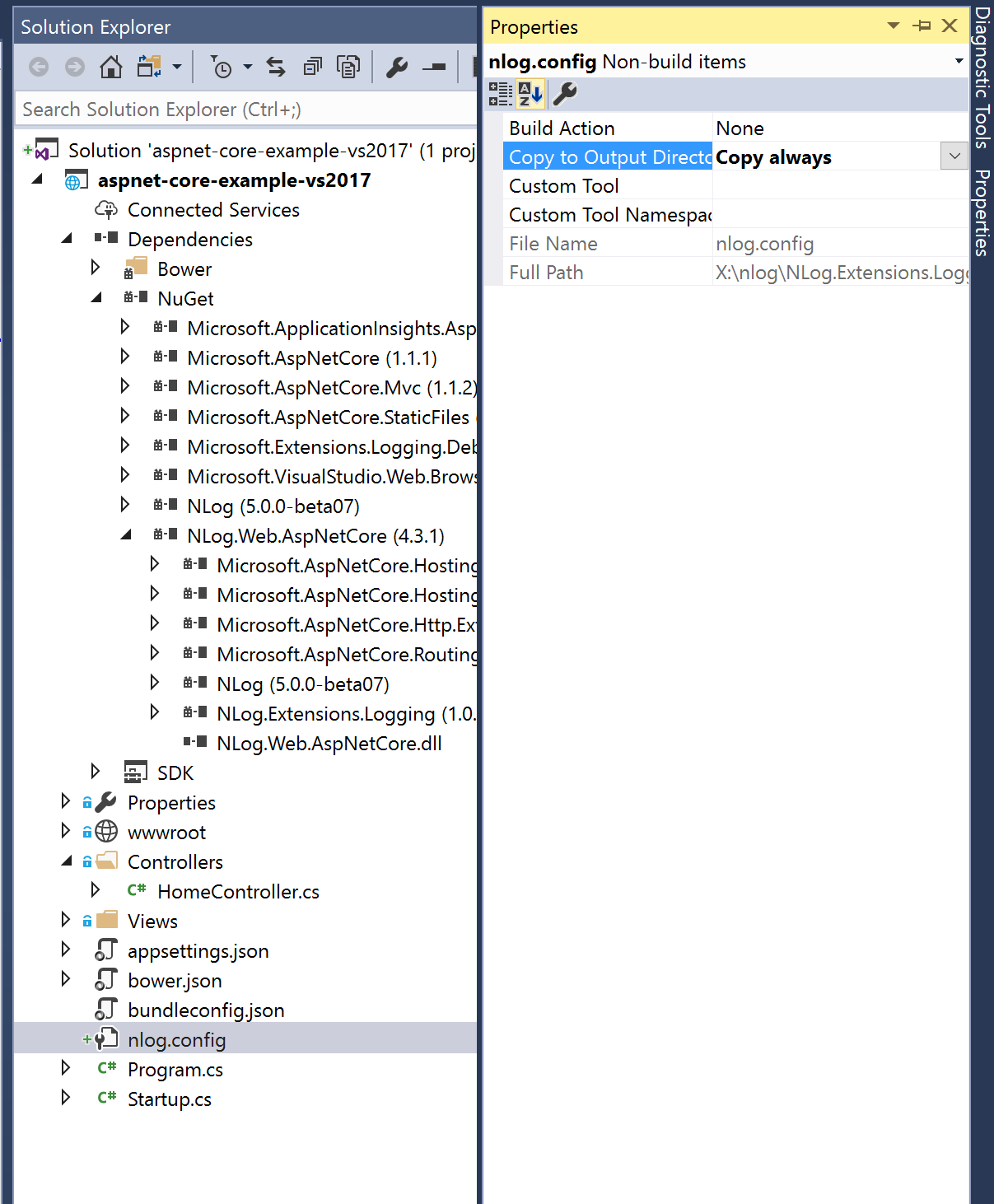
在startup.cs文件中添加(红字)
 using NLog.Extensions.Logging;

 using NLog.Web;

 public Startup(IHostingEnvironment env)

 {

     env.ConfigureNLog("nlog.config");

 }

 public void ConfigureServices(IServiceCollection Services)

 {

     //call this in case you need aspnet-user-authtype/aspnet-user-identity

     services.AddSingleton<IHttpContextAccessor, HttpContextAccessor>();

 }

 // This method gets called by the runtime. Use this method to configure the HTTP request pipeline.

 public void Configure(IApplicationBuilder app, IHostingEnvironment env, ILoggerFactory loggerFactory)

 {

     //add NLog to ASP.NET Core

     loggerFactory.AddNLog();

     //add NLog.Web

     app.AddNLogWeb();

    //note: remove the old loggerFactory, like loggerFactory.AddConsole and  loggerFactory.AddDebug
记录日志
 public class HomeController : Controller

     {

         private readonly ILogger<HomeController> _logger;

         public HomeController(ILogger<HomeController> logger)

         {

             _logger = logger;

         }

         public IActionResult Index()

         {

             _logger.LogInformation("Index page says hello");

             return View();

         }
运行ASP.NET Core网站,会生成两个文件
nlog-own-2017-04-28.log和nlog-all-2017-04-28.log
ASP.NET Core 添加NLog日志支持(VS2015update3&VS2017)的更多相关文章
- asp.net core 使用 NLog日志
NLog是一个配置灵活的日志记录类库,拥有输出日志到文件.存储入库.发送到udp地址的高级功能 1 添加 nlog nuget包 Nlog和NLog.Web.AspNetCore 安装完成后 2 ...
- asp.net core结合NLog搭建ELK实时日志分析平台
0.整体架构 整体架构目录:ASP.NET Core分布式项目实战-目录 一.介绍ELK 1.说明(此篇ELK采用rpm的方式安装在服务器上)-牛刀小试 承接上一篇文章的内容准备部署ELK来展示asp ...
- 第七节:Asp.Net Core内置日志和整合NLog(未完)
一. Asp.Net Core内置日志 1. 默认支持三种输出方式:控制台.调试(底部输出窗口).EventSource,当然也可以在Program类中通过logging.ClearProviders ...
- 玩转ASP.NET Core中的日志组件
简介 日志组件,作为程序员使用频率最高的组件,给程序员开发调试程序提供了必要的信息.ASP.NET Core中内置了一个通用日志接口ILogger,并实现了多种内置的日志提供器,例如 Console ...
- asp.net core 系列 13 日志
一.概述 ASP.NET Core 支持适用于各种内置和第三方日志记录, 供程序的日志记录 API,本文介绍了如何将日志记录 API 与内置提供程序一起使用.对于第三方日志记录提供程序使用,文章最后有 ...
- asp.net core 使用NLog记录日志到txt文件
一.使用VisualStudioCode创建一个webapi项目(也可以是mvc等).一个类库(用于封装记录日志方法,当然如果使用依赖注入到控制台项目,就不需要此类库了). 二.在类库中添加NLog. ...
- (14)ASP.NET Core 中的日志记录
1.前言 ASP.NET Core支持适用于各种内置和第三方日志记录提供应用程序的日志记录API.本文介绍了如何将日志记录API与内置提供应用程序一起使用. 2.添加日志提供程序 日志记录提供应用程序 ...
- ASP.NET Core 异常处理与日志记录
1. ASP.NET Core 异常处理与日志记录 1.1. 异常处理 1.1.1. 异常产生的原因及处理 1.1.2. ASP.NET Core中启动开发人员异常页面 1.2. 日志记录 1.2.1 ...
- asp.net core 集成 log4net 日志框架
asp.net core 集成 log4net 日志框架 Intro 在 asp.net core 中有些日志我们可能想输出到数据库或文件或elasticsearch等,如果不自己去实现一个 Logg ...
随机推荐
- mybatis入门篇:mybatis动态SQL
1.if用法 <select id="selectUser" resultType="com.forest.owl.entity.User"> se ...
- LayaAir疑难杂症之二:字符输入限制不生效(多个限制条件该如何赋值给restrict)
问题描述 采用LayaAir进行开发,在使用TextInput时,对restrict属性进行赋值,使该输入框只允许输入中英文.数字,restrict = “[\u4E00-\u9FA5A-Za-z ...
- Django基础模板层(75-76)
Django框架之模板层(d75)一 模版语法之变量: ** locals() 会把*该*视图函数内的变量,传到模板 ** return render(request, 'index.html' ...
- Tmux 常用快捷键
Ctrl-b : Send the prefix key through to the application. " : Split the current pane into two, t ...
- MQTT项目请求设置
MQTT项目请求设置:XMLHttpRequest WithCredentials 1.如果在发送来自其他域的XMLHttpRquest请求之前,未设置withCredentiaals为true,那么 ...
- start to use await
import { browser, $, $$, by, element, protractor } from "protractor"; //import { SearchPag ...
- Powerdesigner16 逆向 postgresql9.2
参考配置连接:https://www.cnblogs.com/simpleZone/p/5489781.html 过程中遇到的问题: 1.Powerdesigner需要用32位的jdk进行逆向,所以需 ...
- vmvare使用桥接和NAT方式连接网络
一.背景:本着学以致用的心态,试着最小化安装Centos7.4.安装centos主要目的有两个:共享文件(samba).安装postgresql数据库 本打算使用内网(不联网)的方式安装samba和p ...
- 很不幸,装win10和Ubuntu双系统还是入坑了
具体问题描述:在安装Ubuntu的时候,没有发现有与windows共存的提示,直接说本计算机没有安装系统.在安装完成后,发现通过BIOS只有进入Ubuntu的启动项,没有进入Windows的启动项. ...
- 44_redux_comment应用_redux版本_同步功能
项目结构: components里面的东西没变,将app.jsx移动至containers中 /* * 包含所有action的type名称常量 * */ //添加评论 export const ADD ...