
解决TensorFlow程序无限制占用GPU
今天遇到一个奇怪的现象,使用tensorflow-gpu的时候,出现内存超额~~如果我训练什么大型数据也就算了,关键我就写了一个y=W*x.......显示如下图所示:
程序如下:
import tensorflow as tf

w = tf.Variable([[1.0,2.0]])

b = tf.Variable([[2.],[3.]])

y = tf.multiply(w,b)

init_op = tf.global_variables_initializer()

with tf.Session() as sess:

    sess.run(init_op)

    print(sess.run(y))
出错提示:
- 占用的内存越来越多,程序崩溃之后,整个电脑都奔溃了,因为整个显卡全被吃了
2018-06-10 18:28:00.263424: I T:\src\github\tensorflow\tensorflow\core\platform\cpu_feature_guard.cc:140] Your CPU supports instructions that this TensorFlow binary was not compiled to use: AVX2

2018-06-10 18:28:00.598075: I T:\src\github\tensorflow\tensorflow\core\common_runtime\gpu\gpu_device.cc:1356] Found device 0 with properties:

name: GeForce GTX 1060 major: 6 minor: 1 memoryClockRate(GHz): 1.6705

pciBusID: 0000:01:00.0

totalMemory: 6.00GiB freeMemory: 4.97GiB

2018-06-10 18:28:00.598453: I T:\src\github\tensorflow\tensorflow\core\common_runtime\gpu\gpu_device.cc:1435] Adding visible gpu devices: 0

2018-06-10 18:28:01.265600: I T:\src\github\tensorflow\tensorflow\core\common_runtime\gpu\gpu_device.cc:923] Device interconnect StreamExecutor with strength 1 edge matrix:

2018-06-10 18:28:01.265826: I T:\src\github\tensorflow\tensorflow\core\common_runtime\gpu\gpu_device.cc:929]      0

2018-06-10 18:28:01.265971: I T:\src\github\tensorflow\tensorflow\core\common_runtime\gpu\gpu_device.cc:942] 0:   N

2018-06-10 18:28:01.266220: I T:\src\github\tensorflow\tensorflow\core\common_runtime\gpu\gpu_device.cc:1053] Created TensorFlow device (/job:localhost/replica:0/task:0/device:GPU:0 with 4740 MB memory) -> physical GPU (device: 0, name: GeForce GTX 1060, pci bus id: 0000:01:00.0, compute capability: 6.1)

2018-06-10 18:28:01.331056: E T:\src\github\tensorflow\tensorflow\stream_executor\cuda\cuda_driver.cc:936] failed to allocate 4.63G (4970853120 bytes) from device: CUDA_ERROR_OUT_OF_MEMORY

2018-06-10 18:28:01.399111: E T:\src\github\tensorflow\tensorflow\stream_executor\cuda\cuda_driver.cc:936] failed to allocate 4.17G (4473767936 bytes) from device: CUDA_ERROR_OUT_OF_MEMORY

2018-06-10 18:28:01.468293: E T:\src\github\tensorflow\tensorflow\stream_executor\cuda\cuda_driver.cc:936] failed to allocate 3.75G (4026391040 bytes) from device: CUDA_ERROR_OUT_OF_MEMORY

2018-06-10 18:28:01.533138: E T:\src\github\tensorflow\tensorflow\stream_executor\cuda\cuda_driver.cc:936] failed to allocate 3.37G (3623751936 bytes) from device: CUDA_ERROR_OUT_OF_MEMORY

2018-06-10 18:28:01.602452: E T:\src\github\tensorflow\tensorflow\stream_executor\cuda\cuda_driver.cc:936] failed to allocate 3.04G (3261376768 bytes) from device: CUDA_ERROR_OUT_OF_MEMORY

2018-06-10 18:28:01.670225: E T:\src\github\tensorflow\tensorflow\stream_executor\cuda\cuda_driver.cc:936] failed to allocate 2.73G (2935238912 bytes) from device: CUDA_ERROR_OUT_OF_MEMORY

2018-06-10 18:28:01.733120: E T:\src\github\tensorflow\tensorflow\stream_executor\cuda\cuda_driver.cc:936] failed to allocate 2.46G (2641714944 bytes) from device: CUDA_ERROR_OUT_OF_MEMORY

2018-06-10 18:28:01.800101: E T:\src\github\tensorflow\tensorflow\stream_executor\cuda\cuda_driver.cc:936] failed to allocate 2.21G (2377543424 bytes) from device: CUDA_ERROR_OUT_OF_MEMORY

2018-06-10 18:28:01.862064: E T:\src\github\tensorflow\tensorflow\stream_executor\cuda\cuda_driver.cc:936] failed to allocate 1.99G (2139789056 bytes) from device: CUDA_ERROR_OUT_OF_MEMORY

2018-06-10 18:28:01.925434: E T:\src\github\tensorflow\tensorflow\stream_executor\cuda\cuda_driver.cc:936] failed to allocate 1.79G (1925810176 bytes) from device: CUDA_ERROR_OUT_OF_MEMORY

2018-06-10 18:28:01.986180: E T:\src\github\tensorflow\tensorflow\stream_executor\cuda\cuda_driver.cc:936] failed to allocate 1.61G (1733229056 bytes) from device: CUDA_ERROR_OUT_OF_MEMORY

2018-06-10 18:28:02.043456: E T:\src\github\tensorflow\tensorflow\stream_executor\cuda\cuda_driver.cc:936] failed to allocate 1.45G (1559906048 bytes) from device: CUDA_ERROR_OUT_OF_MEMORY

2018-06-10 18:28:02.103531: E T:\src\github\tensorflow\tensorflow\stream_executor\cuda\cuda_driver.cc:936] failed to allocate 1.31G (1403915520 bytes) from device: CUDA_ERROR_OUT_OF_MEMORY

2018-06-10 18:28:02.168973: E T:\src\github\tensorflow\tensorflow\stream_executor\cuda\cuda_driver.cc:936] failed to allocate 1.18G (1263524096 bytes) from device: CUDA_ERROR_OUT_OF_MEMORY

2018-06-10 18:28:02.229387: E T:\src\github\tensorflow\tensorflow\stream_executor\cuda\cuda_driver.cc:936] failed to allocate 1.06G (1137171712 bytes) from device: CUDA_ERROR_OUT_OF_MEMORY

2018-06-10 18:28:02.292997: E T:\src\github\tensorflow\tensorflow\stream_executor\cuda\cuda_driver.cc:936] failed to allocate 976.04M (1023454720 bytes) from device: CUDA_ERROR_OUT_OF_MEMORY

2018-06-10 18:28:02.356714: E T:\src\github\tensorflow\tensorflow\stream_executor\cuda\cuda_driver.cc:936] failed to allocate 878.44M (921109248 bytes) from device: CUDA_ERROR_OUT_OF_MEMORY

2018-06-10 18:28:02.418167: E T:\src\github\tensorflow\tensorflow\stream_executor\cuda\cuda_driver.cc:936] failed to allocate 790.59M (828998400 bytes) from device: CUDA_ERROR_OUT_OF_MEMORY

2018-06-10 18:28:02.482394: E T:\src\github\tensorflow\tensorflow\stream_executor\cuda\cuda_driver.cc:936] failed to allocate 711.54M (746098688 bytes) from device: CUDA_ERROR_OUT_OF_MEMORY
分析原因:
- 显卡驱动不是最新版本,用__驱动软件__更新一下驱动,或者自己去下载更新。
- TF运行太多,注销全部程序冲洗打开。
- 由于TF内核编写的原因,默认占用全部的GPU去训练自己的东西,也就是像meiguo一样优先政策吧
这个时候我们得设置两个方面:
- 选择什么样的占用方式?优先占用__还是__按需占用
- 选择最大占用多少GPU,因为占用过大GPU会导致其它程序奔溃。最好在0.7以下
先更新驱动:
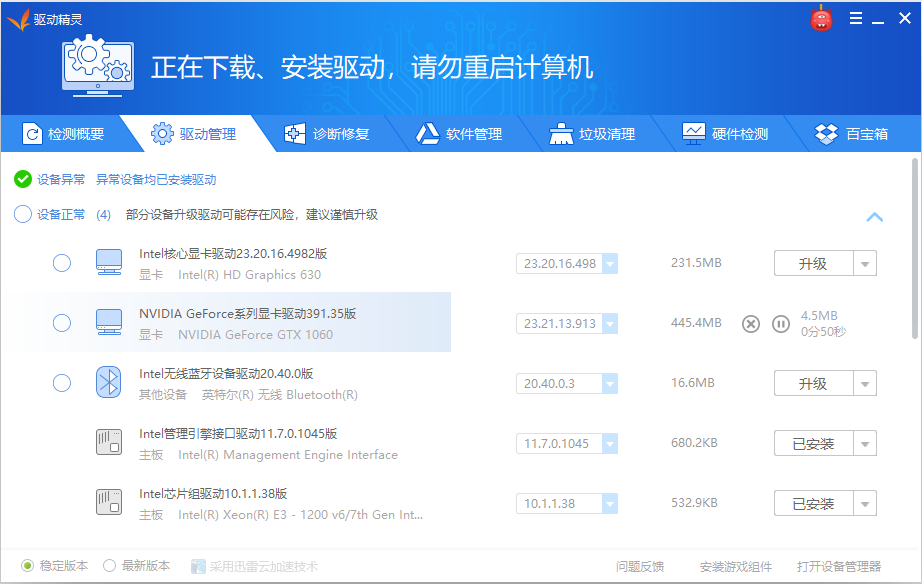
再设置TF程序:
注意:单独设置一个不行!按照网上大神博客试了,结果效果还是很差(占用很多GPU)
设置TF:
- 按需占用
- 最大占用70%GPU
修改代码如下:
import tensorflow as tf

w = tf.Variable([[1.0,2.0]])

b = tf.Variable([[2.],[3.]])

y = tf.multiply(w,b)

init_op = tf.global_variables_initializer()

config = tf.ConfigProto(allow_soft_placement=True)

gpu_options = tf.GPUOptions(per_process_gpu_memory_fraction=0.7)

config.gpu_options.allow_growth = True

with tf.Session(config=config) as sess:

    sess.run(init_op)

    print(sess.run(y))
成功解决:
2018-06-10 18:21:17.532630: I T:\src\github\tensorflow\tensorflow\core\platform\cpu_feature_guard.cc:140] Your CPU supports instructions that this TensorFlow binary was not compiled to use: AVX2

2018-06-10 18:21:17.852442: I T:\src\github\tensorflow\tensorflow\core\common_runtime\gpu\gpu_device.cc:1356] Found device 0 with properties:

name: GeForce GTX 1060 major: 6 minor: 1 memoryClockRate(GHz): 1.6705

pciBusID: 0000:01:00.0

totalMemory: 6.00GiB freeMemory: 4.97GiB

2018-06-10 18:21:17.852817: I T:\src\github\tensorflow\tensorflow\core\common_runtime\gpu\gpu_device.cc:1435] Adding visible gpu devices: 0

2018-06-10 18:21:18.511176: I T:\src\github\tensorflow\tensorflow\core\common_runtime\gpu\gpu_device.cc:923] Device interconnect StreamExecutor with strength 1 edge matrix:

2018-06-10 18:21:18.511397: I T:\src\github\tensorflow\tensorflow\core\common_runtime\gpu\gpu_device.cc:929]      0

2018-06-10 18:21:18.511544: I T:\src\github\tensorflow\tensorflow\core\common_runtime\gpu\gpu_device.cc:942] 0:   N

2018-06-10 18:21:18.511815: I T:\src\github\tensorflow\tensorflow\core\common_runtime\gpu\gpu_device.cc:1053] Created TensorFlow device (/job:localhost/replica:0/task:0/device:GPU:0 with 4740 MB memory) -> physical GPU (device: 0, name: GeForce GTX 1060, pci bus id: 0000:01:00.0, compute capability: 6.1)

[[2. 4.]

 [3. 6.]]
参考资料:
解决TensorFlow程序无限制占用GPU的更多相关文章
- TensorFlow,Keras限制GPU显存
运行TensorFlow程序会占用过多的显卡比例,多人共同使用GPU的时候,会造成后面的人无法运行程序. 一.TensorFlow 1.预加载比例限制 tf_config = tensorflow.C ...
- C# Winform程序CPU占用高的原因和解决方法
程序CPU占用高的可能原因: 1.存在死循环: 为什么死循环会导致CPU占用高呢? 虽然分时操作系统是采用时间片的机制对CPU的时间进行管理的,也就是说到了一定时间它会自动从一个进程切换到下 ...
- Atitit. 解决80端口 System 占用pid 4,,找到拉个程序或者服务占用http 80服务
Atitit. 解决80端口 System 占用pid 4,,找到拉个程序或者服务占用http服务 这个是http.sys系统服务占用了... net stop http ,三,没法儿终止 1. 寻 ...
- 查看是否用GPU跑的TensorFlow程序
查看是否用GPU跑的TensorFlow程序 第一种方法,直接输出日志法(推荐) import tensorflow as tf sess = tf.Session(config=tf.ConfigP ...
- 【TensorFlow】:解决TensorFlow的ImportError: DLL load failed: 动态链接库(DLL)初始化例程失败
[背景] 在scikit-learn基础上系统结合数学和编程的角度学习了机器学习后(我的github:https://github.com/wwcom614/machine-learning),意犹未 ...
- 彻底解决COM端口被占用(在使用中)问题的办法
今天就遇到这个问题了串口调试的时候发现usb转串口使用的是COM8而串口调试助手里面只有COM1到4,我想去该COM口发现COM1到7都在使用中,找了好多办法都不行,后面在网上找到这篇解决办法的文章, ...
- 收藏:解决其它程序与IIS共享80端口的四个方法
今天写的程序也占用80端口,而 IIS也占用 80端口,我在我的一张网卡上分配了两个IP地址,但是测试发现:只要IIS启动后,我写的程序就无法使用80端口,到网上搜索了一下,终于找到了解决办法: 使用 ...
- 第一个TensorFlow程序
第一个TensorFlow程序 TensorFlow的运行方式分为如下4步: (1)加载数据及定义超参数 (2)构建网络 (3)训练模型 (4)评估模型和进行预测 import tensorflow ...
- TensorFlow指定CPU和GPU方法
TensorFlow指定CPU和GPU方法 TensorFlow 支持 CPU 和 GPU.它也支持分布式计算.可以在一个或多个计算机系统的多个设备上使用 TensorFlow. TensorFlow ...
随机推荐
- leetcode 刷题(1)--- 两数之和
给定一个整数数组和一个目标值,找出数组中和为目标值的两个数. 你可以假设每个输入只对应一种答案,且同样的元素不能被重复利用. 示例: 给定 nums = [2, 7, 11, 15], target ...
- MySQL 8.0常见问题
1.连接问题: 1.1:8.0的驱动地址更换由原来的com.mysql.jdbc.Driver改为com.mysql.cj.jdbc.Driver 1.2:8.0以后访问地址要加上时区.编码等属性jd ...
- SpringSecurity身份验证基础入门
对于没有访问权限的用户需要转到登录表单页面.要实现访问控制的方法多种多样,可以通过Aop.拦截器实现,也可以通过框架实现(如:Apache Shiro.Spring Security). pom.xm ...
- vim-go 安装
vim-go 安装 https://studygolang.com/articles/3229
- linux下的c程序排版工具:indent
版权声明:本文为博主原创文章,未经博主同意不得转载. https://blog.csdn.net/u010839382/article/details/30779523 Linux下有一个方便的c语言 ...
- 通过Jmeter 代理功能获取postman请求
对于初学者在Jmeter 配置 请求其实属于比较麻烦的事情,但是如果在Postman配置就容易多了,所以考虑是否可以把postman的配置直接导入Jmeter,避免初学者上手不易的问题,后来考虑使用J ...
- 4.认识Angular组件之2
11. 变化监测:Angular提供了数据绑定的功能.所谓的数据绑定就是将组件类的数据和页面的DOM元素关联起来.当数据发生变化时,Angular能够监测到这些变化,并对其所绑定的DOM元素 进行相应 ...
- MySQL 设置root密码报错:mysqladmin: connect to server at 'localhost' failed
MySQL 设置root密码报错:mysqladmin: connect to server at 'localhost' failed 1.安装完MySQL设置root密码报错如下 [root@vm ...
- centos7 php-apache镜像添加redis/memcache/gd/mysql_pdo/mysqli/imagick
FROM php:5.6-apache-stretch RUN /usr/local/bin/docker-php-ext-install mysqli pdo_mysql; \ && ...
- Wpf开源收集
1,到底有哪些开源MVVM框架? 前面介绍了WPF的基本概念和一些相关知识,我们了解到开发WPF应用程序可以使用现成的框架和模式,最为合适的莫过于时下正热的MVVM模式,所以这里我们也列出针对MVVM ...