
IOS项目之弹出动画二
在IOS项目之弹出动画一中只是实现也功能,并没有体现面向对象的思想 ,今天就试着把它封装了一下,弹出视图的内容可以根据自定义,此处只是用UIDatePicker来演示
我把它传到了GitHub上 https://github.com/ywcui/YvanDatePicker.git
一、新建一个类YWDatePicker集成UIView
//  YvanDatePicker.h

#import <UIKit/UIKit.h>
typedef  void (^selectDate)(NSDate *date);

@interface YvanDatePicker : UIView

//单利
+ (YvanDatePicker *)sharedManager;

//block传值获取选择时间
@property(nonatomic,strong) selectDate selectDate;

//时间选择控件 可设置属性
@property(nonatomic,strong) UIDatePicker *datePicker;

//window全屏显示
-(void)showInWindow;

// View中显示
-(void)showInView:(UIView*)view;

//在父视图view的相对位置为Frame
-(void)showInView:(UIView*)view withFrame:(CGRect)frame;

//消失视图
-(void)dismissView;
@end
#define MAXHEIGHT [UIScreen mainScreen].bounds.size.height
#import "YvanDatePicker.h"

@interface YvanDatePicker ()

@end

@implementation YvanDatePicker

+ (YvanDatePicker *)sharedManager
{
    static YvanDatePicker *sharedAccountManagerInstance = nil;
    static dispatch_once_t predicate;
    dispatch_once(&predicate, ^{
        sharedAccountManagerInstance = [[self alloc] init];
        sharedAccountManagerInstance.backgroundColor=[UIColor colorWithWhite:0.5 alpha:0.4];
    });
    return sharedAccountManagerInstance;
}

-(void)showInWindow
{
    [self showInView:[UIApplication sharedApplication].keyWindow];
}
-(void)showInView:(UIView*)view
{
    [self showInView:view withFrame:CGRectMake(, , view.frame.size.width, view.frame.size.height)];

}
//frame相对于父视图的位置
-(void)showInView:(UIView*)view withFrame:(CGRect)frame;
{
    //在此可以自定义视图
    self.frame=CGRectMake(frame.origin.x, MAXHEIGHT, frame.size.width, frame.size.height);
    [UIView animateWithDuration: options:UIViewAnimationOptionCurveEaseOut animations:^{
        self.frame=frame;
    } completion:nil];
    UITapGestureRecognizer *tapGesture=[[UITapGestureRecognizer alloc]initWithTarget:self action:@selector(dismissView)];
    [self addGestureRecognizer:tapGesture];
    if (_datePicker==nil) {
        _datePicker=[[UIDatePicker alloc]init];
        _datePicker.locale=[[NSLocale alloc ]initWithLocaleIdentifier:@"zh_Hans_CN"];
        _datePicker.datePickerMode=UIDatePickerModeDate;
        _datePicker.timeZone=[NSTimeZone defaultTimeZone];
    }
    _datePicker.frame=CGRectMake(, frame.size.height-, , );
    [self addSubview:_datePicker];

    [view addSubview:self];

}
-(void)dismissView
{
    _selectDate(_datePicker.date);
    [UIView animateWithDuration: options:UIViewAnimationOptionCurveEaseOut animations:^{
        self.frame=CGRectMake(, MAXHEIGHT, self.frame.size.width , self.frame.size.height);
    } completion:^(BOOL finished) {
        [self removeFromSuperview];
    }];

}

@end
二、调用
//
//  ViewController.m
//  YvanDatePicker
//
//  Created by City--Online on 15/6/18.
//  Copyright (c) 2015年 YvanCui. All rights reserved.
//

#import "ViewController.h"
#import "YvanDatePicker.h"

@interface ViewController ()

@end

@implementation ViewController

- (void)viewDidLoad {
    [super viewDidLoad];
    self.navigationItem.rightBarButtonItem=[[UIBarButtonItem alloc]initWithTitle:@"弹出" style:UIBarButtonItemStyleDone target:self action:@selector(leftClick)];
}
-(void)leftClick
{
    YvanDatePicker *picker=[YvanDatePicker sharedManager];
    picker.selectDate=^(NSDate *date)
    {
        NSLog(@"%@",date);
    };
//    //1.设置在父视图的Frame
//    CGRect frame=CGRectMake(10, self.view.bounds.size.height-260, self.view.bounds.size.width-20, 260);
//    [picker showInView:self.view withFrame:frame];
//
//    //2.Window显示
//    [picker showInWindow];
//
//    //3.View全屏显示
//    [picker showInView:self.view];

    //4.相对于Window的Frame
    CGRect frame1=CGRectMake(, [UIApplication sharedApplication].keyWindow.bounds.size.height-, [UIApplication sharedApplication].keyWindow.bounds.size.width, );
    [picker showInView:[UIApplication sharedApplication].keyWindow withFrame:frame1];

}

- (void)didReceiveMemoryWarning {
    [super didReceiveMemoryWarning];
    // Dispose of any resources that can be recreated.
}

@end
三、显示效果


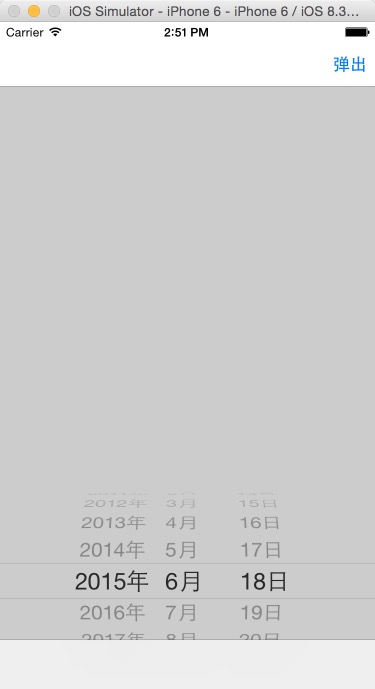
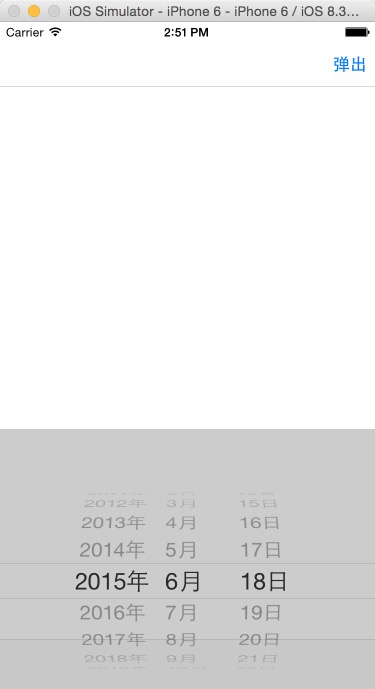
这个还可以进一步优化可以加一个标记值可以防止连续点击时一直弹出
#define MAXHEIGHT [UIScreen mainScreen].bounds.size.height
#import "YvanDatePicker.h"

@interface YvanDatePicker ()
@property(nonatomic,assign) BOOL openFlag;
@end

@implementation YvanDatePicker

+ (YvanDatePicker *)sharedManager
{
    static YvanDatePicker *sharedAccountManagerInstance = nil;
    static dispatch_once_t predicate;
    dispatch_once(&predicate, ^{
        sharedAccountManagerInstance = [[self alloc] init];
        sharedAccountManagerInstance.backgroundColor=[UIColor colorWithWhite:0.5 alpha:0.4];
    });
    return sharedAccountManagerInstance;
}

-(void)showInWindow
{
    [self showInView:[UIApplication sharedApplication].keyWindow];
}
-(void)showInView:(UIView*)view
{
    [self showInView:view withFrame:CGRectMake(, , view.frame.size.width, view.frame.size.height)];

}
//frame相对于父视图的位置
-(void)showInView:(UIView*)view withFrame:(CGRect)frame;
{
    if (_openFlag) {
        [self dismissView];
        return;
    }

    _openFlag=true;
    self.frame=CGRectMake(frame.origin.x, -frame.size.height, frame.size.width, frame.size.height);
    [UIView animateWithDuration: options:UIViewAnimationOptionCurveEaseOut animations:^{
        self.frame=CGRectMake(frame.origin.x, , frame.size.width, frame.size.height);;
    } completion:nil];
    [UIView animateWithDuration:0.3 delay:0.4 options:UIViewAnimationOptionCurveEaseOut animations:^{
        self.frame=CGRectMake(frame.origin.x, , frame.size.width, frame.size.height);;
    } completion:nil];
    UITapGestureRecognizer *tapGesture=[[UITapGestureRecognizer alloc]initWithTarget:self action:@selector(dismissView)];
    [self addGestureRecognizer:tapGesture];
    if (_datePicker==nil) {
        _datePicker=[[UIDatePicker alloc]init];
        _datePicker.locale=[[NSLocale alloc ]initWithLocaleIdentifier:@"zh_Hans_CN"];
        _datePicker.datePickerMode=UIDatePickerModeDate;
        _datePicker.timeZone=[NSTimeZone defaultTimeZone];
    }
    _datePicker.frame=CGRectMake(, frame.size.height-, , );
    [self addSubview:_datePicker];

    [view addSubview:self];

}
-(void)dismissView
{
    _openFlag=false;
    _selectDate(_datePicker.date);
    [UIView animateWithDuration: options:UIViewAnimationOptionCurveEaseOut animations:^{
        self.frame=CGRectMake(,- self.frame.size.height, self.frame.size.width , self.frame.size.height);
    } completion:^(BOOL finished) {
        [self removeFromSuperview];
    }];

}

@end
 YvanDatePicker *picker=[YvanDatePicker sharedManager];
    picker.selectDate=^(NSDate *date)
    {
        NSLog(@"%@",date);
    };
//    //1.设置在父视图的Frame
    CGRect frame=CGRectMake(, , self.view.bounds.size.width, );
    [picker showInView:self.view withFrame:frame];
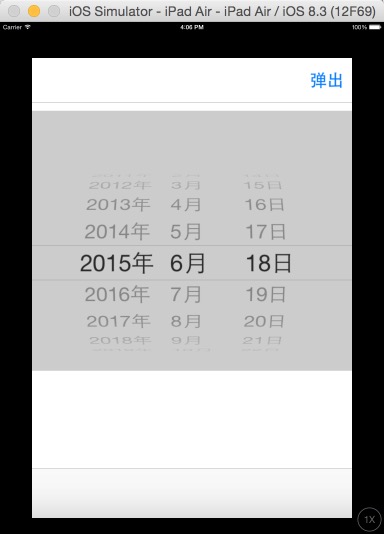
回弹效果
有了这个东西,妈妈再也不用担心我的学习,下面的这几个都可以做


IOS项目之弹出动画二的更多相关文章
- IOS项目之弹出动画终结篇
在之前写过IOS项目之弹出动画一.IOS项目之弹出动画二.IOS项目之弹出动画三,今天来一个终极封装已经上传到Github上弹出动画总结篇UIPopoverTableView. UIPopoverTa ...
- IOS项目之弹出动画三
前面写了弹出动画两个,今天做商城时又用到了,看着这个用着蛮普遍的,所以记了下来 // // mallMoreView.h // XQB // // Created by City--Online on ...
- IOS项目之弹出动画一
小区宝首页导航栏左边有一个物业按钮,点击时会出现一个视图动画,之前用的是一个POP第三方,想着几个POP动画就要引用一堆的第三方有点麻烦,就试着自己写了一下,功能实现了,下一步就是优化将其封装一下.下 ...
- ios等待ualertview弹出动画完成后再跳转至其他页面
[self performSelector:@selector(popView:) withObject:nil afterDelay:2.0];
- 阶段一:为View设置阴影和弹出动画(天气应用)
“阶段一”是指我第一次系统地学习Android开发.这主要是对我的学习过程作个记录. 上一篇阶段一:通过网络请求,获得并解析JSON数据(天气应用)完成了应用的核心功能,接下来就要对它进行优化.今天我 ...
- mac关闭渐隐和弹出动画效果
苹果系统应用程序的窗口和对话框每次使用的时候都有华丽的特效,但是如果你感觉这种特效显得有点慢(MacGG闲的蛋疼),那该如何取消掉他呢? 方法很简单,打开"终端"(Finder-& ...
- 清除ios系统alert弹出框的域名
清除ios系统alert弹出框的域名 <script> window.alert = function(name) { var iframe = document.createElemen ...
- iOS学习——键盘弹出遮挡输入框问题解决方案
在iOS或Android等移动端开发过程中,经常遇到很多需要我们输入信息的情况,例如登录时要输入账号密码.查询时要输入查询信息.注册或申请时需要填写一些信息等都是通过我们键盘来进行输入的,在iOS开发 ...
- 原生Js_实现简单的下拉折叠菜单(添加弹出动画效果)
用javascript实现简单的下拉折叠菜单效果 实现步骤 (a)获得各操作的dom对象: (b)在所有菜单按钮对象上添加单击事件: (c)设置所有菜单按钮样式为空,并将当前按钮的样式设置为“acti ...
随机推荐
- vscode怎样新建项目
首先,vscode本身没有新建项目的选项,所以要先创建一个空的文件夹喔. 然后打开vscode,再在vscode里面打开文件夹,这样才可以创建项目. 选择之前创建的空文件将作为vscode的文 ...
- 基于ASP.NET生成条形码(code128)
using System; using System.Collections.Generic; using System.Linq; using System.Web; using System.Dr ...
- IIS服务器添加网站
1.添加IIS服务:对“我的电脑”右键,管理,点击服务和应用程序,如果下面没有”Internet Information Services(IIS)管理器“,打开控制面板,点击程序,启用或者关闭Win ...
- WPF Adorner 在TabControl切换TabItem时消失
错误的截图: 一开始以为是MVVM绑定的代码中出现了问题,但是通过断点追踪并没有发现问题. 通过通过VS的实时可视化树发现问题:切换Item时Adorner会在AdornerLayer直接消失.届时怀 ...
- leetcode 84. 柱状图中最大的矩形 JAVA
题目: 给定 n 个非负整数,用来表示柱状图中各个柱子的高度.每个柱子彼此相邻,且宽度为 1 . 求在该柱状图中,能够勾勒出来的矩形的最大面积. 以上是柱状图的示例,其中每个柱子的宽度为 1,给定的高 ...
- JavaWeb -cookie&session&application
cookie&session&application总结 Cookie[key-value](不是内置对象必须new): 1. Cookie 是由服务端生成的,在发送给客户端保存 2. ...
- “全栈2019”Java异常第十八章:Exception详解
难度 初级 学习时间 10分钟 适合人群 零基础 开发语言 Java 开发环境 JDK v11 IntelliJ IDEA v2018.3 文章原文链接 "全栈2019"Java异 ...
- 关于Mybatis 反向生成后 查询结果全部为null 解决办法
今天遇到了一个问题,就是mybatis通过反向生成工具 生成的pojo类(实体类) xml文件 以及Mapper之后查询时结果为null 我写的代码怎么看都没有错 就是没有结果 后来在排除错误的时候发 ...
- select子句排列顺序与聚集函数
selcet 要返回的列或表达式 from 从中检索数据的表 where 行级过滤 group by 分组说明 having 组级过滤 order by 输出排列顺序 ASC正序排 ...
- Servlet入门实践
本文主要介绍servlet,包括入门到升入,基本上可以对servlet有一个很好的认识: 1servlet介绍: Servlet(Server Applet),全称Java Servlet,未有中 ...