
『科学计算』通过代码理解SoftMax多分类
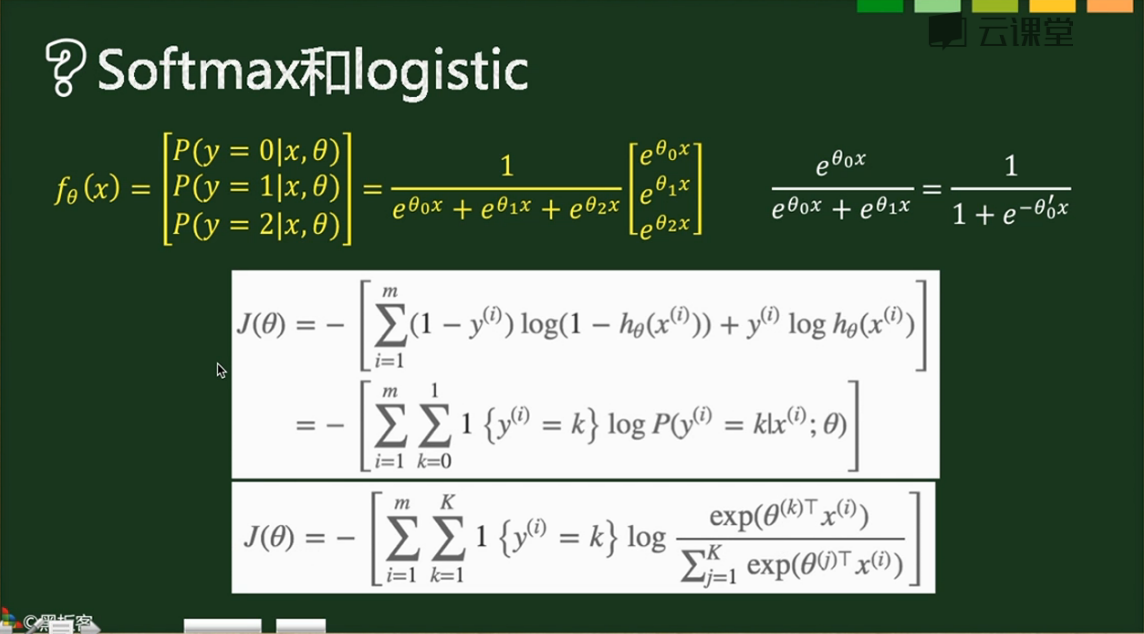
SoftMax实际上是Logistic的推广,当分类数为2的时候会退化为Logistic分类
其计算公式和损失函数如下,
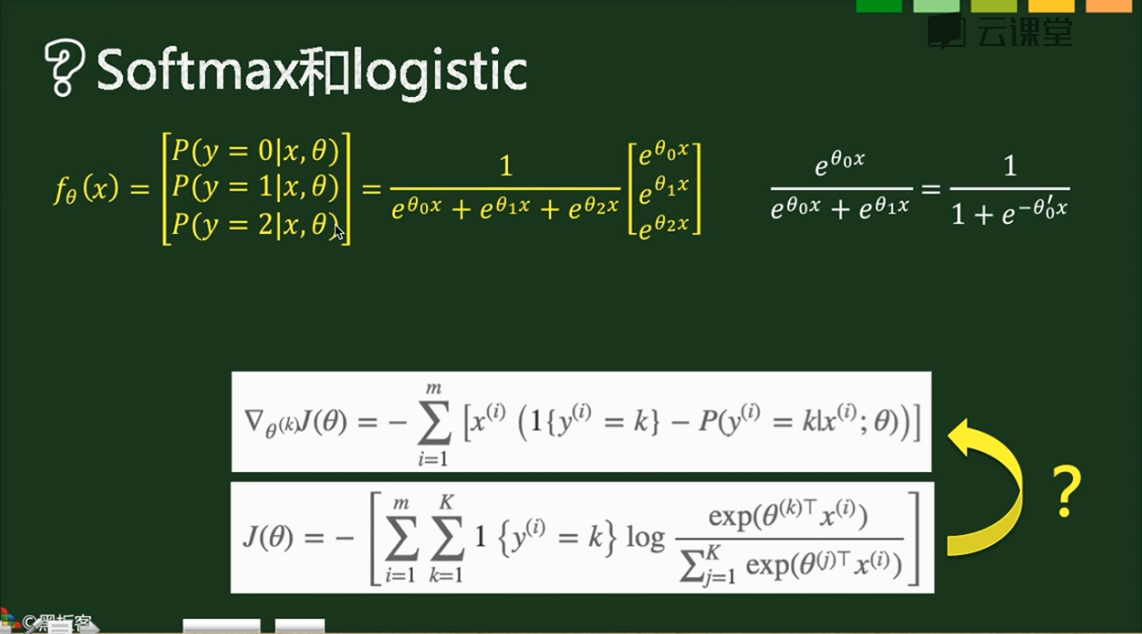
梯度如下,
1{条件} 表示True为1,False为0,在下图中亦即对于每个样本只有正确的分类才取1,对于损失函数实际上只有m个表达式(m个样本每个有一个正确的分类)相加,
对于梯度实际上是把我们以前的最后一层和分类层合并了:
- 第一步则和之前的求法类似,1-概率 & 0-概率组成向量,作为分类层的梯度,对batch数据实现的话就是建立一个(m,k)的01矩阵,直接点乘控制开关,最后求np.sum
- x的转置乘分类层梯度
- 全batch数据求和,实际上这在代码实现中和上一步放在了一块
对于单个数据梯度:x.T.dot(y_pred-y),维度是这样的(k,1)*(1,c)=(k,c)
对于成批数据梯度:X.T.dot(y_pred-y),维度是这样的(k,m)*(1,c)=(k,c),只不过结果矩阵的对应位置由x(i,1)*er(1,j)变换为x0(i,1)*er(1,j)+x1(i,1)*er(1,j)... ...正好是对全batch求了个和,所以后面需要除下去
X.T.dot(grad_next)结果是batch梯度累加和,所以需要除以样本数m,这个结论对全部使用本公式的梯度均成立(1,这句话是废话;2,但是几乎全部机器or深度学习算法都需要矩阵乘法,亦即梯度必须使用本公式,所以是很重要的废话)。
L2正则化:lamda*np.sum(W*W)或者lamda*np.sum(W.T.dot(W))均可,实际上就是W各个项的平方和
#计算Error,Cost,Grad

y_dash = self.softmax(X.dot(theta_n))   # 向前传播结果

Y = np.zeros((m,10))                    # one-hot编码label矩阵

for i in range(m):

    Y[i,y[i]]=1

error = np.sum(Y * np.log(y_dash), axis=1)   # 注意,这里是点乘

cost = -np.sum(error, axis=0)

grad = X.T.dot(y_dash-Y)

grad_n = grad.ravel()
代码实现:
import numpy as np

import matplotlib.pyplot as plt

import math

def scale_n(x):

    return x

    #return (x-x.mean(axis=0))/(x.std(axis=0)+1e-10)

class SoftMaxModel(object):

    def __init__(self,alpha=0.06,threhold=0.0005):

        self.alpha = alpha         # 学习率

        self.threhold = threhold   # 循环终止阈值

        self.num_classes = 10      # 分类数

    def setup(self,X):

        # 初始化权重矩阵,注意,由于是多分类,所以权重由向量变化为矩阵

        # 而且这里面初始化的是flat为1维的矩阵

        m, n = X.shape  # 400,15

        s = math.sqrt(6) / math.sqrt(n+self.num_classes)

        theta = np.random.rand(n*(self.num_classes))*2*s-s  #[15,1]

        return theta

    def softmax(self,x):

        # 先前传播softmax多分类

        # 注意输入的x是[batch数目n,类数目m],输出是[batch数目n,类数目m]

        e = np.exp(x)

        temp = np.sum(e, axis=1,keepdims=True)

        return e/temp

    def get_cost_grad(self,theta,X,y):

        m, n = X.shape

        theta_n = theta.reshape(n, self.num_classes)

        #计算Error,Cost,Grad

        y_dash = self.softmax(X.dot(theta_n))   # 向前传播结果

        Y = np.zeros((m,10))                    # one-hot编码label矩阵

        for i in range(m):

            Y[i,y[i]]=1

        error = np.sum(Y * np.log(y_dash), axis=1)

        cost = -np.sum(error, axis=0)

        grad = X.T.dot(y_dash-Y)

        grad_n = grad.ravel()

        return cost,grad_n

    def train(self,X,y,max_iter=50, batch_size=200):

        m, n = X.shape  # 400,15

        theta = self.setup(X)

        #our intial prediction

        prev_cost = None

        loop_num = 0

        n_samples = y.shape[0]

        n_batches = n_samples // batch_size

        # Stochastic gradient descent with mini-batches

        while loop_num < max_iter:

            for b in range(n_batches):

                batch_begin = b*batch_size

                batch_end = batch_begin+batch_size

                X_batch = X[batch_begin:batch_end]

                Y_batch = y[batch_begin:batch_end]

                #intial cost

                cost,grad = self.get_cost_grad(theta,X_batch,Y_batch)

                theta = theta- self.alpha * grad/float(batch_size)

            loop_num+=1

            if loop_num%10==0:

                print (cost,loop_num)

            if prev_cost:

                if prev_cost - cost <= self.threhold:

                    break

            prev_cost = cost

        self.theta = theta

        print (theta,loop_num)

    def train_scipy(self,X,y):

        m,n = X.shape

        import scipy.optimize

        options = {'maxiter': 50, 'disp': True}

        J = lambda x: self.get_cost_grad(x, X, y)

        theta = self.setup(X)

        result = scipy.optimize.minimize(J, theta, method='L-BFGS-B', jac=True, options=options)

        self.theta = result.x

    def predict(self,X):

        m,n = X.shape

        theta_n = self.theta.reshape(n, self.num_classes)

        a = np.argmax(self.softmax(X.dot(theta_n)),axis=1)

        return a

    def grad_check(self,X,y):

        epsilon = 10**-4

        m, n = X.shape

        sum_error=0

        N=300

        for i in range(N):

            theta = self.setup(X)

            j = np.random.randint(1,len(theta))

            theta1=theta.copy()

            theta2=theta.copy()

            theta1[j]+=epsilon

            theta2[j]-=epsilon

            cost1,grad1 = self.get_cost_grad(theta1,X,y)

            cost2,grad2 = self.get_cost_grad(theta2,X,y)

            cost3,grad3 = self.get_cost_grad(theta,X,y)

            sum_error += np.abs(grad3[j]-(cost1-cost2)/float(2*epsilon))

        print ("grad check error is %e\n"%(sum_error/float(N)))

if __name__=="__main__":

    import cPickle, gzip

    # Load the dataset

    f = gzip.open('mnist.pkl.gz', 'rb')

    train_set, valid_set, test_set = cPickle.load(f)

    f.close()

    train_X = scale_n(train_set[0])

    train_y = train_set[1]

    test_X = scale_n(test_set[0])

    test_y = test_set[1]

    l_model = SoftMaxModel()

    l_model.grad_check(test_X[0:200,:],test_y[0:200])

    l_model.train_scipy(train_X,train_y)

    predict_train_y = l_model.predict(train_X)

    b = predict_train_y!=train_y

    error_train = np.sum(b, axis=0)/float(b.size)

    predict_test_y = l_model.predict(test_X)

    b = predict_test_y!=test_y

    error_test = np.sum(b, axis=0)/float(b.size)

    print ("Train Error rate = %.4f, \nTest Error rate = %.4f\n"%(error_train,error_test))
这里面有scipy的优化器应用,因为不是重点(暂时没有学习这个库的日程),所以标注出来,需要用优化器优化函数的时候记得有这么回事再深入学习即可:
def train_scipy(self,X,y):

        m,n = X.shape

        import scipy.optimize

        options = {'maxiter': 50, 'disp': True}

        J = lambda x: self.get_cost_grad(x, X, y)

        theta = self.setup(X)

        result = scipy.optimize.minimize(J, theta, method='L-BFGS-B', jac=True, options=options)

        self.theta = result.x
主要是提供了一些比较复杂的优化算法,而且是一个优化自建目标函数的demo,以后可能有所应用。
『科学计算』通过代码理解SoftMax多分类的更多相关文章
- 『科学计算』通过代码理解线性回归&Logistic回归模型
sklearn线性回归模型 import numpy as np import matplotlib.pyplot as plt from sklearn import linear_model de ...
- 『科学计算』可视化二元正态分布&3D科学可视化实战
二元正态分布可视化本体 由于近来一直再看kaggle的入门书(sklearn入门手册的感觉233),感觉对机器学习的理解加深了不少(实际上就只是调包能力加强了),联想到假期在python科学计算上也算 ...
- 『科学计算』L0、L1与L2范数_理解
『教程』L0.L1与L2范数 一.L0范数.L1范数.参数稀疏 L0范数是指向量中非0的元素的个数.如果我们用L0范数来规则化一个参数矩阵W的话,就是希望W的大部分元素都是0,换句话说,让参数W是稀 ...
- 『科学计算』图像检测微型demo
这里是课上老师给出的一个示例程序,演示图像检测的过程,本来以为是传统的滑窗检测,但实际上引入了selectivesearch来选择候选窗,所以看思路应该是RCNN的范畴,蛮有意思的,由于老师的注释写的 ...
- 『科学计算』科学绘图库matplotlib学习之绘制动画
基础 1.matplotlib绘图函数接收两个等长list,第一个作为集合x坐标,第二个作为集合y坐标 2.基本函数: animation.FuncAnimation(fig, update_poin ...
- 『科学计算』科学绘图库matplotlib练习
思想:万物皆对象 作业 第一题: import numpy as np import matplotlib.pyplot as plt x = [1, 2, 3, 1] y = [1, 3, 0, 1 ...
- 『TensorFlow』通过代码理解gan网络_中
『cs231n』通过代码理解gan网络&tensorflow共享变量机制_上 上篇是一个尝试生成minist手写体数据的简单GAN网络,之前有介绍过,图片维度是28*28*1,生成器的上采样使 ...
- 『cs231n』通过代码理解gan网络&tensorflow共享变量机制_上
GAN网络架构分析 上图即为GAN的逻辑架构,其中的noise vector就是特征向量z,real images就是输入变量x,标签的标准比较简单(二分类么),real的就是tf.ones,fake ...
- 『cs231n』通过代码理解风格迁移
『cs231n』卷积神经网络的可视化应用 文件目录 vgg16.py import os import numpy as np import tensorflow as tf from downloa ...
随机推荐
- (六)最最基本的git操作
1.git init——初始化仓库 初始化成功的标志如下(.git默认为隐藏) 2.git status——查看仓库状态 ps:未跟踪的文件 (untracked files) 不妨在尝试在仓库建立一 ...
- yum配合rpm查看软件包安装位置
今天安装apache,新版本要求除了apache的安装包以外,还要求先安装apr.apr-util和pcre. 开始并没有急着去下载apr的安装包,而是想看看我的操作系统中有没有安装过了这个软件,结果 ...
- 七个月学习Python大计
仅以此篇纪念学习Python征程的开始
- python字符串格式化之format
用法: 它通过{}和:来代替传统%方式 1.使用位置参数 要点:从以下例子可以看出位置参数不受顺序约束,且可以为{},只要format里有相对应的参数值即可,参数索引从0开,传入位置参数列表可用*列表 ...
- MFC、Qt、C#跨线程调用对象
MFC.Qt.C#都是面向对象的编程库 1.MFC不允许跨线程调用对象,即线程只能调用它本身分配了空间的对象 In a multi-threaded application written using ...
- 为 Android 8.0 添加开机启动脚本【转】
本文转载自:https://zhuanlan.zhihu.com/p/32868074 本人对于 SELinux for Android 理解不深,下文中的各文件及安全规则虽都是我所编写,但也是一边查 ...
- python如何安装第三方库
1.python集成开发环境pycharm如何安装第三方库 http://blog.csdn.net/qiannianguji01/article/details/50397046 有的时候安装不上第 ...
- caffe深度学习网络(.prototxt)在线可视化工具:Netscope Editor
http://ethereon.github.io/netscope/#/editor 网址:http://ethereon.github.io/netscope/#/editor 将.prototx ...
- js键盘按钮keyCode及示例大全
以功能区分布 以 keycode 编号顺序分布 keycode 0 = keycode 1 = keycode 2 = keycode 3 = keycode 4 = keycode 5 = keyc ...
- CSU 1808 地铁(最短路变形)
http://acm.csu.edu.cn/csuoj/problemset/problem?pid=1808 题意: Bobo 居住在大城市 ICPCCamp. ICPCCamp 有 n 个地铁站, ...