
ecshop里提出来的js常用函数
ecshop里提出来的js常用函数
Utils.js
/* $Id : utils.js 5052 2007-02-03 10:30:13Z weberliu $ */
var Browser = new Object();
Browser.isMozilla = (typeof document.implementation != 'undefined') && (typeof document.implementation.createDocument != 'undefined') && (typeof HTMLDocument != 'undefined');
Browser.isIE = window.ActiveXObject ? true : false; //判断头前是否为ie浏览器
Browser.isFirefox = (navigator.userAgent.toLowerCase().indexOf("firefox") != - 1);
Browser.isSafari = (navigator.userAgent.toLowerCase().indexOf("safari") != - 1);
Browser.isOpera = (navigator.userAgent.toLowerCase().indexOf("opera") != - 1);
var Utils = new Object();
Utils.htmlEncode = function(text)
{
return text.replace(/&/g, '&').replace(/"/g, '"').replace(/</g, '<').replace(/>/g, '>');
}
/**
* 去除最前、最后空格
*/
Utils.trim = function( text )
{
if (typeof(text) == "string")
{
return text.replace(/^\s*|\s*$/g, "");
}
else
{
return text;
}
}
/**
* 是否为空
*/
Utils.isEmpty = function( val )
{
switch (typeof(val))
{
case 'string':
return Utils.trim(val).length == 0 ? true : false;
break;
case 'number':
return val == 0;
break;
case 'object':
return val == null;
break;
case 'array':
return val.length == 0;
break;
default:
return true;
}
}
/**
* 数值
*/
Utils.isNumber = function(val)
{
var reg = /^[\d|\.|,]+$/;
return reg.test(val);
}
/**
* 整形
*/
Utils.isInt = function(val)
{
if (val == "")
{
return false;
}
var reg = /\D+/;
return !reg.test(val);
}
/**
* 邮件验证
* @param email:邮件
* @returns:若是邮件,返回true,反之,返回false!
*/
Utils.isEmail = function( email )
{
var reg1 = /([\w-\.]+)@((\[[0-9]{1,3}\.[0-9]{1,3}\.[0-9]{1,3}\.)|(([\w-]+\.)+))([a-zA-Z]{2,4}|[0-9]{1,3})(\]?)/;
return reg1.test( email );
}
/**
* 邮编验证
* @param postalCode:邮编
* @returns:若是邮编,返回true,反之,返回false!
*/
Utils.isPostalCode = function isPostalCode(postalCode)
{
// var reg=/^[1-9]\d{5}(?!\d)$/;
var reg=/^[0-9]\d{5}(?!\d)$/;
return reg.test(postalCode);
}
/**
* 电话
*/
Utils.isTel = function ( tel )
{
var reg = /^[\d|\-|\s|\_]+$/; //只允许使用数字-空格等
return reg.test( tel );
}
Utils.fixEvent = function(e)
{
var evt = (typeof e == "undefined") ? window.event : e;
return evt;
}
Utils.srcElement = function(e)
{
if (typeof e == "undefined") e = window.event;
var src = document.all ? e.srcElement : e.target;
return src;
}
/**
* time时间
*/
Utils.isTime = function(val)
{
var reg = /^\d{4}-\d{2}-\d{2}\s\d{2}:\d{2}$/;
return reg.test(val);
}
Utils.x = function(e)
{ //当前鼠标X坐标
return Browser.isIE?event.x + document.documentElement.scrollLeft - 2:e.pageX;
}
Utils.y = function(e)
{ //当前鼠标Y坐标
return Browser.isIE?event.y + document.documentElement.scrollTop - 2:e.pageY;
}
Utils.request = function(url, item)
{
var sValue=url.match(new RegExp("[\?\&]"+item+"=([^\&]*)(\&?)","i"));
return sValue?sValue[1]:sValue;
}
Utils.$ = function(name)
{
return document.getElementById(name);
}
function rowindex(tr)
{
if (Browser.isIE)
{
return tr.rowIndex;
}
else
{
table = tr.parentNode.parentNode;
for (i = 0; i < table.rows.length; i ++ )
{
if (table.rows[i] == tr)
{
return i;
}
}
}
}
/**
* 保留两位小数
* @param {Object} number
* @param {Object} decimals
*/
Utils.roundNumber = function(number,decimals) {
var newString;// The new rounded number
decimals = Number(decimals);
if (decimals < 1) {
newString = (Math.round(number)).toString();
} else {
var numString = number.toString();
if (numString.lastIndexOf(".") == -1) {// If there is no decimal point
numString += ".";// give it one at the end
}
var cutoff = numString.lastIndexOf(".") + decimals;// The point at which to truncate the number
var d1 = Number(numString.substring(cutoff,cutoff+1));// The value of the last decimal place that we'll end up with
var d2 = Number(numString.substring(cutoff+1,cutoff+2));// The next decimal, after the last one we want
if (d2 >= 5) {// Do we need to round up at all? If not, the string will just be truncated
if (d1 == 9 && cutoff > 0) {// If the last digit is 9, find a new cutoff point
while (cutoff > 0 && (d1 == 9 || isNaN(d1))) {
if (d1 != ".") {
cutoff -= 1;
d1 = Number(numString.substring(cutoff,cutoff+1));
} else {
cutoff -= 1;
}
}
}
d1 += 1;
}
if (d1 == 10) {
numString = numString.substring(0, numString.lastIndexOf("."));
var roundedNum = Number(numString) + 1;
newString = roundedNum.toString() + '.';
} else {
newString = numString.substring(0,cutoff) + d1.toString();
}
}
if (newString.lastIndexOf(".") == -1) {// Do this again, to the new string
newString += ".";
}
var decs = (newString.substring(newString.lastIndexOf(".")+1)).length;
for(var i=0;i<decimals-decs;i++) newString += "0";
//var newNumber = Number(newString);// make it a number if you like
return newString; // Output the result to the form field (change for your purposes)
}
document.getCookie = function(sName)
{
// cookies are separated by semicolons
var aCookie = document.cookie.split("; ");
for (var i=0; i < aCookie.length; i++)
{
// a name/value pair (a crumb) is separated by an equal sign
var aCrumb = aCookie[i].split("=");
if (sName == aCrumb[0])
return decodeURIComponent(aCrumb[1]);
}
// a cookie with the requested name does not exist
return null;
}
document.setCookie = function(sName, sValue, sExpires)
{
var sCookie = sName + "=" + encodeURIComponent(sValue);
if (sExpires != null)
{
sCookie += "; expires=" + sExpires;
}
document.cookie = sCookie;
}
document.removeCookie = function(sName,sValue)
{
document.cookie = sName + "=; expires=Fri, 31 Dec 1999 23:59:59 GMT;";
}
function getPosition(o)
{
var t = o.offsetTop;
var l = o.offsetLeft;
while(o = o.offsetParent)
{
t += o.offsetTop;
l += o.offsetLeft;
}
var pos = {top:t,left:l};
return pos;
}
function cleanWhitespace(element)
{
var element = element;
for (var i = 0; i < element.childNodes.length; i++) {
var node = element.childNodes[i];
if (node.nodeType == 3 && !/\S/.test(node.nodeValue))
element.removeChild(node);
}
}
// 首字母大写
Utils.strUpper = function(str) {
return str.substring(0,1).toUpperCase() + str.substring(1);
}
// 首字母小写
Utils.strLower=function(str) {
return str.substring(0,1).toLowerCase() + str.substring(1);
}
//千分位处理
Utils.thousands = function (num) {
if (typeof num !== 'number') return 0;
return (num.toFixed(2) + '').replace(/\d{1,3}(?=(\d{3})+(\.\d*)?$)/g, '$&,');
},
jquery.listTable.js
/* $Id: listtable.js 14980 2008-10-22 05:01:19Z testyang $ */

var listTable = new Object;

listTable.query = "query";

listTable.filter = new Object;

//判断地址里是否有?号,如果没有就从最后一个/截到最后,如果有?就从最后一个/截至?号处

listTable.url = location.href.lastIndexOf("?") == -1 ? location.href.substring((location.href.lastIndexOf("/")) + 1) : location.href.substring((location.href.lastIndexOf("/")) + 1, location.href.lastIndexOf("?"));

listTable.url += "?is_ajax=1";

/**

 * 创建一个可编辑区

 */

listTable.edit = function(obj, act, id)

{

  var tag = obj.firstChild.tagName;

  //alert(tag);

  if (typeof(tag) != "undefined" && tag.toLowerCase() == "input")

  {

    return;

  }

  /* 保存原始的内容 */

  var org = obj.innerHTML;

  var val = Browser.isIE ? obj.innerText : obj.textContent;

  /* 创建一个输入框 */

  var txt = document.createElement("INPUT");

  txt.value = (val == 'N/A') ? '' : val;

  txt.style.width = (obj.offsetWidth + 1) + "px" ;

  /* 隐藏对象中的内容,并将输入框加入到对象中 */

  obj.innerHTML = "";

  obj.appendChild(txt);

  txt.focus();

  /* 编辑区输入事件处理函数 */

  txt.onkeypress = function(e)

  {

    var evt = Utils.fixEvent(e);

    var obj = Utils.srcElement(e);

    if (evt.keyCode == 13)

    {

      obj.blur();

      return false;

    }

    if (evt.keyCode == 27)

    {

      obj.parentNode.innerHTML = org;

    }

  }

  /* 编辑区失去焦点的处理函数 */

  txt.onblur = function(e)

  {

      $.ajax({

		   type:"POST",

		   url:listTable.url,

		   data:"act="+act+"&val=" + encodeURIComponent(Utils.trim(txt.value)) + "&id=" +id ,

		   dataType:"json",

		   async:false,

		   success:function(res){

			       if (res.message)

				  {

					alert(res.message);

				  }

				  obj.innerHTML = (res.error == 0) ? res.content : org;

		   }

	   });

  }

}

/**

 * 切换状态

 */

listTable.toggle = function(obj, act, id)

{

  var val = (obj.src.match(/yes.gif/i)) ? 0 : 1;

  $.ajax({

		   type:"POST",

		   url:listTable.url,

		   data:"act="+act+"&val=" + val + "&id=" +id ,

		   dataType:"json",

		   async:false,

		   success:function(res){

			       if (res.message)

				  {

					alert(res.message);

				  }

				  if (res.error == 0)

				  {

					obj.src = (res.content > 0) ? 'images/yes.gif' : 'images/no.gif';

				  }

		   }

 });

}

/**

 * 切换排序方式

 */

listTable.sort = function(sort_by, sort_order)

{

  var args = "act="+this.query+"&sort_by="+sort_by+"&sort_order=";

  if (this.filter.sort_by == sort_by)

  {

    args += this.filter.sort_order == "DESC" ? "ASC" : "DESC";

  }

  else

  {

    args += "DESC";

  }

  for (var i in this.filter)

  {

    if (typeof(this.filter[i]) != "function" &&

      i != "sort_order" && i != "sort_by" && !Utils.isEmpty(this.filter[i]))

    {

      args += "&" + i + "=" + this.filter[i];

    }

  }

  this.filter['page_size'] = this.getPageSize();

 $.ajax({

		   type:"POST",

		   url:listTable.url,

		   data:args ,

		   dataType:"json",

		   success:this.listCallback

 });

}

/**

 * 翻页

 */

listTable.gotoPage = function(page)

{

  if (page != null) this.filter['page'] = page;

  if (this.filter['page'] > this.pageCount) this.filter['page'] = 1;

  this.filter['page_size'] = this.getPageSize();

  this.loadList();

}

/**

 * 载入列表

 */

listTable.loadList = function()

{

  var args = "act="+this.query+"" + this.compileFilter();

  $.ajax({

		   type:"POST",

		   url:listTable.url,

		   data:args ,

		   dataType:"json",

		   success:this.listCallback

 });

}

/**

 * 删除列表中的一个记录

 */

listTable.remove = function(id, cfm, opt)

{

  if (opt == null)

  {

    opt = "remove";

  }

  if (confirm(cfm))

  {

    var args = "act=" + opt + "&id=" + id + this.compileFilter();

	$.ajax({

		   type:"get",

		   url:listTable.url,

		   data:args ,

		   dataType:"json",

		   success:this.listCallback

   });

  }

}

/**

 * 删除列表中的多个记录

 */

listTable.remove_batch = function(id,opt)

{

  if (opt == null)

  {

    opt = "remove_batch";

  }

  var args = "act=" + opt + "&id=" + id + this.compileFilter();

  $.ajax({

		   type:"get",

		   url:listTable.url,

		   data:args ,

		   dataType:"json",

		   success:this.listCallback

   });

}

listTable.gotoPageFirst = function()

{

  if (this.filter.page > 1)

  {

    listTable.gotoPage(1);

  }

}

listTable.gotoPagePrev = function()

{

  if (this.filter.page > 1)

  {

    listTable.gotoPage(this.filter.page - 1);

  }

}

listTable.gotoPageNext = function()

{

  if (this.filter.page < listTable.pageCount)

  {

    listTable.gotoPage(parseInt(this.filter.page) + 1);

  }

}

listTable.gotoPageLast = function()

{

  if (this.filter.page < listTable.pageCount)

  {

    listTable.gotoPage(listTable.pageCount);

  }

}

listTable.changePageSize = function(e)

{

    var evt = Utils.fixEvent(e);

    if (evt.keyCode == 13)

    {

        listTable.gotoPage();

        return false;

    };

}

listTable.listCallback = function(result, txt)

{

  if (result.error > 0)

  {

    alert(result.message);

  }

  else

  {

	try

    {

      document.getElementById('listDiv').innerHTML = result.content;

      if (typeof result.filter == "object")

      {

        listTable.filter = result.filter;

      }

      listTable.pageCount = result.page_count;

    }

    catch (e)

    {

      alert(e.message);

    }

  }

}

listTable.selectAll = function(obj, chk)

{

  if (chk == null)

  {

    chk = 'checkboxes';

  }

  var elems = obj.form.getElementsByTagName("INPUT");

  for (var i=0; i < elems.length; i++)

  {

    if (elems[i].name == chk || elems[i].name == chk + "[]")

    {

      elems[i].checked = obj.checked;

    }

  }

}

listTable.compileFilter = function()

{

  var args = '';

  for (var i in this.filter)

  {

    if (typeof(this.filter[i]) != "function" && typeof(this.filter[i]) != "undefined")

    {

      args += "&" + i + "=" + encodeURIComponent(this.filter[i]);

    }

  }

  return args;

}

listTable.getPageSize = function()

{

  var ps = 15;

  pageSize = document.getElementById("pageSize");

  if (pageSize)

  {

    ps = Utils.isInt(pageSize.value) ? pageSize.value : 15;

    //document.cookie = "LOS[page_size]=" + ps + ";";

    document.cookie = "ECSCP[page_size]=" + ps + ";";

  }

}

listTable.addRow = function(checkFunc)

{

  cleanWhitespace(document.getElementById("listDiv"));

  var table = document.getElementById("listDiv").childNodes[0];

  var firstRow = table.rows[0];

  var newRow = table.insertRow(-1);

  newRow.align = "center";

  var items = new Object();

  for(var i=0; i < firstRow.cells.length;i++) {

    var cel = firstRow.cells[i];

    var celName = cel.getAttribute("name");

    var newCel = newRow.insertCell(-1);

    if (!cel.getAttribute("ReadOnly") && cel.getAttribute("Type")=="TextBox")

    {

      items[celName] = document.createElement("input");

      items[celName].type  = "text";

      items[celName].style.width = "50px";

      items[celName].onkeypress = function(e)

      {

        var evt = Utils.fixEvent(e);

        var obj = Utils.srcElement(e);

        if (evt.keyCode == 13)

        {

          listTable.saveFunc();

        }

      }

      newCel.appendChild(items[celName]);

    }

    if (cel.getAttribute("Type") == "Button")

    {

      var saveBtn   = document.createElement("input");

      saveBtn.type  = "image";

      saveBtn.src = "./images/icon_add.gif";

      saveBtn.value = save;

      newCel.appendChild(saveBtn);

      this.saveFunc = function()

      {

        if (checkFunc)

        {

          if (!checkFunc(items))

          {

            return false;

          }

        }

        var str = "act=add";

        for(var key in items)

        {

          if (typeof(items[key]) != "function")

          {

            str += "&" + key + "=" + items[key].value;

          }

        }

		$.ajax({

		   type:"POST",

		   url:listTable.url,

		   data:str ,

		   dataType:"json",

		   async:false,

		   success:function(res){

			       	if (res.error)

					{

					  alert(res.message);

					  table.deleteRow(table.rows.length-1);

					  items = null;

					}

					else

					{

					  document.getElementById("listDiv").innerHTML = res.content;

					  if (document.getElementById("listDiv").childNodes[0].rows.length < 6)

					  {

						 listTable.addRow(checkFunc);

					  }

					  items = null;

					}

		   }

 		});

      }

      saveBtn.onclick = this.saveFunc;

      //var delBtn   = document.createElement("input");

      //delBtn.type  = "image";

      //delBtn.src = "./images/no.gif";

      //delBtn.value = cancel;

      //newCel.appendChild(delBtn);

    }

  }

}
使用例子:
demo下载链接:https://pan.baidu.com/s/1ngxDafl-tmCF3wYXF68QGg 提取码:zh5k
例子1:双击span变成input框,失去焦点ajax修改数据.


<!DOCTYPE html>

<html>

<head>

    <meta charset="utf-8">

    <title></title>

</head>

<script src="https://cdn.staticfile.org/jquery/1.10.2/jquery.min.js">

</script>

<script src="jquery.listtable.js" type="text/javascript" charset="utf-8"></script>

<script src="utils.js" type="text/javascript" charset="utf-8"></script>

<style type="text/css">

    table{

        width: 800px;

        /* border: 1px solid red; */

    }

</style>

<body>

    <form class="" action="" method="post">

        <table border="1px">

            <caption>this is demo</caption>

            <thead>

                <tr>

                    <th>ID</th>

                    <th>SN</th>

                </tr>

            </thead>

            <tbody>

                <tr>

                    <td>1</td>

                    <td><span onclick="listTable.edit(this, 'edit_sn', 2)">123123</span></td>

                </tr>

            </tbody>

        </table>

    </form>

</body>

<script type="text/javascript">

</script>

</html>
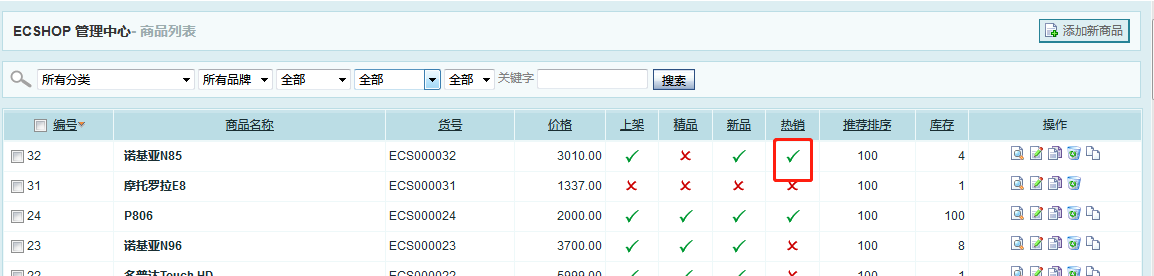
例子二:双击改状态
ecshop里提出来的js常用函数的更多相关文章
- 总结js常用函数和常用技巧(持续更新)
学习和工作的过程中总结的干货,包括常用函数.常用js技巧.常用正则表达式.git笔记等.为刚接触前端的童鞋们提供一个简单的查询的途径,也以此来缅怀我的前端学习之路. PS:此文档,我会持续更新. Aj ...
- js常用函数和常用技巧
学习和工作的过程中总结的干货,包括常用函数.常用js技巧.常用正则表达式.git笔记等.为刚接触前端的童鞋们提供一个简单的查询的途径,也以此来缅怀我的前端学习之路. PS:此文档,我会持续更新. Aj ...
- js常用函数、书写可读性的js、js变量声明...
1.Array类型函数 array.concat(item...) 函数功能:关联数组,实现数组相加功能,但并不影响原先数组,concat返回新数组. array.join(separator) 函数 ...
- JavaScript的使用以及JS常用函数(JS 遍历数组和集合)
JavaScript入门 学习总结 1. 什么是 JavaScript 2. JavaScript 的特点 3. JS的使用 编写位置 基本语法 变量 打印变量 数据类型 innerHTML和inne ...
- 总结JS 常用函数
希望本文总结的内容能给各位看官带来焕然一新的感觉.另外,如果你们有什么值得推荐的js技巧,欢迎在评论中补充,我可以收纳在本文中. PS:此文档会持续新增内容. Ajax请求 jquery ajax函数 ...
- js常用函数整理
类型转换:parseInt\parseFloat\toString 类型判断:typeof;eg:if(typeof(var)!="undefined")\isNaN 字符处理函数 ...
- js常用函数汇总(不定期更新)
1.图片按比例压缩 function setImgSize(){ var outbox_w=imgbox.width(), outbox_h=imgbox.height(); imgbox.find( ...
- js常用函数总结
字符串函数 indexOf 返回字符串中一个子串第一处出现的索引(从左到右搜索).如果没有匹配项,返回 -1 . var index1 = a.indexOf("l"); //in ...
- JavaScript学习总结(9)——JS常用函数(一)
本文中,收集了一些比较常用的Javascript函数,希望对学习JS的朋友们有所帮助. 1. 字符串长度截取 ? 1 2 3 4 5 6 7 8 9 10 11 12 13 14 15 16 17 1 ...
随机推荐
- HBase 相关API操练(二):Java API
一.HBase Java编程 (1)HBase是用Java语言编写的,它支持Java编程: (2)HBase支持CRUD操作:Create,Read,Update和Delete: (3)Java AP ...
- MapReduce实战:自定义输入格式实现成绩管理
1. 项目需求 我们取有一份学生五门课程的期末考试成绩数据,现在我们希望统计每个学生的总成绩和平均成绩. 样本数据如下所示,每行数据的数据格式为:学号.姓名.语文成绩.数学成绩.英语成绩.物理成绩.化 ...
- CheatEngine-内存修改
0.备注+待完成 //备注 a). 如果有方括号,就是说CE认为找 到了数值的指针了 //待完成 a). 自动导出外挂 b). 菜单栏中"表单"下的lua是做什么用的 c). CE ...
- 《从0到1学习Flink》—— 介绍Flink中的Stream Windows
前言 目前有许多数据分析的场景从批处理到流处理的演变, 虽然可以将批处理作为流处理的特殊情况来处理,但是分析无穷集的流数据通常需要思维方式的转变并且具有其自己的术语(例如,"windowin ...
- Java并发(三):实例引出并发应用场景
前两篇介绍了一些Java并发的基础知识,博主正巧遇到一种需求:查询数据库,根据查询结果集修改数据库记录,但整个流程是做成了一个schedule的,并且查询比较耗时,并且需要每两分钟执行一次,cpu经常 ...
- Sometimes it takes going through something so awful to realize the beauty that is out there in this world.
Sometimes it takes going through something so awful to realize the beauty that is out there in this ...
- 部署webservice到远程服务器
在本地编写好webservice后并在本机验证正确后,在本地发布后,直接将发布时设置的文件夹复制到远程服务器上,在远程服务器的IIS上默认网站->新建虚拟目录->设置别名->物理路径 ...
- Check Point R80 Security Management
平台: CentOS 类型: 虚拟机镜像 软件包: Security Management basic software security 服务优惠价: 按服务商许可协议 云服务器费用:查看费用 立即 ...
- HDU 1059 Dividing 分配(多重背包,母函数)
题意: 两个人共同收藏了一些石头,现在要分道扬镳,得分资产了,石头具有不同的收藏价值,分别为1.2.3.4.5.6共6个价钱.问:是否能公平分配? 输入: 每行为一个测试例子,每行包括6个数字,分别对 ...
- 为什么表单中post接受数据是获取name值而不是id值
感谢解惑者:http://blog.csdn.net/u013451157/article/details/78503831 表单(form)的控件名,提交的数据都用控件的name而不是id来控制. ...