
Angular 2 npm start 报错
首先, index.html 和styles.css是和app目录平级的, 不要扔到里面去, 否则会404
确认配置文件齐全, 路径都正确之后 npm start
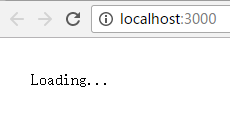
What?! 照着快速起步也会弄错吗? 人品问题吗?
很多人可能会看到npm报错:
$ npm start

> angular-quickstart@1.0. start F:\work\angular_quickstart\angular

> tsc && concurrently "tsc -w" "lite-server"

[] Did not detect a `bs-config.json` or `bs-config.js` override file. Using lite-server defaults...

[] ** browser-sync config **

[] { injectChanges: false,

[]   files: [ './**/*.{html,htm,css,js}' ],

[]   watchOptions: { ignored: 'node_modules' },

[]   server: { baseDir: './', middleware: [ [Function], [Function] ] } }

[] :: - Compilation complete. Watching for file changes.

[] [BS] Access URLs:

[]  --------------------------------------

[]        Local: http://localhost:3000

[]     External: http://192.168.155.1:3000

[]  --------------------------------------

[]           UI: http://localhost:3001

[]  UI External: http://192.168.155.1:3001

[]  --------------------------------------

[] [BS] Serving files from: ./

[] [BS] Watching files...

[] 16.11. ::  GET /index.html

[] 16.11. ::  GET /favicon.ico
除了404是上面说的文件摆放路径错误意外, 其实不需要care它的, 和正常启动应用无关, 属于npm版本相关问题, 此处不赘述。
重要的是console里面的log:

The module AppModule was bootstrapped, but it does not declare "@NgModule.bootstrap" components nor a "ngDoBootstrap" method. Please define one of these.
这句还是make sense的, 意思是
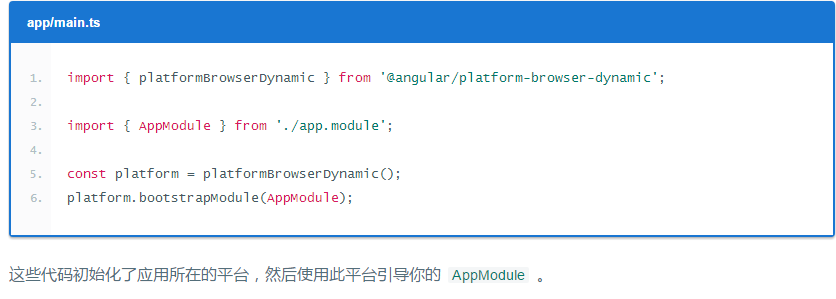
初始化的时候用的platform.bootstrapModule(), 却没有把bootstrap引用为[ AppComponent ]
问题就出在这里 
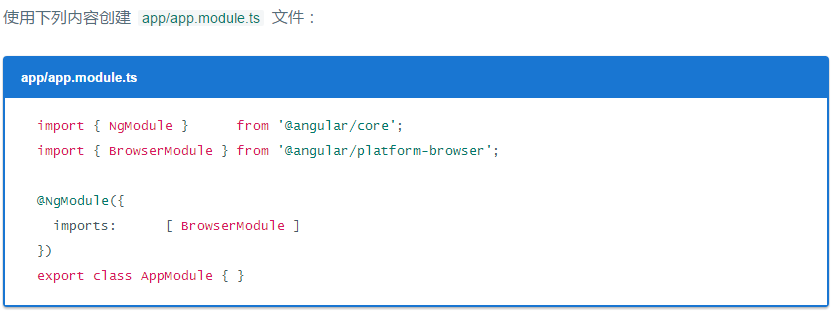
这里是应用的入口点。
由于 QuickStart 是运行在浏览器中的 Web 应用,所以根模块需要从
@angular/platform-browser中导入BrowserModule并添加到imports数组中。这是要让最小的应用在浏览器中运行时,对 Angular 的最低需求。
QuickStart 应用不做别的,也就先不需要其它模块。在真实的应用中,我们可能还得导入
FormsModule、RouterModule和HttpModule。这些会在 英雄指南教程中引入。
官方文档上给的最低需求,低到连它自己给出的index.html都显示不出来了...
我老眼昏花只用了最低配置, 而没有看到就在下面几行它其实又贴了一次这个文件:

这才是  要用的!
要用的!

You see, 改完这个文件以后应该就不会报错了, 最后的console应该变成这样:

Angular 2 npm start 报错的更多相关文章
- 执行npm install报错:npm ERR! code EINTEGRITY
命令行执行npm install报错如下: D:\frontend\viewsdev>npm install npm ERR! code EINTEGRITY npm ERR! sha512-8 ...
- npm install 报错:node-pre-gyp ERR! 问题解决
npm install报错问题解决 问题: E:\CodeSpace\GitlabTest\desktop>npm install > lifeccp-desktop@1.1.9 post ...
- vuejs npm chromedriver 报错
vuejs npm chromedriver 报错 # 全局安装 vue-cli$ npm install -g vue-cli# 创建一个基于 "webpack" 模板的新项 ...
- npm install 报错 error Unexpected end of JSON input while parsing near '...sShrinkwrap":false,"d' 解决办法
npm install 报错 : error Unexpected end of JSON input while parsing near '...sShrinkwrap":false,& ...
- 执行命令npm publish报错:403 Forbidden - PUT https://registry.npmjs.org/kunmomotest2 - You cannot publish over the previously published versions: 0.0.1.
前言 执行命令npm publish报错:403 Forbidden - PUT https://registry.npmjs.org/kunmomotest2 - You cannot publis ...
- 执行npm publish 报错:403 Forbidden - PUT https://registry.npmjs.org/kunmomotest - you must verify your email before publishing a new package: https://www.npmjs.com/email-edit
前言 执行npm publish 报错:403 Forbidden - PUT https://registry.npmjs.org/kunmomotest - you must verify you ...
- 执行npm publish 报错:401 Unauthorized - PUT https://registry.npmjs.org/kunmomotest - You must be logged in to publish packages.
前言 执行npm publish 报错:401 Unauthorized - PUT https://registry.npmjs.org/kunmomotest - You must be logg ...
- npm启动报错
npm 启动报错 event.js 160 报错原因: 端口号被占用 解决方法: 1.重新定义一个端口号. 2.任务管理器关掉node进程,重新运行npm.
- npm -v 报错:Error: EPERM: operation not permitted, mkdir 'C:\soft\nodejs'
npm -v 报错:Error: EPERM: operation not permitted, mkdir 'C:\soft\nodejs' 起因:原本安装node在C盘soft文件夹下,按node ...
随机推荐
- PreferenceActivity的使用
PreferenceActivity是一个非常有用的基类,当我们开发Android项目时避免不了选项设置,这些设置习惯用Preference来保存.Android专门为这种Activity提供了便捷的 ...
- Android(java)学习笔记183:判断SD卡状态和存储空间大小
当我们在使用SD卡时候,如果我们想往SD卡里读写数据,我们必须在这之前进行一个逻辑判断,那就是判断SD卡状态和SD存储空间大小: 核心代码: String status = Environment.g ...
- spring参数类型异常输出(二), SpringMvc参数类型转换错误输出(二)
spring参数类型异常输出(二), SpringMvc参数类型转换错误输出(二) >>>>>>>>>>>>>>&g ...
- Razor的理解
[原创]Razor非常智能非常实用,不了解的人可能会觉得有没有都无所谓,其实不然,起初对Razor不是太了解,现在想想Razor就是来标示出C#语法的,但是HTML和C#混合输出时到底@这个小老鼠到底 ...
- XPath操作XML文档
NET框架下的Sytem.Xml.XPath命名空间提供了一系列的类,允许应用XPath数据模式查询和展示XML文档数据. 3.1XPath介绍 主要的目的是在xml1.0和1.1文档节点树种定位节点 ...
- (转)ie浏览器判断
常用的 JavaScript 检测浏览器为 IE 是哪个版本的代码,包括是否是最人极端厌恶的 ie6 识别与检测. var isIE=!!window.ActiveXObject; var isIE6 ...
- site与subsite
1.List template只能加载在主站点上,加载在主站点上之后,其subsite也能引用: 2.发布webpart的时候,路径也只能写网站集的路径,发布到网站集之后其主站点和subsite都能引 ...
- Socket 错误一览表
出现网络联机错误Socket error #11001 表示您的计算机无法连上服务器,请检查您的Proxy设定以及Proxy相关账号,或暂时取消您防毒软件的「个人防火墙」. · 出现网络联机错误Soc ...
- Javascript中bind()方法的使用与实现
对于bind,我愣了下,这个方法常用在jquery中,用于为被选元素添加一个或多个事件处理程序. 查了下手册,发现bind的作用和apply,call类似都是改变函数的execute context, ...
- java静态代理,动态代理,cglib代理
代理模式在我们的应用中是很常见的,例如拦截器,spring的事务管理等.之所以能被代理,是因为java允许我们通过反射机制动态构造目标对象,并调用相应的方法. 就好像拿到了目标对象的引用,自然可以在目 ...