
Git常用命令速查表 & Git Basics & github : release 发布!
Git常用命令速查表 & Git Basics & github : release 发布!
Git常用命令速查表:

1
1
1
1
1

http://git-scm.com/book/en/v2/Git-Basics-Tagging
Git Basics
2.6 Git Basics - Tagging
Tagging
Like most VCSs, Git has the ability to tag specific points in history as being important. Typically people use this functionality to mark release points (v1.0, and so on). In this section, you’ll learn how to list the available tags, how to create new tags, and what the different types of tags are.
Listing Your Tags
Listing the available tags in Git is straightforward. Just type git tag:
$git tag
v0.1
v1.3
This command lists the tags in alphabetical order; the order in which they appear has no real importance.
You can also search for tags with a particular pattern. The Git source repo, for instance, contains more than 500 tags. If you’re only interested in looking at the 1.8.5 series, you can run this:
$git tag -l"v1.8.5*"
v1.8.5
v1.8.5-rc0
v1.8.5-rc1
v1.8.5-rc2
v1.8.5-rc3
v1.8.5.1
v1.8.5.2
v1.8.5.3
v1.8.5.4
v1.8.5.5
Creating Tags
Git uses two main types of tags: lightweight and annotated.
A lightweight tag is very much like a branch that doesn’t change – it’s just a pointer to a specific commit.
Annotated tags, however, are stored as full objects in the Git database. They’re checksummed; contain the tagger name, email, and date; have a tagging message; and can be signed and verified with GNU Privacy Guard (GPG). It’s generally recommended that you create annotated tags so you can have all this information; but if you want a temporary tag or for some reason don’t want to keep the other information, lightweight tags are available too.
Annotated Tags
Creating an annotated tag in Git is simple. The easiest way is to specify -a when you run the tag command:
$git tag -a v1.4 -m"my version 1.4"
$git tag
v0.1
v1.3
v1.4
The -m specifies a tagging message, which is stored with the tag. If you don’t specify a message for an annotated tag, Git launches your editor so you can type it in.
You can see the tag data along with the commit that was tagged by using the git show command:
$git show v1.4
tag v1.4
Tagger: Ben Straub <ben@straub.cc>
Date: Sat May 3 20:19:12 2014 -0700my version 1.4commit ca82a6dff817ec66f44342007202690a93763949
Author: Scott Chacon <schacon@gee-mail.com>
Date: Mon Mar 17 21:52:11 2008 -0700changed the version number
That shows the tagger information, the date the commit was tagged, and the annotation message before showing the commit information.
Lightweight Tags
Another way to tag commits is with a lightweight tag. This is basically the commit checksum stored in a file – no other information is kept. To create a lightweight tag, don’t supply the -a, -s, or -m option:
$git tag v1.4-lw
$git tag
v0.1
v1.3
v1.4
v1.4-lw
v1.5
This time, if you run git show on the tag, you don’t see the extra tag information. The command just shows the commit:
$git show v1.4-lw
commit ca82a6dff817ec66f44342007202690a93763949
Author: Scott Chacon <schacon@gee-mail.com>
Date: Mon Mar 17 21:52:11 2008 -0700changed the version number
Tagging Later
You can also tag commits after you’ve moved past them. Suppose your commit history looks like this:
$git log --pretty=oneline
15027957951b64cf874c3557a0f3547bd83b3ff6 Merge branch 'experiment'
a6b4c97498bd301d84096da251c98a07c7723e65 beginning write support
0d52aaab4479697da7686c15f77a3d64d9165190 one more thing
6d52a271eda8725415634dd79daabbc4d9b6008e Merge branch 'experiment'
0b7434d86859cc7b8c3d5e1dddfed66ff742fcbc added a commit function
4682c3261057305bdd616e23b64b0857d832627b added a todo file
166ae0c4d3f420721acbb115cc33848dfcc2121a started write support
9fceb02d0ae598e95dc970b74767f19372d61af8 updated rakefile
964f16d36dfccde844893cac5b347e7b3d44abbc commit the todo
8a5cbc430f1a9c3d00faaeffd07798508422908a updated readme
Now, suppose you forgot to tag the project at v1.2, which was at the “updated rakefile” commit. You can add it after the fact. To tag that commit, you specify the commit checksum (or part of it) at the end of the command:
$ git tag -a v1.2 9fceb02You can see that you’ve tagged the commit:
$git tag
v0.1
v1.2
v1.3
v1.4
v1.4-lw
v1.5$git show v1.2
tag v1.2
Tagger: Scott Chacon <schacon@gee-mail.com>
Date: Mon Feb 9 15:32:16 2009 -0800version 1.2
commit 9fceb02d0ae598e95dc970b74767f19372d61af8
Author: Magnus Chacon <mchacon@gee-mail.com>
Date: Sun Apr 27 20:43:35 2008 -0700updated rakefile
...
Sharing Tags
By default, the git push command doesn’t transfer tags to remote servers. You will have to explicitly push tags to a shared server after you have created them. This process is just like sharing remote branches – you can run git push origin [tagname].
$git push origin v1.5
Counting objects: 14, done.
Delta compression using up to 8 threads.
Compressing objects: 100% (12/12), done.
Writing objects: 100% (14/14), 2.05 KiB | 0 bytes/s, done.
Total 14 (delta 3), reused 0 (delta 0)
To git@github.com:schacon/simplegit.git
* [new tag] v1.5 -> v1.5
If you have a lot of tags that you want to push up at once, you can also use the --tags option to the git push command. This will transfer all of your tags to the remote server that are not already there.
$git push origin --tags
Counting objects: 1, done.
Writing objects: 100% (1/1), 160 bytes | 0 bytes/s, done.
Total 1 (delta 0), reused 0 (delta 0)
To git@github.com:schacon/simplegit.git
* [new tag] v1.4 -> v1.4
* [new tag] v1.4-lw -> v1.4-lw
Now, when someone else clones or pulls from your repository, they will get all your tags as well.
Checking out Tags
You can’t really check out a tag in Git, since they can’t be moved around. If you want to put a version of your repository in your working directory that looks like a specific tag, you can create a new branch at a specific tag with git checkout -b [branchname] [tagname]:
$git checkout -b version2 v2.0.0
Switched to a new branch 'version2'
Of course if you do this and do a commit, your version2 branch will be slightly different than your v2.0.0 tag since it will move forward with your new changes, so do be careful.
1
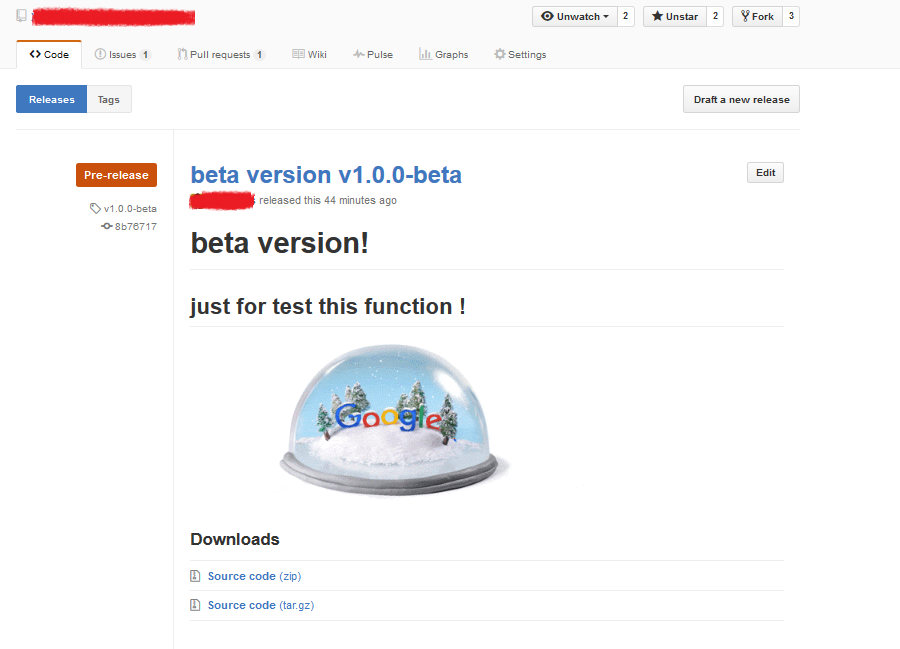
github : release 发布!
1
xxxxxxxxxxxxxxx
xxxxxxxxxxxxxxxxxxxxxxx
xxxxxxxxxxxxxxxxxxxxxxxxxxxx
Git常用命令速查表 & Git Basics & github : release 发布!的更多相关文章
- Git 常用命令速查表(图文+表格)【转】
转自:http://www.jb51.net/article/55442.htm 一. Git 常用命令速查 git branch 查看本地所有分支git status 查看当前状态 git comm ...
- Git 常用命令速查表(图文+表格)
一. Git 常用命令速查 git branch 查看本地所有分支git status 查看当前状态 git commit 提交 git branch -a 查看所有的分支git branch -r ...
- 转收藏:Git常用命令速查表
一. Git 常用命令速查 git branch 查看本地所有分支git status 查看当前状态 git commit 提交 git branch -a 查看所有的分支git branch -r ...
- Git常用命令速查表,新手必备版本控制
Git 跟 SVN 一样,都是用于管理代码的版本控制工具.无论在项目中,我们负责哪一块,只要需要编写代码,就必须熟悉Git(依公司要求而定). 当然,用的越熟练,处理的项目越顺利,离出任CTO.迎娶白 ...
- [No0000176]Git常用命令速查表(收藏大全)
名词 master: 默认开发分支 origin: 默认远程版本库 Index / Stage:暂存区 Workspace:工作区 Repository:仓库区(或本地仓库) Remote:远程仓库 ...
- Git常用命令速查表
- Git 常用命令速查表(三)
http://blog.csdn.net/sunboy_2050/article/details/7529841
- Git 常用命令速查表
- git常用命令速查表【转】
随机推荐
- SpringBoot 自动配置:Spring Data JPA
前言 不知道从啥时候开始项目上就一直用MyBatis,其实我个人更新JPA些,因为JPA看起来OO的思想更强烈些,所以这才最近把JPA拿出来再看一看,使用起来也很简单,除了定义Entity实体外,声明 ...
- 全栈性能测试修炼宝典-JMeter实战笔记(三)
JMeter体系结构 简介 JMeter是一款开源桌面应用软件,可用来模拟用户负载来完成性能测试工作. JMeter体系结构 X1~X5是负载模拟的一个过程,使用这些组件来完成负载的模拟 Y1:包含的 ...
- thinkphp如何实现伪静态
去掉 URL 中的 index.php ThinkPHP 作为 PHP 框架,是单一入口的,那么其原始的 URL 便不是那么友好.但 ThinkPHP 提供了各种机制来定制需要的 URL 格式,配合 ...
- Python+Selenium+Unittest实现PO模式web自动化框架(5)
1.PageObjects目录下的模块 该目录下是存放各页面功能点. 比如:login_page.py模块下就是存放登录页面上的各个功能点的.(登录功能.获取登录失败的提示信息) # --^_^-- ...
- Bitter.Core系列三:Bitter ORM NETCORE ORM 全网最粗暴简单易用高性能的 NETCore ORM 之 示例模型创建
在具体数据库操作之前,我们先准备好四张表以及相对应数据库操作模型: 学生表,年级表,班级表,学分表.示例数据库表,如下代码(MSSQL 为例) --学生表 CREATE TABLE t_student ...
- 【转载】Linux中找不到ifconfig命令的解决方法
ifconfig命令出错 ifconfig命令是设置或显示网络接口的程序,可以显示出我们机器的网卡信息,可是有些时候最小化安装CentOS等Linux发行版的时候会默认不安装ifconfig等命令,这 ...
- linux/git常用命令收集中
1.进入文件夹 cd 文件名 进入某个文件 cd .. 返回上一级目录 cd / 进入根目录 cd ~ 切换到当前 cd - 切换到上一个目录 2.查看 pwd 文件名 查看路 ...
- It is thread-safe and idempotent, but not reentrant.
https://github.com/django/django/blob/master/django/apps/registry.py
- BIO,NIO,AIO 总结
BIO,NIO,AIO 总结 Java 中的 BIO.NIO和 AIO 理解为是 Java 语言对操作系统的各种 IO 模型的封装.程序员在使用这些 API 的时候,不需要关心操作系统层面的知识,也不 ...
- Python程序中#-*-coding: UTF-8 -*-的作用
1.通常我们在pycharm中写程序的时候会加上#-*coding: UTF-8 -*- 如: #!/usr/bin/env python3#-*-coding: UTF-8 -*-#Author x ...