
ssh整合之五struts和spring整合
1.首先,我们需要先分析一下,我们的spring容器在web环境中,只需要一份就可以了
另外,就是我们的spring容器,要在我们tomcat启动的时候就创建好了(包括其中的spring的对象),怎么保证我们的spring容器能创建呢?
我们可以配合监听器来创建我们的spring容器,然后我们怎么实现我们的监听器呢?
当ServletContext创建成功,就说明tomcat正常启动了,我们使用监听器监听我们的ServletContext,如果创建成功,加载配置文件,创建spring容器
2.我们先在我们的web.xml中加入我们的监听器
<?xml version="1.0" encoding="UTF-8"?>

<web-app xmlns:xsi="http://www.w3.org/2001/XMLSchema-instance" xmlns="http://java.sun.com/xml/ns/javaee" xsi:schemaLocation="http://java.sun.com/xml/ns/javaee http://java.sun.com/xml/ns/javaee/web-app_2_5.xsd" id="WebApp_ID" version="2.5">

  <display-name>ssh_spring</display-name>

 <!--  配置spring的监听器

      加载spring的配置文件,根据配置文件创建我们的spring对象

      默认加载的spring配置文件位置:WEB-INF下的applicationContext.xml

  -->

  <listener>

      <listener-class>org.springframework.web.context.ContextLoaderListener</listener-class>

  </listener>

  <!-- 修改spring默认加载的配置文件的路径 -->

  <context-param>

      <param-name>contextConfigLocation</param-name>

      <param-value>classpath:applicationContext.xml</param-value>

  </context-param>

  <filter>

      <filter-name>ssh</filter-name>

      <filter-class>org.apache.struts2.dispatcher.ng.filter.StrutsPrepareAndExecuteFilter</filter-class>

  </filter>

  <filter-mapping>

      <filter-name>ssh</filter-name>

      <url-pattern>/*</url-pattern>

  </filter-mapping>

  <welcome-file-list>

    <welcome-file>index.html</welcome-file>

    <welcome-file>index.htm</welcome-file>

    <welcome-file>index.jsp</welcome-file>

    <welcome-file>default.html</welcome-file>

    <welcome-file>default.htm</welcome-file>

    <welcome-file>default.jsp</welcome-file>

  </welcome-file-list>

</web-app>
3. 在我们的struts中根据容器获取对象
第一种是使用struts的 插件包(这种方式使用的比较少)

第二种是把struts的动作类交给spring进行管理
applicationContext.xml中
<?xml version="1.0" encoding="UTF-8"?>

<!-- spring的配置文件:导入约束 -->

<beans xmlns="http://www.springframework.org/schema/beans"

    xmlns:xsi="http://www.w3.org/2001/XMLSchema-instance"

    xmlns:context="http://www.springframework.org/schema/context"

    xmlns:aop="http://www.springframework.org/schema/aop"

    xmlns:tx="http://www.springframework.org/schema/tx"

    xsi:schemaLocation="

        http://www.springframework.org/schema/beans

        http://www.springframework.org/schema/beans/spring-beans.xsd

        http://www.springframework.org/schema/context

        http://www.springframework.org/schema/context/spring-context.xsd

        http://www.springframework.org/schema/aop

        http://www.springframework.org/schema/aop/spring-aop.xsd

        http://www.springframework.org/schema/tx

        http://www.springframework.org/schema/tx/spring-tx.xsd

        ">

    <!-- 自定义的java对象交给spring进行管理 -->

   <bean id="customerAction" scope="prototype" class="com.itheima.action.CustomerAction">

        <property name="customerService" ref="customerService"></property>

   </bean>

   <bean id="customerService" class="com.itheima.service.impl.CustomerServiceImpl">

           <property name="customerDao" ref="customerDao"></property>

   </bean>

   <bean id="customerDao" class="com.itheima.dao.impl.CustomerDaoImpl">

           <property name="hibernateTemplate" ref="hibernateTemplate"></property>

   </bean>

   <!--  第三方的jar包中的java对象交给spring进行管理 -->

   <!--  创建一个hibernateTemplate对象 -->

   <bean id="hibernateTemplate" class="org.springframework.orm.hibernate5.HibernateTemplate">

         <!-- 注入sessionFactory -->

         <property name="sessionFactory" ref="sessionFactory"></property>

   </bean>

   <!-- 创建sessionFactory对象 -->

   <!-- 当spring和hibernate整合时,这个sessionFactory的实现类是由spring提供的:LocalSessionFactoryBean,

       创建sessionFactory是根据hibernate的核心配置文件

    -->

   <bean id="sessionFactory" class="org.springframework.orm.hibernate5.LocalSessionFactoryBean">

           <property name="configLocation" value="classpath:hibernate.cfg.xml"></property>

   </bean>

    <!--配置hibernate的事务管理 -->

   <bean id="transactionManager" class="org.springframework.orm.hibernate5.HibernateTransactionManager">

           <property name="sessionFactory" ref="sessionFactory"></property>

   </bean>

   <!-- 配置事务管理通知 -->

   <tx:advice id="txAdvice">

           <tx:attributes>

               <tx:method name="*" propagation="REQUIRED" read-only="false"/>

               <tx:method name="get*" propagation="SUPPORTS" read-only="true"/>

           </tx:attributes>

   </tx:advice>

   <!-- 配置事务的AOP -->

   <aop:config>

           <aop:pointcut expression="execution(* com.itheima.service.impl.*.*(..))" id="pt"/>

           <aop:advisor advice-ref="txAdvice" pointcut-ref="pt"/>

   </aop:config>

</beans>
在struts.xml中配置
<!DOCTYPE struts PUBLIC

    "-//Apache Software Foundation//DTD Struts Configuration 2.3//EN"

    "http://struts.apache.org/dtds/struts-2.3.dtd">

<struts>

    <package name="customer" extends="struts-default" namespace="/customer">

        <!--

            1.class: 全限定类名

                反射的请示创建动作类对象

              class:需要修改为容器中动作类的bean的唯一标识

         -->

        <action name="addCustomerUI" class="customerAction" method="addCustomerUI">

            <result name="success">/jsp/customer/add.jsp</result>

        </action>

        <action name="getAllCustomer" class="customerAction" method="getAllCustomer">

            <result name="success">/jsp/customer/list.jsp</result>

        </action>

    </package>

</struts>
我们在CustomerAction中
package com.itheima.action;

import java.util.List;

import com.itheima.entity.Customer;

import com.itheima.service.CustomerService;

import com.opensymphony.xwork2.ActionSupport;

import com.opensymphony.xwork2.ModelDriven;

public class CustomerAction extends ActionSupport implements ModelDriven<Customer> {

    private Customer customer = new Customer();

    private CustomerService customerService;

    private List<Customer> customers;

    public void setCustomers(List<Customer> customers) {

        this.customers = customers;

    }

    public void setCustomerService(CustomerService customerService) {

        this.customerService = customerService;

    }

    public List<Customer> getCustomers() {

        return customers;

    }

    public Customer getModel() {

        return customer;

    }

    //进入添加页面

    public String addCustomerUI(){

        return this.SUCCESS;

    }

    //进入列表页面

    public String getAllCustomer(){

        customers = customerService.getAllCustomer();

        return this.SUCCESS;

    }

}
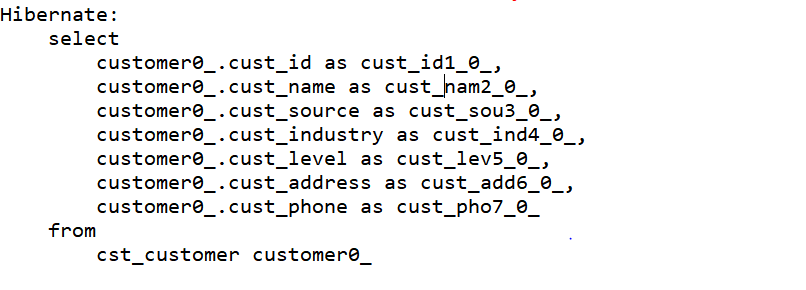
最后.测试我们的结果,访问http://localhost:8080/ssh_spring/

每天进步一点点,今天就到这儿吧!
ssh整合之五struts和spring整合的更多相关文章
- 【SSH框架】系列之 Spring 整合 Hibernate 框架
1.SSH 三大框架整合原理 Spring 与 Struts2 的整合就是将 Action 对象交给 Spring 容器来负责创建. Spring 与 Hibernate 的整合就是将 Session ...
- Struts2框架04 struts和spring整合
目录 1 servlet 和 filter 的异同 2 内存中的字符编码 3 gbk和utf-8的特点 4 struts和spring的整合 5 struts和spring的整合步骤 6 spring ...
- ssh整合之三hibernate和spring整合
1.拷贝我们的spring事务控制所需的jar包 2.在spring容器中配置我们的hibernateTemplate以及事务管理器 <?xml version="1.0" ...
- 【Java EE 学习 53】【Spring学习第五天】【Spring整合Hibernate】【Spring整合Hibernate、Struts2】【问题:整合hibernate之后事务不能回滚】
一.Spring整合Hibernate 1.如果一个DAO 类继承了HibernateDaoSupport,只需要在spring配置文件中注入SessionFactory就可以了:如果一个DAO类没有 ...
- 从0开始整合SSM框架--2.spring整合mybatis
依赖:<properties> <!-- spring版本号 --> <spring.version>4.1.3.RELEASE</spring.versio ...
- SSH开发实践part4:Spring整合Struts
1 好了,前面spring与hibernate的整合开发我们基本上讲完了,现在要开始服务层的开发,也就是处理事务的action,在这里我们需要引入spring与struts的整合.也就是将action ...
- struts与spring整合
Spring与Struts框架整合 Spring,负责对象对象创建 Struts, 用Action处理请求 Spring与Struts框架整合, 关键点:让struts框架action对象的创建,交给 ...
- struts和spring整合
开发流程: 1)引jar包,可以在配置工程中设置用户libarary,然后直接引入.如果在web-inf/lib没有用户导入的lib文件,可以参考问题0的解决方案 需要的是struts_core,sp ...
- struts+hibernate+spring整合过程常见问题收集
1.java.lang.NoClassDefFoundError: org/objectweb/asm/ClassVisitor缺少asm-3.3.jar2.java.lang.NoClassDefF ...
随机推荐
- 微信小程序之swiper组件高度自适应
微信小程序之swiper组件高度自适应 要求: (顶部广告栏 ) 改变swiper组件的固定高度,使之随内部每张图片的高度做自适应 原理: 图片加载完之后,获取图片的原始宽高,根据宽高比,计算出适应后 ...
- Filecoin官方更新: Q4工作进展和2018年工作计划
ICO过后,Filecoin团队一直没有对外更新过工作计划(很多投资人都等待的不耐烦了).经过漫长的等待,在新年的第一个工作日,我们终于等来了来自于filecoin团队的声音, 这次更新真是出乎小编的 ...
- Linux-CentOS7下安装mysql5.6常见问题解决!
第一次写博客,写的不好请大家多见谅!有遇到问题可以评论到下方,我会抽空帮大家解决!! 下载MySQL-5.6.tar安装包(包含server,client等) 首先用root用户将MySQL-5.6. ...
- 用js写的时钟Demo
css代码: <style type="text/css"> .a { width: 200px; height: 100px; position: absolute; ...
- FxCop卸载后依然生成文件夹的问题
在 http://www.cnblogs.com/heroius/p/8270004.html 中,通过编辑csproj文件可以移除对旧版nuget独立程序的依赖. 实际上,通过编辑项目文件的方式可以 ...
- shell脚本里获取字符串的最后一个字符
STR=123456abc FINAL=`echo ${STR: -1}` 或者 FINAL=${STR: -1} 都可以让FINAL获得c这个最后一个字符
- Java多线程:死锁
周末看到一个用jstack查看死锁的例子.昨天晚上总结了一下jstack(查看线程).jmap(查看内存)和jstat(性能分析)命令.供大家参考 1.Jstack 1.1 jstack能得到运行j ...
- 记录python接口自动化测试--主函数(第六目)
把操作excel的方法封装好后,就可以用准备好的接口用例来循环遍历了 我的接口测试用例如下 主函数代码: run_handle_excel.py# coding:utf-8 from base.run ...
- HDFS架构
- 每日冲刺报告——Day3(Java-Team)
第三天报告(11.4 周六) 团队:Java-Team 成员: 章辉宇(284) 吴政楠(286) 陈阳(PM:288) 韩华颂(142) 胡志权(143) github地址:https://git ...