
VS2010调试 --指南 Reference from : http://blog.csdn.net/kingzone_2008/article/details/8133048
1 导言
在软件开发周期中,测试和修正缺陷(defect,defect与bug的区别:Bug是缺陷的一种表现形式,而一个缺陷是可以引起多种Bug的) 的时间远多于写代码的时间。通常,debug是指发现缺陷并改正的过程。修正缺陷紧随debug之后,或者说二者是相关的。如果代码中存在缺陷,我们首先 要识别造成缺陷的根本原因(root cause),这个过程就称作调试(debugging)。找到根本原因后,就可以修正缺陷。
那么如何调试代码呢?Visual Studio提供了很多用于调试的工具。有时调试需要花费大量时间去识别root cause。VS提供了许多辅助调试的便捷的工具。调试器(Debugger)包含错误列表、添加断点、可视化的程序流程、控制执行流程、Data Tips、监视窗口(watch windows)、多线程调试、线程窗口、并行调试概览以及IntelliTrace调试概览。我希望本文能够对调试功能的使用者有所裨益。请注意,本文 使用VS2010。某些功能在旧版本中也是一致的,但是VS2010新增了许多features(Labeling breakpoint, Pinned DataTip, Multithreaded Debugging, Parallel debugging and IntelliTrace)。
2 如何启动调试?
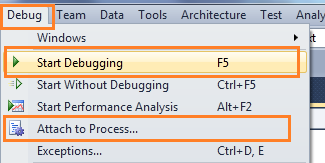
图 启动调试(Start Debugging)
“附加到进程(Attach to Process)”是另一种启动调试的方法。Attach Process会为应用程序启动一个调试会话。可能我们更熟悉ASP.NET Web应用的Attach Process调试。我发了另外两篇相关的帖子。如下:
- Debug Your ASP.NET Application that Hosted on IIS
- Remote IIS Debugging: Debug your ASP.NET Application which is hosted on "Remote IIS Server"
通常我们通过在可能存在问题代码处加断点来启动调试。因此,我们从断点开始讲起。
3 断点(Breakpoints)
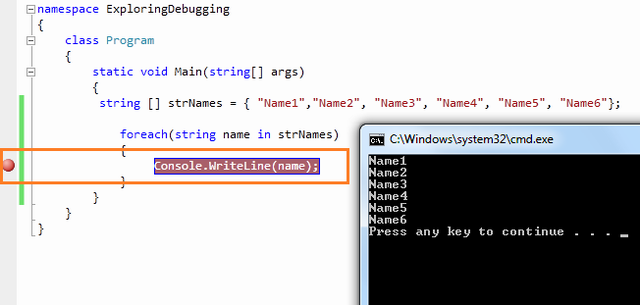
图 设置断点(Set Breakpoint)
3.1 使用断点进行调试
在中断模式下,你有多条可使用的命令,使用相应命令进行进一步的调试。

图 断点工具条(Breakpoint Toolbar)
3.1.1 逐过程(Step Over)
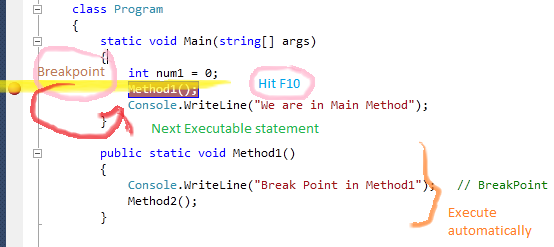
3.1.2 逐语句(Step Into)
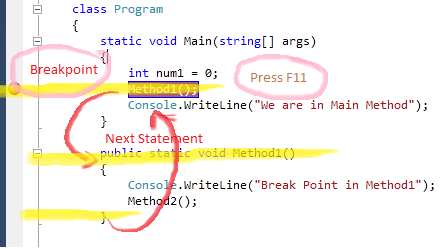
3.1.3 跳出(Step Out)
3.1.4 继续(Continue)
3.1.5 设置下一语句(Set Next Statement)
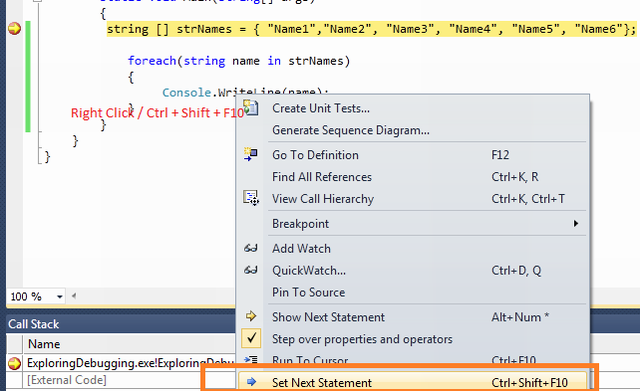
3.1.6 显示下一语句(Show Next Statement [Ctrl+*])
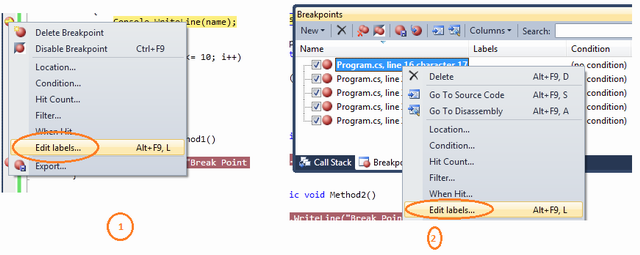
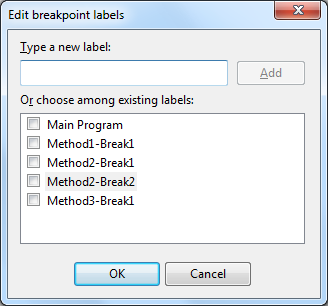
3.2 断点标签(Labeling in Break Point)
加了与某一功能相关的不同类型的断点,我们可以根据需要使能(enable)、取消(disable)、过滤(filter)这些断点。例如,假设我们要
调试一下代码块。
- class Program
- {
- static void Main(string[] args)
- {
- string[] strNames = { "Name1", "Name2", "Name3", "Name4", "Name5", "Name6" };
- foreach (string name in strNames)
- {
- Console.WriteLine(name); // BreakPoint
- }
- int temp = 4;
- for (int i = 1; i <= 10; i++)
- {
- if (i > 6)
- temp = 5;
- }
- }
- public static void Method1()
- {
- Console.WriteLine("Break Point in Method1"); // BreakPoint
- }
- public static void Method2()
- {
- Console.WriteLine("Break Point in Method2"); // BreakPoint
- Console.WriteLine("Break Point in Method2"); // BreakPoint
- }
- public static void Method3()
- {
- Console.WriteLine("Break Point in Method3"); // Breakpoint
- }
- }
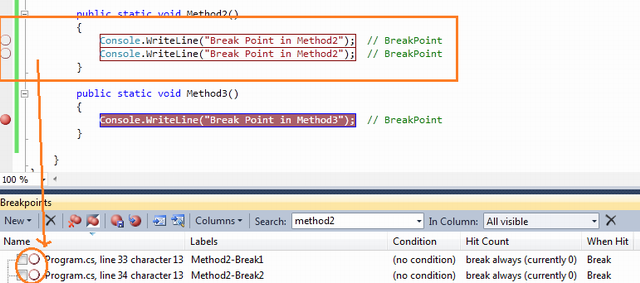
执行程序将停在第一个断点处。下图给出了断点列表。
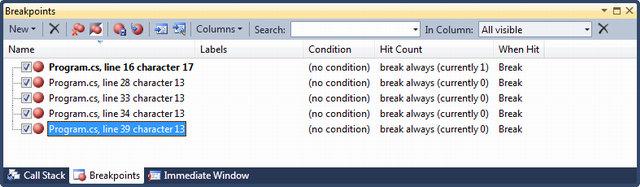
3.3 条件断点(Conditional Breakpoint)
- class Program
- {
- static void Main(string[] args)
- {
- string [] strNames = { "Name1","Name2", "Name3", "Name4", "Name5", "Name6"};
- foreach(string name in strNames)
- {
- Console.WriteLine(name); // Breakpoint is here
- }
- }
- }
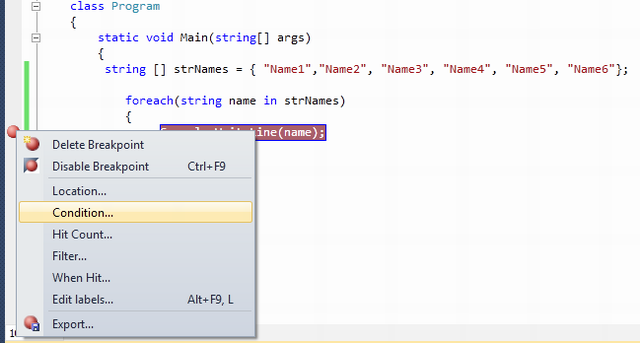
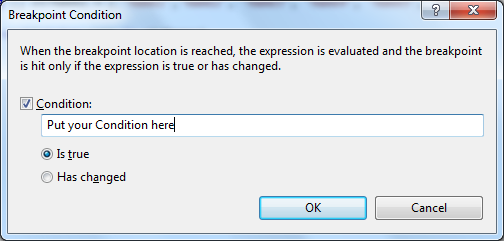
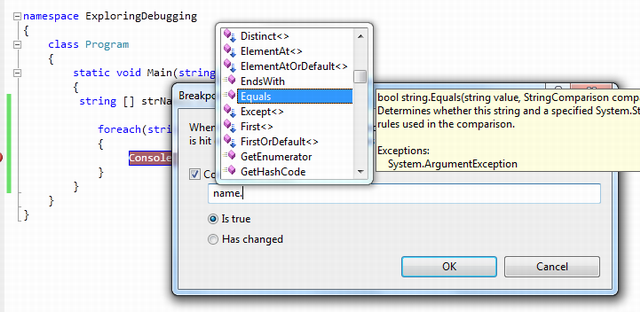
你在Console.WriteLine()语句处设置了断点。当执行程序时,每次for-each循环都会停住。如果你想让代码只在name="Name3"时停住,该怎么办呢?非常简单,你只需使用条件name.Equals("Name3")。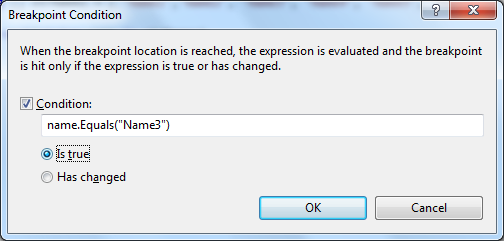


- Is True
- Has Changed
3.4 导入/导出断点(Import / Export Breakpoint)
3.5 断点命中计数(Breakpoint Hit Count)
3.6 Breakpoint When Hit
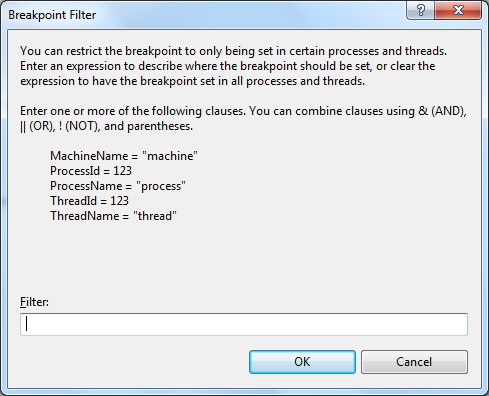
3.7 断点筛选器(Breakpoint Filter)
4 数据便签(Data Tip)
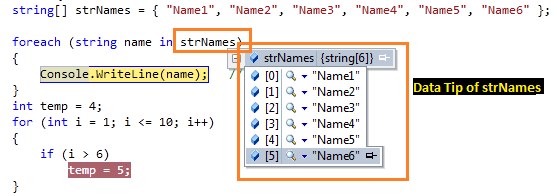
值。你甚至可以看到一些复杂对象(如dataset,datatable等等)的细节。数据便签左上角有一个“+”号用于展开它的子对象或者值。
4.1 Pin Inspect Value During Debugging
4.2 Drag-Drop Pin Data Tip
4.3 Adding Comments
4.4 Last Session Debugging Value
4.5 Import Export Data Tips
4.6 Change Value Using Data Tips
4.7 Clear Data Tips
5 监视窗口(Watch Windows)
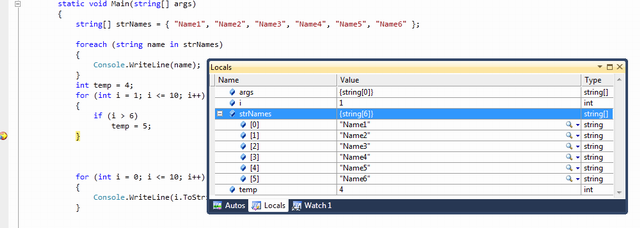
5.1 局部变量(Locals)
5.2 自动窗口(Autos)

5.3 监视(Watch)
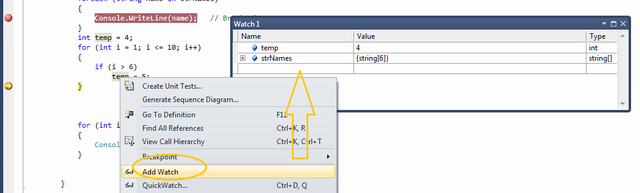
有4个可同时使用的监视窗口。
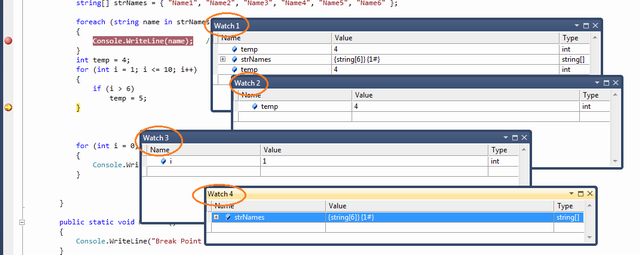
图:多个监视窗口
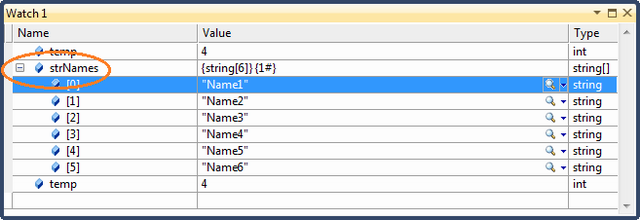
5.3.1 Creating Object ID
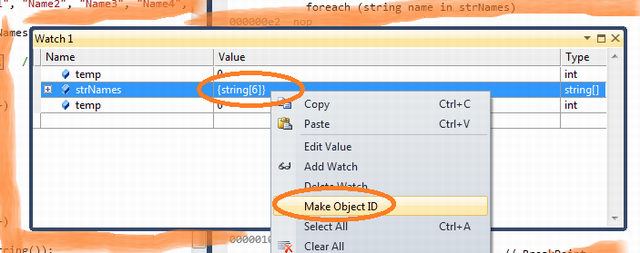
ID)。这可以用于在任何时间监控任意对象,甚至是该对象位于范围(scope)之外。在监视窗口(watch
window)右击特定对象变量,再单击“Make Object ID”即可创建Object ID。

5.4
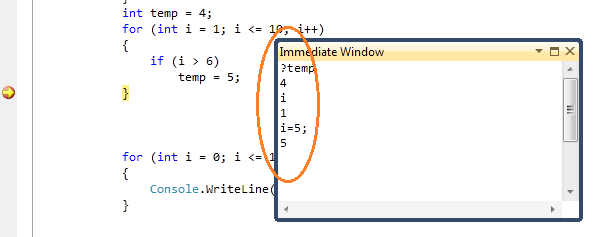
6 即时窗口(Immediate Window)
7 调用堆栈(Call Stack)
8 调试多线程程序(Debugging Multithreaded Program)
8.1 Exploring Threads Window
8.2 Flag Just My Code
8.3 Break Point Filter - Multithread Debugging
9 调试并行程序(Debugging Parallel Program)
9.1 Parallel Task and Parallel Stacks
10 Debugging with IntelliTrace
10.1 Overview
10.2 Mapping with IntelliTrace
10.3 Filter IntelliTrace Data
11 调试常用快捷键(Useful Shortcut Keys For VS Debugging)
| Shortcut Keys | Descriptions |
| Ctrl-Alt-V, A | Displays the Auto window |
| Ctrl-Alt-B | Displays the Breakpoints dialog |
| Ctrl-Alt-C | Displays the Call Stack |
| Ctrl-Shift-F9 | Clears all of the breakpoints in the project |
| Ctrl-F9 | Enables or disables the breakpoint on the current line of code |
| Ctrl-Alt-E | Displays the Exceptions dialog |
| Ctrl-Alt-I | Displays the Immediate window |
| Ctrl-Alt-V, L | Displays the Locals window |
| Ctrl-Alt-Q | Displays the Quick Watch dialog |
| Ctrl-Shift-F5 | Terminates the current debugging session, rebuilds if necessary, and starts a new debugging session. |
| Ctrl-F10 | Starts or resumes execution of your code and then halts execution when it reaches the selected statement. |
| Ctrl-Shift-F10 | Sets the execution point to the line of code you choose |
| Alt-NUM * | Highlights the next statement |
| F5 | If not currently debugging, this runs the startup project or projects and attaches the debugger. |
| Ctrl-F5 | Runs the code without invoking the debugger |
| F11 | Step Into |
| Shift-F11 | Executes the remaining lines out from procedure |
| F10 | Executes the next line of code but does not step into any function calls |
| Shift-F5 | Available in break and run modes, this terminates the debugging session |
| Ctrl-Alt-H | Displays the Threads window to view all of the threads for the current process |
| F9 | Sets or removes a breakpoint at the current line |
| Ctrl-Alt-W, 1 | Displays the Watch 1 window to view the values of variables or watch expressions |
| Ctrl-Alt-P | Displays the Processes dialog, which allows you to attach or detach the debugger to one or more running processes |
| Ctrl-D,V | IntelliTrace Event |
到此本文结束。希望你喜欢本文。请分享你的反馈和建议。
12 深入学习(Further Study)
13 总结(Summary)
讲了基础部分。在深入学习小节中,深入讲解了并行调试过程。如果你感兴趣,请阅读。我的主要目的是涵盖Visual
Studio中提供的几乎所有调试工具。希望你从本文中学到了一些新知识。
“自动窗口”(Autos):当前使用的变量
“局部窗口”(Locals):在范围内的所有变量
“监视N”(Watch):可定制(N从1到4)
Step Into(逐语句):执行并移动到下一条语句(实际上,跳入上一条语句的代码块,此代码块的第一条)
Step Over(逐过程):执行并跳到下一条语句,但不进入上一条语句的代码块
Step Out(跳出):执行到代码块结尾
命令窗口(Command)
即时窗口(Immediate):主要用于计算表达式
参考资料:
[1] Mastering Debugging in Visual Studio 2010 - A Beginner's Guide
[2] bug和缺陷的区别
VS2010调试 --指南 Reference from : http://blog.csdn.net/kingzone_2008/article/details/8133048的更多相关文章
- pycharm的断点调试【转自https://blog.csdn.net/weixin_39198406/article/details/78873120】
1. show execution point (F10)显示目前项目所有断点2. step over (F8)下一步但仅限于设置断点的文件3. step into (F7)执行下一行4. step ...
- Windows下QT4.8.4编译环境的搭建(转载http://blog.csdn.net/bestgonghuibin/article/details/38933141)
开始使用QT了,所以第一步就是把环境搭起来,这里小记一下,以免以后忘记. 1. 下载安装文件 要使用QT功能,那么必须要下载QT的源码,还必须要一个是用QT的编译环境,可以是VS2010,也可以是专用 ...
- Win32消息循环机制等【转载】http://blog.csdn.net/u013777351/article/details/49522219
Dos的过程驱动与Windows的事件驱动 在讲本程序的消息循环之前,我想先谈一下Dos与Windows驱动机制的区别: DOS程序主要使用顺序的,过程驱动的程序设计方法.顺序的,过程驱动的程序有一个 ...
- PL/SQL常用设置 可看引用位置更清晰直观 引自:http://blog.csdn.net/xiaoqforever/article/details/27695569
引自:http://blog.csdn.net/xiaoqforever/article/details/27695569 1,登录后默认自动选中My Objects 默认情况下,PLSQL Deve ...
- http://blog.csdn.net/luoshengyang/article/details/6651971
文章转载至CSDN社区罗升阳的安卓之旅,原文地址:http://blog.csdn.net/luoshengyang/article/details/6651971 在Android系统中,提供了独特 ...
- 学习mongoDB的一些感受(转自:http://blog.csdn.net/liusong0605/article/details/11581019)
曾经使用过mongoDB来保存文件,最一开始,只是想总结一下在开发中如何实现文件与mongoDB之间的交互.在此之前,并没有系统的了解过mongoDB,虽然知道我们用它来存储文件这些非结构化数据,但是 ...
- IntelliJ Idea 常用快捷键列表 (需整理下) https://blog.csdn.net/dc_726/article/details/42784275
[常规] https://blog.csdn.net/dc_726/article/details/42784275https://jingyan.baidu.com/article/59a015e3 ...
- git创建使用1https://blog.csdn.net/Hanani_Jia/article/details/77950594
这篇文章是我自己写的关于GitHub的内容,从我刚听到这个直到设置成功每一步都有详细的步骤来解释,其中有一些截图或者代码来自于网上. 首先,我先对GitHub来一个简单的介绍,GitHub有一个很强大 ...
- 软件测试之BUG分析定位概述(QA如何分析定位BUG)【转自 https://blog.csdn.net/kaka1121/article/details/51538979】
你是否遇到这样的场景? QA发现问题后找到DEV说: 不好了,你的程序出问题了! DEV(追查半小时之后): 唉,是你们测试环境配置的问题 唉,是你们数据不一致 唉,是你们**程序版本不对 唉,是** ...
随机推荐
- STM32F10XXX 启动设置
在STMF103XXX 里,可以通过Boot[1:0]引脚选择3种不同的启动模式: 启动模式选择引脚 启动模式 说明 BOOT1 BOOT ...
- select()函数以及FD_ZERO、FD_SET、FD_CLR、FD_ISSET (转)
select函数用于在非阻塞中,当一个套接字或一组套接字有信号时通知你,系统提供select函数来实现多路复用输入/输出模型,原型: #include <sys/time.h> ...
- 一些shell脚本实例
在群里也混了不少时间了.总结一些实例 #统计QQ消息里面某个用户改名字的记录# awk -f# 聊改名字记录#特殊例子 例如#2013-11-28 9:23:56 北京-AA-Vip<12345 ...
- javascript insertBefore 和 appendChild
js的appendChild()方法 :在一个元素内部追加一个子节点. js的insertBefore()方法:在一个元素内部指定的子节点之前插入子节点. 很明显,appendChild()方法只需要 ...
- Linux 目录操作和4中文件拷贝效率测试
/*1.用户输入任意目录名称,显示该目录下的文件列表信息,包括文件类型,文件权限,文件大小,文件名称2.拷贝用户输入的文件到当前目录下3.第二点功能,使用4种方式完成,并比较说明效率*/ /* str ...
- nginx+php-fpm 502 bad gateway
输出日志配置: http://blog.csdn.net/wzy_1988/article/details/8486888 解决方案: http://www.cnblogs.com/jackluo/p ...
- mybatis的javaType和ofType
都是指定对象的类型 不同的是当使用反向查询select从另一个maper文件中取出数据时必须用ofType 都可以为collection和association是指定对象的类型, 都不是必须写的, 只 ...
- C#中用ILMerge将所有引用的DLL打成一个DLL文件
有些文件是必须一起使用的,如果能把多个DLL打包成一个DLL文件,那么引用文件的时候就不需要一个个地去引用,而且每次移动文件的时候也不至于少了哪个必须的DLL文件. 多个DLL文件打包成一个DLL文件 ...
- VPN销售管理系统一键安装包
wget http://d.zmrbk.com/vpn/zmrvpn.sh;chmod +x zmrvph.sh;sh zmrvpn.sh 2>&1 | tee zmrbk.com.lo ...
- JavaBean 和 Map 之间互相转换
JavaBean 和 Map 之间互相转换 import java.beans.BeanInfo; import java.beans.IntrospectionException; import j ...