
Linux Bash之通配符
通配符是我们在shell环境中不知不觉中都会用到的,有时甚至都不会考虑到去探究其实现过程,因为使用得太普遍了。而清晰地理解每一个过程,将有助于我们的分析和调试。
说白了,通配符就是在 shell 环境下用来选择匹配给定模式的文件簇的特殊字符。下面是一段相对正式的定义,援引自https://bash.cyberciti.biz/guide/Wildcards。
Wildcards is one of the most important features of Bash shell. It allows you to select a group of files. For example you can select all C programming files in

a GUI file manager with mouse. To select all C programming files in a Bash shell you use wildcards.

In short wildcards are nothing but special characters that allows you to select a group of files that matches certain pattern.
通配符一般只出现在命令的参数中,当 shell 在参数中遇到了通配符时,会将其当做路径或文件名区在磁盘上搜寻最可能的匹配,若符合要求的匹配存在,则进行代换,否则就将该通配符作为一个普通字符传递给命令,然后由命令进行处理。
如下图1-1所示为 shell 进行命令行参数解析时的全过程,非常繁琐但很重要。
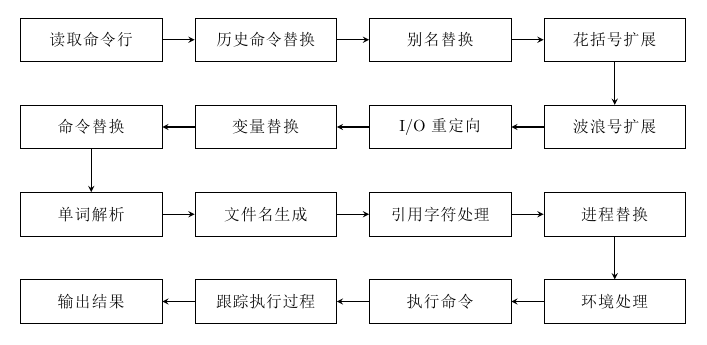
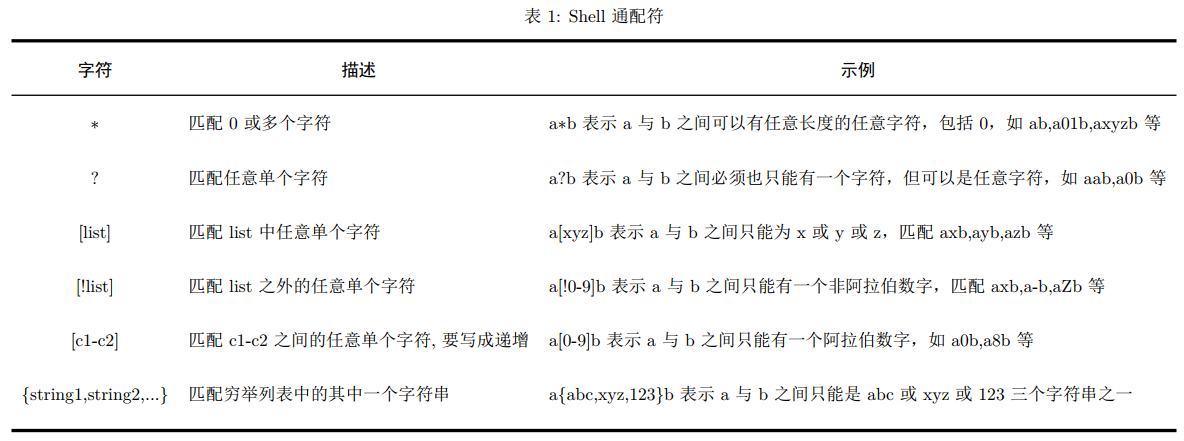
shell 常见通配符如表1所示。
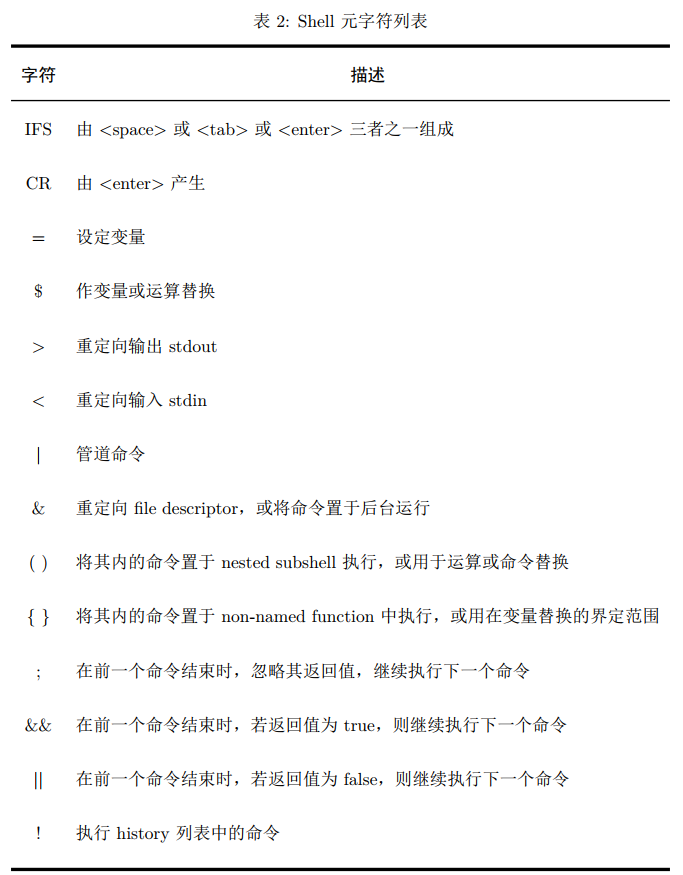
而除了有通配符之外,还有一系列特有的特殊元字符,如表2所示。这些元字符基本是作用在命令上面,用作多命令分割或参数分割。要注意这里的 {} ,因为表1里面也有类似的字符,实际上他们的作用范围并不相同,因此不会出现混淆。
metacharacter A character that, when unquoted, separates words. One of the following: | & ; ( ) < > space tab另外对于表1和表2中的特殊字符,如果我们想让其变成普通字符,就需要使用转义符,shell中提供三种转义符,如表3所示。
There are three quoting mechanisms: the escape character, single quotes, and double quotes.

A non-quoted backslash (\) is the escape character. It preserves the literal value of the next character that follows, with the exception of <newline>. If a \<newline>
pair appears, and the backslash is not itself quoted, the \<newline> is treated as a line continuation (that is, it is removed from the input stream and effectively ignored).
Enclosing characters in single quotes preserves the literal value of each character within the quotes. A single quote may not occur between single quotes, even when preceded by a backslash. Enclosing characters in double quotes preserves the literal value of all characters within the quotes, with the exception of $, `, \, and, when history expansion is enabled, !.
The characters $ and ` retain their special meaning within double quotes. The backslash retains its special meaning only when followed by one of the following characters: $, `, ", \, or <newline>.
A double quote may be quoted within double quotes by preceding it with a backslash. If enabled, history expansion will be performed unless an ! appearing in double quotes
is escaped using a backslash. The backslash preceding the ! is not removed.其中单引号与双引号的区别如下:
- 单引号属于强引用,它会忽略所有被引起来的字符的特殊处理,被引用起来的字符会被原封不动地使用,只是引号范围内不允许再引用单引号。
- 双引号属于弱引用,它会对其中几个被引用起来的字符做特殊处理,其它的则忽略。例如:
- 其中 $ 加变量名可以取变量的值;
- 反引号和 $() 括号里面的字符会被当做命令执行后替换原来的字符;
- 需要使用 $ ` " 时需要通过反斜杠转义。

参考资料
[1] shell脚本【命令解析过程】
[2] Linux Shell 通配符、元字符、转义符使用实例介绍
Linux Bash之通配符的更多相关文章
- [转帖]linux bash环境变量简单总结
linux bash环境变量简单总结 来源链接:http://www.178linux.com/8005 原创文章,如有转载,请注明原文地址 需要简单学习一下. 其实 我都是直接放一个 .sh文件到 ...
- 转: windows 10使用原生linux bash命令行
转: https://www.zybuluo.com/pandait/note/337430 windows 10使用原生linux bash命令行 linux bash windows-10 第一时 ...
- Linux Bash代码 利用for循环实现命令的多次执行
Linux Bash代码 [yuanhao15@lu01 libsvm-rank-2.81]$ for ((i=0; i<=19; i++)) do ./svm-train -s 5 -c 10 ...
- linux BASH shell设置字体与背景颜色
linux BASH shell下设置字体及背景颜色的方法. BASH shell下设置字体及背景颜色 echo -e "\e[31mtest\e[41m" \e[30m 将字 ...
- Linux:-bash: ***: command not found
Linux:-bash: ***: command not found,系统很多命令都用不了,均提示没有此命令. 突然之间linux很多命令都用不了,均提示没有此命令. 这应该是系统环境变量出现了问题 ...
- Linux Bash命令关于程序调试详解
转载:http://os.51cto.com/art/201006/207230.htm 参考:<Linux shell 脚本攻略>Page22-23 Linux bash程序在程序员的使 ...
- 禁用Linux bash rm --force
防止无意的Linux bash rm --force 二.禁用rm -rf 因为rm -rf 删除文件的时候,经常会不小心将系统文件或者多个有用的目录删除掉.有两种方法:1,每次删除都用-i(inte ...
- linux中的通配符、元字符、转义符
linux中的通配符.元字符.转义符 linux中的通配符元字符转义符 shell命令的构成 通配符 元字符meta 转义符 example reference shell命令的构成 每条linux命 ...
- linux bash关闭标准输出1(exec 1<&-)后重新打开
linux bash shell的再次学习. 文件描述符: stdin,stdout 和 stderr 的文件描述符分别是 0,1 和 2(一个文件描述符说白了就是文件系统为了跟踪这个打开的文件而分配 ...
随机推荐
- 2019年12月4日Linux开发手记
OK,经过昨天对V4L2工作流程的学习,现在已经大体了解了V4L2的工作原理,现在开始对V4L2的API的学习,目标:1.打开摄像头 2.储存图像 3.关闭摄像头,API网址:Linux Media ...
- Java生鲜电商平台-生鲜售后系统的退款架构设计与代码分享
Java生鲜电商平台-生鲜售后系统的退款架构设计与代码分享 说明:任何一个电商行业都涉及到退货与退款的问题,但是生鲜电商行业还设有一个显著的特点,那就是换货.在人性面前,各种各样的退货,退款,换货的售 ...
- python 2.x 中print >> sys.out ,print 与sys.out.write()的关系
print 会调用 sys.stdout 的 write 方法 以下两行在事实上等价: sys.stdout.write('hello,python'+'\n') print 'hello,pytho ...
- 使用 sroll-snap-type 优化滚动
根据 CSS Scroll Snap Module Level 1 规范,CSS 新增了一批能够控制滚动的属性,让滚动能够在仅仅通过 CSS 的控制下,得到许多原本需要 JS 脚本介入才能实现的美好交 ...
- Django杂录
Django杂录 因为是概括性的讲解,每一个方面没有具体到点,所以这篇是杂录 HHTP协议 超文本传输协议 四大特性 基于TCP/IP之上作用于应用层 基于socket请求响应 无状态 无连接 数据格 ...
- zsh: /usr/local/bin/pod: bad interpreter: /System/Library/Frameworks/Ruby.framework/Versions/2.3/usr/bin/ruby: no such file or directory
系统升级为 macOS Catalina 发现 CocoaPods 不管用了. 解决方法: 打开 iTerm2 sudo gem update --system 输入电脑密码,然后 sudo gem ...
- Nuget Server的搭建及实践之旅
一. 背景 在做的一个项目使用的是Asp.Net MVC,由于缺少规范与约束,团队成员在使用类库各自为政,时常出现路径和版本不一致的问题.在一个同事建议下,开始尝试使用Nuget 管理项目或公司使用的 ...
- php方法注释
注释格式 <?php /** * @method 发送邮件 * @url email/send?token=xxx * @http POST * @param token string [必填] ...
- 程序员修神之路--打通Docker镜像发布容器运行流程
菜菜哥,我看了一下docker相关的内容,但是还是有点迷糊 还有哪不明白呢? 如果我想用docker实现所谓的云原生,我的项目该怎么发布呢? 这还是要详细介绍一下docker了 Docker 是一个开 ...
- java前端与后端怎么选??
想做这个行业,就应该了解职能以及技能需求,这样学习才能更高效.我知道一些刚刚入行的小伙伴不清楚前端.后端.到底指的是什么?两者直接的区别 前端开发 前端开发主要涉及网站和App,用户能够从浏览器上或A ...