
CMake入门-04-自定义编译选项
工作环境
- 系统:macOS Mojave 10.14.6
- CMake: Version 3.15.0-rc4
Hello,World! - 自定义编译选项
CMake 允许为项目增加编译选项,从而可以根据用户的环境和需求选择最合适的编译方案。
例如,可以将 MathFunctions 库设为一个可选的库,如果该选项为 ON ,就使用该库定义的数学函数来进行运算。否则就调用标准库中的数学函数库。
(0) 初始化项目
$ mkdir hello

$ cd hello

$ mkdir math build

$ touch CMakeLists.txt main.cpp math/MathFunctions.h math/MathFunctions.cpp math/CMakeLists.txt

$ tree

.

├── build

├── CMakeLists.txt

├── main.cpp

└── math

    ├── CMakeLists.txt

    ├── MathFunctions.cpp

    └── MathFunctions.h
- math/MathFunctions.h
int power(int base, int exponent);
- math/MathFunctions.cpp
#include <stdio.h>

#include <stdlib.h>

#include "MathFunctions.h"

int power(int base, int exponent) {

    int result = base;

    int i;

    if (exponent == 0) {

        return 1;

    }

    for(i = 1; i < exponent; ++i){

        result = result * base;

    }

    return result;

}
- main.cpp
#include <iostream>

#include "MathFunctions.h"

using namespace std;

int main(int argc, char const *argv[]) {

  printf("%s power(2,3)=%d \n", "Hello,World!", power(2, 3));

  return 0;

}
- CMakeLists.txt
# CMake 最低版本号要求

cmake_minimum_required(VERSION 3.15.0)

# 项目名

project(hello)

# 查找当前目录下的所有源文件,并将名称保存到 SRC_LIST 变量

aux_source_directory(. SRC_LIST)

# 查找 math 目录下的所有源文件,并将名称保存到 MATH_SRC_LIST 变量

# aux_source_directory(${PROJECT_SOURCE_DIR}/math MATH_SRC_LIST)

# 添加 math 子目录 (math 目录里必须有 CMakeLists.txt),这样 math 目录下的 CMakeLists.txt 文件和源代码也会被处理

add_subdirectory(math)

# 添加头文件路径

include_directories(${PROJECT_SOURCE_DIR}/math)

# 指定生成目标

add_executable(hello ${SRC_LIST} ${MATH_SRC_LIST})

# 添加链接库

target_link_libraries(hello MathFunctions)
- math/CMakeLists.txt
# 查找当前目录下的所有源文件,并将名称保存到 DIR_LIB_SRCS 变量

aux_source_directory(. DIR_LIB_SRCS)

# 生成链接库

add_library (MathFunctions ${DIR_LIB_SRCS})
(1) 修改根目录 CMakeLists.txt
cmake_minimum_required(VERSION 3.15.0)

# 项目名

project(hello)

# 查找当前目录下的所有源文件,并将名称保存到 SRC_LIST 变量

aux_source_directory(. SRC_LIST)

# 加入一个配置头文件,用于处理 CMake 对源码的设置

configure_file (

  "${PROJECT_SOURCE_DIR}/config.h.in"

  "${PROJECT_SOURCE_DIR}/config.h"

)

# 是否使用自己的 MathFunctions 库

# 这里设置的变量 USE_MYMATH、中间的提示文字、默认值,在 ccmake 命令中会展示

option (USE_MYMATH

  "Use provided math implementation"

  ON

)

# 是否加入 MathFunctions 库

if (USE_MYMATH)

  # 添加头文件路径

  include_directories ("${PROJECT_SOURCE_DIR}/math")

  # 添加 math 子目录 (math 目录里必须有 CMakeLists.txt)

  add_subdirectory (math)

  set (EXTRA_LIBS ${EXTRA_LIBS} MathFunctions)

endif (USE_MYMATH)

# 指定生成目标

add_executable(hello ${SRC_LIST} ${MATH_SRC_LIST})

# 添加链接库

target_link_libraries(hello ${EXTRA_LIBS})
- configure_file 命令用于加入一个配置头文件 config.h,这个文件由 CMake 从 config.h.in 生成,通过这样的机制,将可以通过预定义一些参数和变量来控制代码生成。
- option 命令添加了一个 USE_MYMATH 选项,并且默认值为 ON。
- 根据 USE_MYMATH 变量的值来决定是否使用我们自己编写的 MathFunctions 库。
(2) 修改 main.cpp 文件
#include <iostream>

#include "config.h"

#ifdef USE_MYMATH

  // 如果定义了 USE_MYMATH,导入 "MathFunctions.h"

  #include "MathFunctions.h"

#else

  // 如果 USE_MYMATH 未定义,导入 <cmath>

  #include <cmath>

#endif

using namespace std;

int main(int argc, char const *argv[]) {

  #ifdef USE_MYMATH

    printf("Here define USE_MYMATH \n");

    printf("%s power(2,3)=%d \n", "Hello,World!", power(2, 3));

  #else

    printf("Here undefine USE_MYMATH \n");

    printf("%s power(2,3)=%f \n", "Hello,World!", pow(2, 3));

  #endif

  return 0;

}
(3) 新建 config.h.in 文件
#cmakedefine USE_MYMATH
- 这样 CMake 会自动根据 config.h.in 配置文件中的设置自动生成 config.h 文件。
(4) 编译 & 运行
- cmake 命令编译
$ cd Desktop/hello/build

# cmake 指定 USE_MYMATH=ON

$ cmake -DUSE_MYMATH=ON ..

-- The C compiler identification is AppleClang 10.0.1.10010046

-- The CXX compiler identification is AppleClang 10.0.1.10010046

-- Check for working C compiler: /Applications/Xcode.app/Contents/Developer/Toolchains/XcodeDefault.xctoolchain/usr/bin/cc

-- Check for working C compiler: /Applications/Xcode.app/Contents/Developer/Toolchains/XcodeDefault.xctoolchain/usr/bin/cc -- works

-- Detecting C compiler ABI info

-- Detecting C compiler ABI info - done

-- Detecting C compile features

-- Detecting C compile features - done

-- Check for working CXX compiler: /Applications/Xcode.app/Contents/Developer/Toolchains/XcodeDefault.xctoolchain/usr/bin/c++

-- Check for working CXX compiler: /Applications/Xcode.app/Contents/Developer/Toolchains/XcodeDefault.xctoolchain/usr/bin/c++ -- works

-- Detecting CXX compiler ABI info

-- Detecting CXX compiler ABI info - done

-- Detecting CXX compile features

-- Detecting CXX compile features - done

-- Configuring done

-- Generating done

-- Build files have been written to: /Users/staff/Desktop/hello/build

$  make

Scanning dependencies of target MathFunctions

[ 25%] Building CXX object math/CMakeFiles/MathFunctions.dir/MathFunctions.cpp.o

[ 50%] Linking CXX static library libMathFunctions.a

[ 50%] Built target MathFunctions

Scanning dependencies of target hello

[ 75%] Building CXX object CMakeFiles/hello.dir/main.cpp.o

[100%] Linking CXX executable hello

[100%] Built target hello

# 这里输出的 ”Here define USE_MYMATH“

$ ./hello

Here define USE_MYMATH

Hello,World! power(2,3)=8

# cmake 指定 USE_MYMATH=OFF

$ cmake -DUSE_MYMATH=OFF ..

-- Configuring done

-- Generating done

-- Build files have been written to: /Users/staff/Desktop/hello/build

$ make

Scanning dependencies of target hello

[ 50%] Building CXX object CMakeFiles/hello.dir/main.cpp.o

[100%] Linking CXX executable hello

[100%] Built target hello

# 这里输出的 ”Here undefine USE_MYMATH“

$ ./hello

Here undefine USE_MYMATH

Hello,World! power(2,3)=8.000000
- ccmake 命令编译
$ cd Desktop/hello/build

$ ccmake ..
可以看到 USE_MYMATH 选项
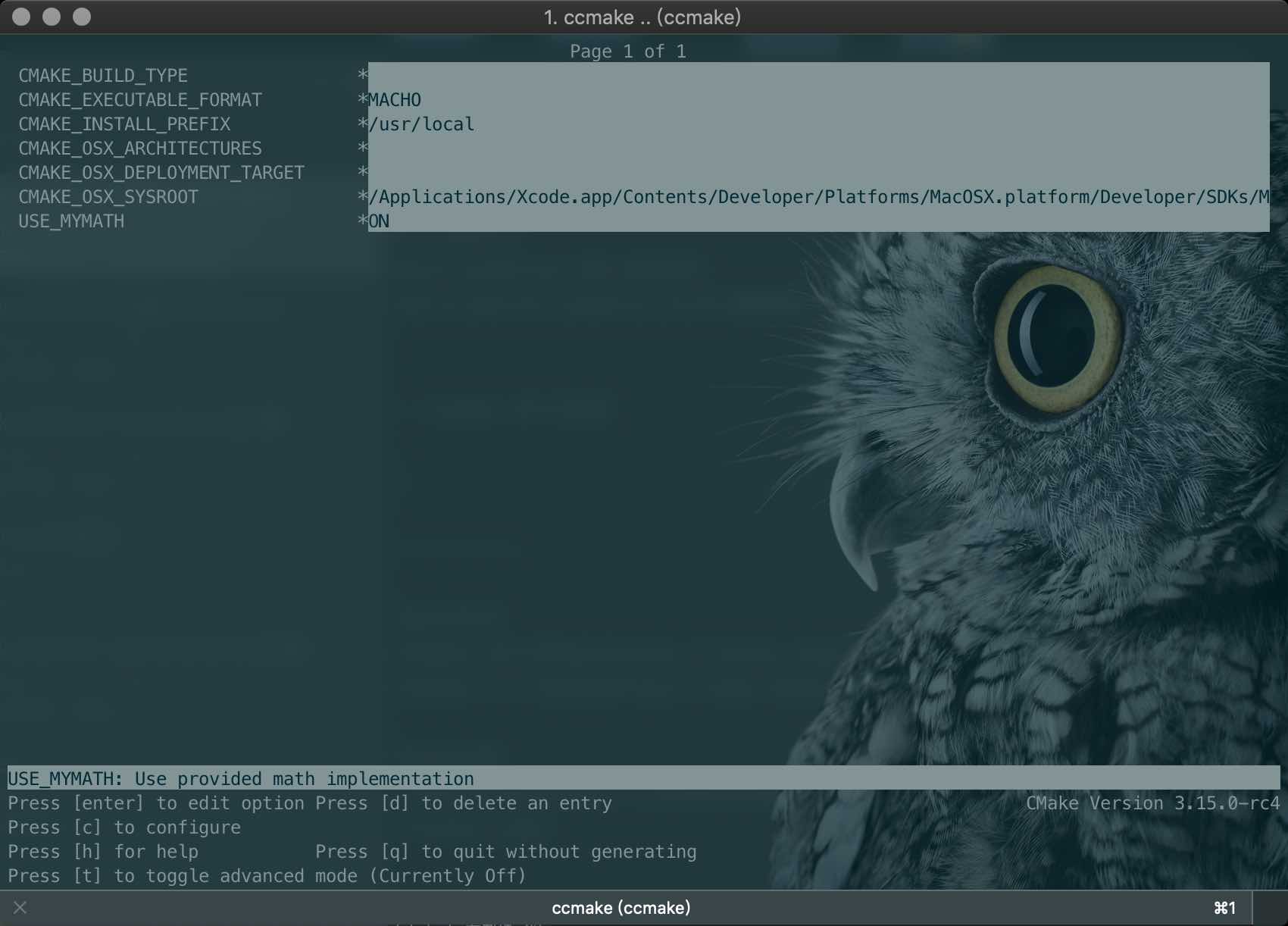
- 键盘的方向键可以在不同的选项间切换
- 按下 enter 键可以修改该选项
- 修改完成后可以按下 c 选项完成配置,之后再按 g 键确认生成 Makefile
- ccmake 的其他操作可以参考窗口下方给出的指令提示
相关参考:
CMake 官方网站
CMake 入门实战
联系作者:

CMake入门-04-自定义编译选项的更多相关文章
- CMake 自定义编译选项
自定义编译选项 CMake 允许为项目增加编译选项,从而可以根据用户的环境和需求选择最合适的编译方案. 例如,可以将 MathFunctions 库设为一个可选库,如果该选项为 ON ,就使用该库定义 ...
- CMake 入门实战【转】
本文转载自:http://www.hahack.com/codes/cmake/ 什么是 CMake All problems in computer science can be solved by ...
- C++ CMake 入门实战[转载]
C++ CMake 入门实战 2016-11-05 CMake用于跨平台的编译系统,对于通常的c/c++工程,都是通过make来进行编译的,CMake可以通过指令生成Makefile文件来指导整个项目 ...
- VScode 使用 CMake 入门
参考 CMake 入门实战 在 linux 平台下使用 CMake 生成 Makefile 并编译的流程如下: 编写 CMake 配置文件 CMakeLists.txt . 执行命令 cmake PA ...
- CMake入门教程(转帖)
本文转自:https://www.cnblogs.com/never--more/p/6921837.html CMake入门教程 参考文献:http://www.ibm.com/developerw ...
- JavaScript基础入门04
目录 JavaScript 基础入门04 JavaScript 对象 介绍 关于键名 对象的引用 语句和表达式需要注意的地方 对象属性常见的操作 with语句 JSON 特点 语法规则 JSON合法示 ...
- ASP.NET 5 入门 (2) – 自定义配置
ASP.NET 5 入门 (2) – 自定义配置 ASP.NET 5 理解和入门 建立和开发ASP.NET 5 项目 初步理解ASP.NET5的配置 正如我的第一篇文章ASP.NET 5 (vNext ...
- 【博客美化】04.自定义地址栏logo
博客园美化相关文章目录: [博客美化]01.推荐和反对炫酷样式 [博客美化]02.公告栏显示个性化时间 [博客美化]03.分享按钮 [博客美化]04.自定义地址栏logo [博客美化]05.添加Git ...
- CMake 入门实战 | HaHack
CMake 入门实战 | HaHack undefined
随机推荐
- ML_Homework_Porject_1_KMeans
第一次机器学习的作业完成了,按照先前做实作的习惯来写一下总结和思考. 作业要求:对COIL20,Yale_32x32,data_batch_1(Cifar)三个数据集,分别运用KMeans对其中的图片 ...
- 【Oracle/Java】以Insert ALL方式向表中插入百万条记录,耗时9分17秒
由于按一千条一插程序长期无反应,之后改为百条一插方式,运行完发现插入百万记录需要9m17s,虽然比MySQL效率差,但比单条插入已经好不少了. 对Oracle的批量插入语法不明的请参考:https:/ ...
- udf提权小结
00x1 首先判断mysql版本, mysql版本 < 5.2 , UDF导出到系统目录c:/windows/system32/ mysql版本 > 5.2 ,UDF导出到安装路径MySQ ...
- Ionic4.x 中的列表UI组件
1.普通列表 <ion-list> <ion-item> <ion-label>Peperoni</ion-label> </ion-item&g ...
- 简易的CRM系统案例之Struts2&Spring整合+Hibernate3+JSP+MySQL版本
主要对上一篇Struts2&Spring整合的改造 简易的CRM系统案例之Struts2+Hibernate3+JSP+MySQL版本 src/bean.xml <beans xmlns ...
- 动画之Evaluator
Evaluator就是通过监听器拿到当前动画对对应的具体数值,作用在于从插值器返回的数值进行转换成对应的数值.简单来说就是转换器 Evaluator返回值的类型更加动画中值决定的,所以在使用的时候注意 ...
- BIM IFC算量
1.基础工程:挖槽.垫层.基础底板.基础墙.地圈梁.暖气沟.回填土等:2.主体工程:梁.板.柱.墙等:3.屋顶工程:挑檐.女儿墙.保温.防水.压顶等:4.装修工程:外墙抹灰.墙裙.门窗套.内墙抹灰.粉 ...
- 26Flutter 日期 和时间戳/格式化日期库/flutter异步/ 官方自带日期组件showDatePicker、时间组件showTimePicker以及国际化
/* 一.Flutter日期和时间戳 日期转换成时间戳 var now=newDateTime.now(); print(now.millisecondsSinceEpoch); //单位毫秒,13位 ...
- 123457------com.threeapp.quWeiKaTongPinTu01----趣味卡通拼图游戏
com.threeapp.quWeiKaTongPinTu01----趣味卡通拼图游戏
- SpringCloud学习成长之十三 断路器聚合监控
上一篇文章讲述了如何利用Hystrix Dashboard去监控断路器的Hystrix command.当我们有很多个服务的时候,这就需要聚合所以服务的Hystrix Dashboard的数据了.这就 ...