
python 下载bilibili视频
说明:
1.清晰度的选择要登录,暂时还没做,目前下载的视频清晰度都是默认的480P
2.进度条仿linux的,参考了一些博客修改了下,侵删
3.其他评论,弹幕之类的相关爬虫代码放在了https://github.com/teleJa/bilibili
4.判断sys.argv那个地方是因为一些爬虫调用了该文件,如果感觉不方面,直接传递视频番号进去就可以了
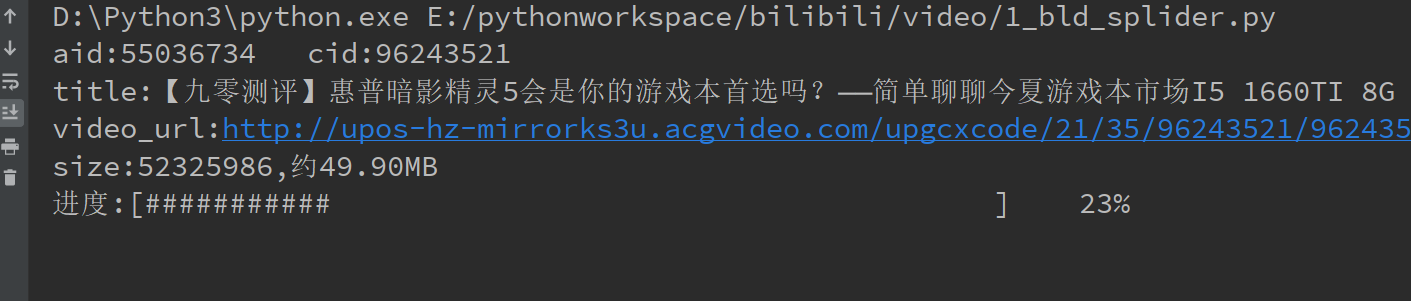
下载过程如图
直接上代码:
 import requests

 import re

 import os

 import json

 import sys

 import math

 from lxml import etree

 class BLDSplider:

     regex_cid = re.compile("\"cid\":(.{8})")

     def __init__(self, aid):

         self.aid = aid

         self.origin_url = "https://www.bilibili.com/video/av{}?from=search&seid=9346373599622336536".format(aid)

         self.headers = {

             "User-Agent": "Mozilla/5.0 (Windows NT 6.1; Win64; x64) AppleWebKit/537.36 (KHTML, like Gecko) Chrome/68.0.3440.106 Safari/537.36",

         }

         self.url = "https://api.bilibili.com/x/player/playurl?avid={}&cid={}&qn=0&type=&otype=json"

     def check_dir(self, author_name):

         # 检查目录

         self.parent_path = "e:/bilibili/" + author_name + "/" + str(self.aid) + "/"

         if not os.path.exists(self.parent_path):

             os.makedirs(self.parent_path)

         self.video_name = self.parent_path + str(self.aid) + ".mp4"

     def parse_url(self, item):

         cid = item["cid"]

         print("aid:%s   cid:%s" % (str(self.aid), cid))

         title = item["title"]

         print("title:%s" % title)

         self.headers["Referer"] = self.origin_url

         # 视频

         response = requests.get(self.url.format(self.aid, cid), headers=self.headers)

         if response.status_code == 200:

             result = json.loads(response.content.decode())

             durl = result["data"]["durl"][0]

             video_url = durl["url"]

             print("video_url:%s" % video_url)

             # 视频大小

             size = durl["size"]

             print("size:%s,约%2.2fMB" % (size, size / (1024 * 1024)))

             video_response = requests.get(video_url, headers=self.headers, stream=True)

             if video_response.status_code == 200:

                 with open(self.video_name, "wb") as file:

                     buffer = 1024

                     count = 0

                     while True:

                         if count + buffer <= size:

                             file.write(video_response.raw.read(buffer))

                             count += buffer

                         else:

                             file.write(video_response.raw.read(size % buffer))

                             count += size % buffer

                         file_size = os.path.getsize(self.video_name)

                         # print("\r下载进度 %.2f %%" % (count * 100 / size), end="")

                         width = 50

                         percent = (count / size)

                         use_num = int(percent * width)

                         space_num = int(width - use_num)

                         percent = percent * 100

                         print('\r进度:[%s%s]    %d%%' % (use_num * '#', space_num * ' ', percent), file=sys.stdout,

                               flush=True, end="")

                         if size == count:

                             break

                 print("\r\n")

     # 获取视频相关参数

     def get_video_info(self):

         response = requests.get(self.origin_url, headers=self.headers)

         item = dict()

         if response.status_code == 200:

             # author

             html_element = etree.HTML(response.content.decode())

             author = dict()

             author_name = html_element.xpath(

                 "/html/body/div[@id='app']/div[@class='v-wrap']/div[@class='r-con']/div[@id='v_upinfo']//a[@report-id='name']/text()")[

                 0]

             # 通常是微博,微信公众号等联系方式

             author_others = html_element.xpath(

                 "/html/body/div[@id='app']/div[@class='v-wrap']/div[@class='r-con']/div[@id='v_upinfo']//div[@class='desc']/@title")[

                 0]

             author["name"] = author_name

             author["others"] = author_others

             item["author"] = author

             # cid

             cid = BLDSplider.regex_cid.findall(response.content.decode())[0]

             item["cid"] = cid

             info_url = "https://api.bilibili.com/x/web-interface/view?aid={}&cid={}".format(self.aid, cid)

             info_response = requests.get(info_url, headers=self.headers)

             if info_response.status_code == 200:

                 data = json.loads(info_response.content.decode())["data"]

                 # 视频简介

                 desc = data["desc"]

                 item["desc"] = desc

                 # title

                 title = data["title"]

                 item["title"] = title

                 stat = data["stat"]

                 # 播放量

                 view = stat["view"]

                 item["view"] = view

                 # 弹幕

                 danmaku = stat["danmaku"]

                 item["danmaku"] = danmaku

                 # 评论

                 reply = stat["reply"]

                 item["reply"] = reply

                 # 硬币

                 coin = stat["coin"]

                 item["coin"] = coin

                 # 点赞

                 like = stat["like"]

                 item["like"] = like

                 # 收藏

                 favorite = stat["favorite"]

                 item["favorite"] = favorite

                 # 分享

                 share = stat["share"]

                 item["share"] = share

             self.check_dir(item["author"]["name"])

             # 视频参数

             with open(self.parent_path + "video_info.txt", "w") as file:

                 file.write(json.dumps(item, ensure_ascii=False, indent=2))

             return item

     def run(self):

         item = self.get_video_info()

         self.parse_url(item)

 def main():

     #

     aid = 55036734

     if len(sys.argv) >= 2:

         if sys.argv[1]:

             aid = sys.argv[1]

     splider = BLDSplider(aid)

     splider.run()

 if __name__ == '__main__':

     main()
python 下载bilibili视频的更多相关文章
- Python 批量下载BiliBili视频 打包成软件
文章目录 很多人学习python,不知道从何学起.很多人学习python,掌握了基本语法过后,不知道在哪里寻找案例上手.很多已经做案例的人,却不知道如何去学习更加高深的知识.那么针对这三类人,我给大家 ...
- 如何下载Bilibili视频
方法1: https://www.bilibili.com/video/av25940642 (源网址) https://www.ibilibili.com/video/av25940642 (新网址 ...
- python下载youtube视频
谷歌开源了一个新的数据集,BoundingBox,(网址在这里)这个数据集是经过人工标注的视频数据集,自然想将它尽快地运用在实际之中,那么首先需要将其下载下来:可以看到网址上给出的是csv文件,该文件 ...
- 爬虫 | Python下载m3u8视频
目录 从 m3u8 文件中解析出 ts 信息 按时间截取视频 抓取 ts 文件 单文件测试 批量下载 合并 ts 文件 将合并的ts文件转化为视频文件 参考资料: m3u8格式介绍 ts文件格式介绍 ...
- python下载网页视频
因网站不同需要修改. 下载 mp4 连接 from bs4 import BeautifulSoup import requests import urllib import re import js ...
- 下载bilibili视频
http://www.urlgot.com/zh_CN/
- 利用Selenium和Browsermob批量嗅探下载Bilibili网站视频
Rerence: http://www.liuhao.me/2016/09/20/selenium_browsermob_sniff_bilibili_video/ 日常生活中,用电脑看视频是非常频繁 ...
- Go设计模式学习准备——下载bilibili合集视频
需求 前段时间面试,被问到设计模式.说实话虽然了解面向对象.多态,但突然被问到设计模式,还要说清解决什么问题,自己是有些懵的,毕竟实习主要工作是在原项目基础进行CRUD,自己还是没有深度思考,所以只能 ...
- Python:使用youtube-dl+ffmpeg+FQ软件下载youtube视频
声明:本文所述内容都是从http://blog.csdn.net/u011475134/article/details/71023612博文中学习而来. 背景: 一同学想通过FQ软件下载一些youtu ...
随机推荐
- 洛谷 P1829 [国家集训队]Crash的数字表格 / JZPTAB(莫比乌斯反演)
题意:求$\sum_{i=1}^{n}\sum_{j=1}^{m}lcm(i,j)$. 开始开心(自闭)化简: $\sum_{i=1}^{n}\sum_{j=1}^{m}lcm(i,j)$ =$\su ...
- FinalShell for Mac
Mac一键安装脚本 curl -o finalshell_install.sh www.hostbuf.com/downloads/finalshell_install.sh;chmod +x fin ...
- python 编码检测工具——chardet
- python 逗号分隔值文件的操作
- [java]struts2 模型驱动 2016-05-01 21:40 702人阅读 评论(19) 收藏
一开始敲网上商城的时候,对于数据的传递方式我是很惊艳了一把的,感觉特别高大上,就感觉,竟然不用像.net一样取谁的值,给谁赋值这样,只要需要用的时候,简单的get一下就ok了,简直高大上啊. 然后发现 ...
- 逗号分隔的字符串转换为Python中的列表 split
将逗号分隔的字符串转换为Python中的列表 给定一个字符串: 它是由逗号分隔的几个值的序列: mStr = '192.168.1.1,192.168.1.2,192.168.1.3' 如何将字符 ...
- Linux 正文处理命令及tar命令 利用vi编辑器创建和编辑正文文件
要点回顾 1) 将用户信息数据库文件和组信息数据库文件纵向合并为一个文件/1.txt(覆盖) cp /etc/passwd . cat ./passwd >1.txt cp /etc/group ...
- URL的转义和解析
在开始python编程之前我们先来看看一个关与url的知识 在url中会有一些特殊字符,如果你写过cgi程序,并且提交一个表单去调用你的cgi,你会很清楚的 像?name=aiqier&age ...
- Pytest - 使用介绍
1. 概述 pytest是一个非常成熟的全功能的Python测试框架,主要特点有以下几点: 1.简单灵活,容易上手,文档丰富: 2.支持参数化,可以细粒度地控制要测试的测试用例: 3.能够支持简单的单 ...
- Java JDBC学习实战(三): 事务管理
一. 数据库的事务特性 事务是一步或多步组成操作序列组成的逻辑执行单元,这个序列要么全部执行,要么则全部放弃执行. 事务的四个特性:原子性(Atomicity).一致性(Consistency).隔离 ...