
浅谈Vue不同场景下组件间的数据交流

父子组件间的数据交流
父组件传递数据给子组件——props

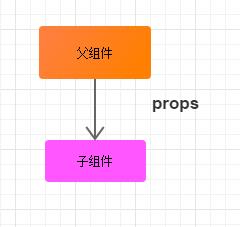
<template>

  <div id="father">

    {{ '我是父组件' }}

    <son :text = "text"></son>

  </div>

</template>


<script>

import son from './son.vue'

export default {

  data: function () {

    return {

      text: '从父组件传来的数据'

    }

  },

  components: {

    son: son

  }

}

</script>


<style scoped>

</style>
<template>

  <div>

    {{ '我是子组件,我接收了' + text }}

  </div>

</template>


<script>

export default {

  props: {

    text: { type: String, default: '' }

  }

}

</script>


<!-- Add "scoped" attribute to limit CSS to this component only -->

<style scoped>

</style>
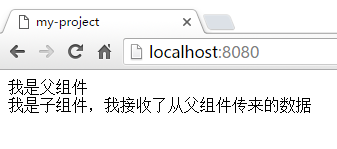
子组件传递数据给父组件
子组件传递数据给父组件 方式一:回调传参

<template>

  <div id="father">

    {{ '我是父组件,名称是' + componentName }}

    <son  :changeComponentName = "changeComponentName"></son>

  </div>

</template>


<script>

import son from './son.vue'

export default {

  data: function () {

    return {

      componentName: '组件A'

    }

  },


  methods: {

    changeComponentName: function (newComponentName) {

      this.componentName = newComponentName

    }

  },


  components: {

    son: son

  }

}

</script>


<style scoped>

  #father div{

    padding: 10px;

    margin: 10px;

    border: 1px solid gray;

  }

</style>
<template>

  <div>

    <p>我是子组件:一个button</p>

    <button @click="() => changeComponentName(newComponentName)">

      把父组件的名称修改为:彭湖湾的组件

    </button>

  </div>

</template>


<script>

export default {

  data: function () {

    return {

      newComponentName: '彭湖湾的组件'

    }

  },

  props: {

    changeComponentName: {

      type: Function,

      default: () => { }

    }

  }

}

</script>


<!-- Add "scoped" attribute to limit CSS to this component only -->

<style scoped>

</style>
demo:
点击前:
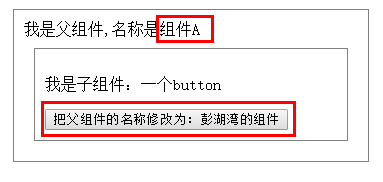
点击后:
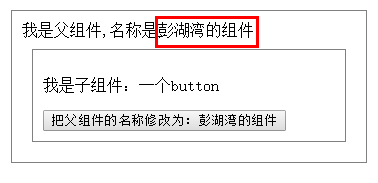
图解:
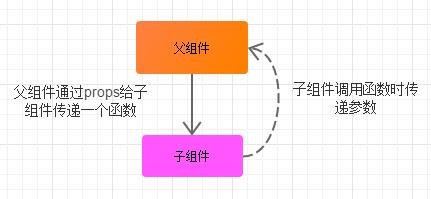

子组件传递数据给父组件 方式二:自定义事件

<template>

  <div id="father">

    <div>

      {{ '我是父组件,我的名称是:' + fatherComponentName }}

      <son  v-on:changeComponentName = "changeComponentName"></son>

    </div>

  </div>

</template>


<script>

import son from './son.vue'

export default {

  data: function () {

    return {

      fatherComponentName: 'A组件'

    }

  },


  methods: {

    changeComponentName: function (componentName) {

      this.fatherComponentName = componentName

    }

  },


  components: {

    son: son

  }

}

</script>


<style scoped>

  #father div{

    padding: 10px;

    margin: 10px;

    border:1px solid grey;

  }

</style>
<template>

  <div>

    <p>我是子组件:一个按钮</p>

    <button @click="clickCallback">

      修改父组件的名称为:彭湖湾的组件

    </button>

  </div>

</template>


<script>

export default {

  data: function () {

    return {

      fatherComponentName: '彭湖湾的组件'

    }

  },

  methods: {

    clickCallback: function () {

      this.$emit('changeComponentName', this.fatherComponentName)

    }

  }

}

</script>


<!-- Add "scoped" attribute to limit CSS to this component only -->

<style scoped>

</style>
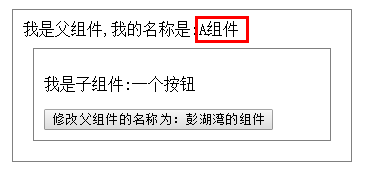
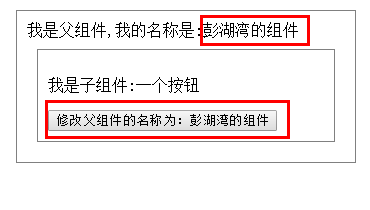
demo:
点击前:
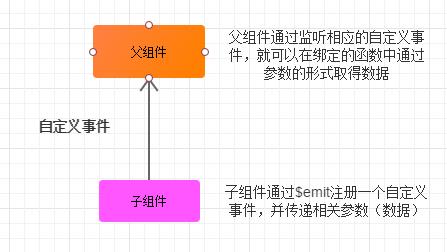
点击后:

兄弟组件间的数据交流(有共同父组件的兄弟组件)

<template>

  <div id="father">

    <div>

      {{ '我是父组件:father' }}

      <eldest-son :text = "text"></eldest-son>

      <youngest-son :changeText="changeText"></youngest-son>

    </div>

  </div>

</template>


<script>

import eldestSon from './eldestSon.vue'

import youngestSon from './youngestSon.vue'


export default {

  data: function () {

    return {

      text: '我是一行文本'

    }

  },


  methods: {

    changeText: function () {

      this.text = '我是经过改动的一行文本'

    }

  },


  components: {

    eldestSon: eldestSon,

    youngestSon: youngestSon

  }

}

</script>


<style>

    #father div{

      border: 1px solid grey;

      padding: 10px;

      margin: 10px;

    }

</style>
<template>

  <div>

    <p>我是兄弟组件:eldestSon</p>

    <p>我有一个可变数据text:{{ text }}</p>

  </div>

</template>


<script>

export default {

  props: {

    text: {

      type: String,

      default: ''

    }

  }

}

</script>


<!-- Add "scoped" attribute to limit CSS to this component only -->

<style scoped>

</style>
<template>

  <div>

    <p>我是兄弟组件:youngestSon</p>

    <button @click="changeText">更改eldestSon兄弟组件中的文本</button>

  </div>

</template>


<script>

export default {

  props: {

    changeText: {

      type: Function,

      default: () => {}

    }

  }

}

</script>


<!-- Add "scoped" attribute to limit CSS to this component only -->

<style scoped>

</style>
点击前:


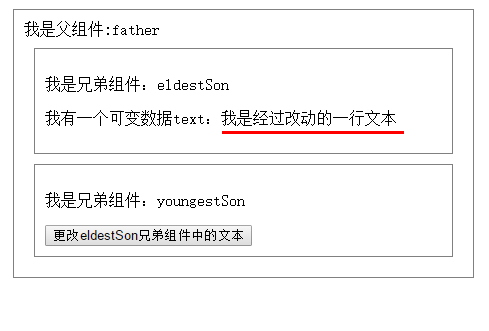
图解:


全局组件间的数据交流——Vuex

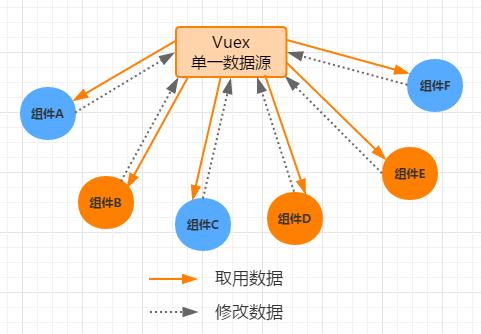
实现View层的数据和model层的解耦

浅谈Vue不同场景下组件间的数据交流的更多相关文章
- 【Vue】浅谈Vue不同场景下组件间的数据交流
浅谈Vue不同场景下组件间的数据“交流” Vue的官方文档可以说是很详细了.在我看来,它和react等其他框架文档一样,讲述的方式的更多的是“方法论”,而不是“场景论”,这也就导致了:我们在阅读完 ...
- 浅谈Vue下的components模板
浅谈Vue下的components模板在我们越来越深入Vue时,我们会发现我们对HTML代码的工程量会越来越少,今天我们来谈谈Vue下的 components模板的 初步使用方法与 应用 我们先来简单 ...
- 浅谈Vue.js
作为一名Vue.js的忠实用户,我想有必要写点文章来歌颂这一门美好的语言了,我给它的总体评价是“简单却不失优雅,小巧而不乏大匠”,下面将围绕这句话给大家介绍Vue.js,希望能够激发你对Vue.js的 ...
- 浅谈Vue模板的那些事儿
接触过vue的童鞋都知道,组件的模板一般都是在template选项内定义的,如 Vue.component('child-component', { template: '<h3>我是闰土 ...
- 浅谈Vue响应式(数组变异方法)
很多初使用Vue的同学会发现,在改变数组的值的时候,值确实是改变了,但是视图却无动于衷,果然是因为数组太高冷了吗? 查看官方文档才发现,不是女神太高冷,而是你没用对方法. 看来想让女神自己动,关键得用 ...
- 浅谈在ES5环境下实现const
最近看到一个面试题--用ES5实现const.作为JS初学者的笔者知道在ES6中有const命令,可以用来声明常量,一旦声明,常量的值就不可改变.例如: 1234567891011 const Pi ...
- 040——VUE中组件之组件间的数据参props的使用实例操作
<!DOCTYPE html> <html lang="en"> <head> <meta charset="UTF-8&quo ...
- Vue – 基础学习(2):组件间 通信及参数传递
Vue – 基础学习(2):组件间 通信及参数传递
- 浅谈Vue中计算属性(computed)和方法(methods)的差别
浅谈Vue中计算属性(computed)和方法(methods)的差别 源码地址 methods方法和computed计算属性,两种方式的最终结果确实是完全相同 计算属性是基于它们的响应式依赖进行缓存 ...
随机推荐
- ecshop循环计数
循环依次递增+1 <!-- {foreach from=$comments item=comment name=comment} --> {$smarty.foreach.comment. ...
- 什么是Css Hack?ie6,7,8的hack分别是什么?
针对不同的浏览器写不同的CSS code的过程,就是CSS hack. 示例如下: 1 2 3 4 5 6 7 8 9 10 11 12 #test { width:300px; heig ...
- ClistCtrl用法及总结(由怎样隐藏ListCtrl列表头的排序小三角形这个bug学习到的知识)
1 怎样隐藏ListCtrl列表头的排序小三角形 在创建控件是加入|LVS_NOSORTHEADER风格即可. 一下是用法总结: 本文根据本人在项目中的应用,来谈谈CListCtrl的部分用法及技巧. ...
- MySQL加密和解密案例
define("ENCRYPT",'2998a15c0cd853edad7');//密钥key 被存储的数据库的字段设置成blob格式(二进制) //AES_ENCRYPT 加密 ...
- php隔行换色输出表格
<?php header("Content-type:text/html;charset=utf-8"); $str=''; $str.='<table border= ...
- HDFS Java API的使用举例
HDFS是Hadoop应用程序使用的主要分布式存储.HDFS集群主要由管理文件系统元数据的NameNode和存储实际数据的DataNodes组成,HDFS架构图描述了NameNode,DataNode ...
- JQuery实战——页面进度条效果
今早逛阮一峰大神的博客 ECMAScript 6 入门 时候看到页面顶部有个进度条显示当前浏览的进度,如图: 顶部进度条会根据当前页面高度进行宽度调整,实战一番,视觉使用animated方法实现.下面 ...
- webpack教程(二)——webpack.config.js文件
首先我们需要安装一个webpack插件html-webpack-plugin,该插件的作用是帮助我们生成创建html入口文件.执行如下命令 npm install html-webpack-plugi ...
- 正则表达式获取body内容
最近项目需要,要弄个正则表达式获取body的内容. 用过angularjs就知道,很多时候要写指令时引用templateUrl的时候.template的内容root是不能包含多个节点的,否则就报错. ...
- PageSlider中CSS3动画在除首屏之外先加载页面后执行动画的问题
PageSlider中CSS3动画在除首屏之外先加载页面后执行动画的问题,PageSlider中加入CSS3动画的话,默认只有首屏是从无到有执行动画,其他屏都是显示下页面再执行动画 这就造成其他屏的动 ...