
JAVAEE——spring03:spring整合JDBC和aop事务
一、spring整合JDBC
1.spring提供了很多模板整合Dao技术
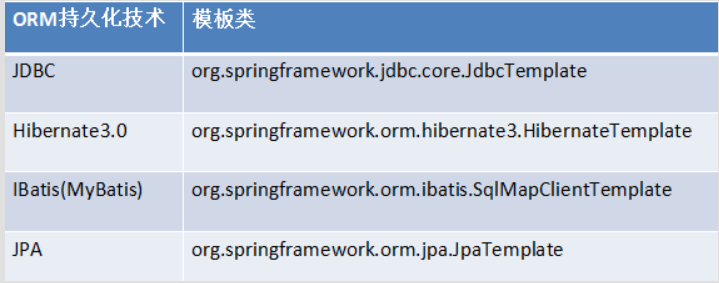
2.spring中提供了一个可以操作数据库的对象.对象封装了jdbc技术.
JDBCTemplate => JDBC模板对象
与DBUtils中的QueryRunner非常相似.
        //0 准备连接池

        ComboPooledDataSource dataSource = new ComboPooledDataSource();

        dataSource.setDriverClass("com.mysql.jdbc.Driver");

        dataSource.setJdbcUrl("jdbc:mysql:///xieyupeng");

        dataSource.setUser("root");

        dataSource.setPassword("1234");

        //1 创建JDBC模板对象

        JdbcTemplate jt = new JdbcTemplate();

        jt.setDataSource(dataSource);

        //2 书写sql,并执行

        String sql = "insert into t_user values(null,'rose') ";

        jt.update(sql);
3.整合步骤
3.1 导包
4+2:4代表: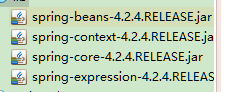
2代表:com.springsource.org.apache.commons.logging-1.1.1.jar、com.springsource.org.apache.log4j-1.2.15.jar(老版本要导入的,导入可以保证一定能运行)
spring-test、spring-aop、junit4类库
c3p0连接池、JDBC驱动
spring-jdbc、spring-tx事务
3.2 准备数据库(两个字段id(自增长)和name即可)
3.3 书写Dao
//使用JDBC模板实现增删改查

public class UserDaoImpl extends JdbcDaoSupport implements UserDao {

    @Override

    public void save(User u) {

        String sql = "insert into t_user values(null,?) ";

        super.getJdbcTemplate().update(sql, u.getName());

    }

    @Override

    public void delete(Integer id) {

        String sql = "delete from t_user where id = ? ";

        super.getJdbcTemplate().update(sql,id);

    }

    @Override

    public void update(User u) {

        String sql = "update  t_user set name = ? where id=? ";

        super.getJdbcTemplate().update(sql, u.getName(),u.getId());

    }

    @Override

    public User getById(Integer id) {

        String sql = "select * from t_user where id = ? ";

        return super.getJdbcTemplate().queryForObject(sql,new RowMapper<User>(){

            @Override

            public User mapRow(ResultSet rs, int arg1) throws SQLException {

                User u = new User();

                u.setId(rs.getInt("id"));

                u.setName(rs.getString("name"));

                return u;

            }}, id);

    }

    @Override

    public int getTotalCount() {

        String sql = "select count(*) from t_user  ";

        Integer count = super.getJdbcTemplate().queryForObject(sql, Integer.class);

        return count;

    }

    @Override

    public List<User> getAll() {

        String sql = "select * from t_user  ";

        List<User> list = super.getJdbcTemplate().query(sql, new RowMapper<User>(){

            @Override

            public User mapRow(ResultSet rs, int arg1) throws SQLException {

                User u = new User();

                u.setId(rs.getInt("id"));

                u.setName(rs.getString("name"));

                return u;

            }});

        return list;

    }

}
3.4 spring配置
依赖关系
<!-- 1.将连接池放入spring容器 -->

<bean name="dataSource" class="com.mchange.v2.c3p0.ComboPooledDataSource" >

    <property name="jdbcUrl" value="${jdbc.jdbcUrl}" ></property>

    <property name="driverClass" value="${jdbc.driverClass}" ></property>

    <property name="user" value="${jdbc.user}" ></property>

    <property name="password" value="${jdbc.password}" ></property>

</bean>

<!-- 2.将JDBCTemplate放入spring容器 -->

<bean name="jdbcTemplate" class="org.springframework.jdbc.core.JdbcTemplate" >

    <property name="dataSource" ref="dataSource" ></property>

</bean>

<!-- 3.将UserDao放入spring容器 -->

<bean name="userDao" class="cn.itcast.a_jdbctemplate.UserDaoImpl" >

    <!-- <property name="jt" ref="jdbcTemplate" ></property> -->

    <property name="dataSource" ref="dataSource" ></property>

</bean>
3.5 测试
//演示JDBC模板

@RunWith(SpringJUnit4ClassRunner.class)

@ContextConfiguration("classpath:applicationContext.xml")

public class Demo {

    @Resource(name="userDao")

    private UserDao ud;

    @Test

    public void fun2() throws Exception{

        User u = new User();

        u.setName("tom");

        ud.save(u);

    }

    @Test

    public void fun3() throws Exception{

        User u = new User();

        u.setId(2);

        u.setName("jack");

        ud.update(u);

    }

    @Test

    public void fun4() throws Exception{

        ud.delete(2);

    }

    @Test

    public void fun5() throws Exception{

        System.out.println(ud.getTotalCount());

    }

    @Test

    public void fun6() throws Exception{

        System.out.println(ud.getById(1));

    }

    @Test

    public void fun7() throws Exception{

        System.out.println(ud.getAll());

    }

}
4.进阶内容
4.1 JDBCDaoSupport
public class UserDaoImpl extends JdbcDaoSupport

<!-- 3.将UserDao放入spring容器(继承JDBCDaoSupport,直接注入dataSourse即可) -->

<bean name="userDao" class="cn.itcast.a_jdbctemplate.UserDaoImpl" >

    <!-- <property name="jt" ref="jdbcTemplate" ></property> -->

    <property name="dataSource" ref="dataSource" ></property>

</bean>
4.1 读取外部的Properties配置
db.properties 注意加前缀(更好区分,防止重名)
jdbc.jdbcUrl=jdbc:mysql:///hibernate_32

jdbc.driverClass=com.mysql.jdbc.Driver

jdbc.user=root

jdbc.password=1234
<!-- 指定spring读取db.properties配置 -->

<context:property-placeholder location="classpath:db.properties"  />

<!-- 1.将连接池放入spring容器 -->

<bean name="dataSource" class="com.mchange.v2.c3p0.ComboPooledDataSource" >

    <property name="jdbcUrl" value="${jdbc.jdbcUrl}" ></property>

    <property name="driverClass" value="${jdbc.driverClass}" ></property>

    <property name="user" value="${jdbc.user}" ></property>

    <property name="password" value="${jdbc.password}" ></property>

</bean>
二、使用注解配置spring
1.事务回顾
事务特性:acid
事务并发问题:脏读、不可重复读、幻读
事务的隔离级别:1 读未提交、2 读已提交、4 可重复读、8 串行化
2.spring封装了事务管理代码
事务操作:打开事务、提交事务、回滚事务
事务操作对象
因为在不同平台,操作事务的代码各不相同.spring提供了一个接口
2.1 PlatformTransactionManager 接口
DataSourceTransactionManager
HibernateTransitionmanager
注意:在spring中玩事务管理.最为核心的对象就是TransactionManager对象
2.2 spring管理事务的属性介绍
事务的隔离级别:1 读未提交、2 读已提交、4 可重复读、8 串行化
是否只读:true 只读、false 可操作
事务的传播行为:
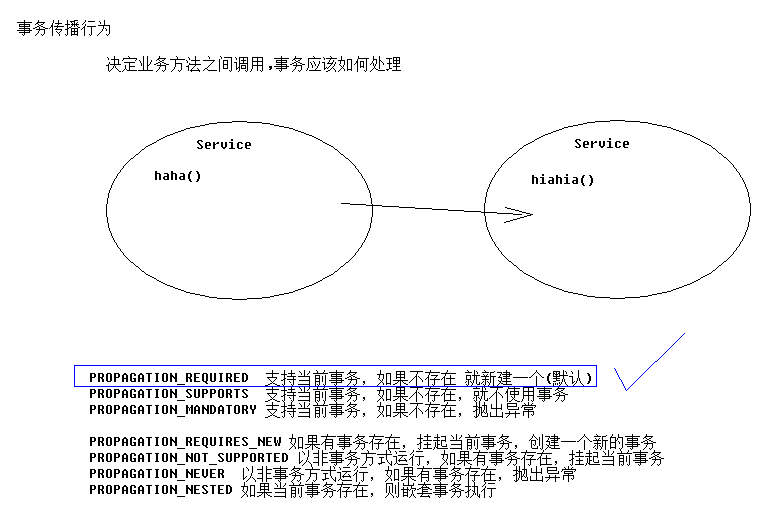
3.spring管理事务方式
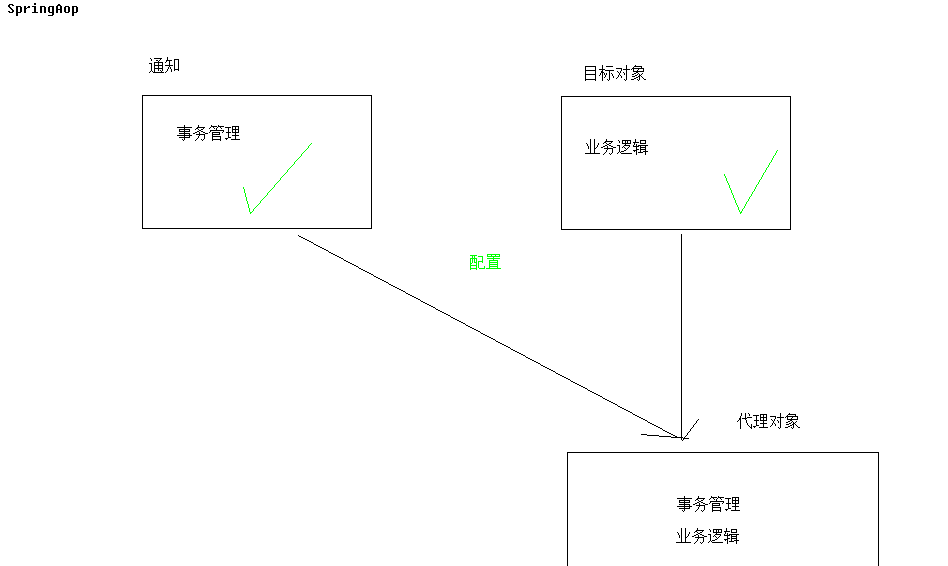
3.1 编码式(了解)
3.1.1 将核心事务管理器配置到spring容器
<!-- 事务核心管理器,封装了所有事务操作. 依赖于连接池 -->

<bean name="transactionManager" class="org.springframework.jdbc.datasource.DataSourceTransactionManager" >

    <property name="dataSource" ref="dataSource" ></property>

</bean>
3.1.2 配置TransactionTemplate模板
<!-- 事务模板对象 -->

<bean name="transactionTemplate" class="org.springframework.transaction.support.TransactionTemplate" >

    <property name="transactionManager" ref="transactionManager" ></property>

</bean>
3.1.3 将事务模板注入Service
<!-- 3.Service-->

<bean name="accountService" class="cn.itcast.service.AccountServiceImpl" >

    <property name="ad" ref="accountDao" ></property>

    <property name="tt" ref="transactionTemplate" ></property>

</bean>
3.1.4 在Service中调用模板
    public void transfer(final Integer from,final Integer to,final Double money) {

        tt.execute(new TransactionCallbackWithoutResult() {

            @Override

            protected void doInTransactionWithoutResult(TransactionStatus arg0) {

                //减钱

                ad.decreaseMoney(from, money);

                int i = 1/0;//触发错误,验证代码是否正确

                //加钱

                ad.increaseMoney(to, money);

            }

        });

    }
3.2 xml配置(aop)
3.2.1 导包
aop、aspect、aop联盟和weaving织入包
3.2.2 导入新的约束(tx)

beans: 最基本
context:读取properties配置
aop:配置aop
tx:配置事务通知
3.2.3 配置通知
<!-- 配置事务通知 -->

<tx:advice id="txAdvice" transaction-manager="transactionManager" >

    <tx:attributes>

        <!-- 以方法为单位,指定方法应用什么事务属性

            isolation:隔离级别

            propagation:传播行为

            read-only:是否只读

         -->

        <tx:method name="save*" isolation="REPEATABLE_READ" propagation="REQUIRED" read-only="false" />

        <tx:method name="persist*" isolation="REPEATABLE_READ" propagation="REQUIRED" read-only="false" />

        <tx:method name="update*" isolation="REPEATABLE_READ" propagation="REQUIRED" read-only="false" />

        <tx:method name="modify*" isolation="REPEATABLE_READ" propagation="REQUIRED" read-only="false" />

        <tx:method name="delete*" isolation="REPEATABLE_READ" propagation="REQUIRED" read-only="false" />

        <tx:method name="remove*" isolation="REPEATABLE_READ" propagation="REQUIRED" read-only="false" />

        <tx:method name="get*" isolation="REPEATABLE_READ" propagation="REQUIRED" read-only="true" />

        <tx:method name="find*" isolation="REPEATABLE_READ" propagation="REQUIRED" read-only="true" />

        <tx:method name="transfer" isolation="REPEATABLE_READ" propagation="REQUIRED" read-only="false" />

    </tx:attributes>

</tx:advice>
3.2.4 配置将通知织入目标
<!-- 配置织入 -->

<aop:config  >

    <!-- 配置切点表达式 -->

    <aop:pointcut expression="execution(* cn.itcast.service.*ServiceImpl.*(..))" id="txPc"/>

    <!-- 配置切面 : 通知+切点

             advice-ref:通知的名称

             pointcut-ref:切点的名称

     -->

    <aop:advisor advice-ref="txAdvice" pointcut-ref="txPc" />

</aop:config>
3.3 注解配置(aop)
导包、tx约束和xml配置(aop)相同
3.3.1 开启注解管理事务
<!-- 开启使用注解管理aop事务 -->

<tx:annotation-driven/>
3.3.2 使用注解
@Transactional(isolation=Isolation.REPEATABLE_READ,propagation=Propagation.REQUIRED,readOnly=true)

public class AccountServiceImpl implements AccountService {

    private AccountDao ad ;

    private TransactionTemplate tt;

    @Override

    @Transactional(isolation=Isolation.REPEATABLE_READ,propagation=Propagation.REQUIRED,readOnly=false)

    public void transfer(final Integer from,final Integer to,final Double money) {
JAVAEE——spring03:spring整合JDBC和aop事务的更多相关文章
- Spring整合JDBC以及AOP管理事务
本节内容: Spring整合JDBC Spring中的AOP管理事务 一.Spring整合JDBC Spring框架永远是一个容器,Spring整合JDBC其实就是Spring提供了一个对象,这个对象 ...
- Spring整合JDBC(连接池、JDBC模板、Dao配置到Spring容器、配置文件的优化)
1.Spring整合JDBC (1)导包(共12个): c3p0连接池.JDBC驱动(4个) Spring-jdbc.Spring-tx事务(2个) (2)JDBC模板对象(JDBCTemplate) ...
- Spring整合jdbc
首先web.xml文件跟往常一样,加载spring容器和加载org.springframework.web.context.ContextLoaderListener读取applicationCont ...
- Spring整合JDBC及事务处理
1.Spring整合JDBC DAO是数据访问对象(data access object)的简写.接口是实现松耦合的关键,Spring也鼓励使用接口,但不是强制的. 捕获异常时希望能尝试从异常状态中恢 ...
- Spring整合JDBC实现简单的增删改
Spring整合JDBC实现简单的增删改: 1.导入Spring的包和数据库的驱动包: 2.选择一个数据源(dbcp和C3P0) 3.导入数据源的包(这里我们使用dbcp) <span styl ...
- Spring整合AspectJ的AOP
学而时习之,不亦说乎! --<论语> 看这一篇之前最好先看前面关于AOP的两篇. http://www.cnblogs.com/z ...
- Spring知识点总结(五)Spring整合JDBC
1. 回顾JDBC a. java操作关系型数据的API.导入相关数据库的驱动包后可以通过JDBC提供的接口来操作数据库. b. 实现JDBC的六个步骤 ...
- spring整合jdbc方法一
用了一段时间的spring这,闲来没事做一下spring整合jdbc 目录文件 导入jar包 由于spring的jar包是在myeclipse中自动导入的有些暂时用不到的也没有处理. Emp类 pac ...
- 四、spring的JDBC模板和事务管理
Spring的JDBC模板 Spring是JavaEE开发的一站式框架,对各种持久化技术都提供了简单的模板 ORM持久化技术 模板类 JDBC org.springframework.jdbc.cor ...
随机推荐
- CentOS6.5_x86安装Mysql5.5.49
1.说明: 安装MySQL主要有两种方法:一种是通过源码自行编译安装,这种适合高级用户定制MySQL的特性,这里不做说明:另一种是通过编译过的二进制文件进行安装.二进制文件安装的方法又分为两种:一种是 ...
- 【 js 基础 】【 源码学习 】 setTimeout(fn, 0) 的作用
在 zepto 源码中,$.fn 对象 有个 ready 函数,其中有这样一句 setTimeout(fn,0); $.fn = { ready: function(callback){ // don ...
- 精准准确的统一社会信用代码正则(js)
参照标准: <GB_32100-2015_法人和其他组织统一社会信用代码编码规则.> 按照编码规则: 统一代码为18位,统一代码由十八位的数字或大写英文字母(不适用I.O.Z.S.V)组成 ...
- Ubuntu 完全卸载MySQL 重装步骤
sudo rm /var/lib/mysql/ -R 删除mysql的数据文件 sudo rm /etc/mysql/ -R 删除mqsql的配置文件 sudo apt-get autorem ...
- DDD理论学习系列(3)-- 限界上下文
1. 引言 限界上下文可以拆分为两个词,限界和上下文. 限界:是指一个界限,具体的某一个范围. 上下文:个人理解就是语境. 比如我们常说的段子: "我想静静." 这个句子一般是想表 ...
- java面向对象--包及访问控制符
多人开发同一个项目时,会出现类名称相同的情况.package就是为了避免类或接口名称重复而采用的一种措施.实际上包就是有一定层次结构的文件夹,*.class文件要保存当前类声明的和包对应的文件夹中. ...
- js中new一个对象的过程
使用new关键字调用函数(new ClassA(-))的具体步骤: 1. 创建空对象{}: 2. 设置新对象的constructor属性为构造函数的名称,设置新对象的__proto__属性指向构造函数 ...
- CPU最核心的电子元件叫做石英晶振
CPU是电子计算机的主要设备之一,是电脑中的核心配件.主要功能是解释计算机指令以及处理计算机软件中的数据.有人会问,你知道CPU里面都有什么吗?我想大家都会说硅晶体,集成度极大的半导体材料.却没有人提 ...
- Cornerstone 3.0.3 for mac 破解版
破解版本 直接安装即可 解压密码:xclient.info 下载地址: 链接: https://pan.baidu.com/s/1mhD64vY 密码: nwmc
- Nginx教程(二) Nginx虚拟主机配置
Nginx教程(二) Nginx虚拟主机配置 1 虚拟主机管理 1.1 Nginx管理虚拟主机 虚拟主机使用的是特殊的软硬件技术,它把一台运行在因特网上的服务器主机分成一台台“虚拟”的主机,每台虚拟主 ...