
WCF 学习笔记之异常处理
WCF 学习笔记之异常处理
1:WCF异常在配置文件

<configuration>

  <system.serviceModel>

    <behaviors>

      <serviceBehaviors>

        <behavior name="serviceDebuBehavior">

          <serviceDebug includeExceptionDetailInFaults="true" />

        </behavior>

      </serviceBehaviors>

    </behaviors>

    <services>

      <service name="Artech.WcfServices.Service.CalculatorService" behaviorConfiguration="serviceDebuBehavior">

        <endpoint address="http://127.0.0.1:3721/calculatorservice"

                  binding="ws2007HttpBinding"

                  contract="Artech.WcfServices.Service.Interface.ICalculator" />

      </service>

    </services>

  </system.serviceModel>

</configuration>
2:也可以直接在服务上直接用特性进行设定
[ServiceBehavior(IncludeExceptionDetailInFaults=true)]
public class CalculatorService:ICalculator
{
}
上面两种方式实现的效果是一样的;
3:自定义异常信息
(1)直接通过FaultException直接指定错误的信息
using System.ServiceModel;

namespace Artech.WcfServices.Service

{

    public class CalculatorService : ICalculator

    {

        public int Divide(int x, int y)

        {

            if (0 == y)

            {

                throw new FaultException("被除数y不能为零!");

            }

            return x / y;

        }

    }

}
相应的配置文件内容为:
<configuration>

  <system.serviceModel>

    <behaviors>

      <serviceBehaviors>

        <behavior name="serviceDebuBehavior">

          <serviceDebug includeExceptionDetailInFaults="true" />

        </behavior>

      </serviceBehaviors>

    </behaviors>

    <services>

      <service name="Artech.WcfServices.Service.CalculatorService" behaviorConfiguration="serviceDebuBehavior">

        <endpoint address="http://127.0.0.1:3721/calculatorservice"

                  binding="ws2007HttpBinding"

                  contract="Artech.WcfServices.Service.Interface.ICalculator" />

      </service>

    </services>

  </system.serviceModel>

</configuration>
(2)通过FaultException<TDetail>采用自定义类型封装错误
首先我们看一下一个实例;注意Interface层里的CalculaltionError.cs这个是自定义封装的错误类;
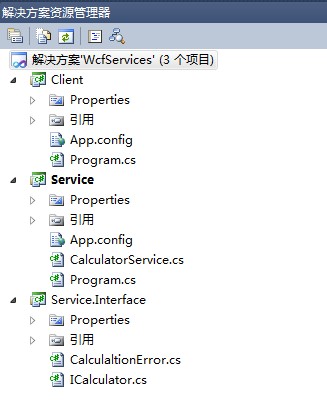
CalculaltionError.cs类代码如下:它是一个数据契约
using System.Text;

using System.Runtime.Serialization;

namespace Artech.WcfServices.Service.Interface

{

    [DataContract]

    public class CalculationError

    {

        public CalculationError(string operation, string message)

        {

            this.Operation = operation;

            this.Message = message;

        }

        [DataMember]

        public string Operation { get; set; }

        [DataMember]

        public string Message { get; set; }

    }

}
契约里的定义如下:为了确保错误细节对象能够被正常序列化和反序列化,要按照如下的方式通过FaultContractAttribute特性为操作定义基于CalculationError类型的错误契约(错误契约的一些注意点在下面会讲到);
namespace Artech.WcfServices.Service.Interface

{

    [ServiceContract(Namespace = "http://www.artech.com/")]

    public interface ICalculator

    {

        [OperationContract]

        [FaultContract(typeof(CalculationError))]

        int Divide(int x, int y);

    }

}
服务实现里直接抛出一个FaultException<CalculationError>,并创建一个CalculationError对象作为该异常对象的细节;
using System.ServiceModel;

namespace Artech.WcfServices.Service

{

    public class CalculatorService : ICalculator

    {

        public int Divide(int x, int y)

        {

            if (0 == y)

            {

                var error = new CalculationError("Divide", "被除数y不能为零!");

                throw new FaultException<CalculationError>(error, error.Message);

            }

            return x / y;

        }

    }

}
服务实现的配置文件内容如下:
<configuration>

  <system.serviceModel>

    <behaviors>

      <serviceBehaviors>

        <behavior name="serviceDebuBehavior">

          <serviceDebug includeExceptionDetailInFaults="true" />

        </behavior>

      </serviceBehaviors>

    </behaviors>

    <services>

      <service name="Artech.WcfServices.Service.CalculatorService" behaviorConfiguration="serviceDebuBehavior">

        <endpoint address="http://127.0.0.1:3721/calculatorservice"

                  binding="ws2007HttpBinding"

                  contract="Artech.WcfServices.Service.Interface.ICalculator" />

      </service>

    </services>

  </system.serviceModel>

</configuration>
客户端调用相关的异常处理;获得FaultException<CalculationError>类型的异常
using System.ServiceModel;

using Artech.WcfServices.Service.Interface;

namespace Artech.WcfServices.Clients

{

    class Program

    {

        static void Main(string[] args)

        {

            using (ChannelFactory<ICalculator> channelFactory = new ChannelFactory<ICalculator>("calculatorservice"))

            {

                ICalculator calculator = channelFactory.CreateChannel();

                using (calculator as IDisposable)

                {

                    try

                    {

                        int result = calculator.Divide(1, 0);

                    }

                    catch (FaultException<CalculationError> ex)

                    {

                        Console.WriteLine("运算错误");

                        Console.WriteLine("运算操作:{0}", ex.Detail.Operation);

                        Console.WriteLine("错误消息: {0}", ex.Detail.Message);

                        (calculator as ICommunicationObject).Abort();

                    }

                }

            }

            Console.Read();

        }

    }

}
客户端配置信息如下:
<configuration>

  <system.serviceModel>

    <client>

      <endpoint name="calculatorservice"

                address= "http://127.0.0.1:3721/calculatorservice"

                binding="ws2007HttpBinding"

                contract="Artech.WcfServices.Service.Interface.ICalculator"/>

    </client>

  </system.serviceModel>

</configuration>
*接下来讲解关于错误契约的注意点:
对于错误契约的运用不仅仅在将自定义的错误细节类型应用到服务契约相应操作上时才要显式地在操作方法上应用FaultContracAttribute特性;对于一些基元类型(比如Int32, String等)也要这么做;
    public class CalculatorService : ICalculator

    {

        public int Divide(int x, int y)

        {

            if (0 == y)

            {

                throw new FaultException<String>("不能为0");

            }

            return x / y;

        }

    }
契约如下:
namespace Artech.WcfServices.Service.Interface

{

    [ServiceContract]

    public interface ICalculator

    {

        [OperationContract]

        [FaultContract(typeof(string))]

        int Divide(int x, int y);

    }

}
当然它是可以多次声明针对多个异常的处理
namespace Artech.WcfServices.Service.Interface

{

    [ServiceContract]

    public interface ICalculator

    {

        [OperationContract]

        [FaultContract(typeof(CalculationError))]

        [FaultContract(typeof(string))]

        int Divide(int x, int y);

    }

}
若是两个是相同类型的则要增加Name 或者Namespace来区别开;若是Name一样类型不一样同样会报错;
    [ServiceContract]

    public interface ICalculator

    {

        [OperationContract]

        [FaultContract(typeof(CalculationError),Name="CalualationError")]

        [FaultContract(typeof(CalculationError),Name="CalualationException")]

        int Divide(int x, int y);

    }
(4)通过XmlSerializer对错误细节对象进行序列化([XmlSerializerFormat(SupportFaults=true)])因为WCF默认是采用序列化器是DataContractSerializer(WCF提供的两种序列化器DataContractSerializer 和 XmlSerializer)
    [ServiceContract]

    public interface ICalculator

    {

        [OperationContract]

        [FaultContract(typeof(CalculationError))]

        [XmlSerializerFormat(SupportFaults=true)]

        int Divide(int x, int y);

    }
封装的错误类如下:
    [Serializable]

    public class CalculationError

    {

        [XmlAttributeAttribute("op")]

        public string Operation { get; set; }

        [XmlElement("Error")]

        public string Message { get; set; }

    }
WCF 学习笔记之异常处理的更多相关文章
- WCF学习笔记之事务编程
WCF学习笔记之事务编程 一:WCF事务设置 事务提供一种机制将一个活动涉及的所有操作纳入到一个不可分割的执行单元: WCF通过System.ServiceModel.TransactionFlowA ...
- WCF学习笔记之传输安全
WCF学习笔记之传输安全 最近学习[WCF全面解析]下册的知识,针对传输安全的内容做一个简单的记录,这边只是简单的记录一些要点:本文的内容均来自[WCF全面解析]下册: WCF的传输安全主要涉及认证. ...
- WCF 学习笔记之双工实现
WCF 学习笔记之双工实现 其中 Client 和Service为控制台程序 Service.Interface为类库 首先了解契约Interface两个接口 using System.Service ...
- Python学习笔记之异常处理
1.概念 Python 使用异常对象来表示异常状态,并在遇到错误时引发异常.异常对象未被捕获时,程序将终止并显示一条错误信息 >>> 1/0 # Traceback (most re ...
- WCF学习笔记(2)——使用IIS承载WCF服务
通过前面的笔记我们知道WCF服务是不能独立存在,必须“寄宿”于其他的应用程序中,承载WCF服务的应用程序我们称之为“宿主”.WCF的多种可选宿主,其中比较常见的就是承载于IIS服务中,在这里我们来学习 ...
- WCF学习笔记1--发布使用配置文件的服务
关于WCF的入门网上资料很多,可以参考蒋金楠老师的博客http://www.cnblogs.com/artech/archive/2007/02/26/656901.html,我是从这篇博客开始学习的 ...
- WCF学习笔记(1)——Hello WCF
1.什么是WCF Windows Communication Foundation(WCF)是一个面向服务(SOA)的通讯框架,作为.NET Framework 3.0的重要组成部分于2006年正式发 ...
- WCF学习笔记(基于REST规则方式)
一.WCF的定义 WCF是.NET 3.0后开始引入的新技术,意为基于windows平台的通讯服务. 首先在学习WCF之前,我们也知道他其实是加强版的一个面向服务(SOA)的框架技术. 如果熟悉Web ...
- [WCF学习笔记] 我的WCF之旅(1):创建一个简单的WCF程序
近日学习WCF,找了很多资料,终于找到了Artech这个不错的系列.希望能从中有所收获. 本文用于记录在学习和实践WCF过程中遇到的各种基础问题以及解决方法,以供日后回顾翻阅.可能这些问题都很基础,可 ...
随机推荐
- Winform: use the WebBrowser to display XML with xslt, xml, xslt 转 html 字符串
原文:Winform: use the WebBrowser to display XML with xslt, xml, xslt 转 html 字符串 声明xml字符串: string xml = ...
- Cocos2d-x 3.0 编译出错 解决 error: expected ';' at end of member declaration
近期把项目移植到cocos2d-x 3.0,在整Android编译环境的时候,出现一大堆的编译出错,都是类似"error: expected ';' at end of member dec ...
- 亮点面试题&&实现Singleton(辛格尔顿)模式-JAVA版本
称号:设计一个类.我们只能产生这个类的一个实例.(来自<剑指Offer>) 解析:仅仅能生产一个实例的类是实现Singleton(单例)模式的类型.因为设计模式在面向对象程序设计中起着举足 ...
- JSP中获取jstl中的数据
我们在编程JSP时,有时会须要訪问jstl中的数据,或者说是el表达式中的数据. 比方, <c:forEach varStatus="data1" var=" ...
- MySQL之查询优化方式(笔记)
1.COUNT() 对COUNT的优化可以通过下面的SQL实现 mysql> select count(gnp<10000 or null) as '<<<<',c ...
- CodeIgniter学习一:基础知识
1. url片段(CI域名组成说明) example.com/index.php/test/index 第一部分(test):控制器 第二部分(index):方法,动作 如果第二部分 ...
- object 插入元素,插入HTML页面
object标签用于定义一个嵌入的对象,包括:图像.音频.Java applets.ActiveX.PDF以及Flash.该标签允许您规定插入HTML文档中的对象的数据和参数,以及可用来显示和操作数据 ...
- LinQ—扩展方法
概述 本节主要解说扩展方法,涉及LinQ的详细知识不多. 扩展方法的描写叙述 .net framework为编程人员提供了非常多的类,非常多的方法,可是,不论.net framework在类中为我们提 ...
- javascript 10进制和64进制的转换
原文:javascript 10进制和64进制的转换 function string10to64(number) { var chars = '0123456789abcdefghigklmnopqr ...
- Windows 下安装 Oracle 12c 教程
原文 Windows 下安装 Oracle 12c 教程 申明:本文原作者:Jmq 本文给大家带来的是 Oracle 12C 的安装教程. 1.准备 1.1 下载 Oracle 12c 安装程序 ...