
Shiro官方快速入门10min例子源码解析框架2-Session
Shiro自身维护了一套session管理组件,它可以独立使用,并不单纯依赖WEB/Servlet/EJB容器等环境,使得它的session可以任何应用中使用。
2-Session)主要介绍在quickstart例子中从获取Subject后,由初始化获取Session并写入读出session参数的完整过程。
同样,本篇本文使用的是shiro 1.3.2版本,配合源码最佳~
Shiro自身提供了SessionManager的三种实现来支持不同的模式
DefaultSessionManager:Shiro自身维护的session,可在普通应用环境使用
DefaultWebSessionManager:独立提供在shiro-web包中,继承SessionManager,并额外支持WEB相关方法
ServletContainerSessionManager:使用Servlet容器提供Session管理,提供少量额外方法
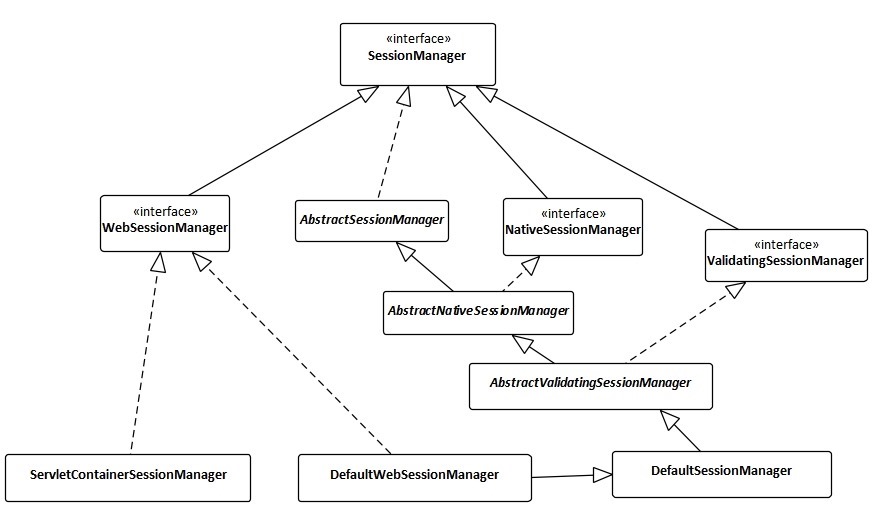
在samples-quickstart例子中使用到的是DefaultSessionManager。
篇1(Shiro官方快速入门10min例子源码解析框架1-初始化)中,1.2节DefaultSecurityManager是DefaultSessionManager的子类,在初始化DefaultSecurityManager时一同初始化DefaultSessionManager
在获取到Subject后,继续看samples-quickstart的代码如何获取和设置Session
Subject currentUser = SecurityUtils.getSubject();
2.1下一步是获取Session,调用Subject的getSession方法
Session session = currentUser.getSession();
DelegatingSubject中,getSession()若无参数,则调用getSession(true),如果不需要Shiro 的Session功能可以调用getSession(false),
public Session getSession() {

        return getSession(true);

    }
调用DelegatingSubject.getSession(true),前半部分是日志,及isSessionCreationEnabled()判断(默认为ture)
public Session getSession(boolean create) {

        if (log.isTraceEnabled()) {

            log.trace("attempting to get session; create = " + create +

                    "; session is null = " + (this.session == null) +

                    "; session has id = " + (this.session != null && session.getId() != null));

        }

        if (this.session == null && create) {

            //added in 1.2:

            if (!isSessionCreationEnabled()) {

                String msg = "Session creation has been disabled for the current subject.  This exception indicates " +

                        "that there is either a programming error (using a session when it should never be " +

                        "used) or that Shiro's configuration needs to be adjusted to allow Sessions to be created " +

                        "for the current Subject.  See the " + DisabledSessionException.class.getName() + " JavaDoc " +

                        "for more.";

                throw new DisabledSessionException(msg);

            }

            log.trace("Starting session for host {}", getHost());

            SessionContext sessionContext = createSessionContext();

            Session session = this.securityManager.start(sessionContext);

            this.session = decorate(session);

        }

        return this.session;

    }
主要在后半部分sessionContext、session获取,及decorate过程
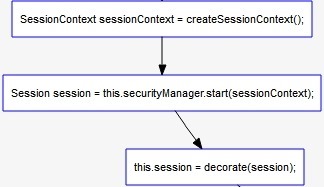
2.1.1获取默认空白sessonContext,其为map的子类,
2.1.2构建session将sessionContext绑定到其中
2.1.3包装session
2.1.2调用SessionsSecurityManager.start 其中sessionManager是DefaultSessionManager的实例
public Session start(SessionContext context) throws AuthorizationException {

        return this.sessionManager.start(context);

    }
其调用父类AbstractNativeSessionManager中的start方法
public Session start(SessionContext context) {

        Session session = createSession(context);

        applyGlobalSessionTimeout(session);

        onStart(session, context);

        notifyStart(session);

        //Don't expose the EIS-tier Session object to the client-tier:

        return createExposedSession(session, context);

    }
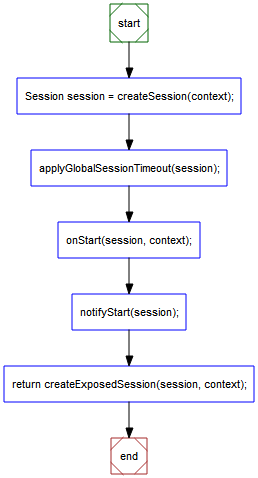
2.1.2.1构建Session
2.1.2.2设置session过期时间
2.1.2.3onStart操作,作为session监听器点(本例无监听器
2.1.2.4调用监听器onStart(本例无监听器
2.1.2.5创建
2.1.2.1继而AbstractNativeSessionManager.createSession()调用AbstractValidatingSessionManager.createSession() 启用session的验证功能,
protected Session createSession(SessionContext context) throws AuthorizationException {

        enableSessionValidationIfNecessary();

        return doCreateSession(context);

    }
继续调用DefaultSessionManager.doCreateSession(),DefaultSessionManager调用newSessionInstance,
protected Session doCreateSession(SessionContext context) {

        Session s = newSessionInstance(context);

        if (log.isTraceEnabled()) {

            log.trace("Creating session for host {}", s.getHost());

        }

        create(s);

        return s;

    }
获得SimpleSessionFactory工厂后构建调用SimpleSessionFactory.createSession()
此时session中只有时间戳、session失效时间等信息
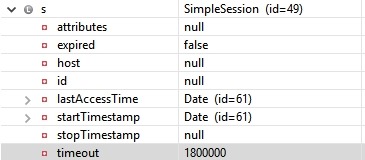
继而调用DefaultSessionManager.create() 持久化session(由于例子中未设置外部DAO则使用的是MemorySessionDAO实例
protected void create(Session session) {

        if (log.isDebugEnabled()) {

            log.debug("Creating new EIS record for new session instance [" + session + "]");

        }

        sessionDAO.create(session);

    }
这一步中会 为session生成一个UUID作为sessionID,并保存到session中,调用storeSession()将session 及其ID保存在MemorySessionDAO实例中的一个ConcurrentMap sessions中
protected Serializable doCreate(Session session) {

        Serializable sessionId = generateSessionId(session);

        assignSessionId(session, sessionId);

        storeSession(sessionId, session);

        return sessionId;

    }
最后成功返回session
2.1.2.2依据全局session过期时间设置session并更新到sessionDAO
protected void applyGlobalSessionTimeout(Session session) {

        session.setTimeout(getGlobalSessionTimeout());

        onChange(session);

    }
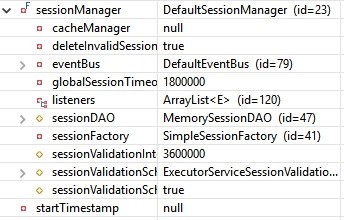
2.1.2.5
将SimpleSession转化为外部可用的DelegatingSession
protected Session createExposedSession(Session session, SessionContext context) {

        return new DelegatingSession(this, new DefaultSessionKey(session.getId()));

    }
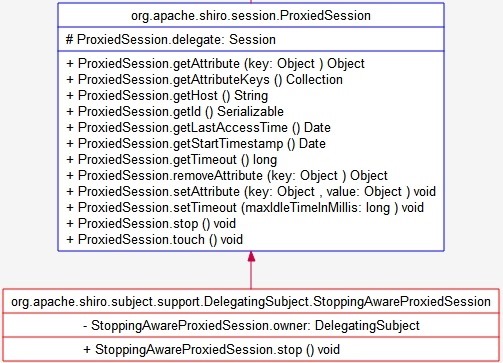
2.1.3将session包装成统一的StoppingAwareProxiedSession,后续通过委托操作session内的方法
protected Session decorate(Session session) {

        if (session == null) {

            throw new IllegalArgumentException("session cannot be null");

        }

        return new StoppingAwareProxiedSession(session, this);

    }
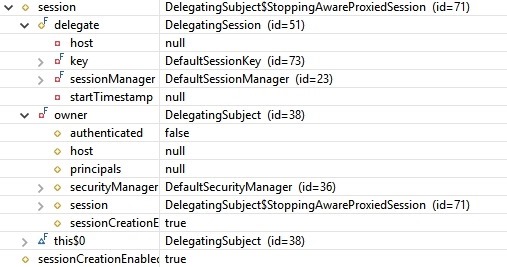
最后各处返回得到session
2.2在session中插入值
session.setAttribute("someKey", "aValue");
调用StoppingAwareProxiedSession父类方法ProxiedSession.setAttribute(),其中
public void setAttribute(Object key, Object value) throws InvalidSessionException {

        delegate.setAttribute(key, value);

    }
继而调用DelegatingSession.setAttribute(),其中调用并调用AbstractNativeSessionManager.setAttribute(),参数sessionKey为当前DelegatingSession的sessionKey
public void setAttribute(SessionKey sessionKey, Object attributeKey, Object value) throws InvalidSessionException {

        if (value == null) {

            removeAttribute(sessionKey, attributeKey);

        } else {

            Session s = lookupRequiredSession(sessionKey);

            s.setAttribute(attributeKey, value);

            onChange(s);

        }

    }
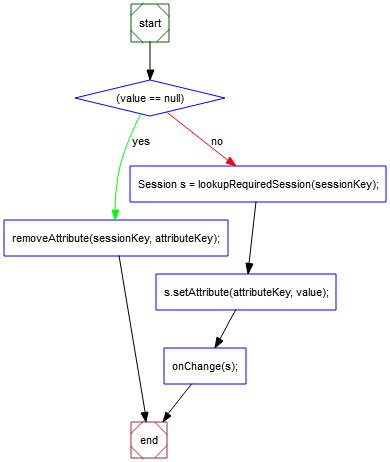
2.2.1判断来值是否为空
2.2.2.1
lookupRequiredSession(sessionKey)经过一系列过程,获得sessionId,依据sessionId由sessionDAO从DAO中获取simplesession实例
2.2.2.2空则删除对应的session参数
2.2.3获得的session设置参数
2.2.4sessionDAO中更新session
2.2在session中查找值
String value = (String) session.getAttribute("someKey");
调用StoppingAwareProxiedSession父类方法ProxiedSession.getAttribute(),
public Object getAttribute(Object key) throws InvalidSessionException {

        return delegate.getAttribute(key);

    }
与setAttribute()类似,从DAO中依据由sessionKey得到的sessionID获得SimpleSession的实例,再调用其getAttribute方法获得参数
public Object getAttribute(SessionKey sessionKey, Object attributeKey) throws InvalidSessionException {

        return lookupRequiredSession(sessionKey).getAttribute(attributeKey);

    }
至此一个简单的Session获取及参数写入读取便完成了
参考:
http://shiro.apache.org/10-minute-tutorial.html
http://shiro.apache.org/session-management.html
http://www.apache.org/dyn/closer.cgi/shiro/1.3.2/shiro-root-1.3.2-source-release.zip
转载请注明作者及来源:https://www.cnblogs.com/codflow/
Shiro官方快速入门10min例子源码解析框架2-Session的更多相关文章
- Shiro官方快速入门10min例子源码解析框架3-Authentication(身份认证)
在作完预备的初始化和session测试后,到了作为一个权鉴别框架的核心功能部分,确认你是谁--身份认证(Authentication). 通过提交给shiro身份信息来验证是否与储存的安全信息数据是否 ...
- Shiro官方快速入门10min例子源码解析框架1-初始化
Shiro,一个易用的Java安全框架,主要集合身份认证.授权.加密和session管理的功能. 这系文章主要简介Shiro架构,并通过官方的quickstart例程分析最简实现下Shiro的工作流程 ...
- Orleans例子源码
这是Orleans系列文章中的一篇.首篇文章在此 我共享以下我现在写教程的简单的Orleans例子源码. 这个代码已经是我为了写word改动过了的.不过大体内容是通用的. 我写博客总体想法是:去除所有 ...
- 【Activiti工作流引擎】官方快速入门demo
Activiti官方快速入门demo 地址: https://www.activiti.org/quick-start 0. 版本 activiti 5.22.0 JDK 1.8 1. 介绍 这个快速 ...
- 分布式 PostgreSQL 集群(Citus),官方快速入门教程
多租户应用程序 在本教程中,我们将使用示例广告分析数据集来演示如何使用 Citus 来支持您的多租户应用程序. 注意 本教程假设您已经安装并运行了 Citus. 如果您没有运行 Citus,则可以使用 ...
- 使用C#类向数据库添加数据的例子源码
在上一篇中,增加了sql server数据库操作类SqlOperator,用于操作sql server数据库.还有一个SqlStringHelper类,用于处理sql语句的单引号.那么这两个类怎么使用 ...
- jackson官方快速入门文档
官方地址: http://jackson.codehaus.org/ http://wiki.fasterxml.com/JacksonInFiveMinutes http://wiki.faster ...
- TodoMVC中的Backbone+MarionetteJS+RequireJS例子源码分析之一
Marionette牵线木偶,Backbone是脊骨的意思,Marionette是基于Backbone做扩展库,可以理解为把脊骨骨架绑线扯着变成牵线木偶动起来哈哈,使backbone更易使用呵呵! 构 ...
- Android例子源码非第三方实现根据字母排序的城市列表
values 下dimens.xml <resources> <!-- Default screen margins, per the Android Design guidelin ...
随机推荐
- Qt5学习笔记(消息基础)
#include "MyWidget.h" #include <QApplication> #include <QEvent> #include <Q ...
- mxonline实战17,上线部署
在线演示: http://47.244.22.82 python3+django2.0的环境 需要安装的库pip install django-simple-captcha django-pure-p ...
- jpetStore 学习总结(2)
在写jpetstore时,最难理解的应该是数据库还有每个表之间的关系了,我在这里对数据库简单的介绍. 以下是数据库的所有表: account表是个人信息表,里面包括用户的名字,邮箱,地址,哪个城 ...
- find查找文件命令 - Linux系统中的常用技巧整理
“find”在Linux系统中是比较常用的文件查找命令,使用方法有很多,可以拥有查找文件.文件目录.文件更新时间.文件大小.文件权限及对比文件时间.下面是整理的“find”常用方法,方便以后需要的时候 ...
- Hexo博客系列(二)-在多台机器上利用Hexo发布博客
[原文链接]:https://www.tecchen.xyz/blog-hexo-env-02.html 我的个人博客:https://www.tecchen.xyz,博文同步发布到博客园. 由于精力 ...
- P2486 [SDOI2011]染色(树剖)区间覆盖+区间的连续段
https://www.luogu.org/problemnew/show/P2486 值的一看https://www.cnblogs.com/Tony-Double-Sky/p/9283262.ht ...
- 二分难题 && deque
141. Sqrt(x) https://www.lintcode.com/problem/sqrtx/description?_from=ladder&&fromId=4 publi ...
- [Xamarin] 簡單實作ListActivity (转帖)
但是文中案例因為是用事先設好的Layout 但是如果需要被選擇的東西很多時該怎麼辦 我們討論一下,如何製作很簡單的List . 首先我們得先參考一下再android 思維下要製作一個List 需要的架 ...
- jQuery对象扩展方法(Extend)深度解析
1.这几天在写自己的Js工具类库,所以在编写对象扩展方法,参考了jQuery的对象扩展方法,在编写该方法前,需要掌握js深拷贝和浅拷贝的相关知识,下面是jQuery3.2.1版本对象扩展方法的源码: ...
- javac的Resolve类解读
方法1:isInitializer() /** An environment is an "initializer" if it is a constructor or * an ...