
java利用freemarker导出world
一、简单导出(不含循环导出)
1、新建一个word文件。如下图:
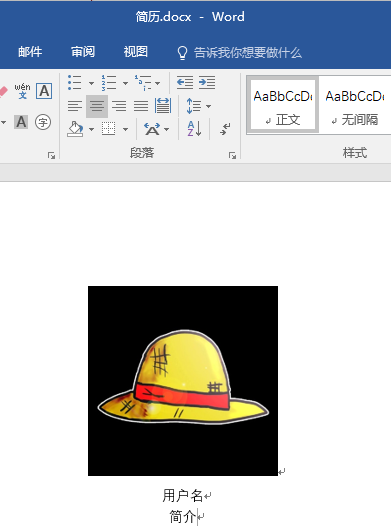
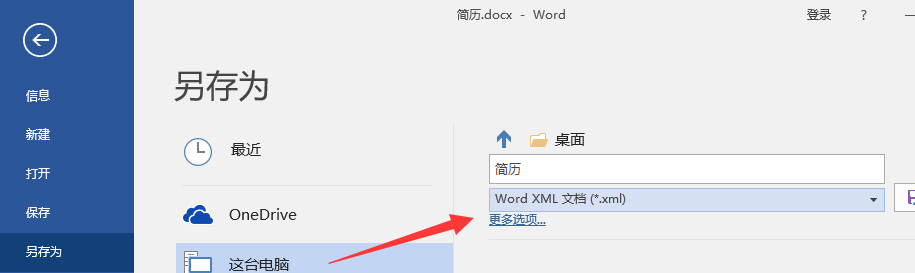
2、使用word将文件另存为xml的格式
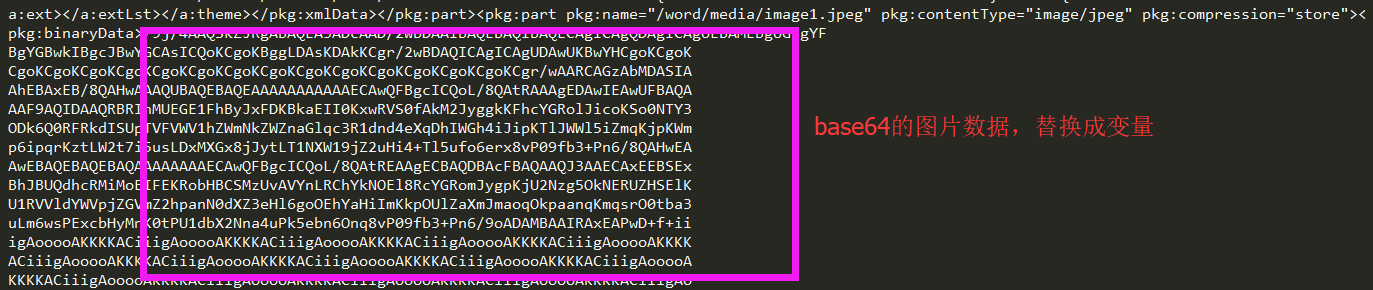
3、编辑xml文件内容,将'用户名'替换成-> ${username}、'简介'替换成-> ${resume}、将图片内容用变量-> ${img}替换。
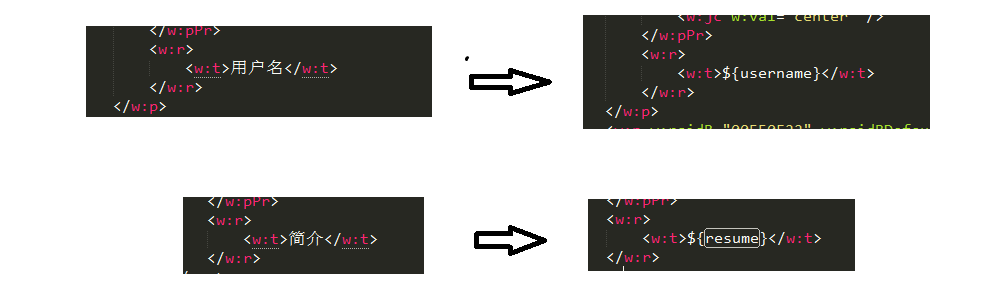
 --》
--》
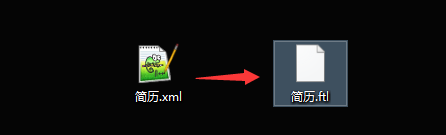
4、修改xml文件后缀名,将xml修改为ftl格式。
5、使用java代码,完成word文件导出,需要使用到freemarker.jar包,maven依赖如下:
 <!-- https://mvnrepository.com/artifact/org.freemarker/freemarker -->

 <dependency>

     <groupId>org.freemarker</groupId>

     <artifactId>freemarker</artifactId>

    <version>2.3.23</version>

 </dependency>
package com.test.word;
import java.io.BufferedWriter;
import java.io.File;
import java.io.FileInputStream;
import java.io.FileNotFoundException;
import java.io.FileOutputStream;
import java.io.IOException;
import java.io.InputStream;
import java.io.OutputStreamWriter;
import java.io.UnsupportedEncodingException;
import java.io.Writer;
import java.util.HashMap;
import java.util.Map;
import freemarker.template.Configuration;
import freemarker.template.Template;
import freemarker.template.TemplateException;
import sun.misc.BASE64Encoder;
public class Test {
public static void main(String[] args) throws IOException, TemplateException {
// 要填充的数据, 注意map的key要和word中${xxx}的xxx一致
Map<String, String> dataMap = new HashMap<String, String>();
dataMap.put("username", "张三");
dataMap.put("resume", "我是谁?");
dataMap.put("img", getImageStr());
// Configuration用于读取ftl文件
Configuration configuration = new Configuration();
configuration.setDefaultEncoding("utf-8");
/*
* 以下是两种指定ftl文件所在目录路径的方式, 注意这两种方式都是 指定ftl文件所在目录的路径,而不是ftl文件的路径
*/
// 指定路径的第一种方式(根据某个类的相对路径指定)
// configuration.setClassForTemplateLoading(this.getClass(),"");
// 指定路径的第二种方式,我的路径是C:/a.ftl
configuration.setDirectoryForTemplateLoading(new File("C:/Users/H__D/Desktop/"));
// 输出文档路径及名称
File outFile = new File("C:/Users/H__D/Desktop/test.doc");
// 以utf-8的编码读取ftl文件
Template t = configuration.getTemplate("简历.ftl", "utf-8");
Writer out = new BufferedWriter(new OutputStreamWriter(new FileOutputStream(outFile), "utf-8"), 10240);
t.process(dataMap, out);
out.close();
}
/**
* 将图片转换成base64编码
* @return
*/
public static String getImageStr() {
String imgFile = "C:/Users/H__D/Desktop/IMG_0109.JPG";
InputStream in = null;
byte[] data = null;
try {
in = new FileInputStream(imgFile);
data = new byte[in.available()];
in.read(data);
in.close();
} catch (Exception e) {
e.printStackTrace();
}
BASE64Encoder encoder = new BASE64Encoder();
return encoder.encode(data);
}
}
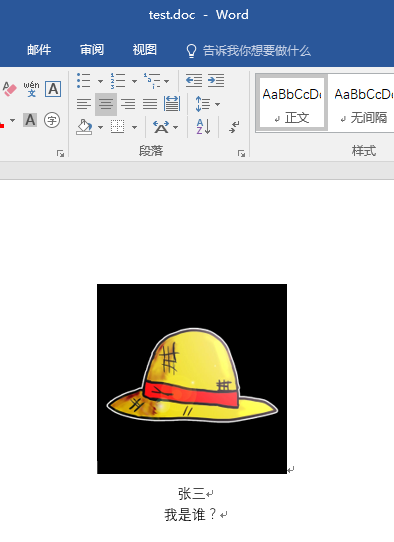
6、打开test.doc,如下:
二、带循环导出
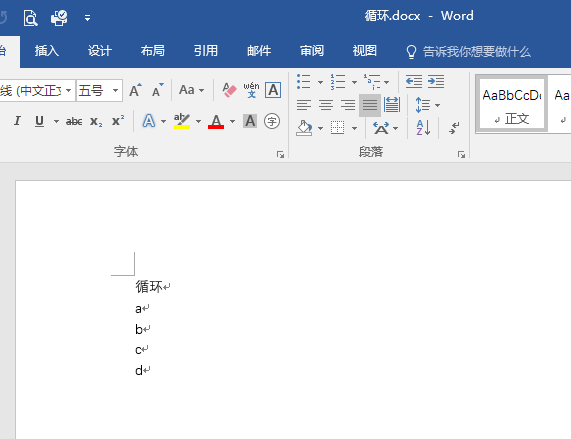
1、新建一个带循环的word 文件,如下:
2、使用word将文件另存为xml的格式
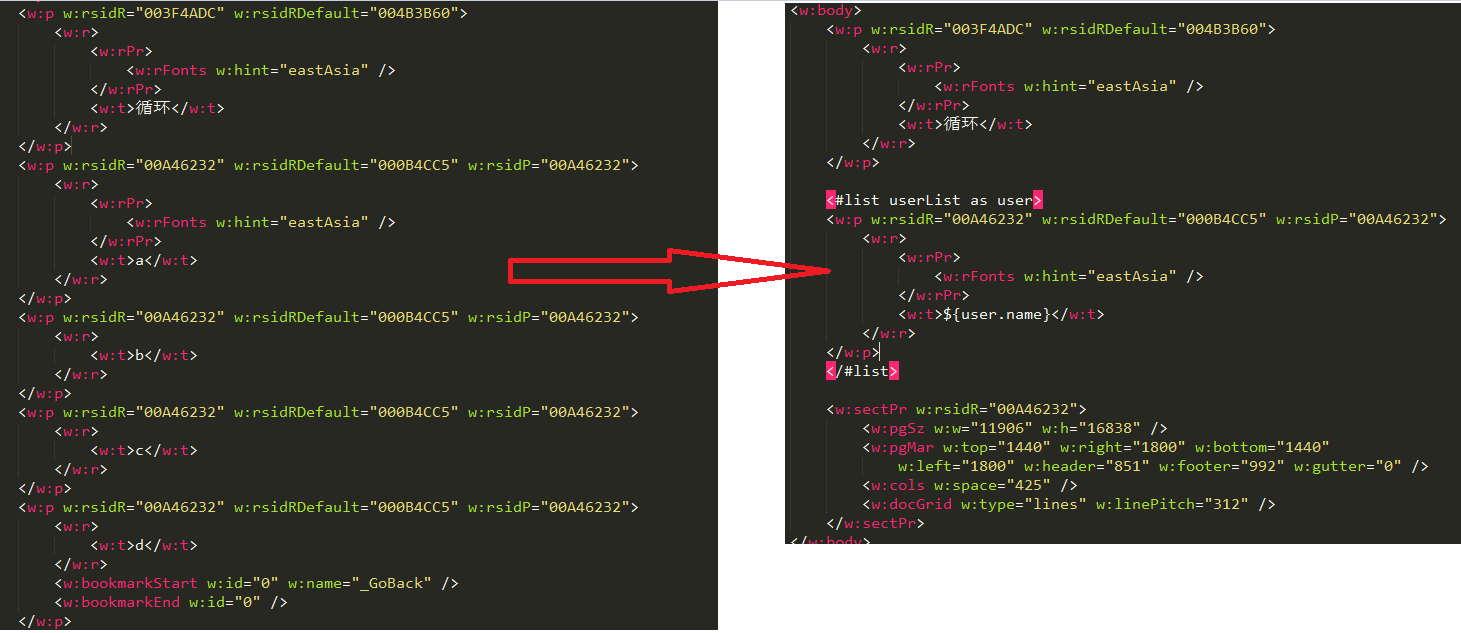
3、编辑xml文件内容,用<#list userList as user> </#list>标签将循环标签包围起来(userList是集合的key, user是集合中的每个元素, 类似<c:forEach items='userList' var='user'>), 如图:
4、修改xml文件后缀名,将xml修改为ftl格式。
5、使用java代码,完成word文件导出,如下:
package com.test.word;
import java.io.BufferedWriter;
import java.io.File;
import java.io.FileInputStream;
import java.io.FileNotFoundException;
import java.io.FileOutputStream;
import java.io.IOException;
import java.io.InputStream;
import java.io.OutputStreamWriter;
import java.io.UnsupportedEncodingException;
import java.io.Writer;
import java.util.ArrayList;
import java.util.HashMap;
import java.util.List;
import java.util.Map;
import freemarker.template.Configuration;
import freemarker.template.Template;
import freemarker.template.TemplateException;
public class Test2 {
public static void main(String[] args) throws IOException, TemplateException {
// 要填充的数据, 注意map的key要和word中${xxx}的xxx一致
Map<String, List> dataMap = new HashMap<String, List>();
List<User> list = new ArrayList<User>();
for(int i=0;i<5;i++){
User user = new User();
user.setName("hd"+(i+1));
list.add(user);
}
dataMap.put("userList", list);
// Configuration用于读取ftl文件
Configuration configuration = new Configuration();
configuration.setDefaultEncoding("utf-8");
/*
* 以下是两种指定ftl文件所在目录路径的方式, 注意这两种方式都是 指定ftl文件所在目录的路径,而不是ftl文件的路径
*/
// 指定路径的第一种方式(根据某个类的相对路径指定)
// configuration.setClassForTemplateLoading(this.getClass(),"");
// 指定路径的第二种方式,我的路径是C:/a.ftl
configuration.setDirectoryForTemplateLoading(new File("C:/Users/H__D/Desktop/"));
// 输出文档路径及名称
File outFile = new File("C:/Users/H__D/Desktop/test2.doc");
// 以utf-8的编码读取ftl文件
Template t = configuration.getTemplate("循环.ftl", "utf-8");
Writer out = new BufferedWriter(new OutputStreamWriter(new FileOutputStream(outFile), "utf-8"), 10240);
t.process(dataMap, out);
out.close();
}
}
package com.test.word;
public class User {
private String name;
public String getName() {
return name;
}
public void setName(String name) {
this.name = name;
}
}
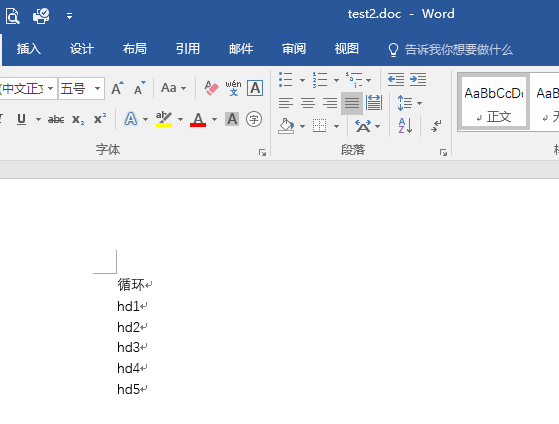
6、打开test2.doc,如下:
java利用freemarker导出world的更多相关文章
- java用freemarker导出数据到word(含多图片)
一.制作word模版 新建word文档,按照需要设置好字体等各种格式:这里为了显得整齐使用了无边框的表格. 将word文档另存为xml文件(注意不是word xml文档,我吃了这家伙的大亏了) 然后用 ...
- 利用freemarker导出页面格式复杂的excel
刚开始大家可能会利用poi生成简单的excel,但是遇到需要生成复杂的excel,poi导出excel就比较困难,这时候可以利用freemarker来渲染实现实现生成复杂的excel, 首先,将exc ...
- JAVA利用JXL导出/生成 EXCEL
/** * 导出导出采暖市场部收入.成本.利润明细表 * @author JIA-G-Y */ public String exporExcel(String str) { String str=Se ...
- java通过freemarker导出包含富文本图片的word文档
废话不多说,进入正题! 本文重点在于:对富文本图片的导出(基础的freemarker+word模板导出这里不做详细解说哈) 参考文章:http://www.cnblogs.com/liaofeifig ...
- Java用freemarker导出word
概述 最近一个项目要导出word文档,折腾老半天,发现还是用freemarker的模板来搞比较方便省事,现总结一下关键步骤,供大家参考,这里是一个简单的试卷生成例子. 详细 代码下载:http://w ...
- Java用freemarker导出Word 文档
1.用Microsoft Office Word打开word原件: 2.把需要动态修改的内容替换成***,如果有图片,尽量选择较小的图片几十K左右,并调整好位置: 3.另存为,选择保存类型Word 2 ...
- Java使用freemarker导出word文档
通过freemarker,以及JAVA,导出word文档. 共分为三步: 第一步:创建模板文件 第二步:通过JAVA创建返回值. 第三步:执行 分别介绍如下: 第一步: 首先创建word文档,按照想要 ...
- JAVA利用JXL导出/生成 EXCEL1
/** * 导出导出采暖市场部收入.成本.利润明细表 * @author JIA-G-Y */ public String exporExcel(String str) { String str=Se ...
- java利用poi导出数据到excel
背景: 上一篇写到利用jtds连接数据库获取对应的数据,本篇写怎样用poi将数据到处到excel中,此程序为Application 正文: 第三方poi jar包:poi驱动包下载 代码片段: /** ...
随机推荐
- 记一次mysql启动不了的问题
在linux上用的是xampp,mysql启动没有报任何错误,但就是查找不到进程,于是找mysql错误日志,日志在哪?在lampp/var/mysql 以.err结尾的文件里.里面内容如下; /opt ...
- python: 基本的日期与时间转换
需要执行简单的时间转换,比如天到秒,小时到分钟等的转换. 为了执行不同时间单位的转换和计算,请使用datetime 模块.比如,为了表示一个时间段,可以创建一个timedelta 实例,就像下面这样: ...
- [POI2006][luogu3435] OKR-Periods of Words [kmp+next数组]
题面 传送门 思路 先把题面转成人话: 对于给定串的每个前缀i,求最长的,使这个字符串重复两边能覆盖原前缀i的前缀(就是前缀i的一个前缀),求所有的这些"前缀的前缀"的长度和 利用 ...
- WebCollector2.7爬虫框架——在Eclipse项目中配置
WebCollector2.7爬虫框架——在Eclipse项目中配置 在Eclipse项目中使用WebCollector爬虫非常简单,不需要任何其他的配置,只需要导入相关的jar包即可. Netbea ...
- Python3.x:生成器简介
Python3.x:生成器简介 概念 任何使用yield的函数都称之为生成器:使用yield,可以让函数生成一个序列,该函数返回的对象类型是"generator",通过该对象连续调 ...
- 使用 log4js UDP 发送数据到 logstash
本文地址 http://www.cnblogs.com/jasonxuli/p/6532723.html 因为 nodejs 一般会部署在多台机器,并且每台机器会起多个进程,因此查看日志时往往要人工区 ...
- MSF基础攻击实践报告
MSF基础攻击实践 MSF的六个模块:exploit,encoder,payload,aux,post,nops exploit——渗透攻击模块 测试者利用它来攻击一个系统,程序,或服务,以获得开发者 ...
- 20145221 《Java程序设计》第一周学习总结
20145221 <Java程序设计>第一周学习总结 教材学习内容总结 第一周内容已在假期完成,详见博客: Hello Java! 开源中国的代码托管 代码调试中的问题和解决过程 第一周内 ...
- 解决数据库里表字段带下划线,实体类转小驼峰,Mapper的映射问题
mybatis中mapUnderscoreToCamelCase的使用 mybatis-config.xml配置: <?xml version="1.0" encoding= ...
- Java静态内存与动态内存分配的解析
1. 静态内存 静态内存是指在程序开始运行时由编译器分配的内存,它的分配是在程序开始编译时完成的,不占用CPU资源. 程序中的各种变量,在编译时系统已经为其分配了所需的内存空间,当该变量在作用域内使用 ...