
Windows里正确安装Zookeeper以服务运行
不多说,直接上干货!
为什么要在Win下来安装Zookeeper呢?
其实玩过大数据的人很清楚,在Linux下我更不说了。在win下,如Disconf 、Dubbo等应用。
所以,它的应用是非常广的。
ZooKeeper是一个分布式的,开放源码的分布式应用程序协调服务,是Google的Chubby一个开源的实现,是Hadoop和Hbase的重要组件。它是一个为分布式应用提供一致性服务的软件,提供的功能包括:配置维护、域名服务、分布式同步、组服务等。
ZooKeeper的目标就是封装好复杂易出错的关键服务,将简单易用的接口和性能高效、功能稳定的系统提供给用户。
ZooKeeper包含一个简单的原语集,提供Java和C的接口。
ZooKeeper代码版本中,提供了分布式独享锁、选举、队列的接口,代码在zookeeper-3.4.8\src\recipes。其中分布锁和队列有Java和C两个版本,选举只有Java版本。
zookeeper下载地址:
http://archive.apache.org/dist/zookeeper/zookeeper-3.4.8/
(可自行在官网下载自己需要的版本)
我这里以zookeeper-3.4.8为例。

我的是解压到指定目录下 D:\SoftWare\zookeeper-3.4.8

本博文,只关心其bin目录和conf目录。
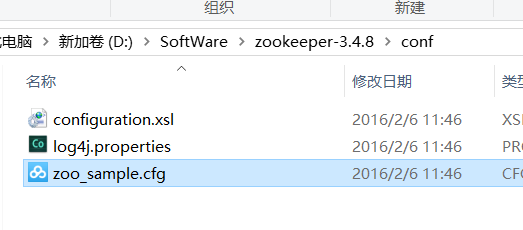
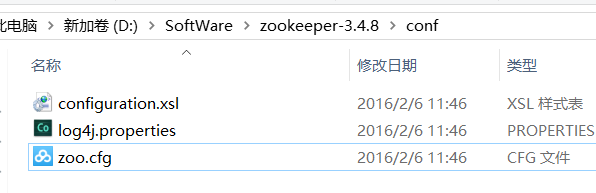
以下是默认的内容
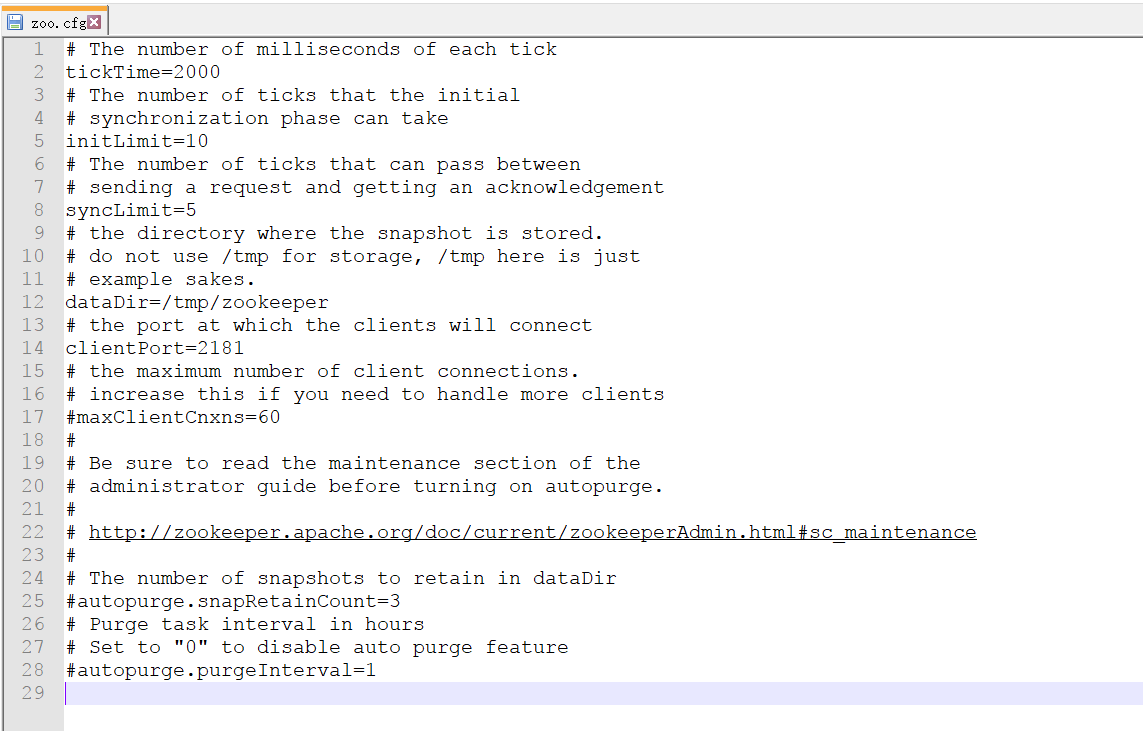

# The number of milliseconds of each tick

tickTime=

# The number of ticks that the initial

# synchronization phase can take

initLimit=

# The number of ticks that can pass between

# sending a request and getting an acknowledgement

syncLimit=

# the directory where the snapshot is stored.

# do not use /tmp for storage, /tmp here is just

# example sakes.

dataDir=/tmp/zookeeper

# the port at which the clients will connect

clientPort=

# the maximum number of client connections.

# increase this if you need to handle more clients

#maxClientCnxns=

#

# Be sure to read the maintenance section of the

# administrator guide before turning on autopurge.

#

# http://zookeeper.apache.org/doc/current/zookeeperAdmin.html#sc_maintenance

#

# The number of snapshots to retain in dataDir

#autopurge.snapRetainCount=

# Purge task interval in hours

# Set to "" to disable auto purge feature

#autopurge.purgeInterval=
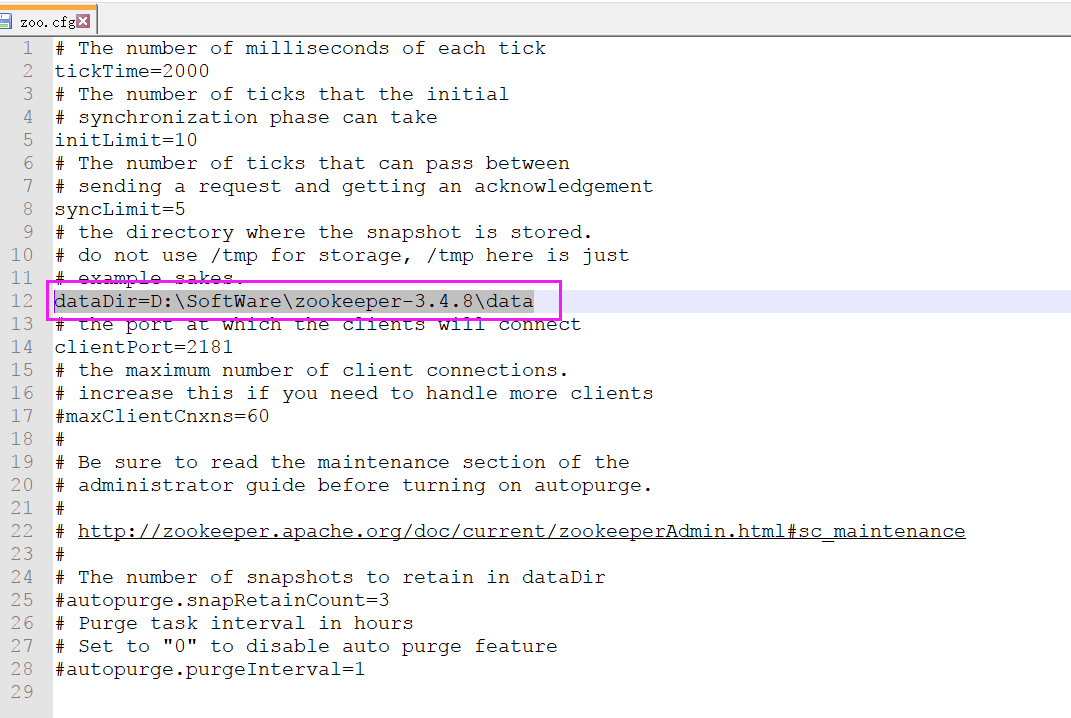
主要修改配置中的 dataDir ,根据自己实际修改即可,如下
比如我这里是
dataDir=D:\SoftWare\zookeeper-3.4.8\data
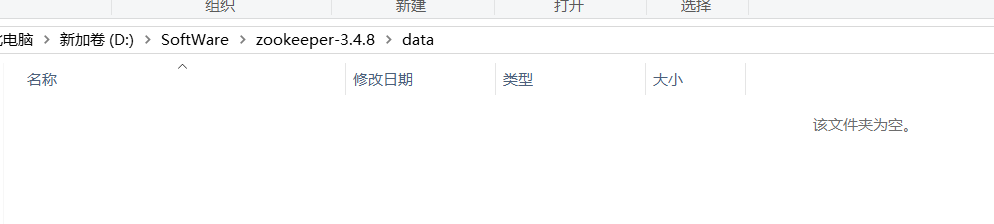
所以,我的为
# The number of milliseconds of each tick

tickTime=

# The number of ticks that the initial

# synchronization phase can take

initLimit=

# The number of ticks that can pass between

# sending a request and getting an acknowledgement

syncLimit=

# the directory where the snapshot is stored.

# do not use /tmp for storage, /tmp here is just

# example sakes.

dataDir=D:\SoftWare\zookeeper-3.4.\data

# the port at which the clients will connect

clientPort=

# the maximum number of client connections.

# increase this if you need to handle more clients

#maxClientCnxns=

#

# Be sure to read the maintenance section of the

# administrator guide before turning on autopurge.

#

# http://zookeeper.apache.org/doc/current/zookeeperAdmin.html#sc_maintenance

#

# The number of snapshots to retain in dataDir

#autopurge.snapRetainCount=

# Purge task interval in hours

# Set to "" to disable auto purge feature

#autopurge.purgeInterval=
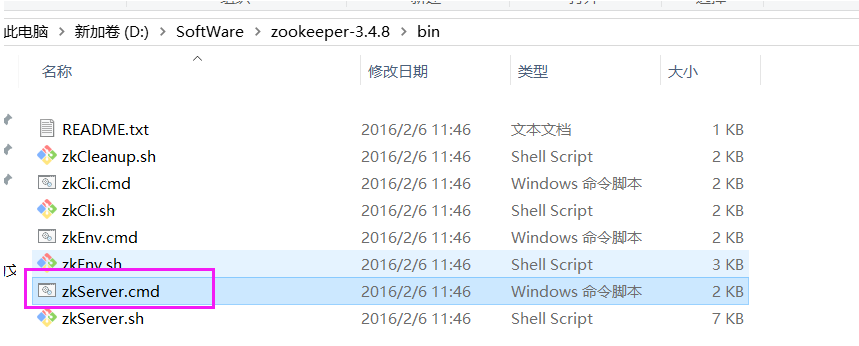
进入cmd下进bin目录,执行 zkserver.cmd 即可启动
至此,完成!
下载的Zookeeper是.cmd的批处理命令运行的,默认没有提供以windows服务的方式运行的方案!!!
为此,本文下载prunsrv 来作为zookeeper的服务管理。
将zookeeper做成 windows 服务,避免每次关闭后,再启动还需要使用cmd。
下载prunsrv
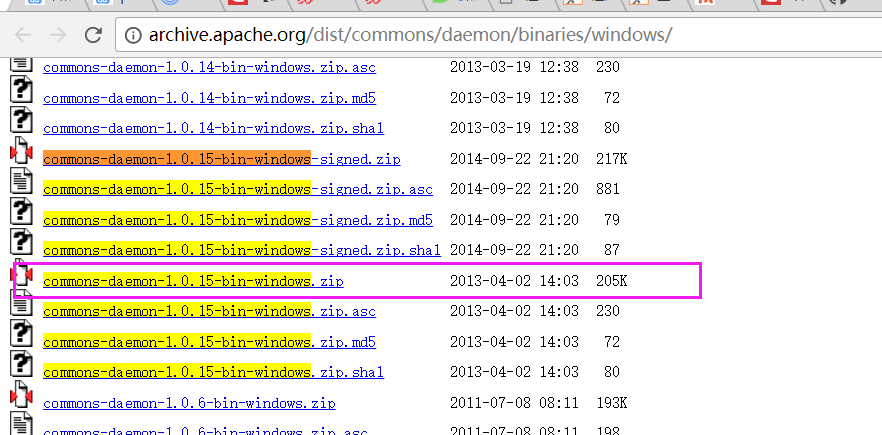
下载地址:http://archive.apache.org/dist/commons/daemon/binaries/windows/ ,找到commons-daemon-1.0.15-bin-windows

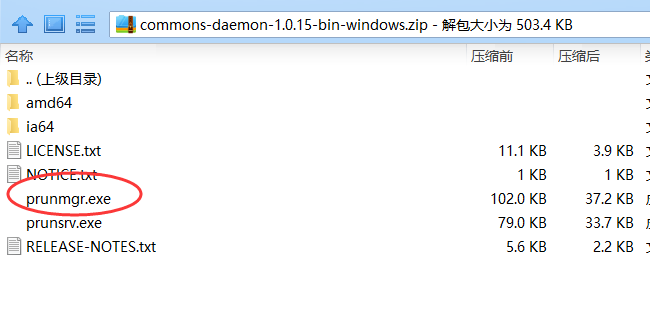
解压后复制以下文件
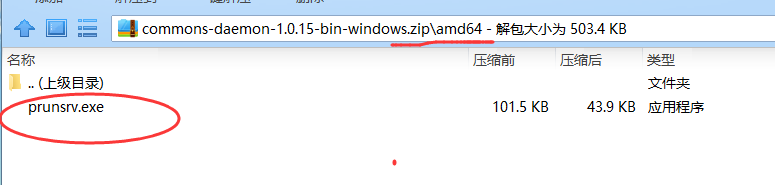
注意:64位系统的机器用amd64/prunsrv.exe
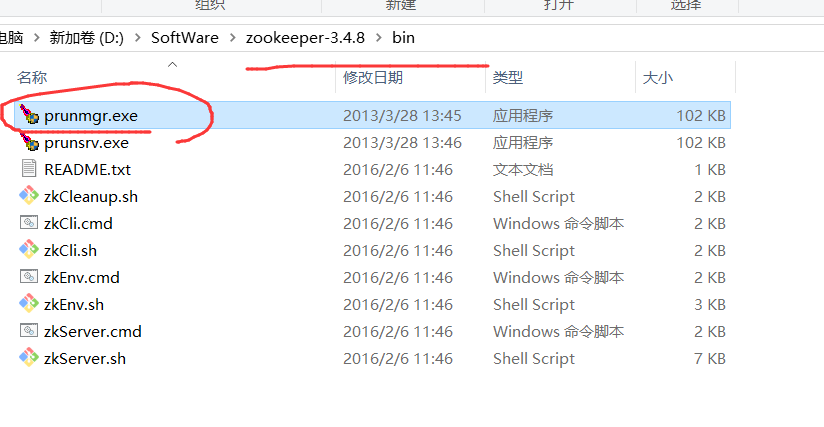
(1)复制 commons-daemon-1.0.15-bin-windows/amd64/prunsrv.exe 至 zookeeper-3.4.8\bin目录下
这是做服务的执行程序

(2)复制 commons-daemon-1.0.15-bin-windows/prunmgr.exe 至 zookeeper-3.4.8\bin目录下
监控服务配置及运行的程序
为Zookeeper配置环境变量
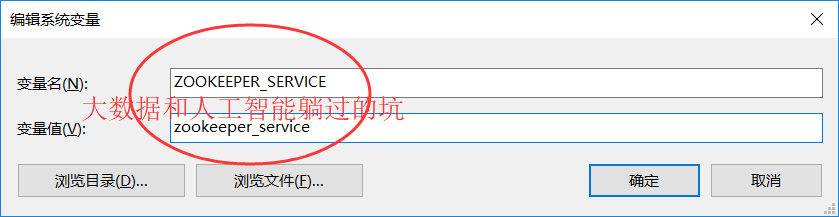
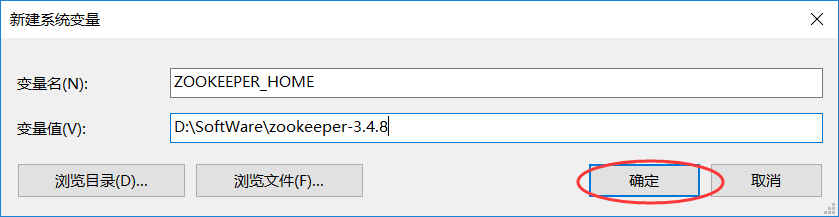
添加ZOOKEEPER_SERVICE, ZOOKEEPER_HOME两个环境变量
ZOOKEEPER_SERVICE:服务名称(不要有中文),我这里取的是,命名为zookeeper_service
ZOOKEEPER_HOME:设置到zookeeper-3.4.8目录下
新建 zkServerStop.cmd 文件
在zookeeper-3.4.8\bin目录下添加一个 zkServerStop.cmd 文件.
(注:cmd文件或者下面的bat文件,我们都可以先创建一个文本文件,然后把下面的内容copy进去,然后修改文本文件的后缀名即可)
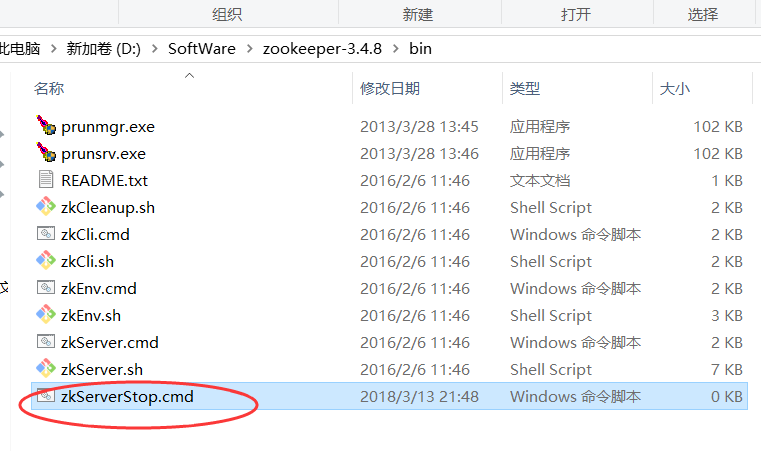
内容如下:
@echo off

 setlocal

 TASKLIST /svc | findstr /c:"%ZOOKEEPER_SERVICE%" > %ZOOKEEPER_HOME%\zookeeper_svc.pid

 FOR /F "tokens=2 delims= " %%G IN (%ZOOKEEPER_HOME%\zookeeper_svc.pid) DO (

    @set zkPID=%%G

 )

 taskkill /PID %zkPID% /T /F

 del %ZOOKEEPER_HOME%/zookeeper_svc.pid

 endlocal
新建一个批处理安装文件install.bat
(注: install.bat 文件也需要放在zookeeper-3.4.8\bin 目录下才可以)
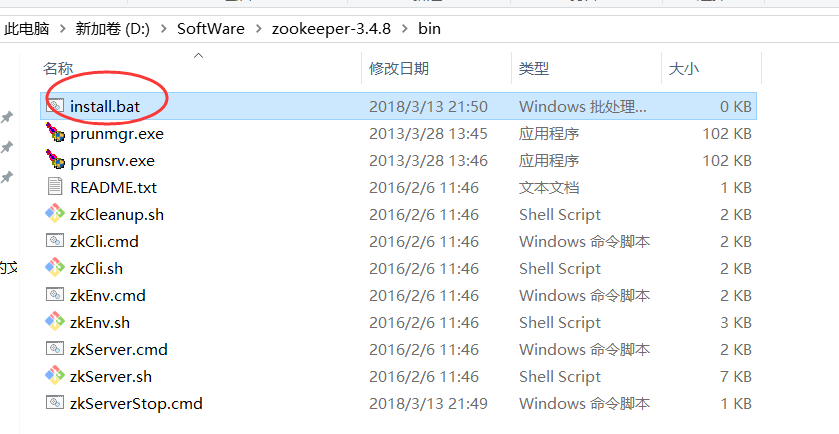
prunsrv.exe "//IS//%ZOOKEEPER_SERVICE%" ^

        --DisplayName="Zookeeper (%ZOOKEEPER_SERVICE%)" ^

        --Description="Zookeeper (%ZOOKEEPER_SERVICE%)" ^

        --Startup=auto --StartMode=exe ^

        --StartPath=%ZOOKEEPER_HOME% ^

        --StartImage=%ZOOKEEPER_HOME%\bin\zkServer.cmd ^

        --StopPath=%ZOOKEEPER_HOME%\ ^

        --StopImage=%ZOOKEEPER_HOME%\bin\zkServerStop.cmd ^

        --StopMode=exe --StopTimeout= ^

        --LogPath=%ZOOKEEPER_HOME% --LogPrefix=zookeeper-wrapper ^

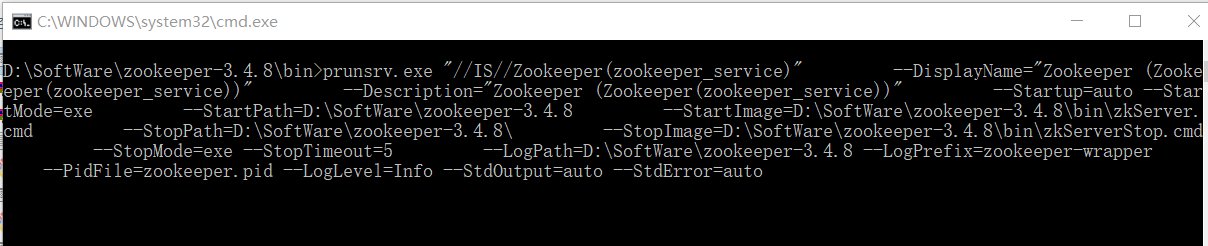
        --PidFile=zookeeper.pid --LogLevel=Info --StdOutput=auto --StdError=auto
最后在cmd中以管理员身份运行install.bat
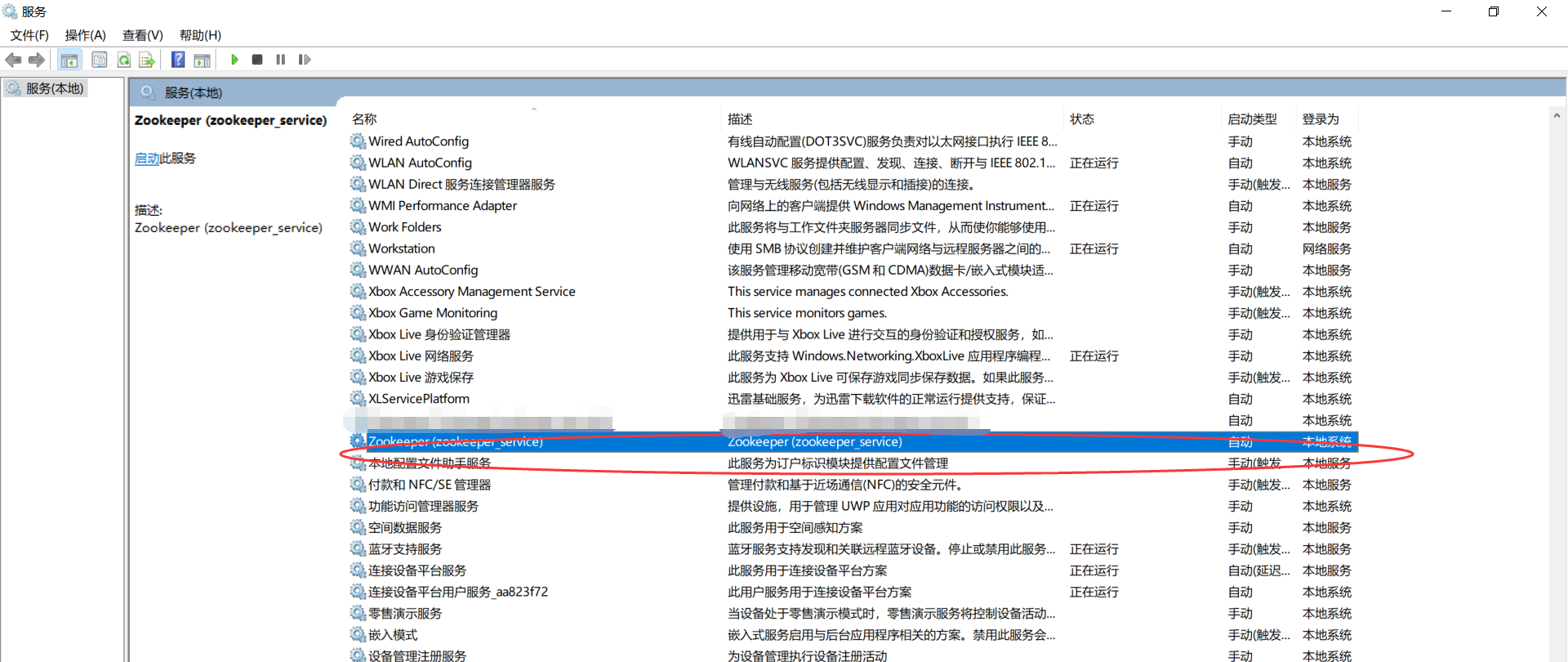
(注:其实我想说在zookeeper-3.4.8\bin目录下,双击install.bat文件就可以了,然后进入服务管理,就可以看到相应的服务了,不过这时候还没启动,右击启动即可。)
查看: 开始→运行(Windows+R快捷键也能调出运行) 输入:services.msc确定
如果你想彻底删除这个服务,则
开始”——“运行”——“regedit”)然后依次打开HKEY_LOCAL_MACHINE\SYSTEM\ControlSet001\Services

Windows里正确安装Zookeeper以服务运行的更多相关文章
- Windows里如何正确安装Zookeeper以服务运行(博主推荐)(图文详解)
不多说,直接上干货! 为什么要在Win下来安装Zookeeper呢? 其实玩过大数据的人很清楚,在Linux下我更不说了.在win下,如Disconf .Dubbo等应用. 所以,它的应用是非常广的. ...
- Windows里如何正确安装Redis以服务运行(博主推荐)(图文详解)
不多说,直接上干货! 注意 : Redis官方并没有提供Redis的windows安装包,但在github上, 有相关的下载地址. 一.Redis的下载地址 相关的下载地址,如下: ...
- 无法定位 Local Database Runtime 安装。请验证 SQL Server Express 是否正确安装以及本地数据库运行时功能是否已启用。
错误描述: 在与 SQL Server 建立连接时出现与网络相关的或特定于实例的错误.未找到或无法访问服务器.请验证实例名称是否正确并且 SQL Server 已配置为允许远程连接. (provide ...
- Lua在Windows下的安装、配置、运行
Lua在Windows下的安装.配置.运行 本文链接:https://blog.csdn.net/ChinarCSDN/article/details/78667262 展开 # Windows下安装 ...
- windows环境下安装 zookeeper
我们下载下来的zookeeper的安装包是.tar.gz格式的,但是还是可以在windows下运行. 下载地址 http://mirrors.hust.edu.cn/apache/zookeeper/ ...
- Windows环境下安装配置Mosquitto服务及入门操作介绍
关键字:在windows安装mosquitto,在mosquitto中配置日志,在mosquitto中配置用户账号密码 关于Mosquitto配置的资料网上还是有几篇的,但是看来看去,基本上都是基于L ...
- windows环境下安装ZooKeeper
$.说明 ZooKeeper: ZooKeeper是一个分布式的,开放源码的分布式应用程序协调服务,是Google的Chubby一个开源的实现,是Hadoop和Hbase的重要组件. 它是一个为分布式 ...
- windows下离线安装mysql8.0服务(支持多个安装,端口不同就可以)
1.官网下载 mysql文件.官网下载链接:https://dev.mysql.com/downloads/mysql/ 选择mysql下载的系统版本. 此处可以下载MSI安装包,图简单的朋友可以 ...
- Windows下Go安装&环境配置&编译运行
Go下载安装 官方Go下载站点:https://golang.google.cn/ 也可以选择:https://studygolang.com/dl 配置环境变量 常用环境变量 GOROOT GORO ...
随机推荐
- $_SERVER 详解
$_SERVER['HTTP_ACCEPT_LANGUAGE']//浏览器语言 $_SERVER['REMOTE_ADDR'] //当前用户 IP . $_SERVER['REMOTE_HOST'] ...
- BA-siemens-insight报警设置
以0007001(DDC-B3-09)为例,介绍insight报警的设置方法:
- etymology-R
1)vor = to eat devour vt. 狼吞虎咽地吃光: 吞没,毁灭: 目不转睛地看[de-向下+vour-吃] voracity n.贪食,贪婪.拉丁词根vor-,vorac-表示吞食 ...
- failed to sync branch You might need to open a shell and debug the state of this repo.
failed to sync branch You might need to open a shell and debug the state of this repo. i made some c ...
- A server is already running. Check tmp/pids/server.pid.
A server is already running. Check tmp/pids/server.pid. 把server.pid删除: 学习了: http://stackoverflow.co ...
- JPEG压缩图像超分辨率重建算法
压缩图像超分辨率重建算法学习 超分辨率重建是由一幅或多幅的低分辨率图像重构高分辨率图像,如由4幅1m分辨率的遥感图像重构分辨率0.25m分辨率图像.在军用/民用上都有非常大应用. 眼下的超分辨率重建方 ...
- 浏览器启动不起来java.lang.NoClassDefFoundError: com/google/common/base/Function
java.lang.NoClassDefFoundError: com/google/common/base/Function 原因:只有以下两个包 解决方案:导入 selenium-server-s ...
- 【leetcode 字符串处理】Compare Version Numbers
[leetcode 字符串处理]Compare Version Numbers @author:wepon @blog:http://blog.csdn.net/u012162613 1.题目 Com ...
- c++中字符输入函数getline、cin.getline区分
1.cin>>s; s能够是:string s.char s[]; 这个是ostream中的函数.遇到' '(空格) , '\n'(换行),就会自己主动结束,因此假设用cin读取字符串, ...
- hdu 5031 Lines 爆搜
事实上嘞,这个线能够仅仅延伸一端 然后嘞,爆搜一次就能够 最后嘞,600-800ms过 本弱就是弱啊.你来打我呀-- #include<iostream> #include<cstr ...