
solr的增删改查
solr的配置请查看:http://www.cnblogs.com/byteworld/p/5898651.html
创建Core:(可以复制模版到solrhome\test\conf文件夹中)
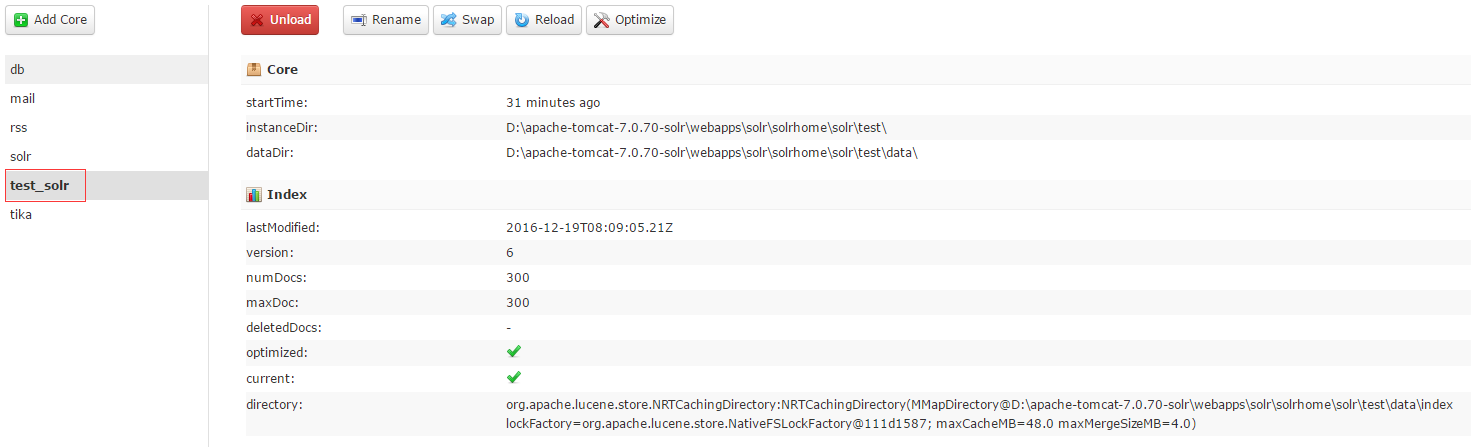
简化了(schema.xml配置文件)
<?xml version="1.0" encoding="UTF-8" ?>

<schema name="test_solr" version="1.5">

    <!--版本这个也需要加-->

    <field name="_version_" type="long" indexed="true" stored="true"/>

    <field name="_root_" type="string" indexed="true" stored="false"/>

	<field name="id" type="string" stored="true" indexed="true"/>

	<field name="name" type="string" stored="true" indexed="true" omitNorms="false"/>

	<field name="price" type="string" stored="true" indexed="true"/>

	<fieldType name="string" class="solr.StrField" sortMissingLast="true" />

	<!-- 这个主键必须加不然报错 -->

	<uniqueKey>id</uniqueKey>

    <!-- boolean type: "true" or "false" -->

    <fieldType name="boolean" class="solr.BoolField" sortMissingLast="true"/>

    <fieldType name="int" class="solr.TrieIntField" precisionStep="0" positionIncrementGap="0"/>

    <fieldType name="float" class="solr.TrieFloatField" precisionStep="0" positionIncrementGap="0"/>

    <fieldType name="long" class="solr.TrieLongField" precisionStep="0" positionIncrementGap="0"/>

    <fieldType name="double" class="solr.TrieDoubleField" precisionStep="0" positionIncrementGap="0"/>

</schema>
java代码:
jar包下载:链接: http://pan.baidu.com/s/1kUIRWRt 密码: xvtu
package demo;

import java.io.IOException;

import java.util.ArrayList;

import org.apache.solr.client.solrj.SolrServerException;

import org.apache.solr.client.solrj.impl.HttpSolrClient;

import org.apache.solr.client.solrj.impl.HttpSolrServer;

import org.apache.solr.common.SolrInputDocument;

/**

 * @Description:solr添加

 * @author byte-zbs

 * @date 2016年12月19日 下午2:28:33

 */

public class AddDemo

{

    public static final String SOLR_URL = "http://localhost:8090/solr/test_solr";

    public static void main(String[] args)

    {

        addDoc();

    }

    public static void addDoc()

    {

        String[] words = {"Document是Solr索引(动词,indexing)和搜索的最基本单元","它类似于关系数据库表中的一条记录","可以包含一个或多个字段(Field","每个字段包含一个name和文本值","字段在被索引的同时可以存储在索引中","搜索时就能返回该字段的值"};

        long start = System.currentTimeMillis();

        ArrayList<SolrInputDocument> docs = new ArrayList<SolrInputDocument>();

        for(int i = 0;i < 300; i++)

        {

            SolrInputDocument input = new SolrInputDocument();

            input.addField("id", "id"+i,1.0f);

            input.addField("name",words[i % 21], 1.0f);

            input.addField("price",10*i);

            docs.add(input);

        }

        @SuppressWarnings("resource")

        HttpSolrClient client = new HttpSolrClient(SOLR_URL);

        try

        {

            client.add(docs.iterator());

        }

        catch (SolrServerException e)

        {

            e.printStackTrace();

        }

        catch (IOException e)

        {

            e.printStackTrace();

        }

        System.out.println(System.currentTimeMillis() - start);

    }

}
/**

     * @Description:查询

     * @param

     * @return void 返回类型

     */

    public static void query()

    {

        HttpSolrClient client = new HttpSolrClient(SOLR_URL);

        client.setMaxRetries(1);

        client.setConnectionTimeout(60*1000);

        client.setSoTimeout(60*1000);

        client.setDefaultMaxConnectionsPerHost(100);

        client.setMaxTotalConnections(1000);

        client.setFollowRedirects(false);

        client.setAllowCompression(true);

        client.setRequestWriter(new BinaryRequestWriter());

        SolrQuery query = new SolrQuery();

        query.setQuery("id:id*");

        query.setFields("name","id","price");

        query.setSort("price", ORDER.asc);

        query.setStart(0);

        query.setRows(20);

        try

        {

            QueryResponse res = client.query(query);

            SolrDocumentList DocumentList = res.getResults();

            for (SolrDocument document:DocumentList)

            {

                String value = document.getFieldValue("id").toString();

                String price = document.getFieldValue("price").toString();

                System.out.println(value + "====" +price);

            }

        }

        catch (SolrServerException e)

        {

            e.printStackTrace();

        }

        catch (IOException e)

        {

            e.printStackTrace();

        }

    }

    /**

     * @Description:集合插入对象

     * @param

     * @return void 返回类型

     */

    public static void pojoDocAll()

    {

        Goods good1 = new Goods("pojo_commit1", "苹果", 12.0);

        Goods good2 = new Goods("pojo_commit2", "橘子", 12.0);

        Goods good3 = new Goods("pojo_commit3", "香蕉", 12.0);

        ArrayList<Goods> list = new ArrayList<Goods>();

        list.add(good1);

        list.add(good2);

        list.add(good3);

        HttpSolrClient client = new HttpSolrClient(SOLR_URL);

        try

        {

            client.addBeans(list);

            client.commit();

        }

        catch (SolrServerException e)

        {

            e.printStackTrace();

        }

        catch (IOException e)

        {

            e.printStackTrace();

        }

    }

    /**

     * @Description:插入对象

     * @param

     * @return void 返回类型

     */

    public static void pojoDoc()

    {

        Goods good = new Goods("pojo_commit", "苹果", 12.0);

        HttpSolrClient Client = new HttpSolrClient(SOLR_URL);

        Client.setRequestWriter(new RequestWriter());

        try

        {

            Client.addBean(good);

            //Client.optimize();

            Client.commit();

        }

        catch (IOException e)

        {

            e.printStackTrace();

        }

        catch (SolrServerException e)

        {

            e.printStackTrace();

        }

    }

    /**

     * @Description:删除文档

     * @param

     * @return void 返回类型

     */

    public static void delDoc()

    {

        HttpSolrClient client = new HttpSolrClient(SOLR_URL);

        try

        {

            client.deleteById("id_update");

            client.commit();

        }

        catch (SolrServerException e)

        {

            e.printStackTrace();

        }

        catch (IOException e)

        {

            e.printStackTrace();

        }

    }

    /**

     * @Description:添加的第一种方式

     * @param

     * @return void 返回类型

     */

    public static void addone()

    {

        SolrInputDocument doc = new SolrInputDocument();

        doc.addField("id", "id_double");

        doc.addField("name", "呵呵呵呵");

        doc.addField("price", 100.0);

        HttpSolrClient client = new HttpSolrClient(SOLR_URL);

        try

        {

            client.add(doc);

            client.commit();

        }

        catch (SolrServerException e)

        {

            e.printStackTrace();

        }

        catch (IOException e)

        {

            e.printStackTrace();

        }

    }

    /**

     * @Description:添加第二种方式

     * @param

     * @return void 返回类型

     */

    public static void addoneOther()

    {

        SolrInputDocument doc = new SolrInputDocument();

        doc.addField("id", "id_update");

        doc.addField("name", "来个测试");

        doc.addField("price", 100.0);

        UpdateRequest request = new UpdateRequest();

        request.setAction(ACTION.COMMIT,false, false);

        request.add(doc);

        HttpSolrClient client = new HttpSolrClient(SOLR_URL);

        try

        {

            UpdateResponse resp = request.process(client);

            System.out.println(resp);

        }

        catch (SolrServerException e)

        {

            e.printStackTrace();

        }

        catch (IOException e)

        {

            e.printStackTrace();

        }

    }
package demo.dao;

import org.apache.solr.client.solrj.beans.Field;

public class Goods

{

    @Field

    private String id;

    @Field(value = "name")

    private String goodsname;

    @Field

    private double price;

    public Goods(String id, String name, double price)

    {

        super();

        this.id = id;

        this.goodsname = name;

        this.price = price;

    }

    public String getId()

    {

        return id;

    }

    public void setId(String id)

    {

        this.id = id;

    }

    public String getName()

    {

        return goodsname;

    }

    public void setName(String name)

    {

        this.goodsname = name;

    }

    public double getPrice()

    {

        return price;

    }

    public void setPrice(double price)

    {

        this.price = price;

    }

}
项目完整:链接: http://pan.baidu.com/s/1pLq9Kdt 密码: f558
solr的增删改查的更多相关文章
- 【Solr】solr的增删改查
目录 创建工程 增 删 改 查 高量查询 回到顶部 创建工程 普通的java web工程即可,我采用的是spring mvc! 回到顶部 增 @Autowired private SolrServer ...
- 【ES】ElasticSearch初体验之使用Java进行最基本的增删改查~
好久没写博文了, 最近项目中使用到了ElaticSearch相关的一些内容, 刚好自己也来做个总结. 现在自己也只能算得上入门, 总结下自己在工作中使用Java操作ES的一些小经验吧. 本文总共分为三 ...
- Dapper逆天入门~强类型,动态类型,多映射,多返回值,增删改查+存储过程+事物案例演示
Dapper的牛逼就不扯蛋了,答应群友做个入门Demo的,现有园友需要,那么公开分享一下: 完整Demo:http://pan.baidu.com/s/1i3TcEzj 注 意 事 项:http:// ...
- ASP.NET从零开始学习EF的增删改查
ASP.NET从零开始学习EF的增删改查 最近辞职了,但是离真正的离职还有一段时间,趁着这段空档期,总想着写些东西,想来想去,也不是很明确到底想写个啥,但是闲着也是够 ...
- 构建ASP.NET MVC4+EF5+EasyUI+Unity2.x注入的后台管理系统(9)-MVC与EasyUI结合增删改查
系列目录 文章于2016-12-17日重写 在第八讲中,我们已经做到了怎么样分页.这一讲主要讲增删改查.第六讲的代码已经给出,里面包含了增删改,大家可以下载下来看下. 这讲主要是,制作漂亮的工具栏,虽 ...
- 通过Java代码实现对数据库的数据进行操作:增删改查
在写代码之前,依然是引用mysql数据库的jar包文件:右键项目-构建路径-设置构建路径-库-添加外部JAR 在数据库中我们已经建立好一个表xs :分别有xuehao xingming xue ...
- Hibernate全套增删改查+分页
1.创建一个web工程 2.导入jar包 3.创建Student表 4.创建实体类 package com.entity; public class Student { private Integer ...
- 使用 Json.Net 对Json文本进行 增删改查
JSON 已经成为当前主流交互格式, 如何在C#中使用 Json.Net 对Json文本进行 增删改查呢?见如下代码 #region Create (从零创建) public static strin ...
- yii2 增删改查
自己总结的yii2 advanced 版本的简单的增删改查,希望对大家有所帮助 1.gii生成的actionCreate()方法中 获取插入语句的id $id = $model->attribu ...
随机推荐
- JQuery 筛选器
1.选择对象1).基本·#id 根据给定的ID匹配一个元素.例如:$("#id")·element 根据给定的元素名匹配所有元素.例如:$("div")·.cl ...
- Windows内核开发中如何区分文件对象究竟是文件还是文件夹?
今天有同行问了一个问题,Windows文件过滤驱动里的如何去区分一个对象是文件还是文件夹?我花了1小时左右翻阅了一些微软的文档以及以前的遗留代码,发现在WDK的帮助文档中是这么定义的: FILE_OB ...
- Delphi XE5-XE8 以上 如何发布文件到工程中
首发在 ① FireMonkey[DELPHI XE5] 165232328 欢迎使用 FMX 开发手机程序的高手来访. (* *********************************** ...
- 如何设置ASP.NET页面的运行超时时间 (转载)
全局超时时间 服务器上如果有多个网站,希望统一设置一下超时时间,则需要设置 Machine.config 文件中的 ExecutionTimeout 属性值. Machine.config 文件位于 ...
- 一个多重阴影的DIV框框
要绝对定位,而且需要设置z-index,垂直高度,数值越小越看不见. <div class="beauty">I am your girl~</div> & ...
- SOA和WCF&WebAPI
SOA http://www.cnblogs.com/leslies2/archive/2011/12/12/2272722.html WCF开发框架形成之旅--如何实现X509证书加密 WebAPI ...
- HTML5 History 模式
vue-router 默认 hash 模式 -- 使用 URL 的 hash 来模拟一个完整的 URL,于是当 URL 改变时,页面不会重新加载. 如果不想要很丑的 hash,我们可以用路由的 his ...
- springMVC下集成active MQ发送邮件
环境:本地需安装activemq,且访问正常,安装方法网上很多,这里省略. 1.添加相关jar包,我这里使用的是maven,你也可以选择其他方式添加.下面是maven相关配置: <!-- Act ...
- 一个ubuntu phper的自我修养(杂记)
ubuntu使用杂记 1.flatabulous安装使用. flatabulous是一个ubuntu图标主题. 使用它,必须得安装tweak插件. sudo add-apt-repository pp ...
- libevent源码分析:listener
listener是libevent封装的一个方便生成监听者的一组结构和函数,其中包括: /* * Copyright (c) 2000-2007 Niels Provos <provos@cit ...