
__x__(30)0908第五天__导航条的练习 <div>版本
效果图:
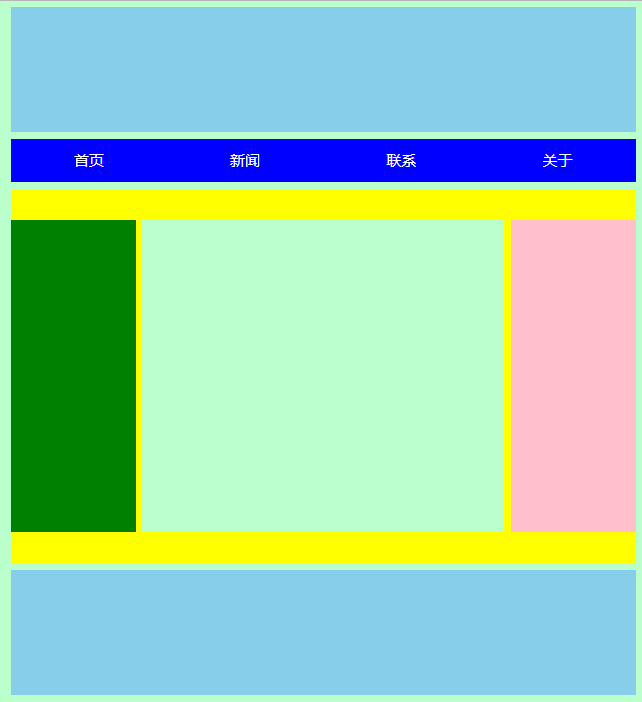
html源代码:
<!doctype html>

<html>

    <head>

        <meta charset="utf-8" />

        <title>湖南城市学院</title>

        <link rel="stylesheet" type="text/css" href="css/hncu.css" />

    </head>

    <body>

        <div id="hncu_header">

        </div>

        <div id="hncu_nav">

            <div>

                <a href="#">首页</a>

            </div>

            <div>

                <a href="#">新闻</a>

            </div>

            <div>

                <a href="#">联系</a>

            </div>

            <div>

                <a href="#">关于</a>

            </div>

        </div>

        <div id="hncu_content">

            <div id="hncu_left"></div>

            <div id="hncu_center"></div>

            <div id="hncu_right"></div>

        </div>

        <div id="hncu_footer">

        </div>

    </body>

</html>
CSS源代码:
@charset "utf-8";

*{

    margin: 0px;

    padding: 0px;

}

body{

    background-color: #bfc;

}

#hncu_header{

    width: 1000px;

    height: 200px;

    background-color: skyblue;

    margin:10px auto 10px;

}

#hncu_nav{

    width: 1000px;

    height: 70px;

    background-color: blue;

    margin:0px auto 10px;

    overflow:hidden;

    zoom:;

}

#hncu_nav a{

    width: 25%;

    color:white;

    float:left;

    line-height:70px;

    text-align:center;

    text-decoration: none;

}

#hncu_nav a:link{

    background-color: blue;

}

#hncu_nav a:visited{

    background-color: blue;

}

#hncu_nav a:hover{

    background-color: red;

}

#hncu_nav a:active{

    color: blue;

}

#hncu_content{

    width: 1000px;

    height: 600px;

    background-color: yellow;

    margin:0px auto 10px;

}

#hncu_left{

    width: 200px;

    height: 500px;

    background-color: green;

    margin-top:50px;

    float:left;

}

#hncu_center{

    width: 580px;

    height: 500px;

    background-color: #bfc;

    margin-top:50px;

    margin-right: 10px;

    margin-left: 10px;

    float:left;

}

#hncu_right{

    width: 200px;

    height: 500px;

    background-color: pink;

    margin-top:50px;

    float:left;

}

#hncu_footer{

    width:1000px;

    height:200px;

    background-color:skyblue;

    margin:0px auto 10px;

}
__x__(30)0908第五天__导航条的练习 <div>版本的更多相关文章
- __x__(31)0908第五天__导航条的练习 <ul> 版本
效果图: html代码: <!doctype html> <html> <head> <meta charset="utf-8" /&g ...
- __x__(29)0908第五天__高度塌陷 问题
高度塌陷 在文档流中,父元素的高度默认是被子元素撑开的. 但是当为 子元素 设置 float 时,子元素会完全脱离文档流,无法再撑开父元素,导致父元素高度塌陷...以致于布局混乱 变成 BFC块级格式 ...
- __x__(34)0908第五天__ 定位 position
position 定位 指将原始摆放到页面的任意位置. 继承性:no 默认值:static 没有定位,原始出现在正常的文档流中 可选值: static : 默认值,元素没有开启定位 ...
- __x__(35)0908第五天__ 层级 z-index
如果三个 div 全部设置 position: absolute; 绝对定位,且未设置 z-index, 则从代码结构上 下面的元素 会盖住 上面的元素. z-index 层级: 通过 z-i ...
- __x__(36)0908第五天__背景 background
1. 背景 background: red url(img/cat.gif) repeat-x fixed; 2. 背景颜色 background-color: red; 3. 背景图片 backgr ...
- __x__(40)0909第五天__表格 table 的 css 样式 美化
如果就向下面的代码那样,不写 tbody , 则浏览器自添加 tbody , 并将所有的 tr 移入 tbody 意味着 tr 并非 table 的子元素,而是 tbody 的子元素. 所以 以后编写 ...
- __x__(41)0909第五天__长表格
长表格 银行流水,表格很长... 则需要将表格分为 表头 thead ,主体数据 tbody , 表格底部 tfoot 三个标签无顺序要求,易于维护:thead → tfoot → tbody 如果没 ...
- __x__(32)0908第五天__Photoshop的基本操作
1. 设置 Photoshop 的单位为 像素px 2. 标尺 显示与隐藏 Ctrl + r 3. 放大与缩小 Ctrl + 1 放大到100% Ctrl + 0 适应屏幕 Alt + ...
- __x__(35)0908第五天__opacity 透明度
opacity 透明度 设置一个 0 - 1 之间的值. opacity: 0; 完全透明 opacity: 0.5 半透明 opacity: 1; 完全不透明 缺点: IE8及以 ...
随机推荐
- sprin源码解析之属性编辑器propertyEditor
目录 异常信息 造成此异常的原因 bean 配置文件 调用代码 特别说明: 异常解决 注册springt自带的属性编辑器 CustomDateEditor 控制台输出 属性编辑器是何时并如何被注册到s ...
- 使用ZooKeeper协调多台Web Server的定时任务处理(方案2)
承接上个博文, 这次是方案2的实现, 本方案的特点:1. 该方案能很好地从几台服务器中选出一个Master机器, 不仅仅可以用于定时任务场景, 还可以用在其他场景下. 2. 该方案能实现Master节 ...
- [物理学与PDEs]第3章第2节 磁流体力学方程组 2.4 不可压情形的磁流体力学方程组
不可压情形的磁流体力学方程组 $$\beex \bea \cfrac{\rd {\bf H}}{\rd t}-({\bf H}\cdot\n){\bf u}&=\cfrac{1}{\sigma ...
- word20161226
1. condensed 英[kən'denst]美[kənˈdɛnst]v. (使) 变稠或变浓,浓缩( condense的过去式和过去分词 ); (使) 凝结; 简说,摘要,简述;[例句]The ...
- android系统添加预置APP(so库自动释放)
将APK直接放入系统目录中,会导致APK找不到so文件.正常情况下的安装是使用PackageManager,它会将so文件拷贝到系统读取的so目录(system/lib或system/lib64)下, ...
- Web从入门到放弃<6>
<1> Canvas. 1,灰度图: js: function showAsGray() { var imgNode = document.getElementById('img'); ...
- 【转】浅析Java中的final关键字
谈到final关键字,想必很多人都不陌生,在使用匿名内部类的时候可能会经常用到final关键字.另外,Java中的String类就是一个final类,那么今天我们就来了解final这个关键字的用法. ...
- Alpha冲刺(10/10)
目录 摘要 团队部分 个人部分 摘要 队名:小白吃 组长博客:hjj 作业博客:冲刺倒计时之10(匆匆而过) 团队部分 后敬甲(组长) 过去两天完成了哪些任务 答辩演练 版本演示视频拍摄 接下来的计划 ...
- ActiveMQ:使用Python访问ActiveMQ
Windows 10家庭中文版,Python 3.6.4,stomp.py 4.1.21 ActiveMQ支持Python访问,提供了基于STOMP协议(端口为61613)的库. ActiveMQ的官 ...
- c4b和c4f的区别
1. cc.c4b的参数直接填rgba的值. 2 .cc.c4f(r,g,b,透明度),把rgb值填进去,会发现颜色不对,需要把rgb值除以255,所以最终转换公式是: cc.c3b(r,g,b) = ...