
Grid Selenium
python selenium-9 grid模式
grid是进行分布式测试的工具,由一个hub主节点和若干个node代理节点组成
1.下载Selenium Standalone Server
下载地址:https://www.seleniumhq.org/download/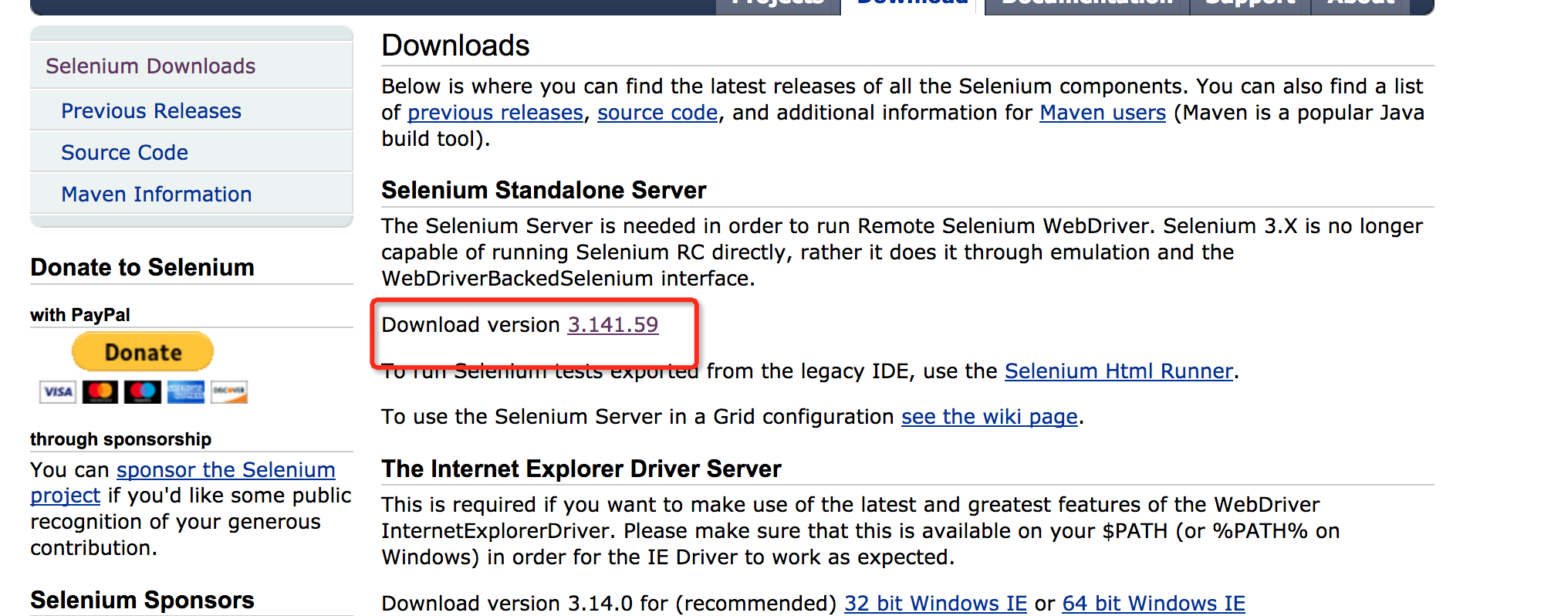
2.启动hub和节点
#hub默认端口是4444,node默认端口是5555

java -jar selenium-server-standalone-3.141.59.jar -role hub

#本机注册节点

java -jar selenium-server-standalone-3.141.59.jar -role node

#本机指定端口注册节点

java -jar selenium-server-standalone-3.141.59.jar -role node -port 5556

#远程机器注册节点

java -jar selenium-server-standalone-3.141.59.jar -role node -port 5557 -hub http://192.168.63.143:4444/grid/register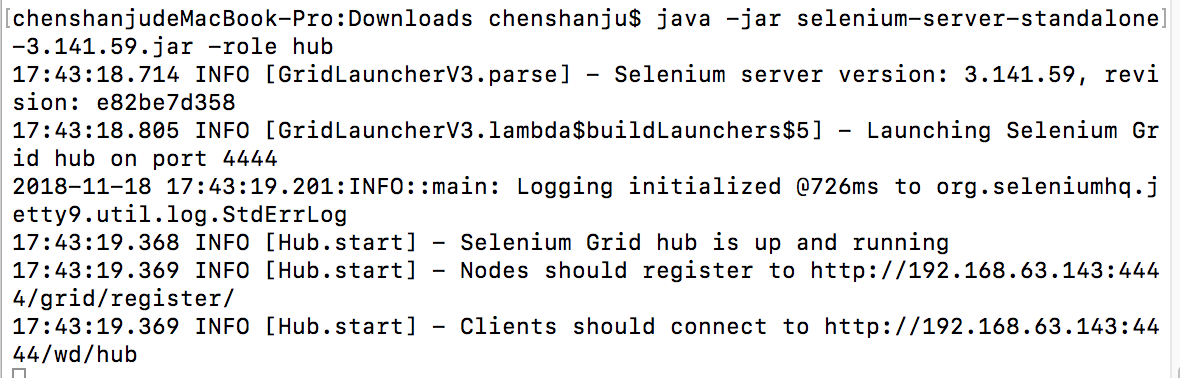
节点注册地址: http://192.168.63.143:4444/grid/register/
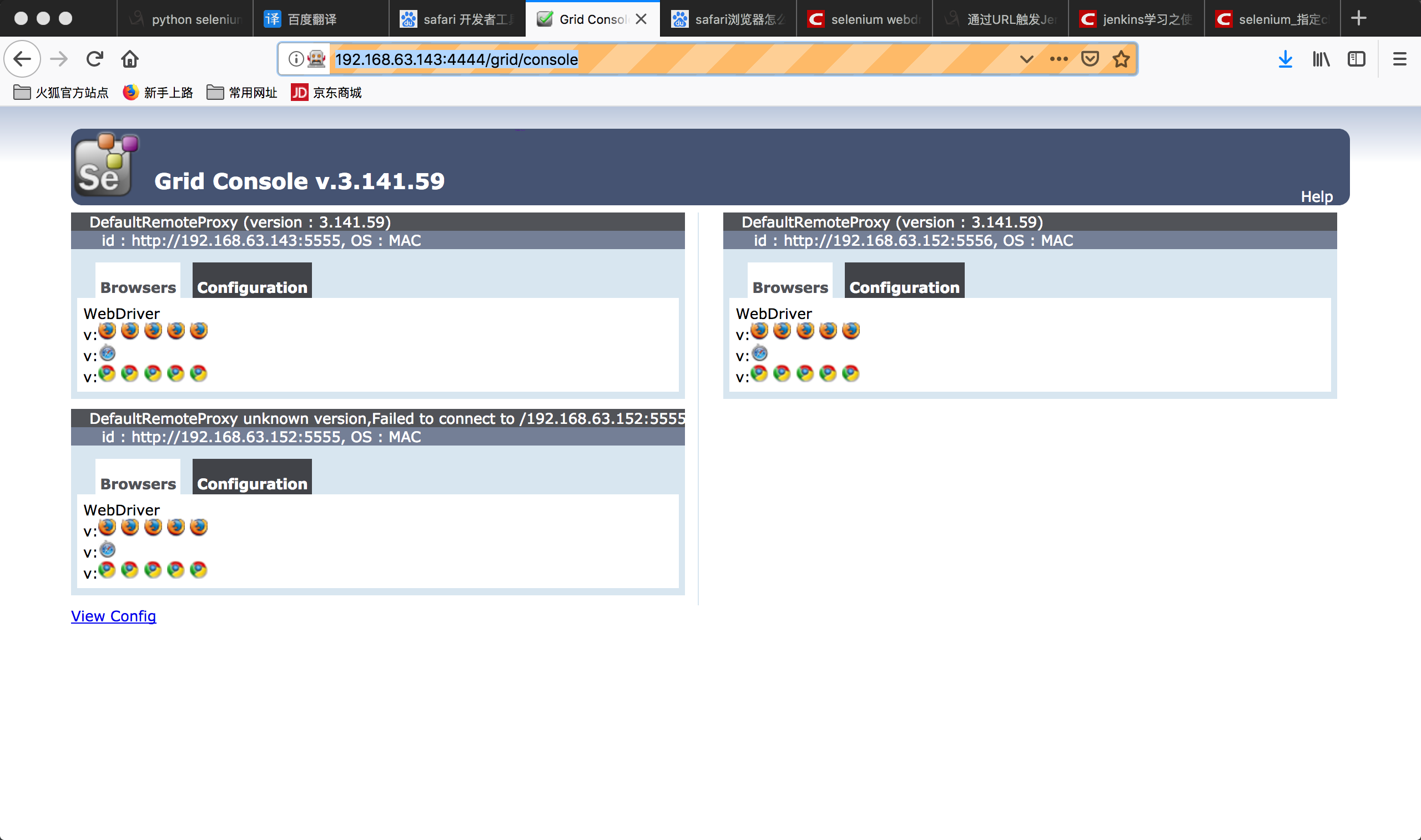
hub管理地址: http://192.168.63.143:4444/grid/console
3.查看后台http://192.168.63.143:4444/grid/console
4.实例1:编写自动化测试脚本
from selenium.webdriver import Remote

driver = Remote(command_executor="http://127.0.0.1:4444/wd/hub",

                desired_capabilities={'platform':'ANY',

                                      'browserName':'chrome',

                                      'version':'',

                                      'javascriptEnabled':True})

driver.get("http://www.baidu.com")

driver.find_element_by_xpath("//input[@id='kw' and @class='s_ipt']").send_keys("hello")

driver.find_element_by_xpath("//input[@value='百度一下' and @id='su']").click()

driver.quit()
修改脚本以在不同的浏览器上运行
from selenium.webdriver import Remote

from time import sleep

lists={'http://192.168.63.143:4444/wd/hub':'chrome',

       'http://192.168.63.143:5555/wd/hub':'firefox'}

for host,browser in lists.items():

    print(host,browser)

    driver = Remote(command_executor=host,

                    desired_capabilities={'browserName': browser,

                                          'platform': 'ANY',

                                          'version':'',

                                          'javascriptEnabled':True

                                          }

                    )

    driver.get("http://www.baidu.com")

    driver.find_element_by_xpath("//input[@id='kw' and @class='s_ipt']").send_keys(browser)

    driver.find_element_by_xpath("//input[@value='百度一下' and @id='su']").click()

    sleep(3)

    result_text = driver.find_element_by_xpath("//span[@class='nums_text']").text

    assert "百度为您找到相关结果约" in result_text

    driver.quit()
5.浏览器内核
浏览器最重要或者最核心的部分是Rendering Engine,即渲染引擎,习惯成为渲染引擎。所谓的浏览器内核,决定了浏览器如何显示网页的内容以及页面的格式信息。| 内核 | 介绍 |
|---|---|
| TridentIE内核 | 基于Mosaic代码基础上修改而来,从IE4开始开始一直沿用到IE11,是一款开放的内核,其接口内核设计成熟,国内早期浏览器都是基于该内核。如遨游,世界之窗,360安全浏览器 |
| Gecko火狐内核 | 代码完全公开,可开发程度很高 |
| Presto 欧朋内核 | 在欧朋7开始使用,自欧朋12.17已被废弃,开始采用谷歌的Blink内核。 |
| Webkit Safari内核 | 是苹果公司自己的内核。谷歌也曾采用webkit打造Chrome浏览器。国内的浏览器也采用了这一内核,如遨游3,搜狗告诉浏览器、360极速浏览器。 |
| Blink | 谷歌和欧朋开发的浏览器排版引擎,该引擎是Webkit中WebCore组件的一个分支,并且在Chrome(28以后)、欧朋(15以后)和Yandex浏览器中使用 |
Grid Selenium的更多相关文章
- Webdriver - Selenium Grid Configuration
Grid parameter: role = <hub|node> (default is no grid, just run an RC/webdriver server). When ...
- Selenium Grid Configuration
Start Hub and Node with Json config 1. Start Hub with json config file title HubWebDriver java -jar ...
- Selenium Grid 运行报错 Exception thrown in Navigator.Start first time ->Error forwarding the new session Empty pool of VM for setup Capabilities
Selenium Grid 运行报错 : Exception thrown in Navigator.Start first time ->Error forwarding the new se ...
- selenium grid 搭建
hub端 Step1: 下载 selenium-server-standalone-x.xx.x.jar我下载的是:selenium-server-standalone-2.44.0.jar下载地址: ...
- selenium grid的使用与配置
一.selenium grid的组成与作用:由一个集线器hub和多个客户机node组成,如果你的程序需要在不用的浏览器,不同的操作系统上测试,而且比较多的case需要多线程远程执行,那么一个比较好的测 ...
- Selenium 15: How to Run Parallel Tests Using Selenium Grid and JUnit
In this post, I will give two techniques and describe how to run your selenium tests in parallel by ...
- Selenium Grid的原理、配置与使用(转)
Selenium GridSelenium Grid在前面介绍Selenium的时候说过它有三大组件,Selenium Grid就是其中之一而作用就是分布式执行测试.讲分布式之前还是要说说UI自动化的 ...
- Selenium索引
Common Selenium各种工具比较 Selenium firefox 版本问题 Selenium IDE Selenium IDE整理 WebDriver Java 版本 Selenium开始 ...
- 转:selenium 并行启动多个浏览器
https://github.com/fool2fish/selenium-doc/blob/master/official-site/selenium-grid.md Selenium Grid 快 ...
随机推荐
- ecmascript 6 的arguments转数组的代码
- react 中使用定时器 Timers(定时器)
setTimeout,clearTmeout setInterval,clearInterval 在 class 中 class TimersDemo extends Component { cons ...
- Android自定义Button按钮显示样式
关于listview和button都要改变android原来控件的背景,在网上查找了一些资料不是很全,所以现在总结一下android的selector的用法. 首先android的selector是在 ...
- redis 管道技术 pipeline 简介
redis数据库的主要瓶颈是网络速度,其次是内存与cpu.在应用允许的情况下,优先使用pipeline批量操作.pipeline批量发出请求/一次性获取响应:不是发出多个请求,每个请求都阻塞等待响应, ...
- ES6-Function
Function 箭头函数 ES6中对于函数的扩展最吸引人的莫过于箭头函数啦,不多说,先学会再说. 函数体内的this对象,是定义时所在的对象,而不是使用时所在的对象,这个特性与正常函数不同. // ...
- LeetCode 题解之Find Peak Element
1.题目描述 2.题目分析 在数组的首尾各加入INT_MIN ,然后遍历数组. 3.代码 int findPeakElement(vector<int>& nums) { ) ; ...
- 2.HTML标签
<a> 链接标签 1) <a href=“#”>这是个链接</a> 表示空链接 2) 未访问过的链接 显示蓝色字体并带下划线;访问过的链接 显示紫色 ...
- WEBserver 性能测试
本地实验(Centos7),WEBserver性能测试; 软件包地址 wget http://download.joedog.org/siege/siege-4.0.2.tar.gztar -xf s ...
- beautifulsoup之CSS选择器
BeautifulSoup支持大部分的CSS选择器,其语法为:向tag或soup对象的.select()方法中传入字符串参数,选择的结果以列表形式返回. tag.select("string ...
- 转:C# WinForm窗体及其控件的自适应
一.说明 2012-11-30 曾经写过 <C# WinForm窗体及其控件自适应各种屏幕分辨率> ,其中也讲解了控件自适应的原理.近期有网友说,装在panel里面的控件,没有效果? 这 ...