
Centos Yum 安装 Mysql 5.7
Centos 6 / 7 官方源安装Mysql 5.7
1 检查当前系统是否有旧版本
# rpm -qa | grep mysql
mysql-libs-5.1.71-1.el6.x86_64
# rpm -qa | grep MySQL
1.1 如有旧版本可以删除
# rpm -e mysql-libs-5.1.71-1.el6.x86_64 --nodeps
2 下载MySQL官方 Yum Repository
根据系统下载6或7
(6) wget -i http://dev.mysql.com/get/mysql57-community-release-el6-7.noarch.rpm
(7) wget -i http://dev.mysql.com/get/mysql57-community-release-el7-10.noarch.rpm
如果发现证书错误需要添加参数:
wget --no-check-certificate http://dev.mysql.com/get/mysql57-community-release-el6-7.noarch.rpm
3 安装和确认仓库内容
3.1 安装
3.2 检查有效仓库
# yum repolist enabled
Loaded plugins: fastestmirror
Loading mirror speeds from cached hostfile
* base: mirrors.aliyun.com
* extras: mirrors.aliyun.com
* updates: mirrors.aliyun.com
repo id repo name status
base CentOS-6 - Base 6,713
extras CentOS-6 - Extras 47
mysql-connectors-community MySQL Connectors Community 129
mysql-tools-community MySQL Tools Community 90
mysql57-community MySQL 5.7 Community Server 396
updates CentOS-6 - Updates 1,046
repolist: 8,421
3.3 查询安装版本
# yum list mysql-community*
Loaded plugins: fastestmirror
Loading mirror speeds from cached hostfile
* base: mirrors.aliyun.com
* extras: mirrors.aliyun.com
* updates: mirrors.aliyun.com
Available Packages
mysql-community-client.i686 5.7.30-1.el6 mysql57-community
mysql-community-client.x86_64 5.7.30-1.el6 mysql57-community
mysql-community-common.i686 5.7.30-1.el6 mysql57-community
mysql-community-common.x86_64 5.7.30-1.el6 mysql57-community
mysql-community-devel.i686 5.7.30-1.el6 mysql57-community
mysql-community-devel.x86_64 5.7.30-1.el6 mysql57-community
mysql-community-embedded.i686 5.7.30-1.el6 mysql57-community
mysql-community-embedded.x86_64 5.7.30-1.el6 mysql57-community
mysql-community-embedded-devel.i686 5.7.30-1.el6 mysql57-community
mysql-community-embedded-devel.x86_64 5.7.30-1.el6 mysql57-community
mysql-community-libs.i686 5.7.30-1.el6 mysql57-community
mysql-community-libs.x86_64 5.7.30-1.el6 mysql57-community
mysql-community-libs-compat.i686 5.7.30-1.el6 mysql57-community
mysql-community-libs-compat.x86_64 5.7.30-1.el6 mysql57-community
mysql-community-release.noarch el6-5 mysql-connectors-community
mysql-community-server.x86_64 5.7.30-1.el6 mysql57-community
mysql-community-test.x86_64 5.7.30-1.el6 mysql57-community
4 安装
# yum install mysql-server
Dependencies Resolved
===========================================================================================================
Package Arch Version Repository Size
===========================================================================================================
Installing:
mysql-community-server x86_64 5.7.30-1.el6 mysql57-community 162 M
Installing for dependencies:
mysql-community-client x86_64 5.7.30-1.el6 mysql57-community 25 M
mysql-community-common x86_64 5.7.30-1.el6 mysql57-community 370 k
mysql-community-libs x86_64 5.7.30-1.el6 mysql57-community 2.4 M
numactl x86_64 2.0.9-2.el6 base 74 k
Transaction Summary
===========================================================================================================
Install 5 Package(s)
Total download size: 189 M
Installed size: 905 M
Is this ok [y/N]:
5 数据库初始化
5.1 启动mysql 服务
# service mysqld start
Initializing MySQL database: [ OK ]
Starting mysqld: [ OK ]
5.2 查看初始密码
# grep password /var/log/mysqld.log
[Note] A temporary password is generated for root@localhost: l#.&dX3Hgade
[Note] Access denied for user 'UNKNOWN_MYSQL_USER'@'localhost' (using password: NO)
5.3 登录
# mysql -u root -pl#.&dX3Hgade
Server version: 5.7.30
Copyright (c) 2000, 2020, Oracle and/or its affiliates. All rights reserved.
Oracle is a registered trademark of Oracle Corporation and/or its
affiliates. Other names may be trademarks of their respective
owners.
Type 'help;' or '\h' for help. Type '\c' to clear the current input statement.
mysql>
5.4 更改初始密码(必须更改初始密码,默认策略大小写数字加特殊字符)
mysql> use mysql;
ERROR 1820 (HY000): You must reset your password using ALTER USER statement before executing this statemen
mysql> ALTER USER 'root'@'localhost' IDENTIFIED BY 'Password-8888';
5.5 确认和修改密码策略
mysql> show variables like '%password%';
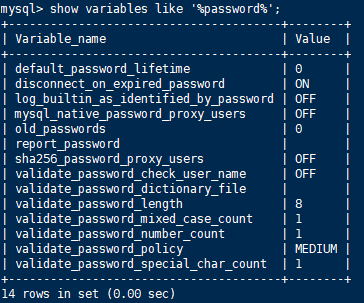
# vi /etc/my.cnf
添加 validate_password_policy配置
选择 0(LOW),1(MEDIUM),2(STRONG)其中一种,选择2需要提供密码字典文件
# 添加validate_password_policy配置
validate_password_policy=0
# 关闭密码策略
validate_password = off
修改后重启服务
5.6 添加远程管理权限
mysql > grant all privileges on *.* to 'root'@'192.168.1.1' identified by 'password' with grant option;
mysql > flush privileges;
Centos Yum 安装 Mysql 5.7的更多相关文章
- centos yum 安装 mysql
centos7下使用yum安装mysql 时间:2015-03-07 21:26:20 阅读:87445 评论:0 收藏:1 [点我收藏+] 标签: Cen ...
- centos yum安装mysql
查看有没有安装包 # yum list mysql 安装mysql客户端 # yum install mysql # yum list mysql-server 安装mysql 服务器端 # yum ...
- Centos yum 安装mysql报错 No package mysql-server available.
这是因为大多数mysql-*的资源名称被mariadb-*重命名了 所以换成 yum install mariadb-server 就可以了 PS[摘自网络] MariaDB不仅仅是Mysql的一个替 ...
- 阿里云服务器Linux CentOS安装配置(三)yum安装mysql
阿里云服务器Linux CentOS安装配置(三)yum安装mysql 1.执行yum安装mysql命令:yum -y install mysql-server mysql-devel 2.启动mys ...
- CentOS 7.0下使用yum安装MySQL
CentOS7默认数据库是mariadb,配置等用着不习惯,因此决定改成mysql,但是CentOS7的yum源中默认好像是没有mysql的.为了解决这个问题,我们要先下载mysql的repo源. 1 ...
- centos yum 安装php mysql
1 安装php7 查看 centos 版本 # cat /etc/centos-release 删除之前的 php 版本 # yum remove php* php-common rpm 安装 Php ...
- 使用yum方式在centOS上安装mysql
1.操作系统及MySQL版本 1.1 操作系统版本 CentOS release 6.5 (Final) 1.2 MySQL版本 mysql-5.1.73-3.el6_5.x86_64mysql-li ...
- centOS Linux下用yum安装mysql
centOS Linux下用yum安装mysql 第一篇:安装和配置MySQL 第一步:安装MySQL [root@192 local]# yum -y install mysql- ...
- 在 CentOS 7.5 64位上使用 yum 安装 MySQL 8.0
前段时间在 CentOS 7.5 64位上安装 MySQL 8.0.查了些资料,在这里记录一下详细的安装和设置步骤. 一.安装 使用yum安装MySQL之前需要先下载对应的.rpm文件,下载方法: 去 ...
随机推荐
- 深入浅出带你玩转sqlilabs(三)--GET,POST,COOKIE,万能密码注入
常见提交方式下的注入漏洞 WEB应用在数据传递接受中,针对SQL注入安全漏洞,由于数据大小,格式等原因,脚本在接受传递时会有多种传递方式,传递方式的不同将影响到安全测试的不同 第一点:数据常见提交方式 ...
- Mac 解压缩软件-keka
去官网 GitHub地址 功能预览
- composer update -- memory_limit
compsoer update取消memory_limit限制.取消扩展对于版本的限制 php -d memory_limit=-1 ./composer.phar update --ignore-p ...
- src/main/resorces applicationContext.xml
<?xml version="1.0" encoding="UTF-8"?> <beans xmlns="http://www.sp ...
- springboot优雅的异常处理
springboot全局异常处理 @ControllerAdvice 尽管springboot会对一些异常进行处理,不过对于开发者来说,这还不太便于维护,因此我们需要自己来对异常进行统一的捕获与处理. ...
- 云空调来自 GitHub 的冷气——GitHub 热点速览 v.21.20
作者:HelloGitHub-小鱼干 万物皆可上云,air-conditioner 是上周火爆小鱼干朋友圈和公众号信息流的云空调项目.第一眼的时候,你会觉得和这个云空调还挺别致的,第二眼,si~~感到 ...
- react+antd 使用脚手架动态修改主题色
最近做了一个需求,后台管理系统添加一个可以动态修改ant-design主题色.查询了大多数的文章,发现基本都是抄来抄去,而且文章记录的也一点也不详细.刚刚把这个功能做完了,顺便记录一下如何去修改主题色 ...
- 迷失在Mysql的锁世界~
1.饮料 这是一杯饮料. 这是3杯饮料,每杯饮料的味道各不相同. 但是人类并不称呼[饮料]为[饮料],而是称呼[饮料]为[记录]. 2.红章鱼 这个红色的,长的像章鱼的家伙,我们就叫它红章鱼~ 红章鱼 ...
- SDK安全测试
设备调试 strace MI 5X 链接:https://pan.baidu.com/s/1KfsfEgjniozXGUD_69m0SQ 提取码:mulo 推strace到手机中 adb push s ...
- Flink使用二次聚合实现TopN计算
一.背景说明: 有需求需要对数据进行统计,要求每隔5分钟输出最近1小时内点击量最多的前N个商品,数据格式预览如下: 543462,1715,1464116,pv,1511658000 662867,2 ...