
SpringBoot从零单排 ------初级入门篇
有人说SSM已死,未来是SpringBoot和SpringCloud的天下,这个观点可能有点极端,但不可否认的是已经越来越多的公司开始使用SpringBoot。所以我将平时学习SpringBoot的内容做个记录,查漏补缺吧
1、创建SpringBoot项目
可以通过官方提供的Spring initializer工具来初始化springboot,同时IntelliJ IDEA 也集成了这个工具。因此可以根据个人需求选择不同的创建方式
1、官方工具Spring initializer
网址 :https://start.spring.io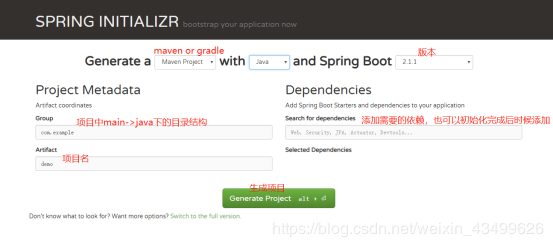
下载下的压缩包进行解压导入到编辑器中即可。
2、Idea创建项目
New -> Project - > spring initializer -> 选择SDK->填写Group& Artifact->next->选择所需jar的依赖(也可暂时勾选)->next->修改项目名->finish
创建成功之后的目录
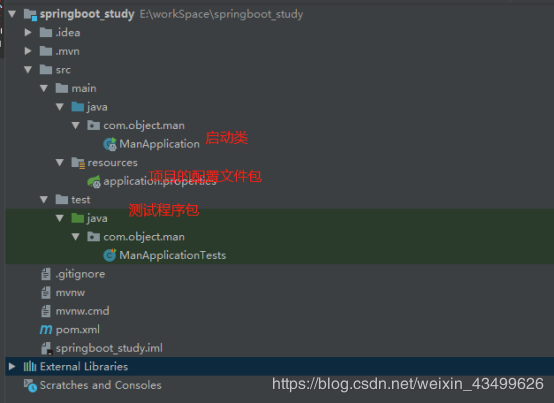
3、启动项目
启动springboot我们只需要执行上图中的ManApplication中的main方法就可以了。
package com.objectman.springboot_study;

import org.springframework.boot.SpringApplication;

import org.springframework.boot.autoconfigure.SpringBootApplication;

@SpringBootApplication

public class SpringbootStudyApplication {

    public static void main(String[] args) {

        SpringApplication.run(SpringbootStudyApplication.class, args);

    }

}
这个启动类可以分为两部分
1、@SpringBootApplication
2、SpringApplication.run
SpringBootApplication
查看源代码我们发现@SpringBootApplication是一个复合注解,主要包括了
@SpringBootConfiguration、@EnableAutoConfiguration、@ComponentScan
@Target(ElementType.TYPE)

@Retention(RetentionPolicy.RUNTIME)

@Documented

@Inherited

@SpringBootConfiguration

@EnableAutoConfiguration

@ComponentScan(excludeFilters = {

        @Filter(type = FilterType.CUSTOM, classes = TypeExcludeFilter.class),

        @Filter(type = FilterType.CUSTOM, classes = AutoConfigurationExcludeFilter.class) })

public @interface SpringBootApplication {

}
@SpringBootConfiguration
其实源代码中的注释已经描述了这个注解的作用了
/**

 * Indicates that a class provides Spring Boot application

 * {@link Configuration @Configuration}. Can be used as an alternative to the Spring's

 * standard {@code @Configuration} annotation so that configuration can be found

 * automatically (for example in tests).

 * <p>

 * Application should only ever include <em>one</em> {@code @SpringBootConfiguration} and

 * most idiomatic Spring Boot applications will inherit it from

 * {@code @SpringBootApplication}.

 *

 * @author Phillip Webb

 * @since 1.4.0

 */

@Target(ElementType.TYPE)

@Retention(RetentionPolicy.RUNTIME)

@Documented

@Configuration

public @interface SpringBootConfiguration {

}
Can be used as an alternative to the Spring’s standard {@code @Configuration} annotation so that configuration can be found 主要意思是可以替代Spring的@Configuration注解。作用是将当前类中用@Bean注解标注的方法实力注入到Spring容器中,实例名就是方法名。
写个代码,举个栗子
定义一个配置类,
import com.objectman.springboot_study.User;

import org.springframework.boot.SpringBootConfiguration;

import org.springframework.context.annotation.Bean;

@SpringBootConfiguration

public class Configuration_Test {

    public Configuration_Test() {

        System.out.println("=====>>>>> Configuration_Test 容器启动初始化");

    }

    @Bean

    public User createUser() {

        User user = new User();

        user.setUserName("Object Man");

        user.setAge(18);

        return user;

    }

}
在main方法中可以直接获取bean。
@SpringBootApplication

public class SpringbootStudyApplication {

	public static void main(String[] args) {

		ConfigurableApplicationContext context = SpringApplication.run(SpringbootStudyApplication.class, args);

		User user = (User) context.getBean("createUser");

		System.out.println("用户姓名为:" + user.getUserName() + ",今年" + user.getAge() + "岁了");

	}

}
启动项目控制后台输出如下
  .   ____          _            __ _ _

 /\\ / ___'_ __ _ _(_)_ __  __ _ \ \ \ \

( ( )\___ | '_ | '_| | '_ \/ _` | \ \ \ \

 \\/  ___)| |_)| | | | | || (_| |  ) ) ) )

  '  |____| .__|_| |_|_| |_\__, | / / / /

 =========|_|==============|___/=/_/_/_/

 :: Spring Boot ::        (v2.1.1.RELEASE)

2019-01-05 20:25:18.761  INFO 71172 --- [           main] c.o.s.SpringbootStudyApplication         : Starting SpringbootStudyApplication on MicroWin10-1123 with PID 71172 (C:\Users\Administrator\IdeaProjects\springboot_study\target\classes started by Administrator in C:\Users\Administrator\IdeaProjects\springboot_study)

2019-01-05 20:25:18.789  INFO 71172 --- [           main] c.o.s.SpringbootStudyApplication         : No active profile set, falling back to default profiles: default

2019-01-05 20:25:19.787  INFO 71172 --- [           main] o.s.b.w.embedded.tomcat.TomcatWebServer  : Tomcat initialized with port(s): 8080 (http)

2019-01-05 20:25:19.809  INFO 71172 --- [           main] o.apache.catalina.core.StandardService   : Starting service [Tomcat]

2019-01-05 20:25:19.809  INFO 71172 --- [           main] org.apache.catalina.core.StandardEngine  : Starting Servlet Engine: Apache Tomcat/9.0.13

2019-01-05 20:25:19.816  INFO 71172 --- [           main] o.a.catalina.core.AprLifecycleListener   : The APR based Apache Tomcat Native library which allows optimal performance in production environments was not found on the java.library.path: [E:\JDK\jdk1.8.0_131\bin;C:\WINDOWS\Sun\Java\bin;C:\WINDOWS\system32;C:\WINDOWS;C:\ProgramData\Oracle\Java\javapath;C:\WINDOWS\system32;C:\WINDOWS;C:\WINDOWS\System32\Wbem;C:\WINDOWS\System32\WindowsPowerShell\v1.0\;E:\JDK\jdk1.8.0_131\bin;E:\JDK\jdk1.8.0_131\jre\bin;C:\WINDOWS\System32\OpenSSH\;E:\apache-maven-3.5.4\bin;C:\Program Files\NVIDIA Corporation\NVIDIA NvDLISR;E:\program\MySql\mysql-8.0.13-winx64\bin;E:\program\node\;C:\Program Files\Git\cmd;E:\Python\Python_Controller\Scripts\;E:\Python\Python_Controller\;C:\Users\Administrator\AppData\Local\Microsoft\WindowsApps;C:\Users\Administrator\AppData\Roaming\npm;.]

2019-01-05 20:25:19.900  INFO 71172 --- [           main] o.a.c.c.C.[Tomcat].[localhost].[/]       : Initializing Spring embedded WebApplicationContext

2019-01-05 20:25:19.900  INFO 71172 --- [           main] o.s.web.context.ContextLoader            : Root WebApplicationContext: initialization completed in 1001 ms

=====>>>>> Configuration_Test 容器启动初始化

2019-01-05 20:25:20.124  INFO 71172 --- [           main] o.s.s.concurrent.ThreadPoolTaskExecutor  : Initializing ExecutorService 'applicationTaskExecutor'

2019-01-05 20:25:20.300  INFO 71172 --- [           main] o.s.b.w.embedded.tomcat.TomcatWebServer  : Tomcat started on port(s): 8080 (http) with context path ''

2019-01-05 20:25:20.304  INFO 71172 --- [           main] c.o.s.SpringbootStudyApplication         : Started SpringbootStudyApplication in 1.945 seconds (JVM running for 2.714)

用户姓名为:Object Man,今年18岁了
SpringBoot的核心理念约定优于配置,因此通过注解的形式取代了xml配置文件,减少了工作量,也使代码变得简洁。
@EnableAutoConfiguration
还是老规矩先看源码
@Target(ElementType.TYPE)

@Retention(RetentionPolicy.RUNTIME)

@Documented

@Inherited

@AutoConfigurationPackage

@Import(AutoConfigurationImportSelector.class)

public @interface EnableAutoConfiguration {

	String ENABLED_OVERRIDE_PROPERTY = "spring.boot.enableautoconfiguration";

	Class<?>[] exclude() default {};

	String[] excludeName() default {};

}
发现有个Import导入了AutoConfigurationImportSelector类。那么这个类是干嘛的呢?查看源码我们发现有个selectImports方法
	public String[] selectImports(AnnotationMetadata annotationMetadata) {

		if (!isEnabled(annotationMetadata)) {

			return NO_IMPORTS;

		}

		//AutoConfigurationMetadataLoader是springboot autoconfigure加载AutoConfigurationMetadata的内部工具类

		AutoConfigurationMetadata autoConfigurationMetadata = AutoConfigurationMetadataLoader

				.loadMetadata(this.beanClassLoader);

		AutoConfigurationEntry autoConfigurationEntry = getAutoConfigurationEntry(

				autoConfigurationMetadata, annotationMetadata);

		return StringUtils.toStringArray(autoConfigurationEntry.getConfigurations());

	}
loadMetadata的实现代码和相关代码如下:
//定义一个路径

	protected static final String PATH = "META-INF/"

			+ "spring-autoconfigure-metadata.properties";

	public static AutoConfigurationMetadata loadMetadata(ClassLoader classLoader) {

		return loadMetadata(classLoader, PATH);

	}

	static AutoConfigurationMetadata loadMetadata(ClassLoader classLoader, String path) {

		try {

			//找到自动配置的属性文件

			Enumeration<URL> urls = (classLoader != null) ? classLoader.getResources(path)

					: ClassLoader.getSystemResources(path);

			//创建一个properties对象,将所有配置文件加载到properties对象中

			Properties properties = new Properties();

			while (urls.hasMoreElements()) {

				properties.putAll(PropertiesLoaderUtils

						.loadProperties(new UrlResource(urls.nextElement())));

			}

			return loadMetadata(properties);

		}

		catch (IOException ex) {

			throw new IllegalArgumentException(

					"Unable to load @ConditionalOnClass location [" + path + "]", ex);

		}

	}
PATH路径下被自动配置的类有
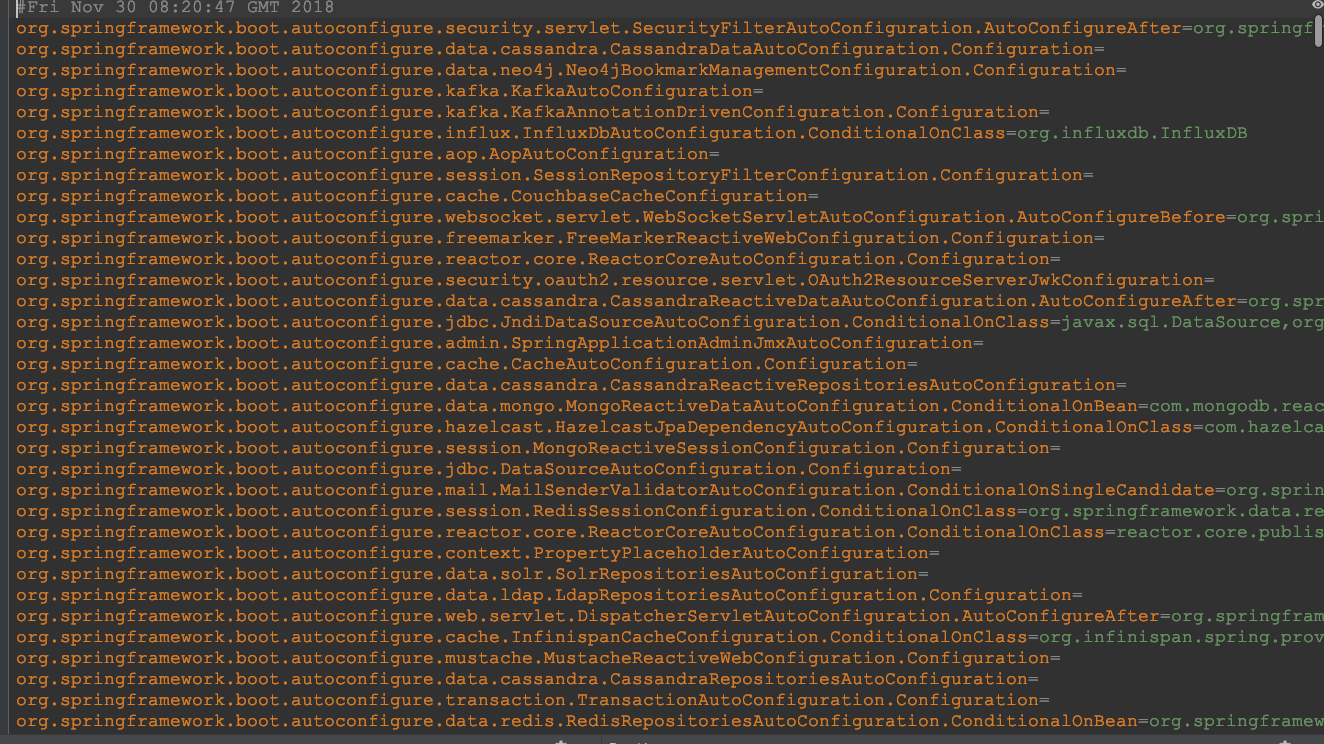
结论:EnableAutoConfiguration会将SpringBoot锁需要的将配置加载到容器中。
@ComponentScan
可以把它理解为一个扫描器,一个项目中可能会有好多个控制器,我们就是通过ComponentScan去发现指定路径下的@Controller(@RestController)、@Service、@Repository 、@Component并将他们装入bean容器中。
他有如下几个属性
public enum FilterType {

   ANNOTATION, //按照注解过滤

   ASSIGNABLE_TYPE, //按照给定的类型过滤

   ASPECTJ, //使用ASPECTJ表达式

   REGEX, //通过正则

   CUSTOM //自定义规则

}
SpringApplication.run
该过程首先创建了一个SpringApplication对象实例,然后完某些实例的初始化。之后调用run方法。具体详情可以参考源码和下图

HelloWorld
添加依赖
pom文件中有个parent标签
     <parent>

		<!-- 一个非常牛x的依赖,使用之后后面常用的依赖包可以不用写version了 -->

		<groupId>org.springframework.boot</groupId>

		<artifactId>spring-boot-starter-parent</artifactId>

		<version>2.1.1.RELEASE</version>

	</parent>
这是SpringBoot的一个父级依赖,使用之后相关依赖的时候可以不用填写版本、默认和父级依赖的版本一样。然后我们需要在dependencies标签中添加web依赖模块
<!-- WEB依赖包 -->

	<dependency>

		<groupId>org.springframework.boot</groupId>

		<artifactId>spring-boot-starter-web</artifactId>

</dependency>
编写Controller
import org.springframework.web.bind.annotation.RequestMapping;

import org.springframework.web.bind.annotation.RestController;

/**

 * @RestController = @Controller + @ResponseBody

 *

 */

@RestController

public class HelloWorldController {

    /**

     * RequestMapping 将Http请求映射到方法上

     */

    @RequestMapping("/")

    public String HelloWorld() {

        return "Hello World";

    }

}
然后启动项目浏览器访问:http://localhost:8080/ 就可以看到浏览器输出"Hello World"
欢迎关注我的公众号:程序员共成长
公众号内回复【礼包】,获取程序员专属资料,包括但不限于Java、Python、Linux、数据库、大数据、架构、测试、前端、ui以及各方向电子书

SpringBoot从零单排 ------初级入门篇的更多相关文章
- 项目17-超详细“零”基础kafka入门篇
分类: Linux服务篇,Linux架构篇 1.认识kafka 1.1 kafka简介 Kafka 是一个分布式流媒体平台 kafka官网:http://kafka.apache.org/ (1) ...
- 超详细“零”基础kafka入门篇
1.认识kafka 1.1 kafka简介 Kafka 是一个分布式流媒体平台 kafka官网:http://kafka.apache.org/ (1)流媒体平台有三个关键功能: 发布和订阅记录流,类 ...
- SpringBoot从零单排 ------ 拦截器的使用
在项目开发中我们常常需要对请求进行验证,如登录校验.权限验证.防止重复提交等等,通过拦截器来过滤请求.自定义一个拦截器需要实现HandlerInterceptor接口.代码如下: import org ...
- SpringBoot的学习一:入门篇
SpringBoot是什么: SpringBoot是Spring项目中的一个子工程,是一个轻量级框架. SpringBoot框架中有两个个非常重要的策略:开箱即用和约定优于配置 一.构建工程 1.开发 ...
- SpringBoot中使用JUnit4(入门篇)
添加依赖 <dependency> <groupId>org.springframework.boot</groupId> <artifactId>sp ...
- git bash【初级入门篇】
最近公司打算使用git代替之前的svn版本控制工具,趁此机会打算好好学学git,这个号称当今世界最牛的分布式版本控制工具. 一.[git和svn的主要区别] 1.去中心化 svn以及微软的TFS均采用 ...
- SpringBoot中使用JNnit4(入门篇)
一.添加依赖 <dependency> <groupId>org.springframework.boot</groupId> <artifactId> ...
- ADO数据库编程详解(C++)----初级入门篇
一.概述 ADO即Microsoft ActiveXData Object,是Microsoft继ODBC之后,基于OLE DB技术的一种数据库操作技术,使您能够编写通过 OLE DB提供者对在数据库 ...
- Linux及Arm-Linux程序开发笔记(零基础入门篇)
Linux及Arm-Linux程序开发笔记(零基础入门篇) 作者:一点一滴的Beer http://beer.cnblogs.com/ 本文地址:http://www.cnblogs.com/bee ...
随机推荐
- ArcCore重构-Platform_Types.h实现辨析
AUTOSAR定义了一系列PlatformTypes,如uint8/uint16/uint32等等基本类型. It contains all platform dependent types and ...
- python 编码形式简单入门
为什么使用Python 假设我们有这么一项任务:简单测试局域网中的电脑是否连通.这些电脑的ip范围从192.168.0.101到192.168.0.200. 思路:用shell编程.(Linux通常是 ...
- python:Json模块dumps、loads、dump、load介绍
由上篇文章(python3+requests:get/post请求)涉及到的json.dumps()扩展 1.json.dumps()用于将dict类型的数据转成str 备注:文件路径前面加上 r 是 ...
- PAT1029:Median
1029. Median (25) 时间限制 1000 ms 内存限制 65536 kB 代码长度限制 16000 B 判题程序 Standard 作者 CHEN, Yue Given an incr ...
- 网络编程之select
一.select函数简介 select一般用在socket网络编程中,在网络编程的过程中,经常会遇到许多阻塞的函数,网络编程时使用的recv, recvfrom.connect函数都是阻塞的函数,当函 ...
- Linux kernel的中断子系统之(六):ARM中断处理过程
返回目录:<ARM-Linux中断系统>. 总结:二中断处理经过两种模式:IRQ模式和SVC模式,这两种模式都有自己的stack,同时涉及到异常向量表中的中断向量. 三ARM处理器在感知到 ...
- java中的取整(/)和求余(%)
1.取整运算符取整从字面意思理解就是被除数到底包含几个除数,也就是能被整除多少次,那么它有哪些需要注意的地方呢?先看下面的两端代码: int a = 10; int b = 3; double c= ...
- TCP入门与实例讲解
内容简介 TCP是TCP/IP协议栈的核心组成之一,对开发者来说,学习.掌握TCP非常重要. 本文主要内容包括:什么是TCP,为什么要学习TCP,TCP协议格式,通过实例讲解TCP的生命周期(建立连接 ...
- 简历HTML网页版
<!DOCTYPE html><html> <head> <meta charset="utf-8" /> <title> ...
- charles模拟手机流量网速
找到proxy--throttle settings 勾选enable throttling,设置手机上网网速 选择throttle preset,有设置好的一些网速,可以随便选 也可以设置2G网络, ...