
c#自制抽奖小程序
        #region 第一部分界面设计

        const int N = ;

        Button button = new Button();

        Image[] images = new Image[N];

        PictureBox[] pictures = new PictureBox[N];

        int[] dx = new int[N] { , , , , -, -, ,  };

        int[] dy = new int[N] { , , , , , , -, - };

        private void Form1_Load(object sender, EventArgs e)

        {

            InitialImage();

            InitialSurface();//初始化窗体界面

        }

        //添加图片

        private void InitialImage()

        {

            images[] = Resources.保温杯;

            images[] = Resources.体重秤;

            images[] = Resources.x1;

            images[] = Resources.台灯;

            images[] = Resources.耳机;

            images[] = Resources.x2;

            images[] = Resources.电动牙刷;

            images[] = Resources.时钟;

            this.BackgroundImage = Resources.formbg;

        }

        //初始化界面

        private void InitialSurface()

        {

            Panel pa = new Panel();

            pa.Size = new System.Drawing.Size(, );

            pa.BackgroundImage = Resources.bga1;

            pa.BackgroundImageLayout = ImageLayout.Stretch;

            pa.Location = new Point(, );

            pa.BackColor = Color.Transparent;

            pa.TabIndex = ;

            this.Controls.Add(pa);

            int x = , y = ;

            for (int i = ; i < N; i++)

            {

                x += dx[i];

                y += dy[i];

                PictureBox box = new PictureBox();

                box.Size = new Size(, );

                box.Location = new Point(x, y);

                box.Image = images[i];

                box.SizeMode = PictureBoxSizeMode.StretchImage;

                box.BorderStyle = BorderStyle.FixedSingle;

                box.Padding = new Padding();

                box.BackColor = Color.White;

                pictures[i] = box;

                pa.Controls.Add(box);

            }

            button.Text = "开始" + "\r\n" + "抽奖";

            button.Font = new Font("宋体", , FontStyle.Bold);

            button.Size = new Size(, );

            button.Location = new Point(, );

            button.Click += Button_Click;

            pa.Controls.Add(button);

            PictureBox box1 = new PictureBox();

            box1.Image = Resources.bgGIF;

            box1.SizeMode = PictureBoxSizeMode.StretchImage;

            box1.BorderStyle = BorderStyle.None;

            box1.Size = new Size(, );

            box1.Location = new Point(, );

            this.Controls.Add(box1);

            this.MaximizeBox = false;

            this.BackgroundImageLayout = ImageLayout.Stretch;

            this.AutoSizeMode = AutoSizeMode.GrowAndShrink;

        }

        #endregion
第一部分界面设计
界面效果如下:
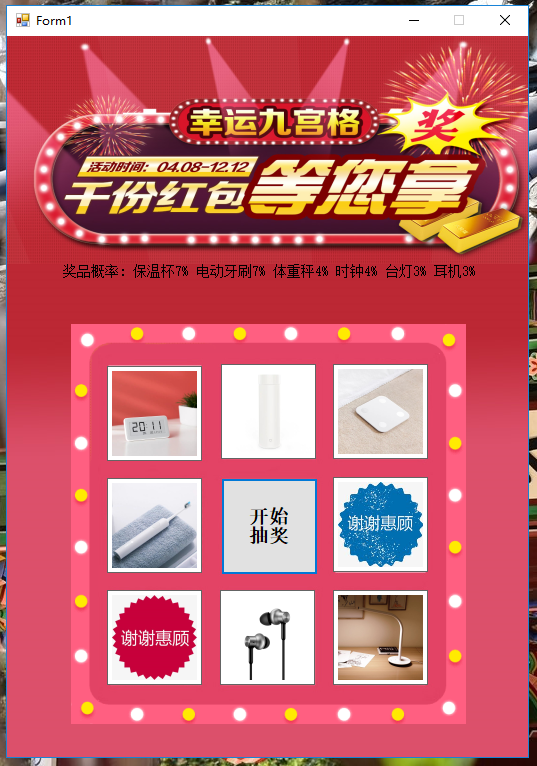
实现旋转是使用的改变控件大小,背景颜色(把padding设置4可以看见背景颜色)。
 Random random = new Random();

         SoundPlayer sp = new SoundPlayer(Resources.Untitled_Project);

         int circle;

         int index;

         int stopNum;

         bool flag = true;//奇数和偶数的标志,为true表示偶数

         private void Button_Click(object sender, EventArgs e)

         {

             circle = random.Next(, );//随机产生旋转的圈数

             stopNum = random.Next(, );//随机确定选择抽中奖品的下标

             button.Enabled = false;

             time.Interval = ;

             index = ;

             flag = true;

             sp.Play();

             time.Start();

         }

         private void time_Tick(object sender, EventArgs e)

         {

             if (flag)//放大picturebox,实现转动效果

             {

                 pictures[index].Size = new Size(, );

                 pictures[index].BackColor = Color.YellowGreen;

                 flag = false;

             }

             else if (flag == false)//将原来的picturebox缩放回原来的尺寸

             {

                 pictures[index].Size = new Size(, );

                 pictures[index].BackColor = Color.White;

                 index++;

                 flag = true;

             }

             if (index == )

             {

                 index = ;

                 circle -= circle >  ?  : ;//每次转动8次,旋转的圈数-1

             }

             //倒数两圈慢

             time.Interval = circle >  ?  : ;

             if (circle ==  && index == stopNum)

             {

                 pictures[index].Size = new Size(, );

                 pictures[index].BackColor = Color.YellowGreen;

                 pictures[index].Location = new Point(pictures[index].Location.X - , pictures[index].Location.Y - );

                 StopRotate(index);

                 pictures[index].Size = new Size(, );

                 pictures[index].BackColor = Color.White;

                 pictures[index].Location = new Point(pictures[index].Location.X + , pictures[index].Location.Y + );

             }

         }
旋转代码
停止再加上一个简单的概率会有点不了不流畅。
  private void StopRotate(int sum)

         {

             string message = null;

             switch (index)

             {

                 case : if (random.Next(, ) == stopNum) message = "恭喜获取保温杯一个"; else { circle = ; stopNum = ; } break;//1/2  14  7%

                 case : if (random.Next(, ) == stopNum) message = "恭喜获取体重秤一个"; else { circle = ; stopNum = ; } break;//1/3  21  4%

                 case : message = "谢谢惠顾"; break;

                 case : if (random.Next(, ) == stopNum) message = "恭喜获取台灯一个"; else { circle = ; stopNum = ; } break;//1/4   28   3%

                 case : if (random.Next(, ) == stopNum) message = "恭喜获取耳机一个"; else { circle = ; stopNum = ; } break;//1/4  28   3%

                 case : message = "谢谢惠顾"; break;

                 case : if (random.Next(, ) == stopNum) message = "恭喜获取电动牙刷一个"; else { circle = ; stopNum = ; } break;//1/2  1/14   7&

                 case : if (random.Next(, ) == stopNum) message = "恭喜获取时钟一个"; else { circle = ; stopNum = ; } break;//1/3   1/21    4%

             }

             if (message != null)

             {

                 sp.Stop();

                 time.Stop();//先关闭定时器

                 MessageBox.Show(message);

                 this.button.Enabled = true;

             }

         }
停止代码
简单的旋转程序就完成了。
c#自制抽奖小程序的更多相关文章
- 用jquery实现抽奖小程序
用jquery实现抽奖小程序 这些日子,到处都可以看到关于微信小程序的新闻或报到,在博客园中写关于微信小程序的也不少.但是今天我要说的不是微信小程序,而是用简单的jquery写的一个好玩的抽奖小程序. ...
- 用 python 写一个年会抽奖小程序
使用 pyinstaller 打包工具常用参数指南 pyinstaller -F demo.py 参数 含义 -F 指定打包后只生成一个exe格式的文件 -D –onedir 创建一个目录,包含exe ...
- 抽奖小程序,js,canvas
js写的网页抽奖小程序,先上截图 源码地址:https://github.com/xiachaoxulu/raffle
- Winform 随机抽奖小程序
效果图: 主要代码: Form1.cs using System; using System.Drawing; using System.IO; using System.Runtime.Intero ...
- Excel VBA活动抽奖小程序
在活动中,我们常会有抽奖,抽奖箱准备繁琐,现在多采用线上抽奖方式,下面用Excel VBA写了一个简单的抽奖小程序 简单测试效果如下,可实现: 多次抽奖,且每次抽奖都不重复 抽奖界面滚动人员信息,点击 ...
- 自制微信小程序 提示插件 -- noticeUitis.js
/* noticeMsg.js by: FEer_llx Modify 2016/08/24 */ function weNotice(obj) { this.fadeFlag = true; thi ...
- Java抽奖小程序
package com.test; import java.awt.Color; import java.awt.Font; import java.awt.event.ActionEvent; im ...
- python——公司年会抽奖小程序
张三科技有限公司有300名员工,开年会抽奖,奖项如下一等奖3名 : 泰国五日游二等奖6名 :iphone手机三等奖30名 :避孕套一盒规则:1.一共抽3次,第一次抽3等奖,第二次抽2等奖,第三次压轴抽 ...
- 基于vs2012的C# winform抽奖小程序的总结
哈希表的使用 Hashtable hashtable = new Hashtable(); hashtable.ContainsValue(tmp);//判断哈希表中有没有tmp hashtable. ...
随机推荐
- windows环境搭建dubbo服务
windows环境搭建dubbo服务 1:首先需要下载dubbo的注册中心 zookeeper zookeeper注册中心下载地址链接:http://mirror.bit.edu.cn/apache/ ...
- Dubbo+zookeeper实现单表的增删改查
1.数据库准备 建表语句 CREATE TABLE `tb_brand` ( `id` ) NOT NULL AUTO_INCREMENT, `name` ) DEFAULT NULL COMMENT ...
- Windows 安装R
下载 R 的安装包 双击 安装包 进行安装 安装完成 测试 修改 R 中的CRAN镜像 添加到 Windows 的环境变量中 测试
- 基于Hadoop爬虫网易云歌曲评论
作业要求来自于:https://edu.cnblogs.com/campus/gzcc/GZCC-16SE2/homework/3339 本次选取的是爬取歌曲<大碗宽面>的歌评数据 1.将 ...
- react项目如何运行
react项目如何运行 一.总结 一句话总结: npm i 安装好package.json的 指定插件后,npm start 启动项目 二.react项目的安装与运行 转自或参考:react项目的安装 ...
- 【mybatis源码学习】mybatis的参数处理
一.mybatis的参数处理以及参数取值 1.单个参数 mybatis不做任何处理 取值方式: #{参数名/任意名} <!-- Employee getEmpById(Integer id) ...
- 纯Python模式
http://crcmod.sourceforge.net/intro.html https://help.aliyun.com/document_detail/85288.html OSS的CRC数 ...
- Python 图片Resize.py
#!/usr/bin/env python # -*- coding: utf-8 -*- # @Time : 19-7-14 下午4:54 # @Author : RongT import cv2 ...
- [LeetCode] 294. Flip Game II 翻转游戏 II
You are playing the following Flip Game with your friend: Given a string that contains only these tw ...
- [LeetCode] 628. Maximum Product of Three Numbers 三个数字的最大乘积
Given an integer array, find three numbers whose product is maximum and output the maximum product. ...