
【SpringCloud】第六篇: 分布式配置中心(Spring Cloud Config)
前言:
必需学会SpringBoot基础知识
简介:
spring cloud 为开发人员提供了快速构建分布式系统的一些工具,包括配置管理、服务发现、断路器、路由、微代理、事件总线、全局锁、决策竞选、分布式会话等等。它运行环境简单,可以在开发人员的电脑上跑。
工具:
JDK8
apache-maven-3.5.2
IntelliJ IDEA 2018.1 x64
一、简介
在分布式系统中,由于服务数量巨多,为了方便服务配置文件统一管理,实时更新,所以需要分布式配置中心组件。在Spring Cloud中,有分布式配置中心组件spring cloud config ,它支持配置服务放在配置服务的内存中(即本地),也支持放在远程Git仓库中。在spring cloud config 组件中,分两个角色,一是eureka-config-server,二是eureka-config-client。
二、构建 eureka-config-server
(1) 创建springboot项目, 命名: eureka-config-server
(2) pom.xml
<?xml version="1.0" encoding="UTF-8"?>

<project xmlns="http://maven.apache.org/POM/4.0.0" xmlns:xsi="http://www.w3.org/2001/XMLSchema-instance"

         xsi:schemaLocation="http://maven.apache.org/POM/4.0.0 http://maven.apache.org/xsd/maven-4.0.0.xsd">

    <modelVersion>4.0.0</modelVersion>

    <groupId>com.lwc</groupId>

    <artifactId>eureka-config-server</artifactId>

    <version>0.0.1-SNAPSHOT</version>

    <packaging>jar</packaging>

    <name>eureka-config-server</name>

    <description>Demo project for Spring Boot</description>

    <parent>

        <groupId>org.springframework.boot</groupId>

        <artifactId>spring-boot-starter-parent</artifactId>

        <version>1.5.10.RELEASE</version>

        <relativePath/> <!-- lookup parent from repository -->

    </parent>

    <properties>

        <project.build.sourceEncoding>UTF-8</project.build.sourceEncoding>

        <project.reporting.outputEncoding>UTF-8</project.reporting.outputEncoding>

        <java.version>1.8</java.version>

        <spring-cloud.version>Edgware.SR3</spring-cloud.version>

    </properties>

    <dependencies>

        <dependency>

            <groupId>org.springframework.cloud</groupId>

            <artifactId>spring-cloud-config-server</artifactId>

        </dependency>

        <dependency>

            <groupId>org.springframework.boot</groupId>

            <artifactId>spring-boot-starter-test</artifactId>

            <scope>test</scope>

        </dependency>

        <dependency>

            <groupId>org.springframework.cloud</groupId>

            <artifactId>spring-cloud-starter-eureka</artifactId>

        </dependency>

    </dependencies>

    <dependencyManagement>

        <dependencies>

            <dependency>

                <groupId>org.springframework.cloud</groupId>

                <artifactId>spring-cloud-dependencies</artifactId>

                <version>${spring-cloud.version}</version>

                <type>pom</type>

                <scope>import</scope>

            </dependency>

        </dependencies>

    </dependencyManagement>

    <build>

        <plugins>

            <plugin>

                <groupId>org.springframework.boot</groupId>

                <artifactId>spring-boot-maven-plugin</artifactId>

            </plugin>

        </plugins>

    </build>

</project>
(3) 启动类: 添加注解 @EnableConfigServer
package com.lwc;

import org.springframework.boot.SpringApplication;

import org.springframework.boot.autoconfigure.SpringBootApplication;

import org.springframework.cloud.config.server.EnableConfigServer;

/**

 * @author Eddie

 */

@EnableConfigServer

@SpringBootApplication

public class EurekaConfigServerApplication {

    public static void main(String[] args) {

        SpringApplication.run(EurekaConfigServerApplication.class, args);

    }

}
(4) application.yml 和 说明
| application.yml | application-dev.yml |
spring: |
server: |
spring.cloud.config.server.git.uri:配置git仓库地址
spring.cloud.config.server.git.searchPaths:配置仓库路径
spring.cloud.config.label:配置仓库的分支
spring.cloud.config.server.git.username:访问git仓库的用户名 (公共库可无视)
spring.cloud.config.server.git.password:访问git仓库的用户密码 (公共库可无视)
里面存在一个config-repo目录, 里面几个app*配置文件 (为方便大家,可使用本人提供的)
启动项目, 访问: http://localhost:8888/app/local/master
{
"name": "app",
"profiles": ["local"],
"label": "master",
"version": "e366cdb9f58c68216631b39432dbbaba7ad70809",
"state": null,
"propertySources": [{
"name": "https://github.com/eddie-code/SpringCloudDemo/config-repo/app-local.properties",
"source": {
"eddie": "local config"
}
},
{
"name": "https://github.com/eddie-code/SpringCloudDemo/config-repo/app.properties",
"source": {
"eddie": "default config"
}
}]
}证明配置服务中心可以从远程程序获取配置信息。
http请求地址和资源文件映射如下:
/{application}/{profile}[/{label}]
/{application}-{profile}.yml
/{label}/{application}-{profile}.yml
/{application}-{profile}.properties
/{label}/{application}-{profile}.properties
三、构建 eureka-config-client
(1) 创建springboot项目, 命名: eureka-config-client
(2) pom.xml
<?xml version="1.0" encoding="UTF-8"?>

<project xmlns="http://maven.apache.org/POM/4.0.0" xmlns:xsi="http://www.w3.org/2001/XMLSchema-instance"

         xsi:schemaLocation="http://maven.apache.org/POM/4.0.0 http://maven.apache.org/xsd/maven-4.0.0.xsd">

    <modelVersion>4.0.0</modelVersion>

    <groupId>com.lwc</groupId>

    <artifactId>eureka-config-client</artifactId>

    <version>0.0.1-SNAPSHOT</version>

    <packaging>jar</packaging>

    <name>eureka-config-client</name>

    <description>Demo project for Spring Boot</description>

    <parent>

        <groupId>org.springframework.boot</groupId>

        <artifactId>spring-boot-starter-parent</artifactId>

        <version>1.5.10.RELEASE</version>

        <relativePath/> <!-- lookup parent from repository -->

    </parent>

    <properties>

        <project.build.sourceEncoding>UTF-8</project.build.sourceEncoding>

        <project.reporting.outputEncoding>UTF-8</project.reporting.outputEncoding>

        <java.version>1.8</java.version>

        <spring-cloud.version>Edgware.SR3</spring-cloud.version>

    </properties>

    <dependencies>

        <dependency>

            <groupId>org.springframework.cloud</groupId>

            <artifactId>spring-cloud-starter-config</artifactId>

        </dependency>

        <dependency>

            <groupId>org.springframework.boot</groupId>

            <artifactId>spring-boot-starter-web</artifactId>

        </dependency>

        <dependency>

            <groupId>org.springframework.boot</groupId>

            <artifactId>spring-boot-starter-test</artifactId>

            <scope>test</scope>

        </dependency>

    </dependencies>

    <dependencyManagement>

        <dependencies>

            <dependency>

                <groupId>org.springframework.cloud</groupId>

                <artifactId>spring-cloud-dependencies</artifactId>

                <version>${spring-cloud.version}</version>

                <type>pom</type>

                <scope>import</scope>

            </dependency>

        </dependencies>

    </dependencyManagement>

    <build>

        <plugins>

            <plugin>

                <groupId>org.springframework.boot</groupId>

                <artifactId>spring-boot-maven-plugin</artifactId>

            </plugin>

        </plugins>

    </build>

    <repositories>

        <repository>

            <id>spring-milestones</id>

            <name>Spring Milestones</name>

            <url>https://repo.spring.io/milestone</url>

            <snapshots>

                <enabled>false</enabled>

            </snapshots>

        </repository>

    </repositories>

</project>
(3) 新建配置文件命名: bootstrap-*.yml
(local=本地测试, dev=开发环境, pro=正式环境)
(spring.cloud.config.label=指明远程仓库的分支, spring.cloud.config.uri=配置服务中心的网址)
| bootstrap.yml | bootstrap-dev.yml (其余自己新建) |
spring: |
server: |
(4) 控制层相关代码
package com.lwc;

import org.springframework.boot.SpringApplication;

import org.springframework.boot.autoconfigure.SpringBootApplication;

/**

 * @author Eddie

 */

@SpringBootApplication

public class EurekaConfigClientApplication {

    public static void main(String[] args) {

        SpringApplication.run(EurekaConfigClientApplication.class, args);

    }

}
package com.lwc.controller;

import com.lwc.dto.GitDto;

import org.springframework.beans.factory.annotation.Autowired;

import org.springframework.beans.factory.annotation.Value;

import org.springframework.web.bind.annotation.GetMapping;

import org.springframework.web.bind.annotation.RestController;

/**

 * @author eddie.lee

 * @Package com.lwc.controller

 * @ClassName AppController

 * @description 获取配置中心属性

 * @date created in 2018-04-03 14:22

 * @modified by

 */

@RestController

public class AppController {

    @Autowired

    private GitDto gitDto;

    @Value("${eddie}")

    private String eddie;

    @Value("${url}")

    private String url;

    @GetMapping("/url")

    public String url() {

        return this.url;

    }

    @GetMapping("/eddie")

    public String eddie() {

        return this.eddie;

    }

    @GetMapping("/configs")

    public String configs() {

        return "This is " + gitDto.getEddie() + " Blog: " + gitDto.getUrl();

    }

}
(5) 测试
访问: http://localhost:8881/configs
This is local config Blog: http://www.cnblogs.com/EddieBlog/
(6) 图解
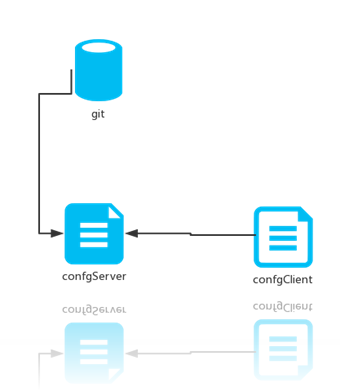
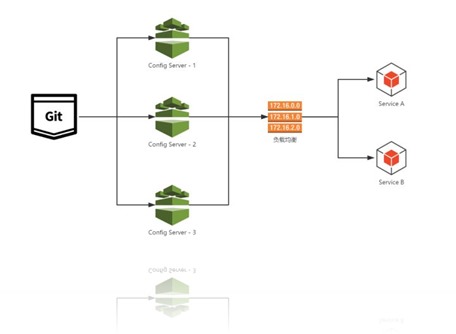
四、源码下载
标签 6-1, 6-2
https://github.com/eddie-code/SpringCloudDemo/tree/master/eureka-config-server
https://github.com/eddie-code/SpringCloudDemo/tree/master/eureka-config-client
五、踩过的坑
源码有记录
【SpringCloud】第六篇: 分布式配置中心(Spring Cloud Config)的更多相关文章
- 第六篇: 分布式配置中心(Spring Cloud Config)
一.简介 在分布式系统中,由于服务数量巨多,为了方便服务配置文件统一管理,实时更新,所以需要分布式配置中心组件. 在Spring Cloud中,有分布式配置中心组件spring cloud confi ...
- SpringCloud教程 | 第六篇: 分布式配置中心(Spring Cloud Config)
一.简介 在分布式系统中,由于服务数量巨多,为了方便服务配置文件统一管理,实时更新,所以需要分布式配置中心组件.在Spring Cloud中,有分布式配置中心组件spring cloud config ...
- 史上最简单的SpringCloud教程 | 第六篇: 分布式配置中心(Spring Cloud Config)
一.简介 在分布式系统中,由于服务数量巨多,为了方便服务配置文件统一管理,实时更新,所以需要分布式配置中心组件. 在Spring Cloud中,有分布式配置中心组件spring cloud confi ...
- SpringCloud教程 | 第六篇: 分布式配置中心(Spring Cloud Config)(Finchley版本)
在上一篇文章讲述zuul的时候,已经提到过,使用配置服务来保存各个服务的配置文件.它就是Spring Cloud Config. 一.简介 在分布式系统中,由于服务数量巨多,为了方便服务配置文件统一管 ...
- SpringCloud(6)分布式配置中心Spring Cloud Config
1.Spring Cloud Config 简介 在分布式系统中,由于服务数量巨多,为了方便服务配置文件统一管理,实时更新,所以需要分布式配置中心组件.在Spring Cloud中,有分布式配置中心组 ...
- SpringCloud学习(六)分布式配置中心(Spring Cloud Config)(Finchley版本)
在上一篇文章讲述zuul的时候,已经提到过,使用配置服务来保存各个服务的配置文件.它就是Spring Cloud Config. 简介 在分布式系统中,由于服务数量巨多,为了方便服务配置文件统一管理, ...
- 一起来学Spring Cloud | 第七章:分布式配置中心(Spring Cloud Config)
上一章节,我们讲解了服务网关zuul,本章节我们从git和本地两种存储配置信息的方式来讲解springcloud的分布式配置中心-Spring Cloud Config. 一.Spring Cloud ...
- Spring Cloud Config(一):聊聊分布式配置中心 Spring Cloud Config
目录 Spring Cloud Config(一):聊聊分布式配置中心 Spring Cloud Config Spring Cloud Config(二):基于Git搭建配置中心 Spring Cl ...
- 【SpringCloud】第七篇: 高可用的分布式配置中心(Spring Cloud Config)
前言: 必需学会SpringBoot基础知识 简介: spring cloud 为开发人员提供了快速构建分布式系统的一些工具,包括配置管理.服务发现.断路器.路由.微代理.事件总线.全局锁.决策竞选. ...
随机推荐
- Spring时间(Date)类型转换+自定义
第一种方法:利用内置的 CustomDateEditor(不推荐,每个类都需要定义) 首先,在我们的 Controller 的 InitBinder 里面,注册 CustomEditor //首先初始 ...
- [转载]对iOS开发中内存管理的一点总结与理解
对iOS开发中内存管理的一点总结与理解 做iOS开发也已经有两年的时间,觉得有必要沉下心去整理一些东西了,特别是一些基础的东西,虽然现在有ARC这种东西,但是我一直也没有去用过,个人觉得对内存操作 ...
- Vue教程:组件Component详解(六)
一.什么是组件? 组件 (Component) 是 Vue.js 最强大的功能之一.组件可以扩展 HTML 元素,封装可重用的代码.在较高层面上,组件是自定义元素,Vue.js 的编译器为它添加特殊功 ...
- java多线程注意事项
1:继承thread和实现Runnable创建线程的区别: 继承thread创建的对象直接start()就可以就绪,但是使用Runnable所new出来的对象要先new Thread(xx)才能sta ...
- [JavaScript]JS中的变量声明与有效域
1.变量声明 var a = 1; //使用var声明变量 b = 1; //不使用var 第一种情况,在当前域中声明一个名为a的变量,如果实在方法内则为局部变量,若在最外层声明则a为全局变量. 第二 ...
- 闲谈Hybrid
前言 当经常需要更换样式,产品迭代,那么我们应该考虑hybrid混合开发,上层使用Html&Css&JS做业务开发,底层透明化.上层多多样化,这种场景非常有利于前端介入,非常适合业务快 ...
- Dubbo 安装ZooKeeper环境
一.在Windows 安装ZooKeeper 1.下载ZooKeeper 2.解压,修改ZooKeeper配置文件 复制一份zoo_sample.cfg文件,改名位zoo.cfg,打开编辑,设置数据保 ...
- foreach传值
- flume搭建新手测试环境
硬件环境: 腾讯云,两台服务器8G 双核 软件环境: flume1.8.jdk1.8,centos6 第一次搭建也是各种找文件,只知道flume是日志抓取服务,也听说了非常稳定强大的服务,正好公司需要 ...
- Ubuntu Linux TinySerial串口调试助手 可视化界面 安装使用
ubuntu Linux下串口调试助手使用 Tiny Serial为一个开源项目,欢迎大家使用,基于Qt开发的串口调试助手,有一般串口助手的基本功能,更多功能正在完善. Github地址:https: ...