
Python爬取豆瓣《复仇者联盟3》评论并生成乖萌的格鲁特
1. 需求说明
本项目基于Python爬虫,爬取豆瓣电影上关于复仇者联盟3的所有影评,并保存至本地文件。然后对影评进行分词分析,使用词云生成树人格鲁特的形象照片。
2. 代码实现
此部分主要解释Python爬虫部分及使用词云生成图像的代码
Python爬虫
首先获取需要爬取的网页地址,然后通过requests.get()方式去获取网页,代码如下:
# 获取网页

def getHtml(url):

    try:

        r = requests.get(url, timeout=30)

        r.raise_for_status()

        return r.text

    except:

        return ''
获取到网页之后,对网页中的元素进行正则匹配,找到评论相关的元素,并获取。
# 获取某个网页中的影评

def getComment(html):

    soup = BeautifulSoup(html, 'html.parser')

    comments_list = []

    comment_nodes = soup.select('.comment > p')

    for node in comment_nodes:

        comments_list.append(node.get_text().strip().replace("\n", "") + u'\n')

    return comments_list
将爬取到的影评保存至文本文件中,以备后续分析使用。
def saveCommentText(fpath):

    pre_url = "https://movie.douban.com/subject/24773958/comments?"

    depth = 8

    with open(fpath, 'a', encoding='utf-8') as f:

        for i in range(depth):

            url = pre_url + 'start=' + str(20 * i) + '&limit=20&sort=new_score&' + 'status=P'

            html = getHtml(url)

            f.writelines(getComment(html))

            time.sleep(1 + float(random.randint(1, 20)) / 20)
基于词云生成图像
注释比较详细,可以看注释说明
def drawWordcloud():

    with codecs.open('text.txt', encoding='utf-8') as f:

        comment_text = f.read()

    # 设置背景图片,可替换为img目录下的任何一张图片

    color_mask = imread("img\Groot4.jpeg")

    # 停用词设置

    Stopwords = [u'就是', u'电影', u'你们', u'这么', u'不过', u'但是',

                 u'除了', u'时候', u'已经', u'可以', u'只是', u'还是', u'只有', u'不要', u'觉得', u','u'。']

    # 设置词云属性

    cloud = WordCloud(font_path="simhei.ttf",

                      background_color='white',

                      max_words=260,

                      max_font_size=150,

                      min_font_size=4,

                      mask=color_mask,

                      stopwords=Stopwords)

    # 生成词云, 可以用generate输入全部文本,也可以我们计算好词频后使用generate_from_frequencies函数

    word_cloud = cloud.generate(comment_text)

    # 从背景图片生成颜色值(注意图片的大小)

    image_colors = ImageColorGenerator(color_mask)

    # 显示图片

    plt.imshow(cloud)

    plt.axis("off")

    # 绘制词云

    plt.figure()

    plt.imshow(cloud.recolor(color_func=image_colors))

    plt.axis("off")

    plt.figure()

    plt.imshow(color_mask, cmap=plt.cm.gray)

    plt.axis("off")

    plt.show()

    # 保存图片

    word_cloud.to_file("img\comment_cloud.jpg")
为了方便阅读,这里贴出整体过程编码:
def getHtml(url):

    try:

        r = requests.get(url, timeout=30)

        r.raise_for_status()

        return r.text

    except:

        return ''

def getComment(html):

    soup = BeautifulSoup(html, 'html.parser')

    comments_list = []

    comment_nodes = soup.select('.comment > p')

    for node in comment_nodes:

        comments_list.append(node.get_text().strip().replace("\n", "") + u'\n')

    return comments_list

def saveCommentText(fpath):

    pre_url = "https://movie.douban.com/subject/24773958/comments?"

    depth = 8

    with open(fpath, 'a', encoding='utf-8') as f:

        for i in range(depth):

            url = pre_url + 'start=' + str(20 * i) + '&limit=20&sort=new_score&' + 'status=P'

            html = getHtml(url)

            f.writelines(getComment(html))

            time.sleep(1 + float(random.randint(1, 20)) / 20)

def cutWords(fpath):

    text = ''

    with open(fpath, 'r', encoding='utf-8') as fin:

        for line in fin.readlines():

            line = line.strip('\n')

            text += ' '.join(jieba.cut(line))

            text += ' '

    with codecs.open('text.txt', 'a', encoding='utf-8') as f:

        f.write(text)

def drawWordcloud():

    with codecs.open('text.txt', encoding='utf-8') as f:

        comment_text = f.read()

    # 设置背景图片

    color_mask = imread("img\Groot4.jpeg")

    # 停用词设置

    Stopwords = [u'就是', u'电影', u'你们', u'这么', u'不过', u'但是',

                 u'除了', u'时候', u'已经', u'可以', u'只是', u'还是', u'只有', u'不要', u'觉得', u','u'。']

    # 设置词云属性

    cloud = WordCloud(font_path="simhei.ttf",

                      background_color='white',

                      max_words=260,

                      max_font_size=150,

                      min_font_size=4,

                      mask=color_mask,

                      stopwords=Stopwords)

    # 生成词云, 可以用generate输入全部文本,也可以我们计算好词频后使用generate_from_frequencies函数

    word_cloud = cloud.generate(comment_text)

    # 从背景图片生成颜色值(注意图片的大小)

    image_colors = ImageColorGenerator(color_mask)

    # 显示图片

    plt.imshow(cloud)

    plt.axis("off")

    # 绘制词云

    plt.figure()

    plt.imshow(cloud.recolor(color_func=image_colors))

    plt.axis("off")

    plt.figure()

    plt.imshow(color_mask, cmap=plt.cm.gray)

    plt.axis("off")

    plt.show()

    # 保存图片

    word_cloud.to_file("img\comment_cloud.jpg")
三、项目结构
项目结构
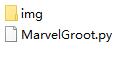
注意整个项目只有一个源码文件,其他的为图片文件
四、运行效果图
一大波格鲁特来袭
格鲁特1号

格鲁特2号

格鲁特3号

格鲁特4号
 Python爬取豆瓣《复仇者联盟3》评论并生成乖萌的格鲁特
注:本文著作权归作者,由demo大师代发,拒绝转载,转载需要作者授权
Python爬取豆瓣《复仇者联盟3》评论并生成乖萌的格鲁特的更多相关文章
- python 爬取豆瓣电影短评并wordcloud生成词云图
最近学到数据可视化到了词云图,正好学到爬虫,各种爬网站 [实验名称] 爬取豆瓣电影<千与千寻>的评论并生成词云 1. 利用爬虫获得电影评论的文本数据 2. 处理文本数据生成词云图 第一步, ...
- Python爬取豆瓣指定书籍的短评
Python爬取豆瓣指定书籍的短评 #!/usr/bin/python # coding=utf-8 import re import sys import time import random im ...
- 利用Python爬取豆瓣电影
目标:使用Python爬取豆瓣电影并保存MongoDB数据库中 我们先来看一下通过浏览器的方式来筛选某些特定的电影: 我们把URL来复制出来分析分析: https://movie.douban.com ...
- Python爬取豆瓣电影top
Python爬取豆瓣电影top250 下面以四种方法去解析数据,前面三种以插件库来解析,第四种以正则表达式去解析. xpath pyquery beaufifulsoup re 爬取信息:名称 评分 ...
- python 爬取豆瓣电影评论,并进行词云展示及出现的问题解决办法
本文旨在提供爬取豆瓣电影<我不是药神>评论和词云展示的代码样例 1.分析URL 2.爬取前10页评论 3.进行词云展示 1.分析URL 我不是药神 短评 第一页url https://mo ...
- python 爬取豆瓣书籍信息
继爬取 猫眼电影TOP100榜单 之后,再来爬一下豆瓣的书籍信息(主要是书的信息,评分及占比,评论并未爬取).原创,转载请联系我. 需求:爬取豆瓣某类型标签下的所有书籍的详细信息及评分 语言:pyth ...
- Python爬取豆瓣音乐存储MongoDB数据库(Python爬虫实战1)
1. 爬虫设计的技术 1)数据获取,通过http获取网站的数据,如urllib,urllib2,requests等模块: 2)数据提取,将web站点所获取的数据进行处理,获取所需要的数据,常使用的技 ...
- 零基础爬虫----python爬取豆瓣电影top250的信息(转)
今天利用xpath写了一个小爬虫,比较适合一些爬虫新手来学习.话不多说,开始今天的正题,我会利用一个案例来介绍下xpath如何对网页进行解析的,以及如何对信息进行提取的. python环境:pytho ...
- python爬取豆瓣小组700+话题加回复啦啦啦python open file with a variable name
需求:爬取豆瓣小组所有话题(话题title,内容,作者,发布时间),及回复(最佳回复,普通回复,回复_回复,翻页回复,0回复) 解决:1. 先爬取小组下,所有的主题链接,通过定位nextpage翻页获 ...
随机推荐
- IE webkit 滚动条样式!
<style type="text/css"> // IE 模式 *{ scrollbar-face-color:#F3F3F3; /*面子*/ scrollbar-a ...
- ThreadLocal深度解析
本文基于jdk1.8.0_66写成 0. ThreadLocal简介 ThreadLocal可以提供线程内的局部对象,合理的使用可以避免线程冲突的问题比方说SimpleDateFormat是线程不安全 ...
- Win10系统激活工具失败错误0xC004C003解决方法
用了几个WIN10的激活工具 都提示 错误0xC004C003 都原因就是这些CDKEY都被拉入了黑名单 鼠标左击屏幕左下角WIN图标,直接输入cmd,在弹出的 命令提示符 右击 以管理员运行(因为 ...
- JS—正则表达式
正则表达式的元字符是包含特殊含义的字符,它们有一些特殊的功能,可以控制匹配模式的方式,反斜杠后的元字符失去其特殊含义. 单个字符和数字 .表示匹配除换行符外的单个字符,两个.就表示匹配两个字符 var ...
- CF 816B Karen and Coffee【前缀和/差分】
To stay woke and attentive during classes, Karen needs some coffee! Karen, a coffee aficionado, want ...
- B - ACM小组的古怪象棋 【地图型BFS+特殊方向】
ACM小组的Samsara和Staginner对中国象棋特别感兴趣,尤其对马(可能是因为这个棋子的走法比较多吧)的使用进行深入研究.今天他们又在 构思一个古怪的棋局:假如Samsara只有一个马了,而 ...
- UVA 12594 Naming Babies
$dp$,斜率优化. 设$dp[j][i]$表示前$i$个位置分成$j$段的最小值,递推式很好写,预处理几个前缀和就可以了,然后斜率优化即可. #pragma comment(linker, &quo ...
- The 15th Zhejiang Provincial Collegiate Programming Contest Sponsored by TuSimple - J CONTINUE...?
CONTINUE...? Time Limit: 1 Second Memory Limit: 65536 KB Special Judge DreamGrid has clas ...
- [ZOJ3316]Game
题意:有一个棋盘,棋盘上有一些棋子,两个人轮流拿棋,第一个人可以随意拿,以后每一个人拿走的棋子与上一个人拿走的棋子的曼哈顿距离不得超过$L$,无法拿棋的人输,问后手能否胜利 把棋子看做点,如果两个棋子 ...
- 【枚举】URAL - 2081 - Faulty dial
//._. ... ._. ._. ... ._. ._. ._. ._. ._. //|.| ..| ._| ._| |_| |_. |_. ..| |_| |_| //|_| ..| |_. ._ ...