
Error building Player: CommandInvokationFailure: Failed to re-package resources. See the Console for details. ShareSDK 也有这种错误
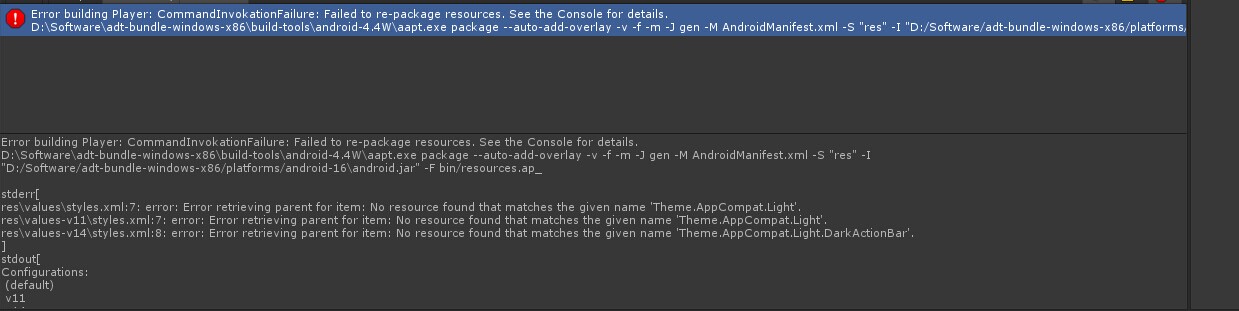
Error building Player: CommandInvokationFailure: Failed to re-package resources. See the Console for details.
D:\GameDevelopment\adt-bundle-windows-x86\build-tools\android-4.4W\aapt.exe package --auto-add-overlay -v -f -m -J gen -M AndroidManifest.xml -S "res" -I "D:/GameDevelopment/adt-bundle-windows-x86/platforms/android-14\android.jar" -F bin/resources.ap_
http://answers.unity3d.com/questions/340592/android-build-woes.html
http://forum.unity3d.com/threads/failed-to-re-package-resources.123883/
使用了别人的接口代码 看看别人的Plugns目录下的res 里 和自己Eclipse 工程下的res目录里的相同XML 文件进行合并 不相同的拷贝进来。
stderr[
res\values\styles.xml:7: error: Error retrieving parent for item: No resource found that matches the given name 'Theme.AppCompat.Light'.
res\values-v11\styles.xml:7: error: Error retrieving parent for item: No resource found that matches the given name 'Theme.AppCompat.Light'.
res\values-v14\styles.xml:8: error: Error retrieving parent for item: No resource found that matches the given name 'Theme.AppCompat.Light.DarkActionBar'.
]
因为新建Android项目自动引用了appcompat_v7 Libraries 生成了 values-v11 和 values-v14文件夹
values 文件夹 下的style.xml
<resources>

    <!--

        Base application theme, dependent on API level. This theme is replaced

        by AppBaseTheme from res/values-vXX/styles.xml on newer devices.

    -->

    <style name="AppBaseTheme" parent="Theme.AppCompat.Light">

        <!--

            Theme customizations available in newer API levels can go in

            res/values-vXX/styles.xml, while customizations related to

            backward-compatibility can go here.

        -->

    </style>

    <!-- Application theme. -->

    <style name="AppTheme" parent="AppBaseTheme">

        <!-- All customizations that are NOT specific to a particular API-level can go here. -->

    </style>

</resources>
values-v11 文件夹 下的style.xml
<resources>

    <!--

        Base application theme for API 11+. This theme completely replaces

        AppBaseTheme from res/values/styles.xml on API 11+ devices.

    -->

    <style name="AppBaseTheme" parent="Theme.AppCompat.Light">

        <!-- API 11 theme customizations can go here. -->

    </style>

</resources>
values-v14 文件夹 下的style.xml
<resources>

    <!--

        Base application theme for API 14+. This theme completely replaces

        AppBaseTheme from BOTH res/values/styles.xml and

        res/values-v11/styles.xml on API 14+ devices.

    -->

    <style name="AppBaseTheme" parent="Theme.AppCompat.Light.DarkActionBar">

        <!-- API 14 theme customizations can go here. -->

    </style>

</resources>
要么 引入android-support-v4.jar 和 android-support-v7-appcompat.jar appcompat_v7.jar 右键 Add to build Path 应该就没问题
或者去掉引用把style.xml 里的 appCompat.Light 换成
<style name="AppBaseTheme" parent="android:Theme.Light"></style>
貌似这篇文章是解决方法:
http://blog.csdn.net/heirenheiren/article/details/7518596
http://zhidao.baidu.com/link?url=oBPfktDVuYf8NBl0-qvAgzPVt-XC0jt56-N-K4Fryc58DmgLya3fYb_1Il2NAOFu_RbHQQSZBcy8pgVgfdcyDvdGEgcvAFUVh-bkxzHJXA_
创建一个项目,还没有动它就有错
res中styles.xml里  <style name="AppBaseTheme" parent="Theme.AppCompat.Light">
错误Error retrieving parent for item: No resource found that matches the given name 'Theme.AppCompat.Light'.
而且还没有R.java              MainActivity里面的错误更多。
请大神帮助!!谢谢……
android版本问题,你把<style name="AppBaseTheme" parent="Theme.AppCompat.Light">
错误Error retrieving parent for item: No resource found that matches the given name 'Theme.AppCompat.Light'.这段删掉,再build,这样R文件应该能生成

http://blog.csdn.net/jiadebin890724/article/details/25166045
1、导入某个现有工程文件夹后,出现R资源不能resolve的错误,导致程序无法编译运行,此时右键->properties->android,看最上面的taget又没有选择对,勾选当前可选的最高那个版本(即你本机已经安装的最高版本的SDK),点击apply,错误解决。
2、style.xml里出现样式无法识别:
error: Error retrieving parent for item: No resource found that matches the given name 'Theme.AppCompat.Light'.
也包括其他样式的此类错误,是因为:
|
8down voteaccepted
|
https://developer.android.com/tools/support-library/setup.html Check the topic Adding libraries with resources. |
去这个地址看解决方法吧。
参考我的另一篇博文:
3、Activity中使用addContentView(layoutPlatform, lpLl);方法动态添加了一个子view,layoutPlatform是LinearLayout类型的,作为view,我想在layoutPlatform这个子view里与Activity通信,即在子view里点击某个按钮之后,让Activity更新界面内容,这个实现方法是,在Activity中实现CallBack借口,重写它的handleMessage方法,然后在子view的按钮点击处理函数里给Activity发送message即可。
发送消息的方式是 handler.sendMessage();
<style name="AppBaseTheme" parent="android:Theme.Light">

http://blog.csdn.net/lan120576664/article/details/34952877

http://blog.csdn.net/lan120576664/article/details/34952877
http://blog.csdn.net/comeonmyideal/article/details/8126186
http://stackoverflow.com/questions/18631643/no-resource-found-that-matches-the-given-name-androidtheme-holo-light
http://blog.csdn.net/yony2011/article/details/8441240      第3步貌似可以解决
http://blog.csdn.net/lincyang/article/details/21040489
http://www.linuxine.com/story/no-resource-found-matches-given-name-stylethemeappcompatlight          这个也ok 待测试
<style name="CustomActionBarTheme" parent="@android:style/Theme.AppCompat"> <item name="android:actionBarStyle">@style/MyActionBar</item> </style>

http://dreamisx.blog.163.com/blog/static/1150048392012112024649308/
3. 錯誤的復原
若是我們原有的專案於建立的時候, Build SDK 為 API 16 ,以及 Minimum Required SDK 是 API 8,在之前沒有去更動資源的狀況,且如上述有 Android API 8 的環境下匯入存在的專案時,會發生如上圖中,專案前的圖示有錯誤圖示,而在 Problems視窗 會看到下列兩個錯誤訊息:
- Description Resource Path Location Type error:
Error retrieving parent for item: No resource found that matches the given name‘android:Theme.Holo.Light.DarkActionBar’. styles.xml - Description Resource Path Location Type error:
Error retrieving parent for item: No resource found that matches the given name‘android:Theme.Holo.Light’. styles.xml
這個狀況是因為,在建立 API 16 時,系統會為我們自動新增 values-v11 以及 values-v14 這兩個分別是 API 11 以及 API 14 的資源目錄,所以在 API 8 為核心的狀況下,系統是不認得他的。而解決方式有二:
- 直接刪除掉這兩個用不到的資源目錄。
- 更改核心:在專案名稱上點擊滑鼠右鍵,選擇 Properties 再選到左側列表的 Android 選項,可以看到如下的畫面,

變更 Project Build Target
這時候,勾選 Android 4.1 或是 Google APIs (API Level 16) 的版本;接著再點擊工具列的Project > Clean 選擇該專案,讓 R.java 重建即可。
而這個動作要注意到 Project > Build Automatically 是否有被勾選,否則,系統只會很單純地幫我們把 R.java 清掉而已。

Build Automatically 在執行 Clean 之後,會再自動產生 R.java
http://www.myexception.cn/android/1080428.html
Error building Player: CommandInvokationFailure: Failed to re-package resources. See the Console for details. ShareSDK 也有这种错误的更多相关文章
- 打包Android:Error building Player: CommandInvokationFailure
错误log Error building Player: CommandInvokationFailure: Unable to determine the tools version of the ...
- Unity出现 error building player exception android (invocation failed)
今天在编译Android的时候出现这个错误 error building player exception android (invocation failed) 百度谷歌之后,看到xuanyuson ...
- Error building Player: Win32Exception: ApplicationName=‘xxxxxxxxxxxxxxxxxx//sdk\tools\zipalign.exe' , CommandLine='4 的解决办法
更新了安卓SDK后,有时候Unity编译失失败,报错类似 Error building Player: Win32Exception: ApplicationName='D:/Program File ...
- 【Unity3D】生成工程报错解决—UnityEditor.HostView:OnGUI() Error building Player: Couldn't build player because of unsupported data on target platform.
错误 错误1:An asset is marked as dont save, but is included in the build: unityEditor.HostView:OnGUI() 错 ...
- Error building Player: UnityException: Bundle Identifier has not been set up correctly
错误提示: Error building Player: UnityException: Bundle Identifier has not been set up correctlyPlease s ...
- 【已解决】unity4.2.0f4 导出Android工程报错:Error building Player: ArgumentException: Illegal characters in path. [unity导出android工程 报错,路径含有非法字符]
使用unity3D开发的一个客户端,需要导出为Android工程,然后接入一些第三方android SDK. unity版本 操作系统为: OS 名称: Microsoft Windows 7 旗舰版 ...
- Error building Player: Exception: Could not start java
4.6.1发布Flash版本出错.解决方法:把C:\Windows\System32\java.exe复制到C:\Windows\SysWOW64下即可
- Error building Player: Win32Exception: ApplicationName='E:/adt-20140702/sdk\tools\zipalign.exe', Com
1.原因 更新sdk后报错..由于版本号不同,zipalign.exe所处路径不同 2.解决的方法 在sdk路径下搜索zipalign.exe .然后拷贝到报错内容中制定的路径即可了.
- configure: error: Building GCC requires GMP 4.2+, MPFR 2.4.0+ and MPC 0.8.0+.
configure: error: Building GCC requires GMP 4.2+, MPFR 2.4.0+ and MPC 0.8.0+. 一.错误发生情景: 在安装gcc时,执行.c ...
随机推荐
- sql常识-LEFT JOIN
SQL LEFT JOIN 关键字 LEFT JOIN 关键字会从左表 (table_name1) 那里返回所有的行,即使在右表 (table_name2) 中没有匹配的行. LEFT JOIN 关键 ...
- CSS 文字溢出时的自动隐藏
http://www.111cn.net/cssdiv/css/34050.htm 语法:overflow : visible | auto | hidden | scroll visible::不剪 ...
- MSSQL 数字钱转化为大写
--说明: --1.本函数范围从 毫 ~ 兆 --2.有四种精度(元,角 ,分,厘 ,毫) --3.有三种进位规则(四舍五入,接舍去,非0就入) --参数说明:dbo.MoneyToCapital( ...
- OpenGL1-创建窗口(建立Win32的OpenGL开发环境 )(代码上传)
视频教程请关注 http://edu.csdn.net/lecturer/lecturer_detail?lecturer_id=440 代码下载 #pragma once #include < ...
- spring事务到底用于service层还是dao层
Spring事务为业务逻辑进行事务管理,保证业务逻辑上数据的原子性. 事务得根据项目性质来细分:事务可以设置到三个层面(dao层.service层和web层). 第一:web层事务,这一般是针对那些安 ...
- C++ typedef用法小结
一.typedef的四个用法 用法一: 为复杂的声明定义一个新的简单的别名.方法是:在原来的声明里逐步用别名替换一部分复杂声明,如此循环,把带变量名的部分留到最后替换,得到的就是原声明的最简化版.举例 ...
- Libcurl笔记二
一: multi与easy接口的不同处The multi interface offers several abilities that the easy interface doesn't. The ...
- (四)Qt之右键菜单
1.右键菜单创建和显示 作为一种交互性强.使用方便的右键菜单在程序中是非常常用的,在Qt中可以轻松的实现. QMenu menu; //添加菜单项,指定图标.名称.响应函数 menu.addActio ...
- 查看Aix系统配置命令
prtconf#topas http://baike.baidu.com/link?url=QruEnlfCqyoqQ565LicyKxIGMQYSkVesj6j9GzHWwzpDOagXtuprhT ...
- 使用MySQL数据库将汉字转换成拼音的一个C语言小程序
环境: mysql:mysql-5.1.65 centos:centos 6.5 编译命令: gcc -o chinesetopinyin chinesetopinyin.c -L/usr/lib/m ...