
JsonPath 使用
Map<String, String> map ----> $.store.bicycle
String str = $.store.other
List<Map<String, String>> list = $.store.book
{

     "category": "fiction",

     "author": "Evelyn Waugh",

     "title": "Sword of Honour",

     "price": 12.99

  }
Map<String, String> entries = JsonPath.read(str, "$");
JSONPATH Parse JSON array file:
If the object is:
[
[50.4154134372953,-1.28486558931069,"CLASS B",9,205,0,"UK",431500382,3,4],
[50.3058858494047,-0.976070494820637,"CLASS B",9,239,0,"UK",2750350,21,2]
]
Then "$[0]" will return:
[50.4154134372953,-1.28486558931069,"CLASS B",9,205,0,"UK",431500382,3,4]
And "$[1]" will return:
[50.3058858494047,-0.976070494820637,"CLASS B",9,239,0,"UK",2750350,21,2]
You can do it two levels deep as well. "$[0][4]" will return:
205
You can also extract the elements of the array into a list with "$[*]", which will return a list of 2 elements. The first being:
[50.4154134372953,-1.28486558931069,"CLASS B",9,205,0,"UK",431500382,3,4]
and the second being:
[50.3058858494047,-0.976070494820637,"CLASS B",9,239,0,"UK",2750350,21,2]
{

    "store": {

        "book": [

            {

                "category": "reference",

                "author": "Nigel Rees",

                "title": "Sayings of the Century",

                "price": 8.95

            },

            {

                "category": "fiction",

                "author": "Evelyn Waugh",

                "title": "Sword of Honour",

                "price": 12.99

            },

            {

                "category": "fiction",

                "author": "Herman Melville",

                "title": "Moby Dick",

                "isbn": "0-553-21311-3",

                "price": 8.99

            },

            {

                "category": "fiction",

                "author": "J. R. R. Tolkien",

                "title": "The Lord of the Rings",

                "isbn": "0-395-19395-8",

                "price": 22.99

            }

        ],

        "bicycle": {

            "color": "red",

            "price": 19.95

        }        "other":"[{\"filterable\":\"true\",\"dataIndex\":\"DateValue\",\"dataType\":\"date\",\"isInStandardView\":\"true\",\"sortAsConverterFormat\":\"yyyyMMdd\",\"id\":\"DateValue\",\"sortable\":\"true\",\"isVisible\":\"true\"},{\"filterable\":\"true\",\"dataIndex\":\"DateType\",\"dataType\":\"string\",\"isInStandardView\":\"true\",\"sortAsConverterFormat\":null,\"id\":\"DateType\",\"sortable\":\"true\",\"isVisible\":\"true\"}]"

    },

    "expensive": 10

}
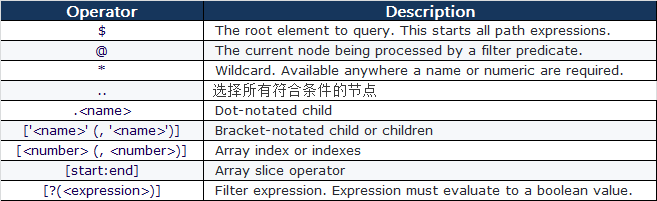
{ "store": {

    "book": [

      { "category": "reference",

        "author": "Nigel Rees",

        "title": "Sayings of the Century",

        "price": 8.95

      },

      { "category": "fiction",

        "author": "Evelyn Waugh",

        "title": "Sword of Honour",

        "price": 12.99,

        "isbn": "0-553-21311-3"

      }

    ],

    "bicycle": {

      "color": "red",

      "price": 19.95

    }

  }

}
private static void jsonPathTest() {

    JSONObject json = jsonTest();//调用自定义的jsonTest()方法获得json对象,生成上面的json

    //输出book[0]的author值

    String author = JsonPath.read(json, "$.store.book[0].author");

    //输出全部author的值,使用Iterator迭代

    List<String> authors = JsonPath.read(json, "$.store.book[*].author");

    //输出book[*]中category == 'reference'的book

    List<Object> books = JsonPath.read(json, "$.store.book[?(@.category == 'reference')]");

    //输出book[*]中price>10的book

    List<Object> books = JsonPath.read(json, "$.store.book[?(@.price>10)]");

    //输出book[*]中含有isbn元素的book

    List<Object> books = JsonPath.read(json, "$.store.book[?(@.isbn)]");

    //输出该json中所有price的值

    List<Double> prices = JsonPath.read(json, "$..price");

    //可以提前编辑一个路径,并多次使用它

    JsonPath path = JsonPath.compile("$.store.book[*]");

    List<Object> books = path.read(json);

}
JsonPath 使用的更多相关文章
- restassured - JsonPath
https://github.com/rest-assured/rest-assured/blob/master/json-path/src/test/java/io/restassured/path ...
- jsonpath
1. java 类库 jayway/JsonPath maven 使用方法 <dependency> <groupId>com.jayway.jsonpath</grou ...
- 使用jsonpath解析json内容
JsonPath提供的json解析非常强大,它提供了类似正则表达式的语法,基本上可以满足所有你想要获得的json内容.下面我把官网介绍的每个表达式用代码实现,可以更直观的知道该怎么用它. 一.首先需要 ...
- 好用的json-path
$.store.book[?(@.price < 10)].title Here is a complete overview and a side by side comparison of ...
- JsonPath详解
JsonPath is to JSON what XPATH is to XML, a simple way to extract parts of a given document. JsonPat ...
- 一.HttpClient、JsonPath、JsonObject运用
HttpClient详细应用请参考官方api文档:http://hc.apache.org/httpcomponents-client-4.5.x/httpclient/apidocs/index.h ...
- jsonpath读取json数据格式公用方法!!!
import java.util.LinkedHashMap; import com.jayway.jsonpath.JsonPath; import com.jayway.jsonpath.Pred ...
- Python爬虫(十六)_JSON模块与JsonPath
本篇将介绍使用,更多内容请参考:Python学习指南 数据提取之JSON与JsonPATH JSON(JavaScript Object Notation)是一种轻量级的数据交换格式,它是的人们很容易 ...
- JSONPath使用
JSONPath是fastjson在1.2.0之后支持的.JSONPath是一个很强大的功能.关于JSONPath的介绍请查看官方文档 JSONPath. 官方文档上给出了详细的说明以及使用.但是官方 ...
- Python_实现json数据的jsonPath(精简版)定位及增删改操作
基于python实现json数据的jsonPath(精简版)定位及增删改操作 by:授客 QQ:1033553122 实践环境 win7 64 Python 3.4.0 代码 #-*- encod ...
随机推荐
- nodejs基础(三)
apache是web服务器,tomcat是应用(java)服务器 ### 开源中国 查找http中加载不同类型文件所需要的Content-type:http://tool.oschina.net/ ...
- 搭建openstf平台的那些事
最近老板建议秀下肌肉,搭建一个STF android 真机测试平台,记录一下坑. 1. stf 是node开发的,通过npm即可安静,依赖的数据库是rethinkdb, 如果搭配appium效果更佳, ...
- python中的模块调用
1.简介 在python中经常需要各模块相互调用,此时会出现以下几种情况: (1)同一目录下文件的调用 (2)父目录调用子目录中的文件 (3)同级目录下文件的调用 2.示例 现有该目录结构:AB中有A ...
- zzw_rsync命令中的/的作用
[root@sv0379 rsync]# rsync -vzrtopg --password-file=/usr/local/rsync/rsync.passwd /opt/aspire/prod ...
- 跟随我在oracle学习php(9)
三目运算符:表达式? 表达式: 表达式: 自增在前在后没有影响 参与表达式需要注意 在前先计算,在后最后加1. + 字符串拼接. 字符串转数字:从左到右第一个不是数字的位置结束 取整 parseInt ...
- 201671010142 <java程序设计>初次学习心得与感悟
从开始对JDK的配置就遇到了问题,从这点就可以知道自己知识的薄弱.又知道了在控制台下一些常用命令的掌握.对知识的理解挺艰难,比如遇到一个新的问题就不知道该从哪里入手,有时候还不知道到底问题是啥.接受能 ...
- FPGA型号解读
- JAVA循环结构
JAVA循环结构:顺序结构只能执行一次,如果要执行多次需要用到循环 JAVA中的循环结构有while:do...while:for: 1.while循环:先判断布尔表达式中的值,若为true,执行循环 ...
- Kafka0.8.2删除topic逻辑(转)
原文链接:Kafka0.8.2.1删除topic逻辑 前提条件: 在启动broker时候开启删除topic的开关,即在server.properties中添加: delete.topic.enabl ...
- format 插入一个字符,%d,%n