
kbmmw 5.0 中的REST 服务
目前关于REST 服务的话题越来越热,kbmmw 在5.0 里面开始支持rest。今天我就试一下kbmmw 的
rest 服务。闲话少说,开始。

老规矩,放上两个kbmMWServer1和 kbmMWHTTPSysServerTransport1两个控件。

设置kbmMWHTTPSysServerTransport1的server 属性。urls 属性默认是http://+:80/, 我们在这里就不改了。
因为我们后面采用的是samrtservice. 因此现在在主窗体里面不用再操心后面有什么服务要注册了。只需要一句话就
ok了。
procedure TForm2.Button1Click(Sender: TObject);

begin

     kbmMWServer1.Active:=True;

end;

procedure TForm2.FormCreate(Sender: TObject);

begin

    kbmMWServer1.AutoRegisterServices;

end;
主窗体就ok 了。
接下来我们来建服务模块

选择这个smartservice

记住这里要填成你定义的这个服务名。然后一路点过去。
默认生成的代码如下:
type

  [kbmMW_Service('name:xalionservice, flags:[listed]')]

  [kbmMW_Rest('path:/xalionservice')]

  // Access to the service can be limited using the [kbmMW_Auth..] attribute.

  // [kbmMW_Auth('role:[SomeRole,SomeOtherRole], grant:true')]

  TkbmMWCustomSmartService1 = class(TkbmMWCustomSmartService)

  private

     { Private declarations }

  protected

     { Protected declarations }

  public

     { Public declarations }

     // HelloWorld function callable from both a regular client,

     // due to the optional [kbmMW_Method] attribute,

     // and from a REST client due to the optional [kbmMW_Rest] attribute.

     // The access path to the function from a REST client (like a browser)+

     // is in this case relative to the services path.

     // In this example: http://.../xalionservice/helloworld

     // Access to the function can be limited using the [kbmMW_Auth..] attribute.

     // [kbmMW_Auth('role:[SomeRole,SomeOtherRole], grant:true')]

     [kbmMW_Rest('method:get, path:helloworld')]

     [kbmMW_Method]

     function HelloWorld:string;

  end;

implementation

uses kbmMWExceptions;

{$R *.dfm}

// Service definitions.

//---------------------

function TkbmMWCustomSmartService1.HelloWorld:string;

begin

     Result:='Hello world';

end;

initialization

  TkbmMWRTTI.EnableRTTI(TkbmMWCustomSmartService1);

end.
这个代码比较简单,只是定义了很少的属性。
但是已经可以运行了。
直接在浏览器里面输入http://127.0.0.1/xalionservice/helloworld 就可以看到下图

好,最简单的rest 服务做好了,我们继续做更复杂的。
我们加一个输入字符串,然后回应
  [kbmMW_Method('EchoString')]       // 回应输入的串

     [kbmMW_Rest('method:get, path: [ "echostring/{AString}","myechostring/{AString}" ]')]

     [kbmMW_Auth('role:[SomeRole,SomeOtherRole], grant:true')]

     function EchoString([kbmMW_Rest('value: "{AString}"')] const AString:string):string;

  end;

implementation

uses kbmMWExceptions;

{$R *.dfm}

// Service definitions.

//---------------------

function TkbmMWCustomSmartService1.EchoString(const AString: string): string;

begin

     result:='你好!'+astring;

end;
在浏览器里面输入http://127.0.0.1/xalionservice/echostring/xalion

和我们想象的一样。
继续加入更复杂的
     [kbmMW_Method]

     [kbmMW_Rest('method:get, path: "cal/addnumbers"')]

     function AddNumbers([kbmMW_Rest('value: "$arg1", required: true')] const AValue1:integer;

                         [kbmMW_Rest('value: "$arg2", required: true')] const AValue2:integer;

                         [kbmMW_Arg(mwatRemoteLocation)] const ARemoteLocation:string):integer;

  end;

implementation

uses kbmMWExceptions;

{$R *.dfm}

// Service definitions.

//---------------------

function TkbmMWCustomSmartService1.AddNumbers(const AValue1, AValue2: integer;

  const ARemoteLocation: string): integer;

begin

       Result:=AValue1+AValue2;

end;
浏览器里面可以输入http://127.0.0.1/xalionservice/cal/addnumbers?arg1=10&arg2=50
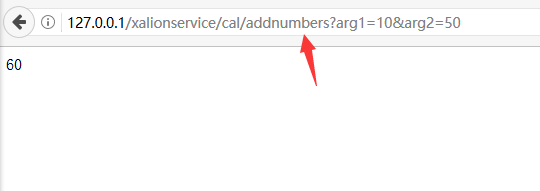
很简单吧.
下面再说一下,服务属性的常用参数,大家可以根据自己的需要改。
// server (optional) indicates name of TkbmMWServer instance to register service with. If missing will be registered with all server instances.
// name (optional) overrides service preferred name.
// version (optional) overrides service version.
// minInstances (optional) overrides services minInstances.
// maxInstances (optional) overrides services maxInstances.
// flags (optional). Array that can contain: [ listed,runrequireauth,listrequireauth,stateful,persistent,default ]
// gatherStatistics (optional). Boolean value that can be on/off or true/false.
// maxIdleTime (optional). Integer indicating max idle time in seconds before non stateful service instance is GC'ed.
// maxIdleStatefulTime (optional). Integer indicating max idle time in seconds before stateful service instance is GC'ed.
// timeout (optional). Integer indicating max allowed time of a request in seconds before service instance is GC'ed.
// dontQueue (optional). Boolean indicating if requests should be queued or not if no instances of the service is available at time of request.
[kbmMW_Service('name:SMARTDEMO, version:1.0, minInstances:32, maxInstances:128')]
上面做完了,那么如何通过这个REST 服务与前端的JS 显示库结合呢?
这个问题就留给各位同学研究吧。
kbmmw 5.0 中的REST 服务的更多相关文章
- ASP.NET Core 3.0 上的gRPC服务模板初体验(多图)
早就听说ASP.NET Core 3.0中引入了gRPC的服务模板,正好趁着家里电脑刚做了新系统,然后装了VS2019的功夫来体验一把.同时记录体验的过程.如果你也想按照本文的步骤体验的话,那你得先安 ...
- 在 vSphere 5.x/6.0 中配置 Network Dump Collector 服务 (2002954)
vmware KB: https://kb.vmware.com/s/article/2002954?lang=zh_CN 重点配置命令: 使用 vSphere Client 连接到 vCenter ...
- 避免在ASP.NET Core 3.0中为启动类注入服务
本篇是如何升级到ASP.NET Core 3.0系列文章的第二篇. Part 1 - 将.NET Standard 2.0类库转换为.NET Core 3.0类库 Part 2 - IHostingE ...
- WCF学习之旅—WCF4.0中的简化配置功能(十五)
六 WCF4.0中的简化配置功能 WCF4.0为了简化服务配置,提供了默认的终结点.绑定和服务行为.也就是说,在开发WCF服务程序的时候,即使我们不提供显示的 服务终结点,WCF框架也能为我们的服务提 ...
- 如何在springMVC 中对REST服务使用mockmvc 做测试
如何在springMVC 中对REST服务使用mockmvc 做测试 博客分类: java 基础 springMVCmockMVC单元测试 spring 集成测试中对mock 的集成实在是太棒了!但 ...
- Android6.0中的权限
Android6.0相比之前的Android版本有一个很大的不同点,就是动态的获取权限.之前我们需要什么权限只需要在Manifest文件中声明即可,在6.0中,又新增了运行时权限的动态检测. Andr ...
- Oracle几个基础配置问题:ORA-12154: TNS: 无法解析指定的连接标识符、ORA-12514: TNS: 监听程序当前无法识别连接描述符中请求的服务、ORA-12516 TNS监听程序找不到符合协议堆栈要求的可用处理程序
问题1:ORA-12154: TNS: 无法解析指定的连接标识符 在一台服务器上部署了Oracle客户端,使用IP/SID的方式访问,老是报ORA-12154错误,而使用tnsnames访问却没有问题 ...
- ASP.NET MVC 中应用Windows服务以及Webservice服务开发分布式定时器
ASP.NET MVC 中应用Windows服务以及Webservice服务开发分布式定时器一:闲谈一下:1.现在任务跟踪管理系统已经开发快要结束了,抽一点时间来写一下,想一想自己就有成就感啊!! ...
- 如何在ubuntu中启用SSH服务
如何在ubuntu14.04 中启用SSH服务 开篇科普: SSH 为 Secure Shell 的缩写,由 IETF 的网络工作小组(Network Working Group)所制定:SSH 为 ...
随机推荐
- mysql 5.7 基于GTID 主从同步的1236故障处理(其它事务故障等同)
登录从库 stop slave; 查看执行事务 show slave status\G Retrieved_Gtid_Set: Executed_Gtid_Set: ee3bdb44-f6a1-11 ...
- windows2008 r2 不能启用网络发现解决方法
1.出现的问题: 在“网络和共享中心”-“网络发现”不论如何,“启用”网络发现功能,系统都会自动重置为关闭状态. 2.解决方法: 运行中输入 services.msc-->在里边找到下边上个服务 ...
- C#创建cookie读写cookie
一.创建cookie HttpCookie cookie = new HttpCookie("UserInfo");//创建多值cookie cookie ...
- 前端框架(kraken、Express、Node、MVC)
You know my loneliness is only kept for you, my sweet songs are only sang for you. 前端框架相关知识记录. krake ...
- python——线程相关
使用python的threading中的Thread 下面是两种基本的实现线程的方式: 第一种方式———— #coding=utf-8 """ thread的第一种声明及 ...
- json的内容回顾
复习一下json这个模块 import json s = '{"name":"cui","age":12}' # 这里外部必须是单引号,内部 ...
- 775. Global and Local Inversions局部取反和全局取反
[抄题]: We have some permutation A of [0, 1, ..., N - 1], where N is the length of A. The number of (g ...
- 监测多个textFiled.text的长度同时不小于0
#pragma mark - 显示超过11位不让输入 - (BOOL)textField:(UITextField *)textField shouldChangeCharactersInRange: ...
- vs调试的时候出错:无法启动程序,操作在当前状态中是非法的
工具--选项--调试--常规--启用asp.net的JavaScript调试(chrome和ie)去掉勾选
- linux 常见基础知识(此文章将会在整个linux学习过程中,不断添加)
1,linux 文件类型 普通文件 目录文件 链接文件 块设备 字符设备 Socket 管道文件 - d l b c s p 2,linux 文件属性 蓝色 绿色 浅蓝色 红色 灰色 目录 可执行文件 ...