
Spring Cloud Hystrix
接上篇:
Spring Cloud Eureka
使用命令开启两个服务提供者
java -jar .\hello-0.0.-SNAPSHOT.jar --server.port=

java -jar .\hello-0.0.-SNAPSHOT.jar --server.port=
运行ribbon-consumer,访问 http://localhost:9000/ribbon-consumer
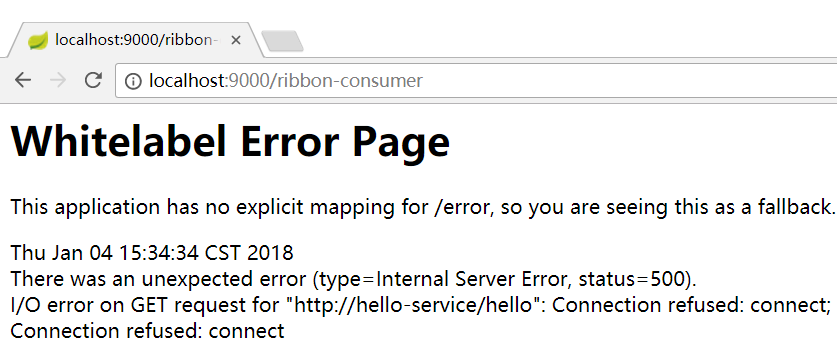
停掉8081服务,刷新页面,会提示错误
改造ribbon-consumer项目
在pom中加入Hystrix
<dependency>

            <groupId>org.springframework.cloud</groupId>

            <artifactId>spring-cloud-starter-hystrix</artifactId>

        </dependency>
在启动类RibbonConsumerApplication 中加入@EnableCircuitBreaker注解
package org.mythsky.ribbonconsumer;

import org.springframework.boot.SpringApplication;

import org.springframework.boot.autoconfigure.SpringBootApplication;

import org.springframework.cloud.client.circuitbreaker.EnableCircuitBreaker;

import org.springframework.cloud.client.discovery.EnableDiscoveryClient;

import org.springframework.cloud.client.loadbalancer.LoadBalanced;

import org.springframework.context.annotation.Bean;

import org.springframework.web.client.RestTemplate;

@EnableCircuitBreaker

@EnableDiscoveryClient

@SpringBootApplication

public class RibbonConsumerApplication {

    @Bean

    @LoadBalanced

    RestTemplate restTemplate(){

        return new RestTemplate();

    }

    public static void main(String[] args) {

        SpringApplication.run(RibbonConsumerApplication.class, args);

    }

}
新增HelloService类,在helloService方法上增加@HystrixCommand
注解来制定回调方法
package org.mythsky.ribbonconsumer.service;

import com.netflix.hystrix.contrib.javanica.annotation.HystrixCommand;

import org.springframework.beans.factory.annotation.Autowired;

import org.springframework.stereotype.Service;

import org.springframework.web.client.RestTemplate;

@Service

public class HelloService {

    @Autowired

    RestTemplate restTemplate;

    @HystrixCommand(fallbackMethod = "helloFallback")

    public String helloService(){

        return restTemplate.getForEntity("http://hello-service/hello",String.class).getBody();

    }

    public String helloFallback(){

        return "error";

    }

}
修改ConsumerController
package org.mythsky.ribbonconsumer.controller;

import org.mythsky.ribbonconsumer.service.HelloService;

import org.springframework.beans.factory.annotation.Autowired;

import org.springframework.web.bind.annotation.RequestMapping;

import org.springframework.web.bind.annotation.RequestMethod;

import org.springframework.web.bind.annotation.RestController;

import org.springframework.web.client.RestTemplate;

@RestController

public class ConsumerController {

    @Autowired

    HelloService helloService;

//    RestTemplate restTemplate;

    @RequestMapping(value = "/ribbon-consumer",method = RequestMethod.GET)

    public String helloConsumer(){

//        return restTemplate.getForEntity("http://hello-service/hello",String.class).getBody();

        return helloService.helloService();

    }

}
同样按上面方法启动8081和8082,打开http://localhost:9000/ribbon-consumer
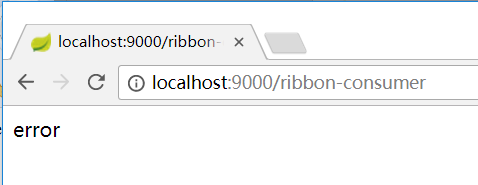
然后停掉8081,多次刷新页面,会直接到error页
继续改造服务提供者hello-service,模拟服务阻塞,修改HelloController
@RequestMapping(value = "/hello",method = RequestMethod.GET)

    public String index() throws Exception {

        ServiceInstance instance=client.getLocalServiceInstance();

        //让处理线程等待几秒钟

        int sleepTime=new Random().nextInt(3000);

        logger.info("sleepTime:"+sleepTime);

        Thread.sleep(sleepTime);

        logger.info("/hello,host:"+instance.getHost()+", service_id:"+instance.getServiceId());

        return "Hello world";

    }
按上面的流程重新测试,Hystrix默认超时时间为2000ms,多刷新几次就能看到效果。
新建Spring boot 工程hystrix-dashboard,添加pom引用
<dependency>

            <groupId>org.springframework.boot</groupId>

            <artifactId>spring-boot-starter-actuator</artifactId>

        </dependency>

        <dependency>

            <groupId>org.springframework.cloud</groupId>

            <artifactId>spring-cloud-starter-hystrix</artifactId>

        </dependency>

        <dependency>

            <groupId>org.springframework.cloud</groupId>

            <artifactId>spring-cloud-starter-hystrix-dashboard</artifactId>

        </dependency>
在入口类添加@EnableHystrixDashboard注解
package org.mythsky.hystrixdashboard;

import org.springframework.boot.SpringApplication;

import org.springframework.boot.autoconfigure.SpringBootApplication;

import org.springframework.cloud.netflix.hystrix.dashboard.EnableHystrixDashboard;

@EnableHystrixDashboard

@SpringBootApplication

public class HystrixDashboardApplication {

    public static void main(String[] args) {

        SpringApplication.run(HystrixDashboardApplication.class, args);

    }

}
添加配置
spring.application.name=hystrix-dashboard

server.port=
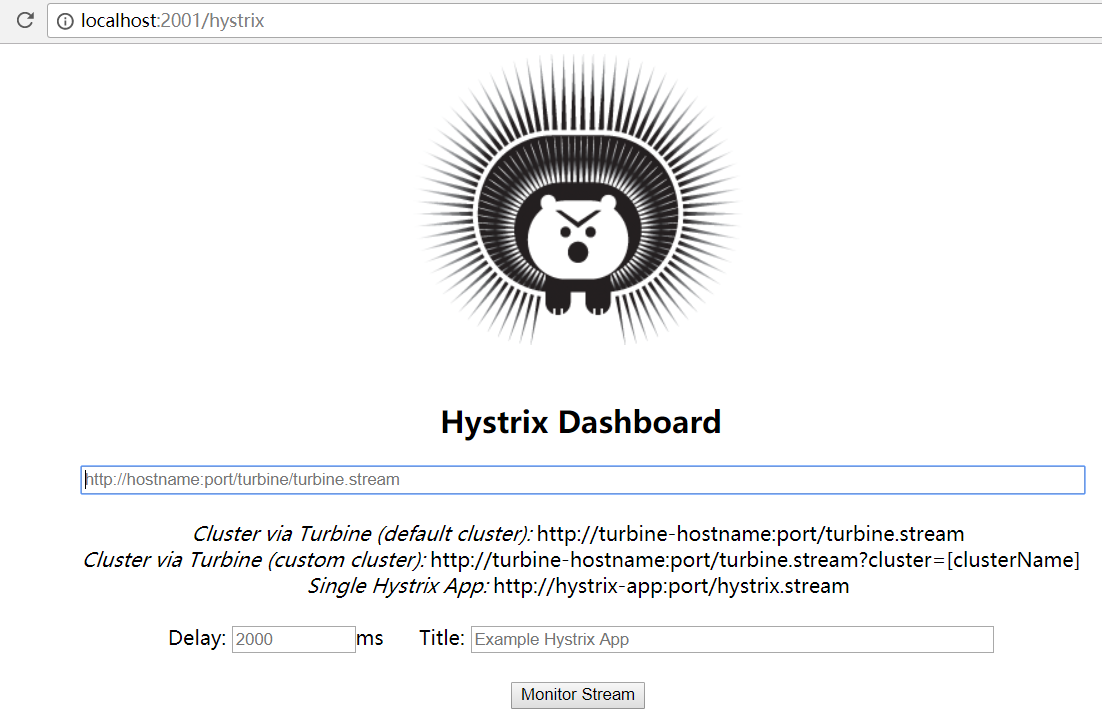
启动项目,打开浏览器:http://localhost:2001/hystrix
修改ribbon-consumer的pom,添加引用
        <dependency>

            <groupId>org.springframework.boot</groupId>

            <artifactId>spring-boot-starter-actuator</artifactId>

        </dependency>
启动ribbon-consumer,可以看到以下节点

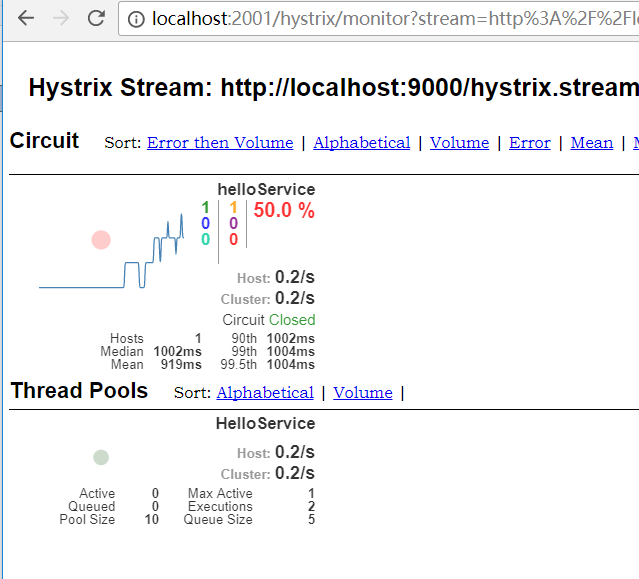
在hystrix-dashboard界面输入监控地址:http://localhost:9000/hystrix.stream 再点击监控,刷新http://localhost:9000/ribbon-consumer 在dashboard界面即可看到相关信息
接下来体验集群监控
新建spring-boot项目turbine,添加pom引用
<dependency>

            <groupId>org.springframework.boot</groupId>

            <artifactId>spring-boot-starter-actuator</artifactId>

        </dependency>

        <dependency>

            <groupId>org.springframework.cloud</groupId>

            <artifactId>spring-cloud-starter-turbine</artifactId>

        </dependency>
在入口类添加注解
package org.mythsky.tuibine;

import org.springframework.boot.SpringApplication;

import org.springframework.boot.autoconfigure.SpringBootApplication;

import org.springframework.cloud.client.discovery.EnableDiscoveryClient;

import org.springframework.cloud.netflix.turbine.EnableTurbine;

@EnableTurbine

@EnableDiscoveryClient

@SpringBootApplication

public class TuibineApplication {

    public static void main(String[] args) {

        SpringApplication.run(TuibineApplication.class, args);

    }

}
添加配置
server.port=

management.port=

spring.application.name=tuibine

eureka.client.service-url.defaultZone=http://localhost:1111/eureka/

turbine.app-config=ribbon-consumer

turbine.cluster-name-expression="default"

turbine.combine-host-port=true
启动项目,然后启动两个服务提供者和两个服务消费者

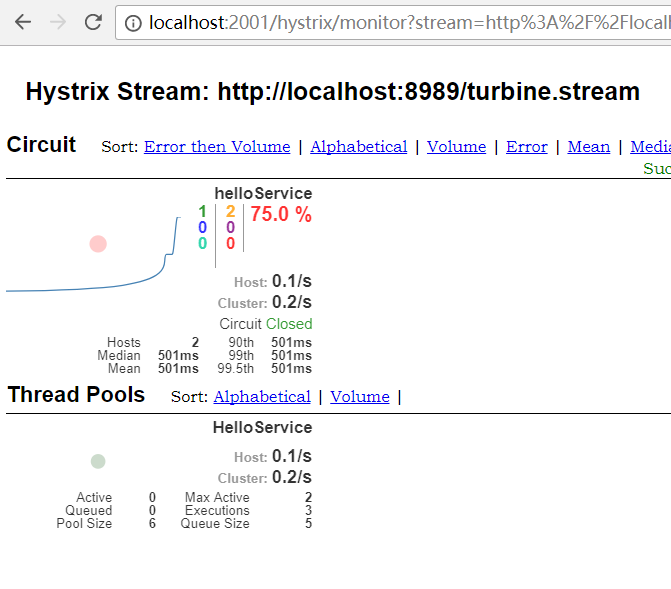
在dashboard中对turbine进行监控
hystrix源码分析
首先看@HystrixCommand,然后查看一下这个注解的引用,发现了HystrixCommandAspect,这个切面会拦截所有带@HystrixCommand注解的方法
    @Pointcut("@annotation(com.netflix.hystrix.contrib.javanica.annotation.HystrixCommand)")

    public void hystrixCommandAnnotationPointcut() {

    }

    @Pointcut("@annotation(com.netflix.hystrix.contrib.javanica.annotation.HystrixCollapser)")

    public void hystrixCollapserAnnotationPointcut() {

    }

    @Around("hystrixCommandAnnotationPointcut() || hystrixCollapserAnnotationPointcut()")

    public Object methodsAnnotatedWithHystrixCommand(final ProceedingJoinPoint joinPoint) throws Throwable {

        Method method = getMethodFromTarget(joinPoint);

        Validate.notNull(method, "failed to get method from joinPoint: %s", joinPoint);

        if (method.isAnnotationPresent(HystrixCommand.class) && method.isAnnotationPresent(HystrixCollapser.class)) {

            throw new IllegalStateException("method cannot be annotated with HystrixCommand and HystrixCollapser " +

                    "annotations at the same time");

        }

        MetaHolderFactory metaHolderFactory = META_HOLDER_FACTORY_MAP.get(HystrixPointcutType.of(method));

        MetaHolder metaHolder = metaHolderFactory.create(joinPoint);

        HystrixInvokable invokable = HystrixCommandFactory.getInstance().create(metaHolder);

        ExecutionType executionType = metaHolder.isCollapserAnnotationPresent() ?

                metaHolder.getCollapserExecutionType() : metaHolder.getExecutionType();

        Object result;

        try {

            if (!metaHolder.isObservable()) {

                result = CommandExecutor.execute(invokable, executionType, metaHolder);

            } else {

                result = executeObservable(invokable, executionType, metaHolder);

            }

        } catch (HystrixBadRequestException e) {

            throw e.getCause();

        } catch (HystrixRuntimeException e) {

            throw hystrixRuntimeExceptionToThrowable(metaHolder, e);

        }

        return result;

    }
HystrixCommandAspect
默认走了这个方法
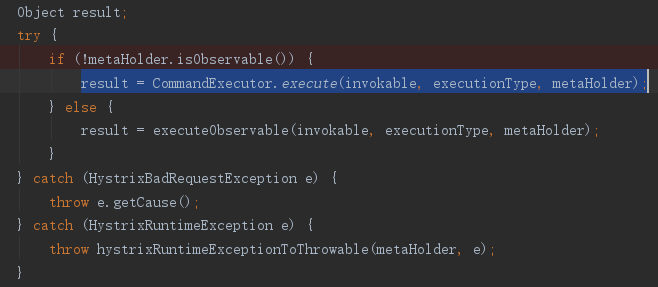
看下这个方法
public static Object execute(HystrixInvokable invokable, ExecutionType executionType, MetaHolder metaHolder) throws RuntimeException {

        Validate.notNull(invokable);

        Validate.notNull(metaHolder);

        switch (executionType) {

            case SYNCHRONOUS: {

                return castToExecutable(invokable, executionType).execute();

            }

            case ASYNCHRONOUS: {

                HystrixExecutable executable = castToExecutable(invokable, executionType);

                if (metaHolder.hasFallbackMethodCommand()

                        && ExecutionType.ASYNCHRONOUS == metaHolder.getFallbackExecutionType()) {

                    return new FutureDecorator(executable.queue());

                }

                return executable.queue();

            }

            case OBSERVABLE: {

                HystrixObservable observable = castToObservable(invokable);

                return ObservableExecutionMode.EAGER == metaHolder.getObservableExecutionMode() ? observable.observe() : observable.toObservable();

            }

            default:

                throw new RuntimeException("unsupported execution type: " + executionType);

        }

    }
如果是同步方法,执行return castToExecutable(invokable, executionType).execute();
再看看这里的execute,是HystrixExecutable 接口,定义如下

找一下接口的实现
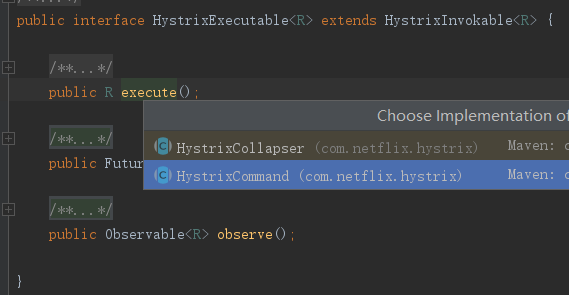
HystrixCommand这个类在 com.netflix.hystrix 包中,下面是execute 方法
public R execute() {

    try {

        return queue().get();

    } catch (Exception e) {

        throw Exceptions.sneakyThrow(decomposeException(e));

    }

}
下面是queue 方法
public Future<R> queue() {

        /*

         * The Future returned by Observable.toBlocking().toFuture() does not implement the

         * interruption of the execution thread when the "mayInterrupt" flag of Future.cancel(boolean) is set to true;

         * thus, to comply with the contract of Future, we must wrap around it.

         */

        final Future<R> delegate = toObservable().toBlocking().toFuture();

        final Future<R> f = new Future<R>() {

            @Override

            public boolean cancel(boolean mayInterruptIfRunning) {

                if (delegate.isCancelled()) {

                    return false;

                }

                if (HystrixCommand.this.getProperties().executionIsolationThreadInterruptOnFutureCancel().get()) {

                    /*

                     * The only valid transition here is false -> true. If there are two futures, say f1 and f2, created by this command

                     * (which is super-weird, but has never been prohibited), and calls to f1.cancel(true) and to f2.cancel(false) are

                     * issued by different threads, it's unclear about what value would be used by the time mayInterruptOnCancel is checked.

                     * The most consistent way to deal with this scenario is to say that if *any* cancellation is invoked with interruption,

                     * than that interruption request cannot be taken back.

                     */

                    interruptOnFutureCancel.compareAndSet(false, mayInterruptIfRunning);

                }

                final boolean res = delegate.cancel(interruptOnFutureCancel.get());

                if (!isExecutionComplete() && interruptOnFutureCancel.get()) {

                    final Thread t = executionThread.get();

                    if (t != null && !t.equals(Thread.currentThread())) {

                        t.interrupt();

                    }

                }

                return res;

            }

            @Override

            public boolean isCancelled() {

                return delegate.isCancelled();

            }

            @Override

            public boolean isDone() {

                return delegate.isDone();

            }

            @Override

            public R get() throws InterruptedException, ExecutionException {

                return delegate.get();

            }

            @Override

            public R get(long timeout, TimeUnit unit) throws InterruptedException, ExecutionException, TimeoutException {

                return delegate.get(timeout, unit);

            }

        };

        /* special handling of error states that throw immediately */

        if (f.isDone()) {

            try {

                f.get();

                return f;

            } catch (Exception e) {

                Throwable t = decomposeException(e);

                if (t instanceof HystrixBadRequestException) {

                    return f;

                } else if (t instanceof HystrixRuntimeException) {

                    HystrixRuntimeException hre = (HystrixRuntimeException) t;

                    switch (hre.getFailureType()) {

                    case COMMAND_EXCEPTION:

                    case TIMEOUT:

                        // we don't throw these types from queue() only from queue().get() as they are execution errors

                        return f;

                    default:

                        // these are errors we throw from queue() as they as rejection type errors

                        throw hre;

                    }

                } else {

                    throw Exceptions.sneakyThrow(t);

                }

            }

        }

        return f;

    }
看一下这里的toObservable()
final Func0<Observable<R>> applyHystrixSemantics = new Func0<Observable<R>>() {

    @Override

    public Observable<R> call() {

        if (commandState.get().equals(CommandState.UNSUBSCRIBED)) {

            return Observable.never();

        }

        return applyHystrixSemantics(_cmd);

    }

};


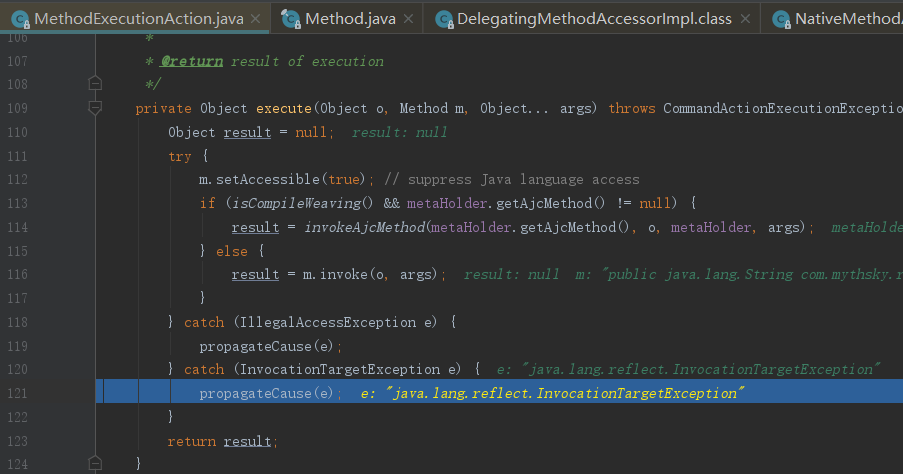

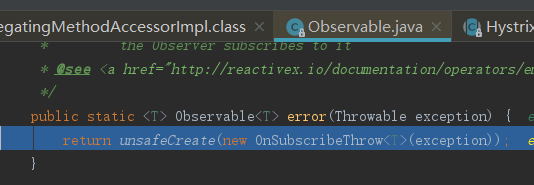
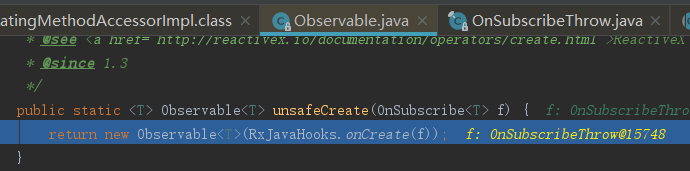
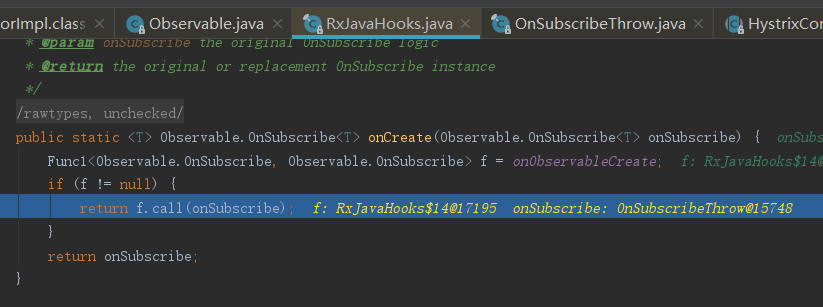
可以看到hystrix底层大量使用了RxJava
写个测试代码
import rx.Observable;

import rx.Subscriber;

public class ObServableTest {

    public static void main(String[] args){

        Observable<String> observable = Observable.create(new Observable.OnSubscribe<String>() {

            @Override

            public void call(Subscriber<? super String> subscriber) {

                subscriber.onNext("Hello RxJava");

                subscriber.onNext("I am tom");

                subscriber.onCompleted();

            }

        });

        Subscriber<String> subscriber = new Subscriber<String>() {

            @Override

            public void onCompleted() {

                System.out.println("订阅完成");

            }

            @Override

            public void onError(Throwable e) {

                System.out.println("订阅出错");

            }

            @Override

            public void onNext(String s) {

                System.out.println("订阅事件:"+s);

            }

        };

        observable.subscribe(subscriber);

    }

}
ObServableTest
运行可以看到
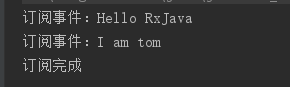
关于RxJava 可以参考:https://www.jianshu.com/p/414f755983f1
Spring Cloud Hystrix的更多相关文章
- 笔记:Spring Cloud Hystrix 异常处理、缓存和请求合并
异常处理 在 HystrixCommand 实现的run方法中抛出异常,除了 HystrixBadRequestException之外,其他异常均会被Hystrix 认为命令执行失败并触发服务降级处理 ...
- 笔记:Spring Cloud Hystrix 服务容错保护
由于每个单元都在不同的进程中运行,依赖通过远程调用的方式执行,这样就有可能因为网络原因或是依赖服务自身问题出现调用故障或延迟,而这些问题会直接导致调用方的对外服务也出现延迟,若此时调用方的请求不断增加 ...
- Spring Cloud 微服务笔记(六)Spring Cloud Hystrix
Spring Cloud Hystrix Hystrix是一个延迟和容错库,旨在隔离远程系统.服务和第三方库,阻止链接故障,在复杂的分布式系统中实现恢复能力. 一.快速入门 1)依赖: <dep ...
- 第五章 服务容错保护:Spring Cloud Hystrix
在微服务架构中,我们将系统拆分为很多个服务,各个服务之间通过注册与订阅的方式相互依赖,由于各个服务都是在各自的进程中运行,就有可能由于网络原因或者服务自身的问题导致调用故障或延迟,随着服务的积压,可能 ...
- 试水Spring Cloud Hystrix
Spring Cloud Hystrix是一个容错库,它实现了断路器模式,使得当服务发生异常时,会自动切断连接,并将请求引导至预设的回调方法. 服务端 在Spring Tool Suite的文件菜单中 ...
- spring cloud: Hystrix(五):如禁止单个FeignClient使用hystrix
spring cloud: Hystrix(五):如禁止单个FeignClient使用hystrix 首先application.yml / applicatoin.propreties的配置项:fe ...
- spring cloud: Hystrix(四):feign类似于hystrix的断容器功能:fallback
spring cloud: Hystrix(四):feign使用hystrix @FeignClient支持回退的概念:fallback方法,这里有点类似于:@HystrixCommand(fallb ...
- spring cloud: Hystrix(三):健康指数 health Indicator
spring cloud: Hystrix(三):健康指数 health Indicator ribbon+hystrix 当使用Hystrix时(spring-cloud-starter-hystr ...
- spring cloud: Hystrix(二):简单使用@HystrixCommand的commandProperties配置@HistrixProperty隔离策略
spring cloud: Hystrix(二):简单使用@HystrixCommand的commandProperties配置@HistrixProperty隔离策略 某电子商务网站在一个黑色星期五 ...
- spring cloud: Hystrix(一):简单使用
在微服务架构中,我们将系统拆分为很多个服务,各个服务之间通过注册与订阅的方式相互依赖,由于各个服务都是在各自的进程中运行,就有可能由于网络原因或者服务自身的问题导致调用故障或延迟,随着服务的积压,可能 ...
随机推荐
- 新建maven遇到的错误
新建一个maven,遇到错误如下: Description Resource Path Location Type Dynamic Web Module 3.0 requires Java 这时候,只 ...
- IDEA插件开发总结
一:前置步骤 1.添加开发插件所需的SDK: 1.1先添加JDK 1.2打开Project Structure-Platform Settings-SDKs 1.3添加IntelliJ Platfor ...
- 开源HIS之C/S选型
客户端/服务的形式是我中爱的,我认可只有这样软件跑起来不会失控.因为你不知道每一个程序员是否足够清醒.但一开始我说过要从基本的应急的门诊收费开始,所以我并不打算一启动就写一个服务,并为之选型:TCP/ ...
- 位图bitbucket
问题:假设有500w条数据,数据是在2^32-1的范围内,数据重复,如何减少内存对数字进行统计呢? 如果用字典来标记数字是否已经统计过来,数字做为key, value仅为0 or1,那么这样需要消耗 ...
- 【Andorid开发框架学习】之Mina开发之Mina简介
今天我将介绍 Apache MINA的基本概念和 API,包括 I/O服务.I/O 会话.I/O 过滤器和 I/O 处理器. 一.MINA的简介 Apache MINA是一个网络应用程序框架,用来帮助 ...
- 最通熟易懂的Hadoop HDFS实践攻略
HDFS是用来解决什么问题?怎么解决的? 如何在命令行下操作HDFS? 如何使用Java API来操作HDFS? 在了解基本思路和操作方法后,进一步深究HDFS具体的读写数据流程 学习并实践本文教程后 ...
- poj2478 Farey Sequence 欧拉函数的应用
仔细看看题目,按照题目要求 其实就是 求 小于等于n的 每一个数的 欧拉函数值 的总和,为什么呢,因为要构成 a/b 然后不能约分 所以 gcd(a,b)==1,所以 分母 b的 欧拉函数值 ...
- cxgrid回车移到下一个单元格
cxgrid回车移到下一个单元格 cxgrid回车移到下一个单元格 作用:表格式录入全键盘操作. 设置cxgrid1Dbtableview1.optionsBehavior.goToNextCel ...
- eclipse 离线安装插件报cannot perform operation.Computing alternate solutions...解决办法
当不能连接外网,离线安装SVN插件时,可能会发现以下问题:eclipse长时间停留在下图所示状态,提示“cannot perform operation.Computing alternate sol ...
- [ASE][Daily Scrum]11.11
各位1111快乐,不知道大家的卡上还剩多少钱啊~~~ TCP server目前遇到一点小瓶颈,不过server的两个人承诺说明天就可以搞定,给他们加油!~! 今天的plan~ View Shilin ...