
Programming 2D Games 读书笔记(第三章)
示例一:DirectX Window
Graphics类用于初始化Direct 3D
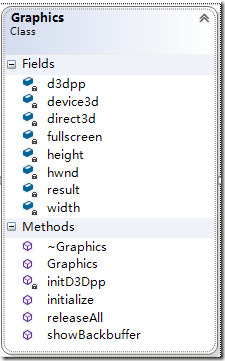
主流程:
仅需要粗体部分
    try{

        // Create Graphics object

        graphics = new Graphics;

        // Initialize Graphics, throws GameError

        graphics->initialize(hwnd, GAME_WIDTH, GAME_HEIGHT, FULLSCREEN);

        // main message loop

        int done = 0;

        while (!done)

        {

            // PeekMessage,non-blocking method for checking for Windows messages.

            if (PeekMessage(&msg, NULL, 0, 0, PM_REMOVE))

            {

                // look for quit message

                if (msg.message == WM_QUIT)

                    done = 1;

                // decode and pass messages on to WinProc

                TranslateMessage(&msg);

                DispatchMessage(&msg);

            } else

                graphics->showBackbuffer();

        }

        SAFE_DELETE(graphics);  // free memory before exit

        return msg.wParam;

    }

    catch(const GameError &err)

    {

        MessageBox(NULL, err.getMessage(), "Error", MB_OK);

    }
- Direct3DCreate9创建IDirect3D9
- GetDeviceCaps测试是否支持硬件顶点支持
- initD3Dpp初始化D3DPRESENT_PARAMETERS参数
//=============================================================================

// Initialize D3D presentation parameters

//=============================================================================

void Graphics::initD3Dpp()

{

    try{

        ZeroMemory(&d3dpp, sizeof(d3dpp));              // fill the structure with 0

        // fill in the parameters we need

        d3dpp.BackBufferWidth   = width;

        d3dpp.BackBufferHeight  = height;

        if(fullscreen)                                  // if fullscreen

            d3dpp.BackBufferFormat  = D3DFMT_X8R8G8B8;  // 24 bit color

        else

            d3dpp.BackBufferFormat  = D3DFMT_UNKNOWN;   // use desktop setting

        d3dpp.BackBufferCount   = 1;

        d3dpp.SwapEffect        = D3DSWAPEFFECT_DISCARD;

        d3dpp.hDeviceWindow     = hwnd;

        d3dpp.Windowed          = (!fullscreen);

        d3dpp.PresentationInterval   = D3DPRESENT_INTERVAL_IMMEDIATE;

    } catch(...)

    {

        throw(GameError(gameErrorNS::FATAL_ERROR,

                "Error initializing D3D presentation parameters"));

    }

} - CreateDevice
- showBackbuffer
//=============================================================================

// Display the backbuffer

//=============================================================================

HRESULT Graphics::showBackbuffer()

{

    result = E_FAIL;    // default to fail, replace on success

    // (this function will be moved in later versions)

    // Clear the backbuffer to lime green

    device3d->Clear(0, NULL, D3DCLEAR_TARGET, D3DCOLOR_XRGB(0,255,0), 0.0f, 0);

    // Display backbuffer to screen

    result = device3d->Present(NULL, NULL, NULL, NULL);

    return result;

}
//=============================================================================

// Initialize DirectX graphics

// throws GameError on error

//=============================================================================

void Graphics::initialize(HWND hw, int w, int h, bool full)

{

    hwnd = hw;

    width = w;

    height = h;

    fullscreen = full;

    //initialize Direct3D

    direct3d = Direct3DCreate9(D3D_SDK_VERSION);

    if (direct3d == NULL)

        throw(GameError(gameErrorNS::FATAL_ERROR, "Error initializing Direct3D"));

    initD3Dpp();        // init D3D presentation parameters

    // determine if graphics card supports harware texturing and lighting and vertex shaders

    D3DCAPS9 caps;

    DWORD behavior;

    result = direct3d->GetDeviceCaps(D3DADAPTER_DEFAULT, D3DDEVTYPE_HAL, &caps);

    // If device doesn't support HW T&L or doesn't support 1.1 vertex

    // shaders in hardware, then switch to software vertex processing.

    if( (caps.DevCaps & D3DDEVCAPS_HWTRANSFORMANDLIGHT) == 0 ||

            caps.VertexShaderVersion < D3DVS_VERSION(1,1) )

        behavior = D3DCREATE_SOFTWARE_VERTEXPROCESSING;  // use software only processing

    else

        behavior = D3DCREATE_HARDWARE_VERTEXPROCESSING;  // use hardware only processing

    //create Direct3D device

    result = direct3d->CreateDevice(

        D3DADAPTER_DEFAULT,

        D3DDEVTYPE_HAL,

        hwnd,

        behavior,

        &d3dpp,

        &device3d);

    if (FAILED(result))

        throw(GameError(gameErrorNS::FATAL_ERROR, "Error creating Direct3D device"));

}
示例二:DirectX Full Screen
见initD3Dpp方法的Windowed属性
参考:http://www.cnblogs.com/Clingingboy/archive/2012/07/27/2611651.html
示例三:DirectX Device Capabilities
获取指定显卡支持的显示模式
全屏时检测
- GetAdapterModeCount:Returns the number of display modes available on this adapter.
- EnumAdapterModes:
Queries the device to determine whether the specified adapter supports the requested format and display mode. This method could be used in a loop to enumerate all the available adapter modes.
bool Graphics::isAdapterCompatible()

{

    UINT modes = direct3d->GetAdapterModeCount(D3DADAPTER_DEFAULT,

                                            d3dpp.BackBufferFormat);

    for(UINT i=0; i<modes; i++)

    {

        result = direct3d->EnumAdapterModes( D3DADAPTER_DEFAULT,

                                        d3dpp.BackBufferFormat,

                                        i, &pMode);

        if( pMode.Height == d3dpp.BackBufferHeight &&

            pMode.Width  == d3dpp.BackBufferWidth &&

            pMode.RefreshRate >= d3dpp.FullScreen_RefreshRateInHz)

            return true;

    }

    return false;

}
Programming 2D Games 读书笔记(第三章)的更多相关文章
- Programming 2D Games 读书笔记(第四章)
示例一:Game Engine Part 1 更加完善游戏的基本流程 Graphics添加了以下几个方法,beginScene和endScene提高绘图,showBackbuffer去掉了clea ...
- Programming 2D Games 读书笔记(第五章)
http://www.programming2dgames.com/chapter5.htm 示例一:Planet 真正示例的开始,首先是载入2张图片 1.Graphics添加了2个方法 load ...
- Programming 2D Games 读书笔记(第六章)
http://www.programming2dgames.com/chapter6.htm 示例一:Bounce 边界碰撞测试 velocity为移动的速度, 超过右边界,velocity.x为 ...
- Programming 2D Games 读书笔记(第二章)
本意还是想了解DirectX的,由于网上拿不到书的pdf文档,幸好有作者的源代码示例,想完整的看一下,基本的游戏需要的点. 下面直接以代码为例,仅用于帮助自身理解 http://www.progr ...
- 《Linux内核设计与分析》第六周读书笔记——第三章
<Linux内核设计与实现>第六周读书笔记——第三章 20135301张忻估算学习时间:共2.5小时读书:2.0代码:0作业:0博客:0.5实际学习时间:共3.0小时读书:2.0代码:0作 ...
- 《Linux内核设计与实现》读书笔记 第三章 进程管理
第三章进程管理 进程是Unix操作系统抽象概念中最基本的一种.我们拥有操作系统就是为了运行用户程序,因此,进程管理就是所有操作系统的心脏所在. 3.1进程 概念: 进程:处于执行期的程序.但不仅局限于 ...
- 《CSS3实战》读书笔记 第三章:选择器:样式实现的标记
第三章:选择器:样式实现的标记 选择器的魔力在于,让你完全实现对网页样式的掌控.不同的选择器可以用在不同的情况下使用.总之把握的原则是:规范的编码,根据合理地使用选择器,比去背选择器的定义有价值的多. ...
- 《linux内核设计与实现》读书笔记第三章
第3章 进程管理 3.1 进程 1.进程 进程就是处于执行期的程序. 进程包括: 可执行程序代码 打开的文件 挂起的信号 内核内部数据 处理器状态 一个或多个具有内存映射的内存地址空间 一个或多个执行 ...
- 《R语言实战》读书笔记--第三章 图形初阶(二)
3.4添加文本.自定义坐标轴和图例 很多作图函数可以设置坐标轴和文本标注.比如标题.副标题.坐标轴标签.坐标轴范围等.需要注意的是并不是所有的绘图函数都有上述的参数,需要进行验证.可以将一些默认的参数 ...
随机推荐
- 勒索软件Locky、Tesalcrypt等使用了新的工具躲避检测
勒索软件Locky.Tesalcrypt等使用了新的工具躲避检测 今天我们发现Locky勒索软件家族使用一种新的工具来躲避检测,并且可能已经感染了很多节点. 自从我们通过AutoFocus智能威胁分析 ...
- jdk1.8源码Synchronized及其实现原理
一.Synchronized的基本使用 关于Synchronized在JVM的原理(偏向锁,轻量级锁,重量级锁)可以参考 : http://www.cnblogs.com/dennyzhangdd/ ...
- linux c中select使用方法
1.select函数作为定时器使用 it_value.tv_sec = 0; it_value.tv_usec = 100000: select(1,NULL,NULL,NULL,& ...
- 基于Consul的数据库高可用架构【转】
几个月没有更新博客了,已经长草了,特意来除草.本次主要分享如何利用consul来实现redis以及mysql的高可用.以前的公司mysql是单机单实例,高可用MHA加vip就能搞定,新公司mysql是 ...
- 关于NotificationListenerService监听时有失败的处理
关于NotificationListenerService监听时有失败的处理 问题由来 去年进入一家专业做智能穿戴设备的公司,在项目中需要监听系统通知栏变化(主要是IM类app的信息获取到后推送到用户 ...
- 数组用console.log输出
输出的时候,如果前面有字符串,那么输出的就是整个字符串
- Faster R-CNN在GPU下的安装、测试经历
在公司的服务器上安装faster rcnn时,遇到了不少问题: 1.cudnn版本不兼容的问题,解决办法参考: http://blog.csdn.net/WoPawn/article/details/ ...
- **linux实用命令之如何移动文件夹及文件下所有文件
http://www.linuxde.net/2013/02/12448.html 格式: mv [选项(option)] 源文件或目录 目标文件或目录 使用命令: mv webdata /bin/u ...
- poj 2253 一条路径中的最大边 再找出最小的
题目大意,有两只青蛙,分别在两个石头上,青蛙A想要到青蛙B那儿去,他可以直接跳到B的石头上,也可以跳到其他石头上,再从其他石头跳到B那儿,求青蛙从A到B的所有路径中最小的Frog Distance,我 ...
- AC自动机学习笔记-1(怎么造一台AC自动机?)
月更博主又来送温暖啦QwQ 今天我们学习的算法是AC自动机.AC自动机是解决字符串多模匹配问题的利器,而且代码也十分好打=w= 在这一篇博客里,我将讲解AC自动机是什么,以及怎么构建一个最朴素的AC自 ...